Multi-Family WiFi: How Isolation, xPSK and Billing Work
Published
A resident's TV won't connect, the leasing office says the internet is working, and the parking lot cameras keep dropping offline. Meanwhile, someone has given a delivery driver the same WiFi password that maintenance uses. You're being asked to buy more bandwidth, but bandwidth won't fix any of those ownership or access-control problems.
Multi-family WiFi works best when you treat the building as a collection of identity-separated networks, not one large wireless hotspot. Decide who each device belongs to, what it may reach, who pays for its connection, and who fixes it before you choose another access point.
Table of Contents
- Three Networks Every Multi-Family Building Needs
- Billing Models Compared
- How Per-Tenant Isolation Keeps Residents Apart
- Shared Keys Versus Per-Device xPSK
- How to Test Coverage and Plan for Failover
- Three Residential Scenarios Worked Through
- Operations and Move-In Readiness
- Confirm Your Building's Model Before You Build
Three Networks Every Multi-Family Building Needs
Say you're planning a building with apartments, a leasing office, a gym, a staff floor, and parking lot cameras. Residents need home-like connectivity, visitors need temporary internet access, and employees need access to business applications. Those requirements shouldn't produce a separate network name for every room or department.
Start with three access categories: open guest, secure staff, and resident and device. These are entry points into policy, not permission to put everything in each category on the same unrestricted subnet.
Network types in a multi-family building
| Network | Who and what uses it | How they join | What isolates it |
|---|---|---|---|
| Open guest | Visitors, delivery drivers, BYOD phones | Captive portal with SSO, social or SMS sign-in | Guest VLAN with client isolation |
| Secure staff | Leasing agents, maintenance, contractors, managed devices | Certificate-based EAP-TLS or Passpoint with individual credentials | Staff VLAN, separated from residents and building systems |
| Resident and device | Residents, smart TVs, thermostats, door locks, cameras, amenity registers | Unique key per device, user or tenant | Own VLAN per resident or tenant, with separate policy groups for property-owned systems |
Let identity choose the destination
An SSID is the network name people see. A VLAN is a logical traffic segment behind that name. Naming a network Resident doesn't prove that the device joining it belongs to a current resident, and naming another Staff doesn't establish which employee is connecting.
Authentication should return the appropriate VLAN or role. A resident's phone belongs in that household's segment; a property-owned camera belongs in the camera policy domain, even if both enter through the same device-oriented SSID. The three-SSID architecture provides a useful way to map these entry points without creating a new broadcast network for every tenant.
Keep BYOD onboarding distinct from ongoing authorization. A personal phone can begin at a portal, but an employee shouldn't gain access to leasing records just because they completed guest sign-in. Likewise, Passpoint streamlines secure discovery and connection, but the credentials and authorization policy still determine access.
Design rule: A device's owner and purpose should determine its permissions, not the access point it happens to reach.
Record portal consent separately from network authorization, and don't make optional marketing consent a substitute for an access policy. Before selecting equipment, list every device class in the building and place it in a table row, then identify the restricted segment it needs behind that entry point.
Billing Models Compared
The distinction between available and included matters: the U.S. Census Bureau's apartment report found that WiFi or internet service was available in 99% of newly constructed unfurnished U.S. rental apartments in 2015, but service was included in only 12%. A building can support connectivity without the owner purchasing every resident's subscription.
Billing, network management, and infrastructure ownership are separate decisions. A managed network doesn't automatically require bulk billing, and a bulk agreement doesn't automatically include apartment-level troubleshooting.
Multi-family WiFi billing models
| Model | How residents pay | Who runs the service | Best fit | Main risk |
|---|---|---|---|---|
| Bulk internet in rent | Included in rent | Owner or bulk provider | Owners who want a leasing amenity | Cost is paid for every unit, used or not |
| Resident-paid retail | Resident subscribes directly to an ISP | Each resident's provider | Lower-density or older buildings | Uneven coverage and residents hunting for service |
| Managed WiFi with resident fee | Monthly fee added to rent or billed separately | Managed provider | Properties wanting property-wide WiFi without a bulk purchasing arrangement | Fee resistance and unclear per-unit pricing |
| Hybrid base plus paid tier | Base included in rent, faster tier optional | Owner and provider together | Mixed-income or amenity-led buildings | Two tiers on one network create support disputes |
| Free common-area WiFi | Nothing for shared areas | Owner | Lobbies and amenity spaces only | Doesn't cover units, and public and private traffic need isolation |
Price the responsibility, not just the circuit
Bulk billing offers a straightforward resident experience, but the owner carries the contracted cost during vacancy periods and low usage. Residents will also bring complaints to the property, regardless of which company technically operates the service.
Retail subscriptions reduce the owner's direct billing role. They don't eliminate building responsibilities such as access to communications rooms, damaged cabling, or interference from poorly placed equipment.
For a hybrid model, apply the paid tier to the authenticated household's policy. Don't create a premium SSID and expect residents to understand whether an issue comes from their subscription, their device, or their location. A faster plan also won't repair weak apartment coverage.
Include the less visible costs in comparisons:
- Physical maintenance: Switches, power supplies, cabling faults, and replacement access points.
- Service administration: Account changes, billing disputes, onboarding, and move-out processing.
- Fault handling: Remote diagnosis, onsite visits, and responsibility for resident-owned equipment.
Choose the support owner first. Then choose the billing model that fits that owner's budget and authority.
An inexpensive service becomes expensive when leasing staff spend their day relaying screenshots between residents and a provider that won't investigate inside the building.
How Per-Tenant Isolation Keeps Residents Apart
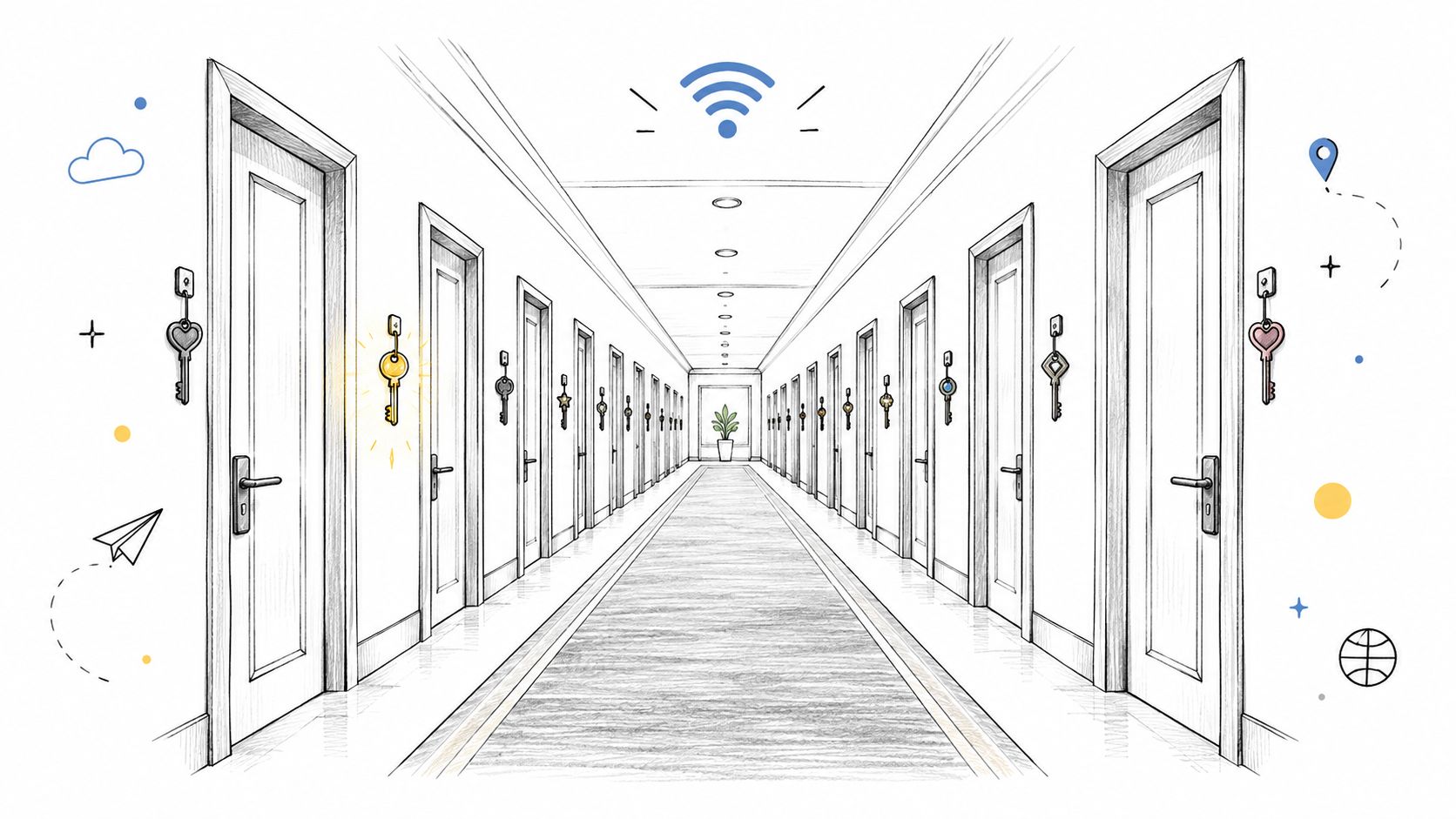
A hotel hallway gives every guest a similar door, but each key opens only the intended room. Multi-Family WiFi needs the same distinction: encryption protects traffic over the air; isolation controls which destinations a connected device can reach.
The corridor analogy makes the boundary easier to explain to property teams.
In Parks Associates findings reported by Mecklenburg Times, 31% of multi-family residents reported that their community offered property-wide WiFi. Wider coverage brings more devices within reach of the infrastructure, which makes an incorrect permission more consequential.
Build the boundaries in layers
- Identity assignment: Place each household or tenant into its authorized VLAN or equivalent policy segment. Preserve that assignment when the device roams.
- Guest client isolation: Prevent visitors on the guest network from directly contacting each other. Test the behavior across access points, not just on the same radio.
- Firewall enforcement: Deny resident-to-resident and resident-to-building-system traffic by default. Permit specific operational flows rather than broad access to internal networks.
- Controlled shared services: Publish approved printers or amenity screens through gateway policy. Limit discovery reflection so private household devices aren't advertised building-wide.
A VLAN alone isn't a firewall. If the gateway freely routes between resident segments, the segmentation diagram looks reassuring while the actual access policy remains permissive.
Say an attacker compromises an unpatched thermostat on an apartment resident network. The attacker may then probe a neighbor's camera or storage device for exposed services. A stronger WiFi password doesn't remove that path because the compromised thermostat is already connected.
The correction is to contain the thermostat within its intended policy domain and restrict its permitted destinations. Property-owned controls should also remain distinct from resident-owned gadgets, even when both sit inside an apartment.
Keep evidence without collecting everything
Network security and resident privacy require separate decisions. Explain what connection telemetry you collect, who can access it, and how long it remains available; isolation doesn't answer those questions.
Log identity, device identifier, VLAN or role assignment, and revocation events, with usable timestamps. During an incident, the operator should be able to identify the affected device and contain its access without treating every household as a suspect.
Shared Keys Versus Per-Device xPSK
xPSK means a WiFi network can accept different pre-shared keys for different devices, users, or tenants. The key identifies the connection, and the authentication policy maps it to the appropriate VLAN or role. Think of the key as a badge and the VLAN as the room that badge permits you to enter.
The implementation matters. Confirm that the access-point platform supports the intended key model, policy assignment, and revocation behavior, rather than assuming every feature called private PSK works identically.
Key models compared for multi-family WiFi
| Approach | Accountability | Revocation reach | Setup effort |
|---|---|---|---|
| Single shared password | No individual identity from the credential | Changing it disconnects everyone using it | Low |
| Per-unit or per-tenant key | Tied to a unit or tenant, not a person | The whole unit or tenant | Low to medium |
| Per-device xPSK | Issued credential is attributable to a device and mapped to policy | One device credential | Medium, with key issuance and VLAN mapping |
| Per-user certificate through EAP-TLS | Each user or device has an individual identity | One identity | High, requiring certificate lifecycle management, often a directory and MDM |
Match the credential to the lifecycle
A resident key is convenient for household devices, but it can't distinguish which household member shared it. Per-device keys provide narrower revocation, provided the issuance process reliably associates each credential with its intended device. They aren't hardware attestation: a copied password can still be used elsewhere unless additional controls prevent it.
For lease-linked access, schedule resident credential expiration against the lease. A departing resident's phone and TV can lose access without changing the incoming household's credentials. Keep property-owned equipment outside that resident expiration workflow.
I would accept a shared password only for a tightly restricted, low-consequence network with no staff or building-system access. A small building isn't, by itself, a reason to share resident credentials.
Use WPA3 without assuming universal compatibility
The WiFi Alliance's security guidance distinguishes WPA3-Personal's resistance to password-guessing attacks from WPA3-Enterprise's controlled-environment capabilities, and explains that WPA3 requires Protected Management Frames. Its optional 192-bit enterprise security mode also requires client compatibility checks before enforcement.
Use certificate-based EAP-TLS for managed staff devices where the device-management infrastructure supports it. Passpoint can improve connection discovery and onboarding, but it doesn't replace the underlying authentication decision.
Migrate in a controlled order:
- Inventory capabilities, including older smart devices and certificate support.
- Move staff first, where administrators can control endpoints.
- Move residents, with tested instructions and a rollback route.
- Move building devices, validating vendor dependencies and operational continuity.
Retire transitional credentials deliberately. Otherwise, the temporary shared password becomes the permanent bypass.
How to Test Coverage and Plan for Failover
A phone can show full signal while calls stutter and streams stall. Signal strength confirms radio energy is present; it says nothing about airtime contention from neighboring radios, congestion on the uplink, or an authentication failure that leaves devices associated but unable to pass traffic.
Coverage carries a second cost in a multi-family building. Every additional covered room widens the pool of devices sharing a channel, and it widens the blast radius of a single misconfigured or shared-password client. Test coverage and identity separation together: a unit that passes throughput checks but drops residents into one common segment when the backend fails has not passed.
Use the following workflow to separate coverage, capacity, and resilience testing.
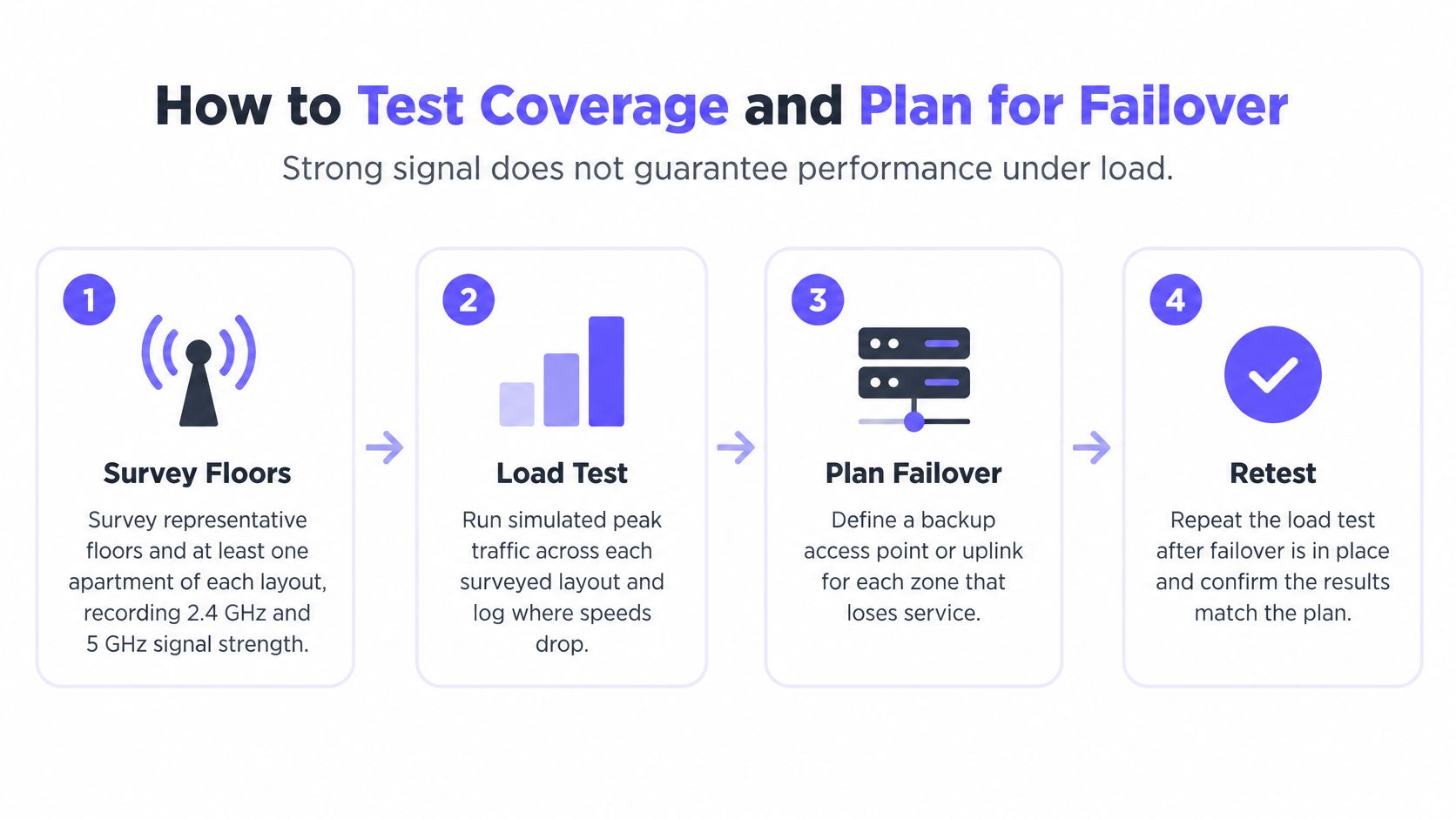
Test the building people actually occupy
Survey representative layouts. Review blueprints, wall thickness, concrete, metalwork, and service risers. Use a survey tool such as Ekahau or Hamina alongside client testing to record received signal strength and signal-to-noise ratio on the bands your devices use.
Validate placement and movement. Test inside apartments, not just corridors. Walk an active call past unit doors, elevators, stairwells, and amenity rooms, recording where roaming interrupts the session.
Generate realistic demand. Size capacity around concurrent active clients and applications. An access point's advertised association limit isn't a promise that every connected device can stream or hold a video call at once.
Exercise authentication failure. Verify geographically redundant RADIUS service, then test loss of a backend or its network path. Document what happens to new connections, existing sessions, reauthentication, and cached authorization. Check which segment each device lands in during the outage; a fallback that flattens per-resident separation into one shared VLAN is a finding to fix, not a recovery.
Remove an access point and an uplink. Confirm neighboring radios provide usable capacity rather than merely detectable coverage. Test upstream failure separately, including power and switching dependencies that overlapping radios can't solve.
Repeat the busy-hour test. Record throughput, packet loss, latency, signal quality, roaming behavior, and policy assignment under load. Repeat after failover rather than assuming the normal-operation results still apply.
The Wi-Fi Alliance security guidance covers the security side of the deployment. Security configuration is no substitute for an RF survey or a property-specific acceptance specification, and identity-separated traffic still shares radio airtime, so channel reuse and transmit-power planning remain part of the job.
Busy-hour acceptance targets
Start from these typical planning values, then tighten them to match the building's applications and service contract.
| Metric | Typical target | Why it matters |
|---|---|---|
| Signal strength | −67 dBm or better at the worst-served point in each unit | Reliable streaming and calls without retransmits |
| SNR | Around 25 dB or higher under load | Clean signal despite interference |
| Packet loss | Within about 1% for voice and video | Calls and video stay stable |
| Latency | Under roughly 50 ms to a named test endpoint | Responsive apps and remote devices |
| Throughput | At least about 70% of the contracted rate in amenity spaces at peak | Exposes contention in shared rooms |
Make the acceptance test reproducible
Record the client model, test location, endpoint, traffic load, and whether latency is measured locally or across the internet. Without those details, competing speed-test screenshots won't resolve a dispute.
Most residential networking material stops short of this scope. A homeowner-level resource such as Edinhart Realty and Property Management's networking guide covers the single-dwelling side of the problem, while a detailed WiFi network design checklist maps more closely to the property-level questions an acceptance specification needs to answer.
Treat the video below as a visual reference during planning; the acceptance specification is the written test document.
Sign-off condition: Accept the network when the worst-served occupied unit passes the agreed busy-hour test. A healthy building average can hide a dead corner unit.
Three Residential Scenarios Worked Through
Multi-family with vacant-unit controls
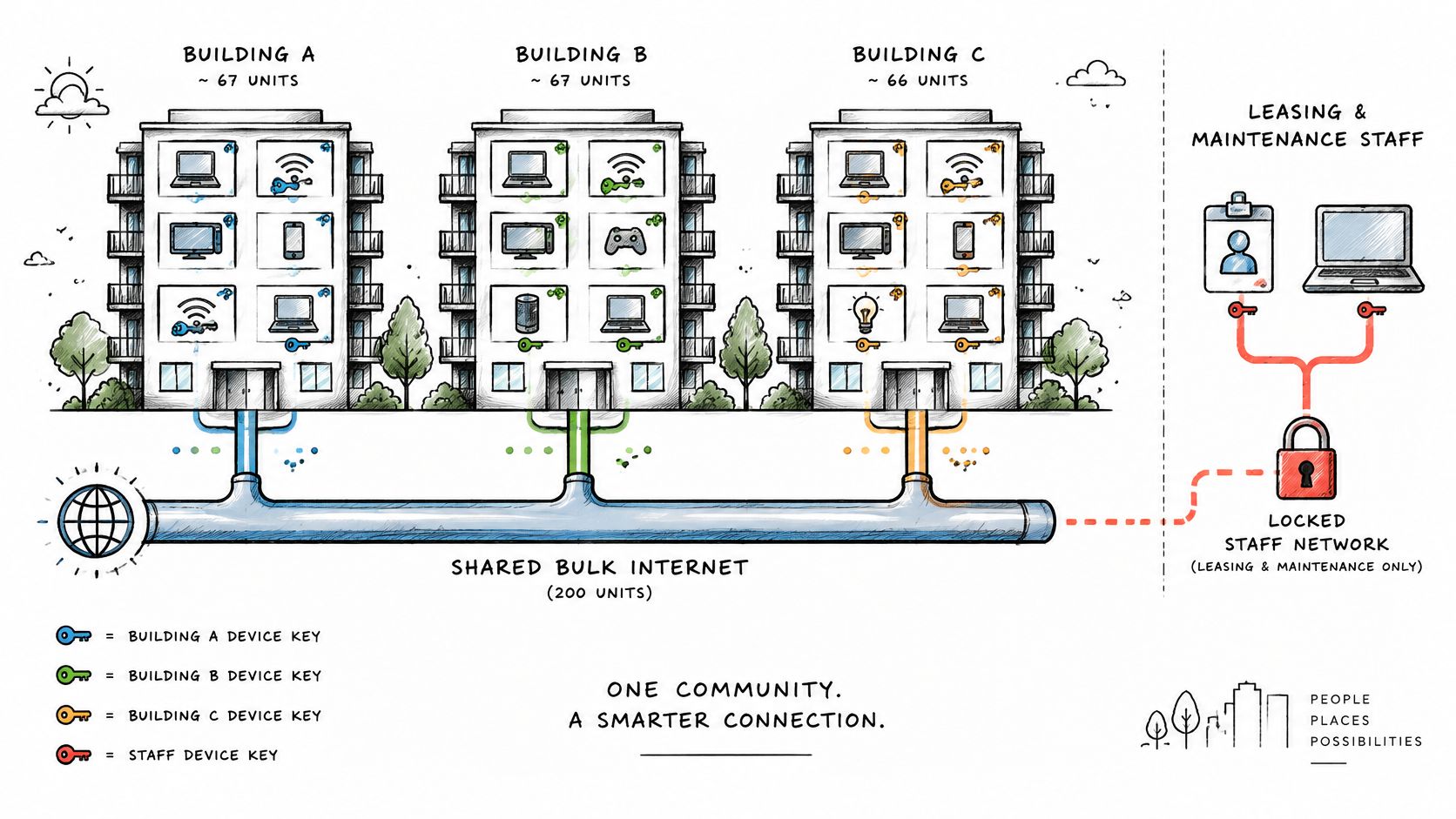
Consider a multi-family community where internet is included in rent. The immediate operational problem is keeping property-owned locks and thermostats connected during vacancy without leaving the former resident authorized.
Use bulk billing for resident service, secure staff access for leasing and maintenance, and independently managed device credentials for building controls. Treat vacancy as a change in resident entitlement, not a shutdown of the apartment's operational systems.
Without that distinction, staff either lose remote control during turnover or preserve a departed tenant's access to avoid disconnecting equipment. Neither is an acceptable maintenance procedure.
A shared physical backbone can support these separate responsibilities across the community.
Co-living with frequent departures
In co-living, the problem is a changing membership rather than a fixed household. Bind the member's credential lifetime to the booking, and make checkout terminate access automatically.
A shared printer or lounge screen can remain available through a narrowly defined gateway policy. Members' laptops, storage devices, and private casting targets shouldn't become community resources just because everyone shares a kitchen.
Useful exception handling includes:
- Booking extensions: Update expiration without issuing a building-wide password.
- Early departures: Revoke the departing member without disturbing roommates.
- Shared-screen access: Allow the intended service without opening private member segments.
Skip this design and a departed member may retain a usable credential long after checkout. Staff then have no clean way to remove that person without inconveniencing current occupants.
Serviced apartments with corporate accounts
Short-stay visitors can join through a captive portal with consent recorded and enter an isolated guest segment. Corporate accounts need a different authorization model: the company's staff may require a company network across the apartments assigned to that account.
Keep that entitlement tied to the corporate allocation, not merely to an apartment number. Reassigning an apartment must remove the previous company's access before the next booking begins.
Otherwise, a guest device may reach a neighbor's exposed files, or a former corporate occupant may remain inside the company segment. Affordable Housing, Student Housing, and military family housing follow the same identity-and-lifecycle pattern, with funding conditions and fee structures layered onto the service design.
Operations and Move-In Readiness
41% of apartment renters expect internet to be ready at move-in, according to Parks Associates findings reported by Mecklenburg Times. An activated circuit doesn't meet that expectation on its own. Residents judge readiness by whether their cell phone, laptop, and TV connect and keep working in every room of the home.
Readiness is a walkthrough result, so verify it the way a resident experiences it.
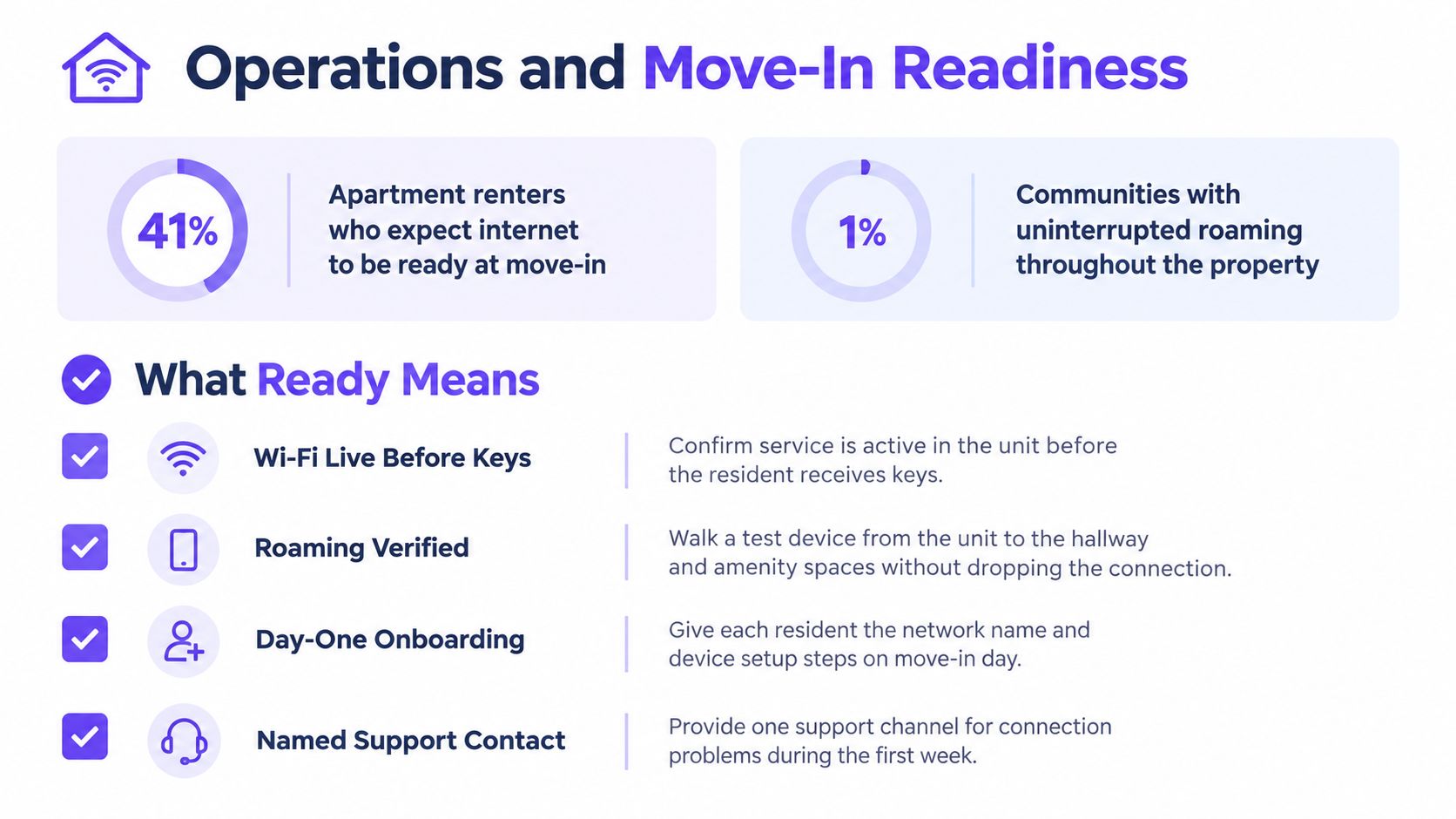
Make readiness an observable result
- Resident authentication succeeds: Test the issued credential through the actual onboarding path, including a device without a convenient browser.
- Amenity coverage works: Verify service where residents sit, exercise, or work, not merely at the entrance.
- Operational identities are active: Confirm staff and building devices use their assigned credentials rather than borrowing a resident connection.
- Roaming preserves service: Walk a test device through the intended resident route while running an application.
- Escalation has an owner: Give residents a named support channel and staff a documented route to the network operator.
At changeover, revoke the outgoing resident's device keys on move-out day, issue the new resident's credentials for move-in, and verify the resulting VLAN assignment. Use a documented move-in and move-out credential workflow so an administrator isn't relying on a handwritten reminder.
Keep an exception queue for delayed departures and disputed occupancy records. Automation needs a controlled override rather than an indefinite access exception, so set the expiration before granting it and keep an audit trail. An open-ended override is an unmanaged credential.
Reduce administrative noise
Every extra SSID adds beacon traffic to the radios broadcasting it, and eight to ten network names can spend 15 to 25% of channel airtime on beacons alone. Consolidating to three entry points wins that airtime back. It also shrinks the blast radius: on a network that covers every hallway and amenity deck, one misconfigured or compromised device on a shared password can reach everywhere the SSID does. Individual keys behind few SSIDs keep a single bad device inside its own segment.
Maintain a concise resident setup sheet with the network name, credential retrieval route, device-addition process, and support contact. Include instructions for TVs and consoles, because a laptop-only onboarding test misses common household problems.
For resident-facing support, route the initial report to the property and the technical escalation to the network operator. Put acknowledgment, escalation, and update deadlines in the agreement, and distinguish a promised response from a promised repair. Residents shouldn't have to determine whether the fault belongs to the ISP, the wireless operator, or the building before anyone accepts the ticket.
Confirm Your Building's Model Before You Build
For a new build with bulk internet, use the construction window to establish cabling ownership, equipment access, and operational responsibility. Choose bulk billing deliberately, use the three access categories, assign individual credentials to building devices, and use certificates for managed staff endpoints.
For an older building without shared infrastructure, start with secure staff connectivity and controlled access for property systems. Inspect existing cabling and switching before committing to resident-wide service, then select resident billing after the support owner is named.
For a mixed-income or amenity-led property, a base service with an optional faster tier may fit the operating model. Keep isolation, credential lifetimes, and privacy protections identical across tiers; paying less shouldn't mean weaker separation.
Put the decisions on paper
- Map device classes: Show the entry network and restricted destination for every resident, staff, guest, and building-system category.
- Name handoff owners: Assign responsibility for onboarding, billing, physical faults, and technical escalation.
- Require acceptance evidence: Complete the busy-hour and failure tests before residents depend on the service.
Purple Access runs on access points you already own and supports multi-family, MDU, and co-living deployments. Our planner maps existing SSIDs onto three networks, using individual identities and per-device keys instead of a property-wide shared password.
Before signing a service agreement, require the three-network diagram and the revocation procedure as deliverables. Have the operator demonstrate how a compromised device loses access while unrelated residents and building controls remain connected.
Purple Access provides open, secure, and xPSK WiFi for guests, staff, residents, and devices on the access points you own. Visit Purple Access to map your building's existing connections into three networks and plan how individual access will be issued, isolated, and revoked.