Hotspot 2.0 Guide: Passpoint Roaming Explained
Published
You know the moment: a guest lands at the airport, checks into a hotel, or sits down in a stadium seat, and the Wi-Fi experience starts over again. Find the SSID, open a captive portal, type in an email address or room number, wait for the login page to clear, then do it all again at the next venue.
Hotspot 2.0 exists to replace that repeated ritual with something closer to cellular roaming. The device should be able to recognize a trusted network, authenticate in the background, and connect without asking the user to become a part-time network operator. If you want a familiar consumer example of the pain point, the travel advice and connectivity tips in St Christopher's Inns travel blog picks sit in the same everyday world of unstable guest Wi-Fi and repeated logins.
Table of Contents
- The Daily Friction Hotspot 2.0 Is Built to Solve
- How Hotspot 2.0 Actually Works Under the Hood
- Hotspot 2.0 Passpoint and the Standards It Stands On
- Passpoint Release 1 Release 2 and Release 3 Compared
- Deployment Benefits and Where Hotspot 2.0 Earns Its Place
- Onboarding Recovery and the Help-Desk Reality
- Interoperability Limits and the OpenRoaming Layer
- Rolling Out Hotspot 2.0 Without Breaking What Works
The Daily Friction Hotspot 2.0 Is Built to Solve
A good Wi-Fi experience should feel invisible. Instead, users still meet the same sequence in every new place, a fresh SSID, a captive portal, a form, and a login they'll probably repeat next time.
That friction is easy to overlook inside one building, but it becomes painful across a day of travel. A phone that already knows how to roam on cellular should not behave like a lost visitor every time it reaches a new access point. Hotspot 2.0 was designed around that expectation, so the network can identify the device and decide whether it belongs before the user starts tapping around.
The user's mental model breaks at the login page
The problem is not just convenience. Each captive portal adds delay, and each re-entry asks the user to trade time for access, even when the device has already been recognized by an identity provider or a managed profile. In places where people move between buildings, terminals, or chain properties, that extra step turns into a daily support burden.
That's why Hotspot 2.0 matters most where Wi-Fi is supposed to be part of the environment, not a task. It aims for the same feeling people already expect from mobile coverage, walk in, connect, keep moving. A hotel guest, a commuter, and an employee on a managed device all benefit from that model, even if the backend workflow behind each connection is very different.
Practical rule: if the connection process needs a person to remember a password, open a portal, or re-enter their details every visit, the network is still acting like a guest book instead of an access system.
How Hotspot 2.0 Actually Works Under the Hood
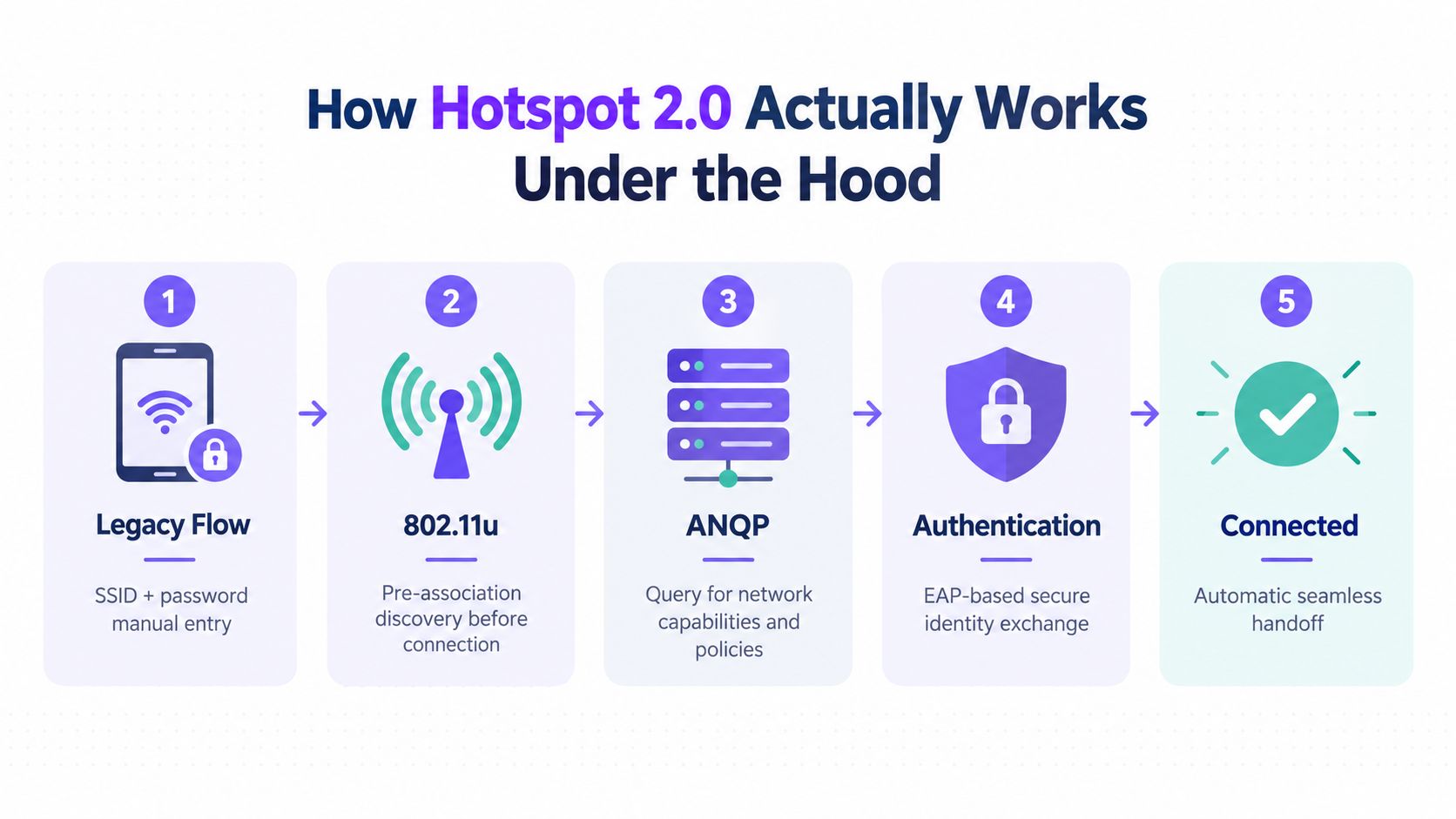
Hotspot 2.0 starts with discovery, and that changes the whole shape of the connection. A legacy Wi-Fi network often waits for the device to join before it reveals much of anything. Hotspot 2.0 lets the client ask first, then decide whether the network matches the profile already stored on the device.
The device reads the network before it joins it
IEEE 802.11u gives the client a way to query the access point before association. That is the first important shift. Instead of joining first and sorting out access later, the device can ask what kind of network this is, whether it supports the right identity method, and whether the profile on the device makes sense for that environment. The Access Network Query Protocol, or ANQP, carries that exchange, including operator identity, roaming consortium information, venue type, and supported authentication services as described in Microsoft's Passpoint documentation.
The sequence works like a hotel front desk with the room list posted before anyone walks in. The device checks the posted information, compares it with its credentials, and only then proceeds. If the profile does not match, the client can stop cleanly instead of stumbling into a generic guest flow and failing later.
Authentication happens after discovery, not after a portal
Once the device finds a compatible network, it uses 802.1X with an Extensible Authentication Protocol method. The profile may call for EAP-TLS, EAP-TTLS, or a SIM-based EAP method, depending on how the device was provisioned. The resulting link uses WPA2-Enterprise or WPA3-Enterprise, so the outcome is an automatically encrypted connection as noted in Microsoft's Passpoint documentation.
That shifts work away from the login page and into identity management. The network now cares about certificate health, policy matching, and whether the credential is still valid. If the certificate has expired, the identity has been revoked, or the profile is wrong, access should fail clearly.
A managed deployment often pairs that backend with a Cloud RADIUS service so identity can be handled centrally. The access point advertises what it supports, the client selects a stored profile, and the authentication stack decides whether the device belongs on the network. The user does not have to solve that matching step each time.
The useful mental model is simple. First the device learns who the network is. Then it checks whether the network fits its profile. Then it presents its own identity and waits for the access decision.
Hotspot 2.0 Passpoint and the Standards It Stands On
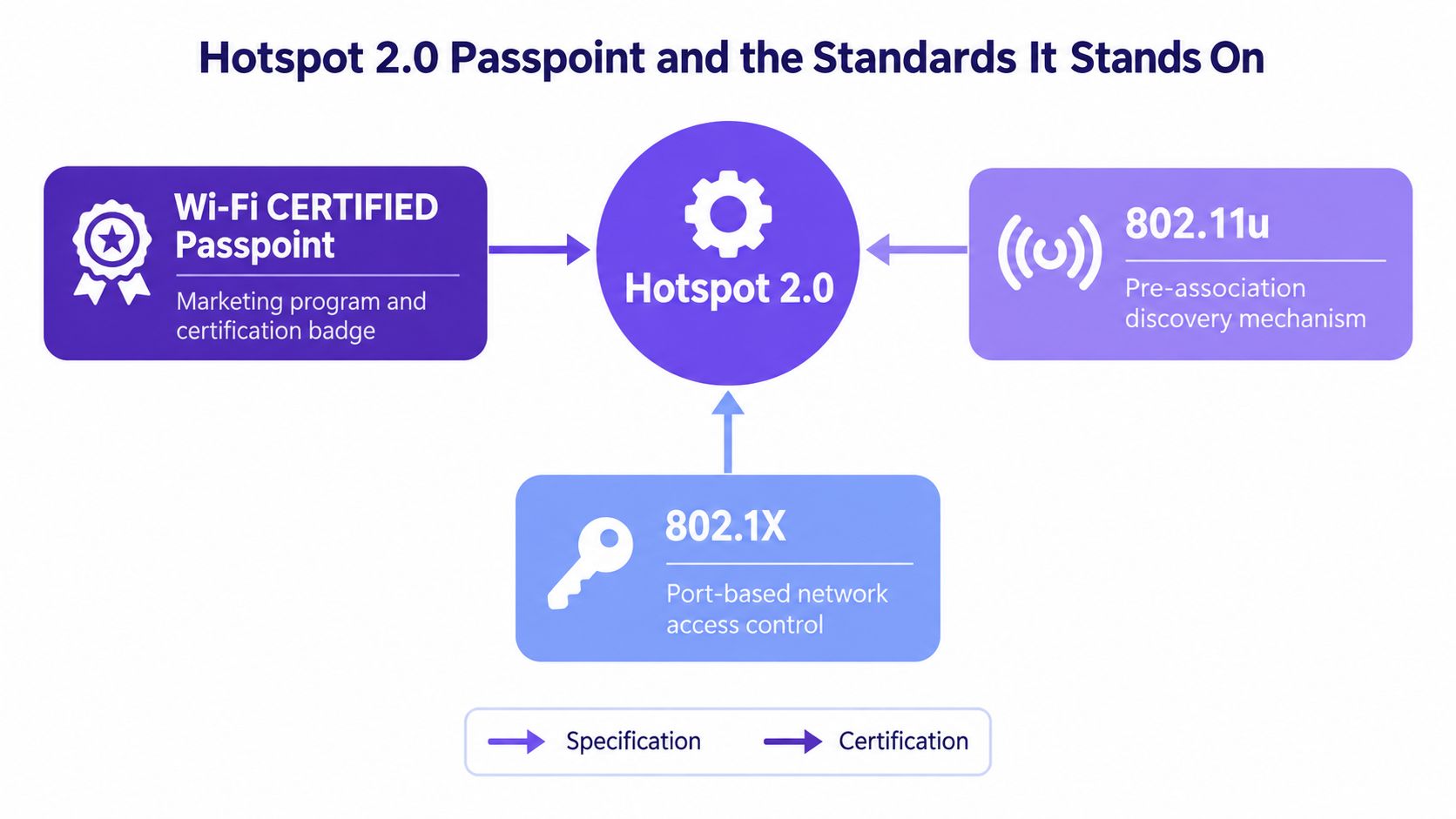
A phone joins a network differently under Hotspot 2.0 than it does on a captive portal. The device first discovers whether the access point advertises the right capabilities, then it matches that network against a saved profile, and only then does authentication begin. Wi-Fi CERTIFIED Passpoint is the certification layer built on top of that behavior, with IEEE 802.11u supplying the pre-association discovery pieces that let a client inspect the network before it connects. The certification matters because it gives multiple vendors a common target instead of leaving the feature locked inside one hardware family the program's early scale is noted in the April 2017 Wireless Broadband Alliance reference.
Hotspot 2.0 is the mechanism, Passpoint is the badge
That separation is useful when you read product sheets. If a vendor says “Passpoint supported,” it usually means the equipment has passed the interoperability program. If it says Hotspot 2.0, it is usually describing the discovery and authentication behavior underneath. If it mentions 802.11u, it is pointing to the part that exposes network information before association.
The security stack sits below the branding. 802.1X handles access control, and WPA2-Enterprise or WPA3-Enterprise carries the encrypted session. The client still needs a valid identity, whether that identity is a certificate, a SIM-backed credential, or another approved EAP method. That is why Passpoint fits managed devices and MDM-driven profiles so well.
A useful analogy is an office building with badge readers at every door. The badge format matters, the reader must understand it, and the back-end policy system must trust the badge before the door opens. Passpoint follows the same logic, but the “badge” is a device profile and certificate chain.
Certificate-based devices fit the model cleanly
For corporate fleets, EAP-TLS is often the cleanest fit because the device presents a certificate and the server checks it against policy. That keeps the exchange machine-readable, which is what roaming standards need. It also gives network teams a clear revocation path. If a laptop is lost or a phone is compromised, trust can be removed without forcing everyone onto a shared password.
That is the value of the model. Passpoint is an interoperability framework for identity-bearing devices, tying together discovery, profile selection, and encrypted authentication.
Operational mindset: if the network cannot distinguish a provisioned device from an unknown one, it is still behaving like a generic open Wi-Fi system.
Passpoint Release 1 Release 2 and Release 3 Compared
The releases make more sense if you treat them as stages of deployment maturity, not as feature checklists. Release 1 established the automatic discovery and selection model. Release 2 added Online Sign-Up, or OSU, so a device could obtain a profile over the air. Release 3 added WPA3-Enterprise support and a single-SSID model that can carry both normal service and OSU provisioning as described in technical and vendor documentation on Release 3.
A release table is more useful than a marketing summary
| Release | Key capability | Security baseline | OSU support | Practical caveat |
|---|---|---|---|---|
| Release 1 | Automatic discovery and selection | WPA2-Enterprise | No | Works only when a compatible profile already exists |
| Release 2 | Adds over-the-air profile provisioning | WPA2-Enterprise | Yes | Useful for first-time users, but deployment support isn't uniform |
| Release 3 | Adds WPA3-Enterprise and single-SSID provisioning | WPA3-Enterprise | Yes | Full benefit depends on end-to-end client and infrastructure support |
The important operational point is that Release 3 is not a magic switch. A rollout still has to line up the client operating system, the access point, the controller, and the authentication server. If one of those layers lags, the user experience falls back to whatever the oldest component can support.
OSU solves the first-connection problem, not every problem
OSU matters because a device with no profile has no path into the automatic flow. That's especially important for visitors and devices that haven't been pre-enrolled. But OSU doesn't erase the need for governance, because the profile still has to be issued, installed, and maintained correctly.
There's also a compatibility reality to acknowledge. A deployment can be technically elegant and still behave unevenly across devices. That's why teams should think in terms of supported paths, not slogans. The question is not whether Passpoint exists, it's which clients can use which release cleanly.
For network teams, the release choice should follow the identity model, not the other way around. If the profile lifecycle is mature, Release 3 can reduce friction. If the environment still relies on manual onboarding, Release 2-style provisioning and a fallback access path remain essential.
Deployment Benefits and Where Hotspot 2.0 Earns Its Place
A hotel lobby, airport lounge, or campus floor can look busy and still behave poorly for Wi-Fi users if every visit starts with the same portal screen. Hotspot 2.0 earns its place when the operator wants access to follow identity and profile state instead of forcing every connection through a shared login page. That shift matters because it lets the network assign policy by device, revoke access cleanly, and keep repeat users out of the captive-portal loop.
The ecosystem is large enough to support that model. The Wi-Fi Alliance's current technology overview says more than 2,800 unique devices have been Wi-Fi CERTIFIED Passpoint worldwide, which shows that the device side is no longer the limiting factor Wi-Fi Alliance technology overview. The same overview reports that member operators collectively served more than 2 billion subscribers and operated over 30 million hotspots globally, which helps explain why identity-based Wi-Fi became more important as public access kept expanding.
Where the operational value shows up
- Less portal friction: Devices can return to the network without repeating the same login steps at every visit.
- Cleaner identity control: Certificates or other managed credentials tie a device to the right policy.
- Better roaming behavior: Participating networks can recognize enrolled devices across venues.
- Less shared-password sprawl: Revocation applies to a device or profile, not to everyone who knows the password.
Those benefits change the support workload. A hotel group can give managed devices a predictable path while still keeping guest onboarding separate. An airport operator can do the same for roaming users. An enterprise campus can reserve manual sign-in for devices that do not yet have a profile, while letting enrolled devices move through authentication without extra friction.
The growth context also helps explain why portals started to strain. WBA projections from that era anticipated public Wi-Fi hotspots growing from 64.2 million in 2015 to 432.5 million by 2020, and that expansion is what made the portal model harder to maintain at scale. A manual login flow does not age well when the access layer keeps getting larger.
If compliance matters as much as convenience, the design choice becomes even clearer. Identity-based Wi-Fi fits more naturally with segmentation and access governance than a shared-password setup, which is why many teams pair it with stronger policy boundaries. For a related look at that operational approach, see Purple Access's PCI compliance guidance for Wi-Fi.
Onboarding Recovery and the Help-Desk Reality
Passpoint feels straightforward on a clean demo device. The support story starts when that clean path breaks. A user without a profile, a phone that has been replaced, an expired certificate, or a revoked identity all end up as real tickets, and if those cases are vague, the deployment will feel unreliable even when the standard itself is working.
The network has to answer four questions cleanly
How does a device get a profile if none exists yet? What happens when a managed phone is replaced? How do you spot and renew certificates before they expire without warning? What path do unsupported devices use instead?
Those are operational questions, not abstract ones. Android supports Release 2 online sign-up, which gives users a standardized way to obtain a profile, while managed devices are often better served by an MDM-pushed profile. The access team still has to watch certificate health and remove stale identities when a device leaves service. Microsoft's Passpoint guidance covers the underlying model
Practical rule: treat certificate lifecycle management as part of Wi-Fi operations, not as a background PKI task that someone else will remember.
A support queue is where the design gets tested. If a device cannot enroll cleanly, the network needs a predictable recovery path, just as a building needs a side entrance when the main door is blocked.
Designing the fallback path deliberately
A good Passpoint rollout keeps guest access in place. It separates the low-friction path for enrolled devices from the recovery path for everyone else. In practice, that usually means keeping a captive portal or another controlled onboarding route for first-time visitors, legacy devices, and unsupported operating systems.
In multi-site environments, identity services and RADIUS policy make that separation manageable. They let teams place known devices on the right network, revoke access when needed, and keep audit visibility around who connected and why. Purple Access, for example, uses Passpoint alongside Cloud RADIUS and directory-based identity for this kind of controlled access design, but the larger point is operational: progressive access works best when the fallback path is already planned.
The support question should always be the same, what does the user see when automation fails? If the answer is nothing, the network team will own that failure in the form of tickets and workarounds. If the answer is a clear fallback with visible diagnostics, the deployment stays supportable.
Interoperability Limits and the OpenRoaming Layer
The most common mistake is to assume that Passpoint works everywhere once it's enabled. It doesn't. Device support is uneven, and the federation layer depends on both client capability and profile availability. A technical source notes that Passpoint Release 3 is supported by Android 12 and later, while iPhones remain on Release 1, which means the same venue can see different behavior across its user base Purple's Passpoint interoperability guide.
Device support and profile support are not the same thing
That distinction matters. A phone can support the standard and still fail to connect if it doesn't have a valid profile. Another phone can have a roaming profile but still land on the fallback SSID if its platform support is limited. Those are different failures, and they need different answers.
OpenRoaming extends the federation layer, which means it helps participating identities and participating venues find each other more easily. It doesn't remove the need for device support, profile provisioning, or a guest path for unsupported clients. For practical deployment planning, that's the right mental model, federation expands reach, but it doesn't erase incompatibility.
If you're weighing alternatives for visitor connectivity, the broader travel and guest-Wi-Fi planning discussions in Simsima's travel Wi-Fi plans are a useful reminder that roaming convenience only solves part of the problem. The rest still comes down to who can authenticate, who can't, and what fallback the venue keeps available.
The contrarian view is the one that holds up in real networks, Passpoint is a progressive access layer, not a total replacement for guest onboarding. It works best when enrolled devices glide through automatically and everyone else lands on a secure, controlled alternative. That layered approach is less elegant on paper, but it's more honest about what devices and identities can do.
Rolling Out Hotspot 2.0 Without Breaking What Works
A sensible rollout starts with audience, not with firmware. Managed devices should get profiles through MDM. First-time visitors should get a standardized onboarding path such as OSU where it's supported. Everyone else should still have a controlled fallback SSID, because a network that only works for enrolled devices is not a complete guest-access strategy.
The access point side needs the usual prerequisites, 802.11u support, RADIUS or AAA integration, and correct ANQP advertising. Then the operations side needs metrics that tell the truth, profile-install success, EAP failure codes, roaming authentication latency, and fallback rate by operating system. Without those, you're just hoping the network is improved.
Purple Access's three-SSID planning model is one way to frame that architecture, but the decision rule is simple even without a product name: use Passpoint for enrolled, identity-bearing users, keep a controlled fallback SSID for everyone else, and measure both.
If you're planning a rollout, Purple Access can help you structure the identity, profile, and fallback layers around the devices you support. Explore Purple Access to see how Passpoint, Cloud RADIUS, and controlled guest onboarding can fit into a staged deployment without disrupting what already works.