EAP TLS vs PEAP: Security, Certs and Fit
Published
The most common advice on eap tls vs peap is tidy and wrong. Pick EAP-TLS because it is "more secure," and leave PEAP for teams that have not caught up. That skips the question that decides whether a multi-site WLAN is still up on a Monday. Can you issue, renew, and revoke a certificate for every device that is supposed to use it?
I would not put one method on the whole estate. EAP-TLS belongs on devices you can enrol and renew. PEAP, almost always with inner EAP-MSCHAPv2, belongs where a directory password already exists and certificate enrolment is not practical. The harder method is not always the one you can run. An expired certificate in a hotel back office locks staff out while their accounts stay valid. A PEAP profile that skips the server check can hand a directory password to a rogue access point. Both failures are operational. Assign the method to the population instead of hunting for a network-wide winner.
Table of Contents
- EAP-TLS and PEAP Side by Side
- How Each Method Authenticates and Where Passwords Leak
- Certificate Requirements Before Rollout
- Certificate Lifecycle and Rollout Effort
- Revocation Roaming Speed and Client Support
- Assign Each Population and Prove the Split
EAP-TLS and PEAP Side by Side
The practical difference between EAP-TLS and PEAP is the credential each endpoint can support and the work required to keep it usable. Use EAP-TLS for devices you can enrol and renew. Use PEAP where users already have directory passwords and certificate enrolment is not practical. Neither method is the right answer for every population.
| Criterion | EAP-TLS | PEAP |
|---|---|---|
| EAP type ID | 13 | 26 |
| Client credential | X.509 client certificate | Username and password, usually EAP-MSCHAPv2 or EAP-GTC |
| Server credential | RADIUS server certificate | RADIUS server certificate on the outer TLS tunnel |
| Mutual authentication | Client and server certificates | Server certificate plus inner user or device auth |
| Password on the wire | None | Yes, inside the TLS tunnel |
| What a rogue AP can steal if the client skips server checks | Nothing password-like; auth fails closed | Directory password |
| Revocation of one device | Revoke or expire that certificate | Disable account or reset a password that may be reused |
| PKI work | Server and client certificates, renewal and recovery | Server certificate only |
| Best first fit | MDM-managed staff and privileged devices | Unmanaged endpoints that cannot enrol certificates |
A 2025 Authentik technical article identifies EAP-TLS as EAP type ID 13 and PEAP as type ID 26. These IDs identify the methods to RADIUS and the supplicant. They do not determine which people or devices should use them.
What the rows actually change
The client credential sets the operational boundary. EAP-TLS presents an X.509 client certificate. PEAP uses a username and password, commonly through EAP-MSCHAPv2 or EAP-GTC. That makes certificate enrolment and renewal the deciding workload, rather than a theoretical ranking of methods.
The trust checks differ too. EAP-TLS authenticates both the client and server certificates. PEAP validates the RADIUS server certificate on the outer TLS tunnel, then authenticates the user or device with an inner method.
Password exposure depends on supplicant configuration. EAP-TLS has no password on the wire. PEAP carries a password inside its tunnel, so a client that skips server checks can disclose a directory password to a rogue access point. With EAP-TLS, a missing or untrusted client certificate causes authentication to fail.
Offboarding also depends on what is being managed. A device certificate can be revoked or allowed to expire without resetting a person's directory password. Disabling an account or changing a reused password may affect other logins tied to that credential.
The operational trade-off is clear: EAP-TLS requires client certificates, renewal, and a recovery path, while PEAP requires the server certificate and careful supplicant configuration. Assign EAP-TLS to enrolled staff and privileged devices; keep PEAP for unmanaged endpoints that cannot join certificate management. Teams running serverless infrastructure for membership platforms may have distinct member, staff, and device populations, but the hosting model does not choose the authentication method. The credential has to match who you can manage.
How Each Method Authenticates and Where Passwords Leak
EAP-TLS is not automatically the right answer for every user. The key decision is whether your team can issue, renew, and revoke certificates reliably for each population. PEAP keeps onboarding simpler for unmanaged users, but its password depends on correct supplicant configuration.
Both methods use 802.1X. The supplicant is the device requesting access, the authenticator is the access point or switch relaying that request, and the RADIUS server accepts or rejects it. They share the EAP framework, not a credential.
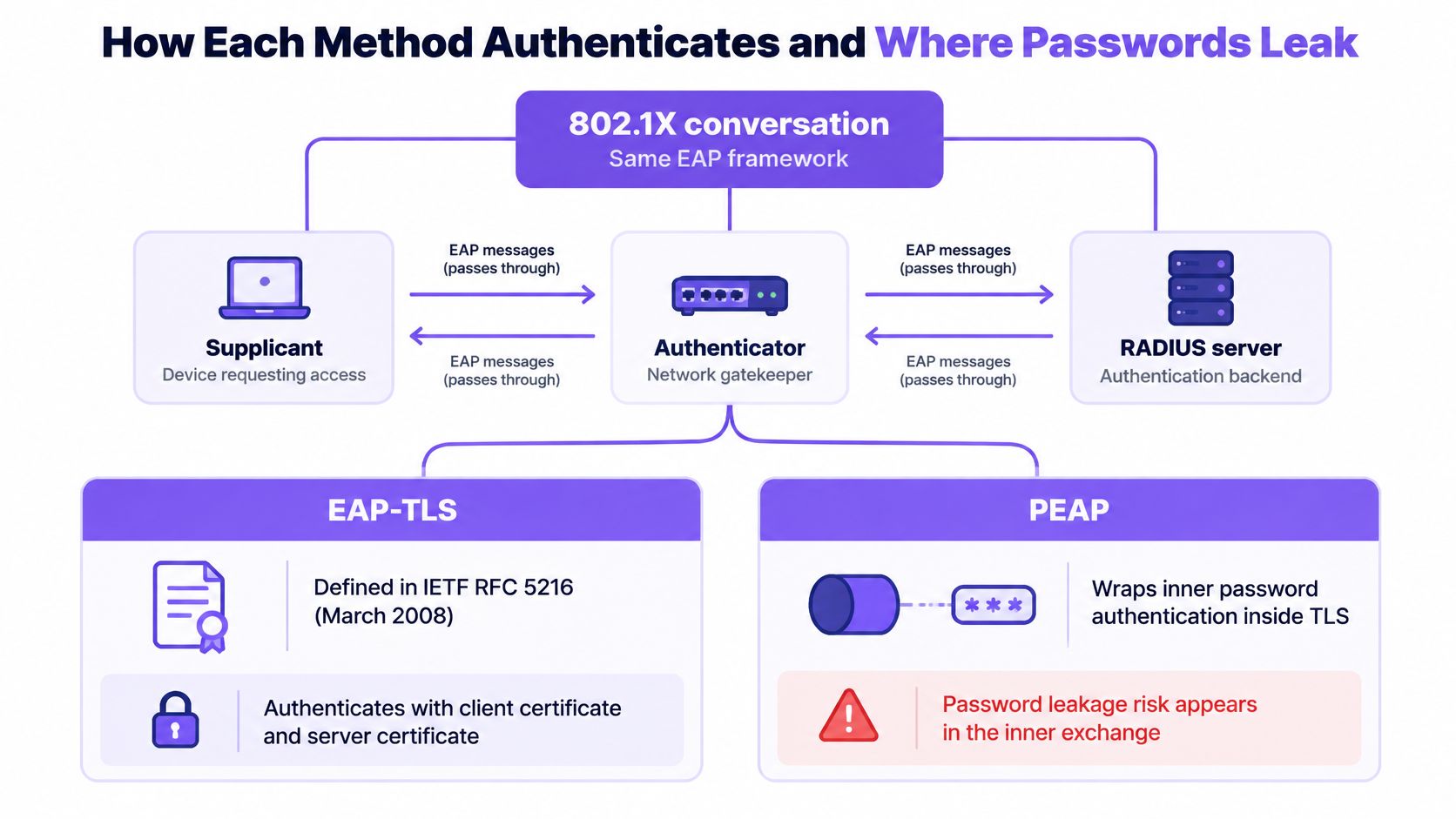
The IETF EAP specifications index describes EAP-TLS, defined in IETF RFC 5216, as certificate-based client and server authentication, with mutual authentication, integrity-protected cipher-suite negotiation, and key derivation. The specification was published in March 2008. In practice, EAP-TLS requires a client certificate issued through PKI, alongside the RADIUS server certificate.
Two sequences, one framework
EAP-TLS authenticates both endpoints in one TLS exchange:
- The supplicant starts EAP with the authenticator, which relays the request to RADIUS.
- The server and client certificates are checked during the TLS exchange.
- The exchange protects cipher-suite negotiation and derives keys, without sending a password that can be phished, replayed, or brute-forced.
- A missing or untrusted client certificate means the device is rejected. It cannot fall back to typing a password.
PEAP creates an outer TLS tunnel that authenticates the server, then runs an inner method, commonly EAP-MSCHAPv2 or EAP-GTC. Because the inner method can use a username and password, endpoints generally do not need client certificates. The IETF EAP specifications index also describes the standards framework these methods use.
Users do not see PEAP's outer tunnel. The inner identity, typically a username and password or a token, is sent only after TLS is established. That makes PEAP familiar to directory-based supplicants, while leaving a password exposed if the client does not verify the tunnel correctly.
PEAP with inner EAP-TLS is a more involved special case, combining a certificate method with an outer TLS tunnel. A deployment labelled “PEAP” usually means PEAP-MSCHAPv2.
Where the supplicant decides the outcome
An enterprise wireless EAP methods write-up explains the distinction: EAP-TLS uses mutual X.509 authentication. RADIUS validates the client certificate, and the client validates the server certificate. No password is available to phish, replay, or brute-force. The write-up also says that NIST requires both the wireless station and authentication server to hold valid certificates.
With PEAP, the client must validate the RADIUS certificate chain and the expected server name. If either check is missing, a rogue access point can solicit a directory password. A supplicant profile set to “do not validate” does not protect the password.
Practical rule: Pin the RADIUS server name and issuing CA in the WiFi profile. Without those checks, PEAP can offer a password to a rogue server.
Captured MS-CHAPv2 responses can be cracked offline after an attacker obtains them through a rogue tunnel. Validating the tunnel is the control; the inner method does not rescue a profile that accepts an untrusted server. The same password risk extends beyond WiFi. Reports of compromised credentials in Australian small businesses underline why a reused directory password remains valuable to an attacker.
Assign EAP-TLS to managed devices and users whose certificate lifecycle you can operate. Use PEAP where users or devices cannot reliably receive and renew certificates, but enforce server-name and CA validation through the supplicant profile. The operational trade-off is direct: certificates take enrolment and recovery work, while passwords leave you managing reuse and account changes. The better method depends on who you can manage, not on declaring one winner for every SSID.
Certificate Requirements Before Rollout
Confirm these six items in a lab before the first production join. A missing chain or a wrong name will look like "WiFi is down," not like a certificate mistake.
- RADIUS server certificate. Issue it from your private CA. Put the name the supplicant profile pins in the subject or SAN. Set server authentication usage, and serve the full intermediate chain with the certificate. A public CA that will sign any matching name is the wrong trust model for an internal RADIUS name.
- Client certificate. One per device or user, with client authentication usage. Put a unique identity in the SAN, such as a user principal name or a device serial. Store the private key in the TPM or secure enclave when the platform supports it.
- Trust anchor. Install the internal root or issuing CA through the MDM profile. Do not point devices at a public root and hope the name check is enough.
- Validity and renewal. Publish a lifetime for the server certificate and for client certificates. Build an overlap window so the replacement is installed before the old one expires.
- Revocation. Give the RADIUS server a CRL or OCSP endpoint it can reach. Decide, in writing, whether authentication fails or proceeds when that endpoint is offline. Test the offline case. Do not discover it during a WAN blip.
- Enrolment channel. Deliver certificates with SCEP or a PKCS#12 through the MDM. Prove it on one device, including renewal, before you target a group.
Say a clinic site uses Okta for staff identity and Intune for laptops. The RADIUS name in the profile must match the certificate, and the Okta group that should land on the clinical VLAN must be the same group the MDM uses for enrolment. Our notes on Okta WiFi authentication walk that identity handoff without turning the lab into a password SSID.
Join one test laptop, revoke its certificate, and confirm the next association fails before you touch a live floor.
Certificate Lifecycle and Rollout Effort
EAP-TLS security becomes an outage when a certificate expires, or when a client cannot reach revocation information, and the user account is still perfectly valid. That is the question worth asking. "Certificates are harder" is not a design.
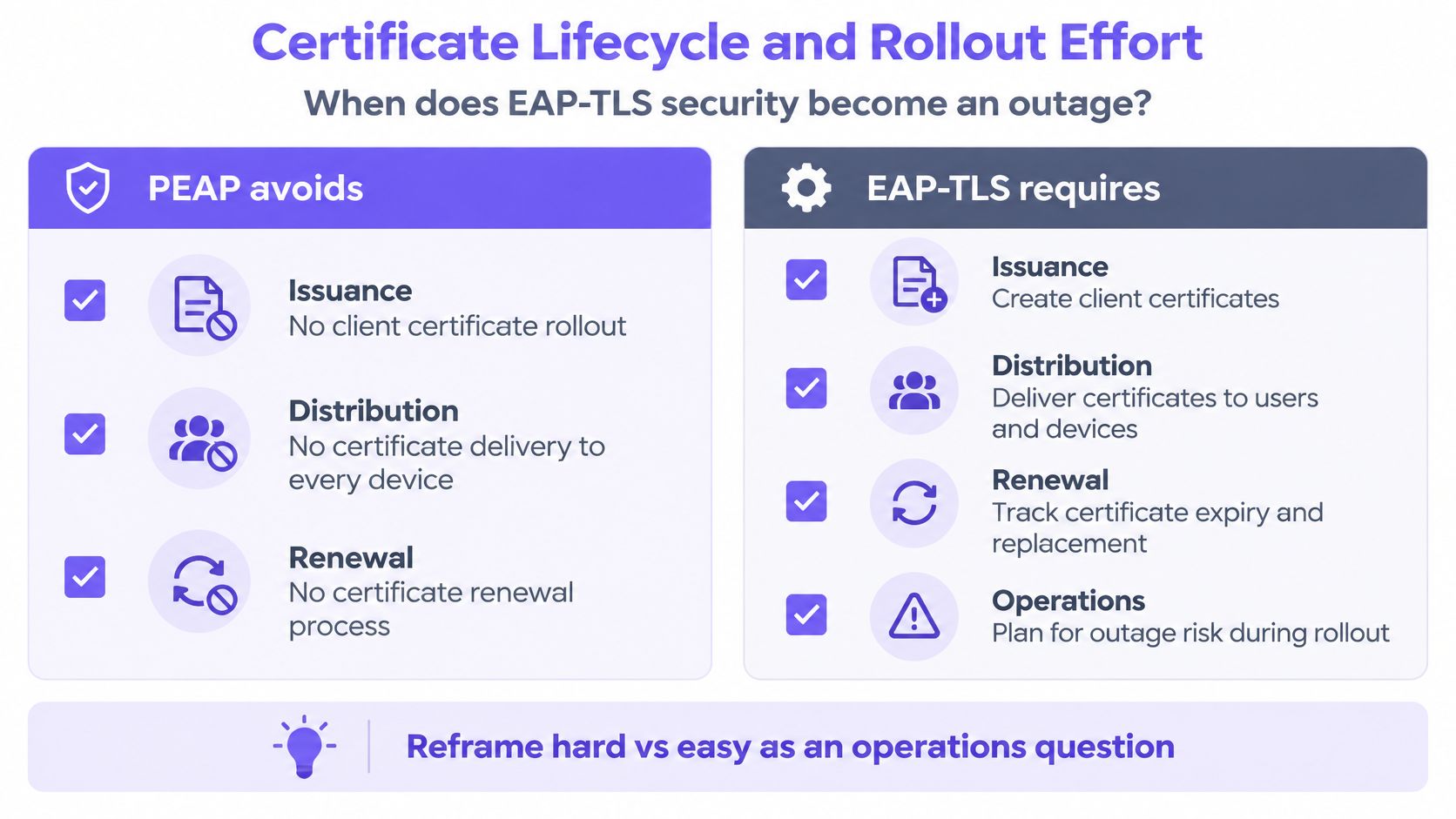
NIST Special Publication 800-120 frames the same liability. EAP-TLS needs reliable issuance, distribution, renewal, trust-chain management, and revocation checking. A device with an expired certificate, or an unreachable revocation service, can lose network access even when the user's identity remains valid. PEAP typically authenticates the server in the outer TLS phase and a username and password through an inner method such as MS-CHAPv2, so it skips that client lifecycle. The easier first day shifts load into password resets and bad profiles.
Keep certificates from becoming the outage
The design response is automation, not a longer runbook.
- Enrol through MDM. Push the profile, the trust anchor, and the certificate together. Manual WiFi setup is how server-name checks get unticked.
- Overlap renewal. Install the new certificate before the old one expires. A weekend where every laptop dies at once is an overlap that was too short.
- Test offline revocation. Know whether RADIUS fails closed or fails open when CRL or OCSP cannot be fetched.
- Keep a recovery path. A failed endpoint needs a way back that is not "borrow someone's PEAP password." A wired helpdesk port or a tightly scoped recovery SSID beats a shared secret written on a whiteboard.
Purple Access takes EAP-TLS certificates from Microsoft Intune, Jamf Pro, JumpCloud, Kandji, Hexnode, Iru, and Addigy, delivered over SCEP, with setup taking five to ten minutes once for the organisation rather than per device. The secure network is passwordless and certificate-based, and a device that fails posture is refused at authentication through Conditional Access. That is a compliance-gated join, not a second password prompt.
PEAP remains the straightforward choice when PKI is underdeveloped, when contractors cannot be included in MDM, or when mixed BYOD environments will not accept a certificate. Healthcare, education, hospitality, and other multi-site fleets often face all three challenges simultaneously. Use EAP-TLS for managed corporate, staff, and high-risk devices. Maintain a strictly controlled alternative for unmanaged or temporary endpoints. Venue-scale identity is the key decision, not a slogan that TLS beat passwords.
If RADIUS itself is the fragile piece, a hosted backend removes the "one server in the HQ closet" failure. Our write-up on RADIUS as a service is the place to check reachability and redundancy before you blame the EAP method.
The short walkthrough below shows certificate enrolment beside a password inner method, which is the contrast helpdesks see when renewal is late.
Revocation Roaming Speed and Client Support
Support and speed are lookup problems. Current Windows, macOS, iOS, Android, and ChromeOS supplicants speak both methods. The failure mode is what differs.
EAP-TLS fails when the profile, the issuing CA, or the validity dates are wrong. PEAP fails when the inner method, the identity format, or the server-name check does not match RADIUS policy. Neither failure means the access point "does not support enterprise."
Revocation has the same split. Disabling one device certificate cuts that laptop off without touching the person's other logins. Resetting a directory password hits every unmanaged client still using it. Immediate, device-specific cut-off is the EAP-TLS advantage. Hard failures from expired certificates are the cost.
Handshakes, not brand names
An ACM paper on wireless authentication latency finds that performance follows handshake count, roaming, certificate validation, and backend latency more than the method name. Standard EAP-TLS completes client and server certificate authentication in its TLS exchange. PEAP establishes a TLS tunnel and then runs the inner authentication, adding a distinct phase. Cisco technical material noted in that paper says PEAP with inner EAP-TLS involves two TLS handshakes and can be slow when full reauthentication happens during roaming.
Measure these separately. Do not crown a winner from one average login time.
- 95th-percentile association-to-IP time
- Full authentication versus roam-resumption latency
- RADIUS round-trip time
- Authentication failure rate
- Certificate-renewal failures
Session resumption, PMK caching or 802.11r, local RADIUS reachability, and a short certificate chain move those numbers more than swapping a cipher suite. PEAP can look simple on day one and still generate delay through repeated password exchanges and user remediation. EAP-TLS can feel instant after enrolment and then fail hard on an expired certificate.
| Symptom | More likely method | Usual cause | Practical fix |
|---|---|---|---|
| Repeats password prompt near an unknown AP | PEAP | Supplicant not validating server name or chain | Push a profile that pins the RADIUS name and CA |
| Access dies on one laptop after a role change | EAP-TLS | Certificate revoked or device removed from MDM | Confirm revocation and re-enrol only that device |
| Whole team locked out on a Monday | EAP-TLS | Certificates expired together or renewal overlap too short | Stage renewal before expiry and keep a recovery path |
| Roam feels slow only on full reauth | PEAP with inner EAP-TLS | Two TLS handshakes | Prefer resumption, PMK caching or 802.11r; avoid inner EAP-TLS unless required |
| Random rejects at one site only | Either | RADIUS round-trip or chain fetch, not the EAP name | Measure RTT and 95th-percentile association-to-IP before changing method |
A slow roam at one site is usually RADIUS distance or a chain fetch, not proof that you picked the wrong EAP type.
Assign Each Population and Prove the Split
One building can hold staff laptops, a conference guest, a contractor Mac, and a till. They should not share a credential type. Map each population, pilot one site beside the network you already run, and judge tickets plus the authentication log before you copy the design.
| Population | Use | Do not use | Why |
|---|---|---|---|
| MDM-managed staff and privileged users | EAP-TLS on a WPA-Enterprise SSID | Shared PSK or PEAP | Certificate identity, VLAN by group, access ends when the account is disabled |
| Short-stay guests and visitors | Captive portal or Passpoint on a guest VLAN | PEAP or EAP-TLS enrolment at the desk | No certificate lifecycle and no directory password to phish |
| Unmanaged laptops and contractors | PEAP-MSCHAPv2 only with forced server validation | EAP-TLS if you cannot enrol or renew them | Passwords already exist, but the profile must check the RADIUS certificate |
| Printers, TVs, tills, CCTV and sensors | Per-device PSK with its own VLAN | EAP-TLS or a shared PEAP password | These devices usually cannot store certificates, and a shared key is hard to rotate |
| Mixed venue in one building | Split by identity across separate VLANs | One SSID and one method for everyone | Staff, guests and things fail in different ways and should not share a credential type |
Who stays on passwords, and who must not
Managed staff and privileged users get EAP-TLS on a WPA-Enterprise SSID. Housekeeping, reception, and operations staff can authenticate with certificates from an MDM over SCEP, land on a VLAN by directory group, and lose access when the account is disabled. A shared PSK or a PEAP password recreates the thing you were trying to retire.
Guests and visitors stay on a captive portal or Passpoint, on a guest VLAN. Do not enrol certificates at the front desk, and do not put them on PEAP. There is no lifecycle you will run, and there is a directory password you do not want phished. A Passpoint profile can rejoin on the next visit without a new ticket.
Unmanaged laptops and contractors may stay on PEAP-MSCHAPv2, and only if the profile forces server validation. If you cannot enrol or renew them, EAP-TLS will strand them. If you cannot force the server check, the password risk outweighs the convenience, and they should not be on the staff SSID at all.
Printers, TVs, tills, EPOS, CCTV, sensors, and door controllers get a per-device PSK and their own VLAN. They usually cannot store certificates. A shared PEAP password brings back the shared-key problem. PCI DSS v4.0.1 Req 2.3.2 requires wireless keys to change when anyone who knows them leaves, which a shared key makes impractical. xPSK is the fit for those things. Room TVs, thermostats, and tills belong on key-bound VLANs guests never see.
Prove it on one site
Put the new design on the access points that site already has, beside today's network. Judge it on tickets and on audit evidence, not on a demo login.
Require an authentication log that records every accept and reject with identity, device, MDM enrolment status, method, access point, SSID, site, VLAN, role, reason, and time. That same log is the evidence set for ISO 27001 access and logging controls and for PCI DSS requirements 8 and 10. Without MDM, lock down PEAP profiles first and schedule certificates only for the managed population.
We can run this split as three networks per property. Guests use the portal, including a PMS room check where the property has one. Staff use EAP-TLS or Passpoint. Things use per-device keys. Cloud RADIUS sends each device to the right network and VLAN by identity, and rejects a leaver whose account is disabled. The migration path off a shared staff password is the same one described in our guide to move multi-site staff WiFi onto 802.1X.
I would start the pilot with the managed staff SSID and the per-device keys for tills, and leave contractors on a validated PEAP profile until enrolment is real. A single method for everyone looks cleaner in a diagram and fails in three different ways on the floor.
Purple Access runs certificate-based staff WiFi and per-device keys for things on the access points you already own, so eap tls vs peap becomes a population choice instead of one estate-wide gamble. You can prove open, secure, and xPSK on a single site, then judge tickets and the authentication log before a wider rollout. Visit Purple Access to map your staff, guest, and device networks.