Guest network security: A practical Guide for 2026
Published
The most popular advice on guest network security is also the weakest. Set a strong password, change it monthly, create a separate guest SSID, and you're done. You're not. A password protects who joins. It says nothing about where a joined device can go, whose device it can reach, or how you remove one guest without kicking off everyone else.
I would start from the opposite assumption. Every guest device is unmanaged and untrusted, every shared credential will spread, and every login page you show can be copied. Design for those three facts and the rest of your choices get simpler, and more honest.
Table of Contents
- Why Guest Networks Need Their Own Security Model
- The Core Controls and How to Verify Each
- How to Segment Guest Traffic from Operations
- Choosing Access Methods and Managing Guest Credentials
- Isolating IoT and Shared Devices Without Chaos
- Filtering, Monitoring and Spotting Abuse
- Confirm Your Compliance Duties Before You Launch
Why Guest Networks Need Their Own Security Model
A hotel that gives every guest the same master key wouldn't call itself secure because the key was long and complex. One lost card would open every room. A flat network with a shared guest password works the same way. The credential gets a visitor, a contractor's infected laptop, or a stranger in the car park onto the network, and the design then decides whether they can reach a till, a printer, a management interface, or another guest's phone.
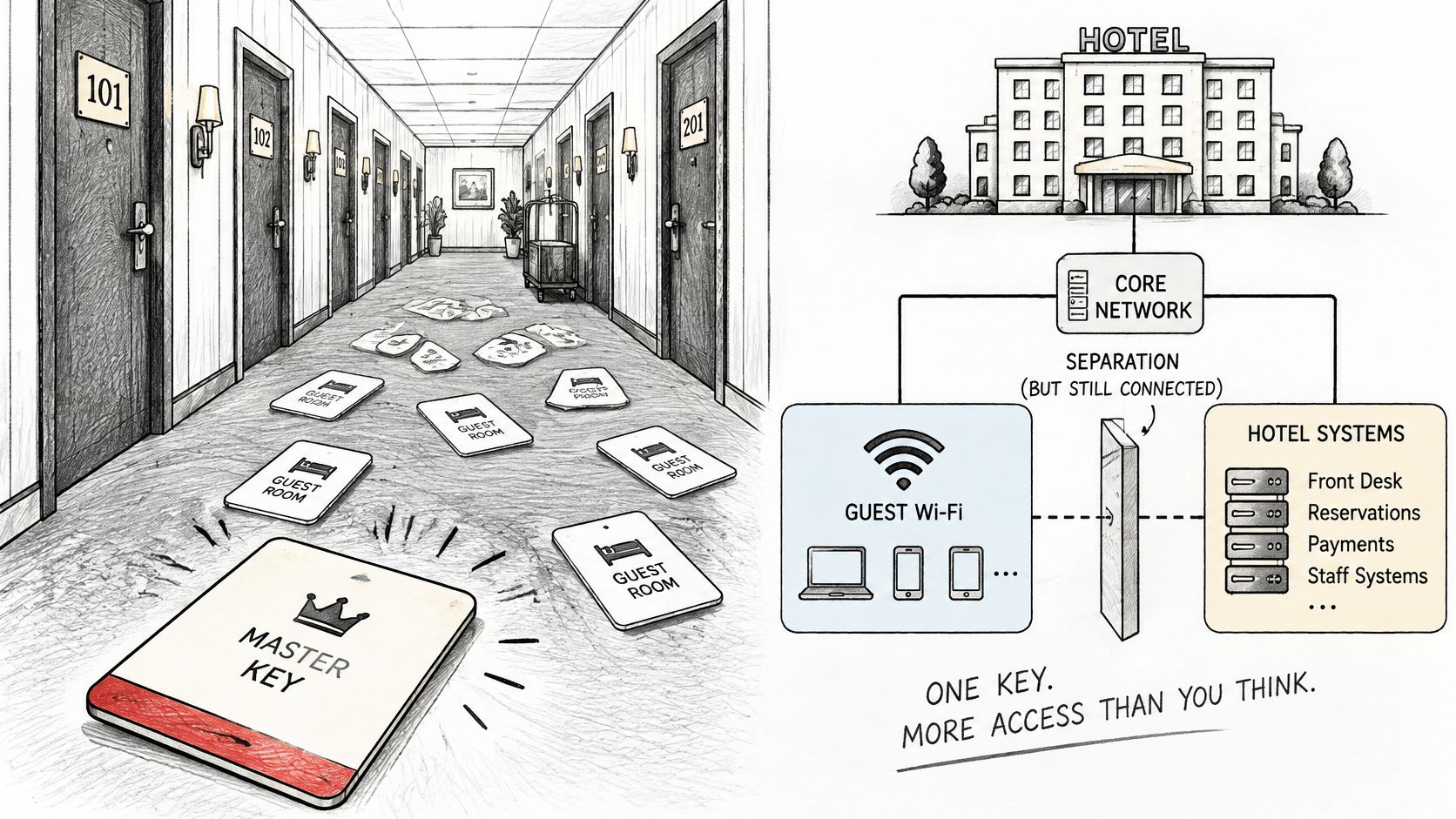
An SSID is a label, not a boundary. Encryption on the radio link stops casual eavesdropping nearby. It doesn't enforce who can route where once traffic hits your switches and firewall.
What the breach pattern shows
The scale of that mistake shows up in Verizon's 2025 Data Breach Investigations Report, which analyzed 22,052 real-world security incidents and identified 12,195 confirmed data breaches occurring inside organizations. Credential abuse remained the leading initial access vector at 22%, while vulnerability exploitation reached 20%, a 34% increase from the previous report.
That same report found third-party involvement in breaches doubled to 30%. Suppliers, contractors, tenants, and service providers are exactly the people who often land on visitor connectivity because nobody wants to put them on the staff network, and nobody has built them a proper category of their own.
Three exposure sources account for most guest failures:
- Shared credentials: One password can't be attributed to a person or revoked for one device.
- Unmanaged visitor devices: You don't control their patching, malware state, or sharing settings.
- Flat networks: A compromised device can probe operational systems that were never meant to be reachable.
Good guest network security therefore needs four properties working together. You need separation between guest devices and operational assets, identity-aware access instead of anonymous admission, fast revocation for a single person or device, and monitoring that spots abnormal authentication and traffic. Miss one and the others carry more weight than they should.
Practical rule: Treat guest access as an untrusted zone that happens to be useful, not as a trusted network with a friendlier name.
The Core Controls and How to Verify Each
Score your current setup against this table before you buy anything new. Mark each row pass, fail, or untested. Untested is the honest answer for most venues, and it's the one you can fix fastest.
| Control | Threat It Stops | Minimum Setting | How to Verify |
|---|---|---|---|
| Dedicated guest VLAN | Guests reaching staff, POS and management systems | Own VLAN and subnet with no route to internal ranges | Test a staff host from a guest device |
| Client isolation | Guests reaching each other's devices | Enabled on the guest SSID and access points | Two guest test devices cannot ping each other |
| Default-deny firewall rules | Lateral movement from guest to internal hosts | Only DHCP, DNS, portal authentication and internet egress allowed | Automated reachability test from the guest VLAN |
| Filtered guest DNS | Malware, phishing and unwanted content categories | Dedicated resolver with category blocks per VLAN | Query a test domain from a blocked category |
| HTTPS captive portal | Fake portals stealing credentials | Valid certificate on a stable domain, no unnecessary fields | Check certificate and domain from a clean device |
| Unique guest credentials | Shared-password exposure | One key or certificate per guest, device or session, with an expiry | Revoke one test credential and confirm others still connect |
| Per-client limits and timeouts | Bulk downloads and crowding out other users | Caps per client, idle and session timeouts | Run a speed test while a second client streams |
| Authentication rate limiting | Credential stuffing | Throttle or lock out after repeated failures | Replay failed logins and confirm a log entry |
| Retained logs | Blind spots during incidents | Authentication, DHCP, DNS and firewall logs kept for a defined period | Trace one test session from login to disconnect |
A control is only as good as its test
A configuration screenshot proves intention. A test proves enforcement. One permissive firewall rule inherited from an old policy can undo a correctly named VLAN, and nobody notices until a scanner, an auditor, or an attacker tries the path you assumed was closed.
Re-run the verification column after every firewall, controller, or access point change. That discipline matters more than adding another tool. For the wider legal and operational picture around protecting business systems from cyber threats, it's worth aligning your network evidence with the duties your organisation already carries for data and systems.
I would start with the cheapest fixes. Client isolation and per-client limits are usually configuration changes on access points you already own, so you can enable and test them the same day. Firewall rule sets take longer because you have to map dependencies first, such as printers staff expect guests to use or a payment terminal someone placed on the wrong VLAN.
Do the quick rows first, then schedule the firewall work properly. Don't let a perfect segmentation project delay turning on isolation tonight.
How to Segment Guest Traffic from Operations
Segmentation fails without warning. The VLAN name looks right, the SSID maps to it, and a broad allow rule still lets guests reach the staff subnet. Follow the steps in order and finish with a test that tries to break your own design.
The three opening moves give you the structure everything else hangs from.
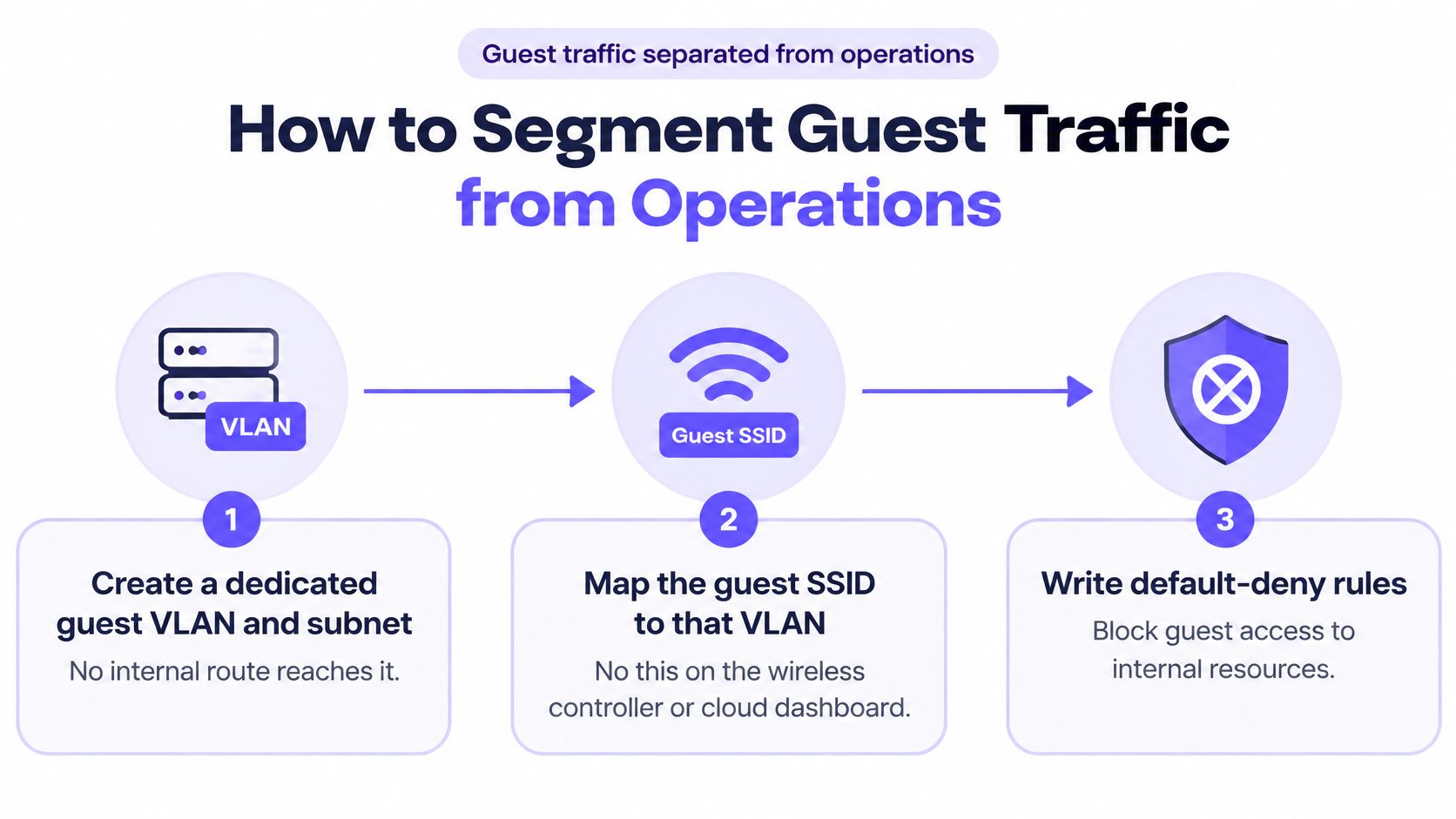
- Create a dedicated guest VLAN and subnet. No internal route should reach it, and it shouldn't reach inward either.
- Map the guest SSID to that VLAN. Do this on the wireless controller or cloud dashboard, not by naming convention alone.
- Write default-deny rules. Block guest-to-corporate, guest-to-management, and guest-to-device traffic unless you can name a reason to permit it.
- Permit only what's required. Allow DHCP, DNS, captive-portal authentication, and internet egress. Everything else starts denied.
- Point guests at a filtered DNS resolver. Guests shouldn't inherit the internal resolver or be free to use any resolver they like without policy.
- Give guest traffic its own source addressing. Incidents then trace cleanly to the guest zone instead of blending into staff traffic.
- Run an automated east-west reachability test. From a guest device, probe staff, payment, camera, and management addresses, then fix every open path it finds.
- Repeat the same template at every site. Standardise VLAN, addressing, DNS, logging, and deny rules so one site doesn't become the weak exception.
Why separate logical networks matter
That sequence reflects guidance in CISA's implementation guidance on segmenting guest network traffic and telemetry, which describes guest traffic sharing physical infrastructure but travelling upstream through distinct VLANs with dedicated source addressing. NIST takes the same position for wireless design. It recommends separate logical WLANs whenever users have different security profiles, explicitly including external guest and internal networks, and states that devices on one WLAN should not be able to connect to devices on another.
Sharing access points and switches is fine. Sharing trust isn't.
The walkthrough below shows the segmentation logic in practice, which is useful when you're checking your own controller settings against the steps above.
Plan the addressing and SSID layout as one exercise, not as separate jobs owned by different people. A clean WiFi network design makes the VLAN map, coverage, and policy boundaries agree with each other.
Your success check is blunt. The test in step 7 must fail for every internal address. If a guest test device gets a reply from a till, a file server, or an access point management page, you don't have segmentation yet. You have a diagram.
Choosing Access Methods and Managing Guest Credentials
A captive portal has two faces. It's the easiest way to onboard a stranger, and a copied portal is the easiest way to steal that stranger's credentials. Treat the portal as a security boundary, not as a marketing form with a login button.
| Method | Credential Type | Guest Effort | Security Strength | Best Fit |
|---|---|---|---|---|
| Shared passphrase (WPA2 or WPA3 Personal) | One password for every user | Low, but the password spreads | Low | Small cafés with no staff or payment systems on the same path |
| Captive portal on an open SSID | Sign-in via SSO, social login, SMS one-time code or voucher | Medium, a sign-in page on each new session | Medium, depends on portal trust | General public and hotel guests, with HTTPS and recorded consent |
| OpenRoaming | Federated identity profile | Low, works across participating networks | High, controlled by the identity provider | Travellers and returning visitors at participating venues |
| WPA3-Enterprise with EAP-TLS | Per-device certificate from an MDM | Low on managed devices, setup required | Very high | Staff, tills and managed devices |
| Per-device pre-shared key (xPSK) | Unique key bound to one device, user or tenant | Low, key issued once | High, individually revocable | IoT, rental units, residents and devices that cannot take certificates |
Check the portal before you trust it
Require HTTPS on a stable domain with a valid certificate, and keep the domain consistent so returning users can learn what genuine looks like. Don't ask for fields you don't need, and don't show a password field unless users expect one. Train front-desk and floor staff to question an unexpected login page on an open network, because guests will ask them, not IT, whether it's real.
That caution isn't theoretical. Research described in a University of Münster publication on public WiFi hotspots examined 55 German public WiFi hotspots and found continuing high-risk behaviour and potential GDPR violations, including excessive personal-data collection. Separate 2025 research found that 66% of participants were not concerned about the authenticity or security of captive portals. If users can't tell your portal from an impersonation, adding more fields to yours increases risk instead of reducing it.
For repeat visitors, Passpoint or OpenRoaming removes the portal from return visits entirely. The trade-off is practical. You need compatible access points and an identity provider, so confirm hardware support before you promise it. When you're specifying that hardware across sites, it's sensible to refer procurement teams to us style checks into the buying process early, so access point capability gets verified before contracts are signed rather than after installation.
Give staff a different class of access
Staff, tills, and administrators shouldn't share the guest path at a higher privilege level. For high-assurance access, the Wi-Fi Alliance guidance on WiFi security specifies that WPA3-Enterprise 192-bit mode permits only EAP-TLS, with TLS_ECDHE_ECDSA using AES-256-GCM and SHA-384, plus the P-384 elliptic curve. Validate client compatibility first, because every client on that network must operate in the same 192-bit mode. Keep a separate guest onboarding path for devices that can't support it.
Manage the credential lifecycle
The reason is measurable. Verizon's 2025 credential-stuffing research found compromised credentials were an initial access vector in 22% of reviewed breaches, and credential-stuffing activity represented a median 19% of all authentication attempts each day. The rate rose to 25% in enterprise-sized organizations, compared with 12% in small businesses.
Issue access that's attributable to a person, device, tenant, or session. Set expiry at issue, so a visitor key ends at checkout or at the end of a booking without anyone remembering to delete it. Rate-limit authentication attempts, and log each authentication event against the policy it produced.
Say a visitor's tablet is reported stolen. You revoke that one key or certificate, the tablet drops off, and every other guest stays connected. With a shared password, your choices are worse. You either leave the stolen device valid or change the password for the whole building and reissue it to everyone.
Track four metrics so you know whether the system works under load:
- Certificate issuance success: Managed devices should enrol without manual fixes.
- Authentication latency: Slow logins push staff toward workarounds.
- Failed-authentication rate: Spikes point to attacks or broken profiles.
- Revocation propagation time: Measure how long a revoked device stays connected.
Isolating IoT and Shared Devices Without Chaos
A hotel television, a tenant's laptop, a point-of-sale terminal, and a visiting clinician's device don't belong in one trust category. They have different owners, different patching, different uptime needs, and very different consequences if compromised. Calling all of them guests hides those differences.
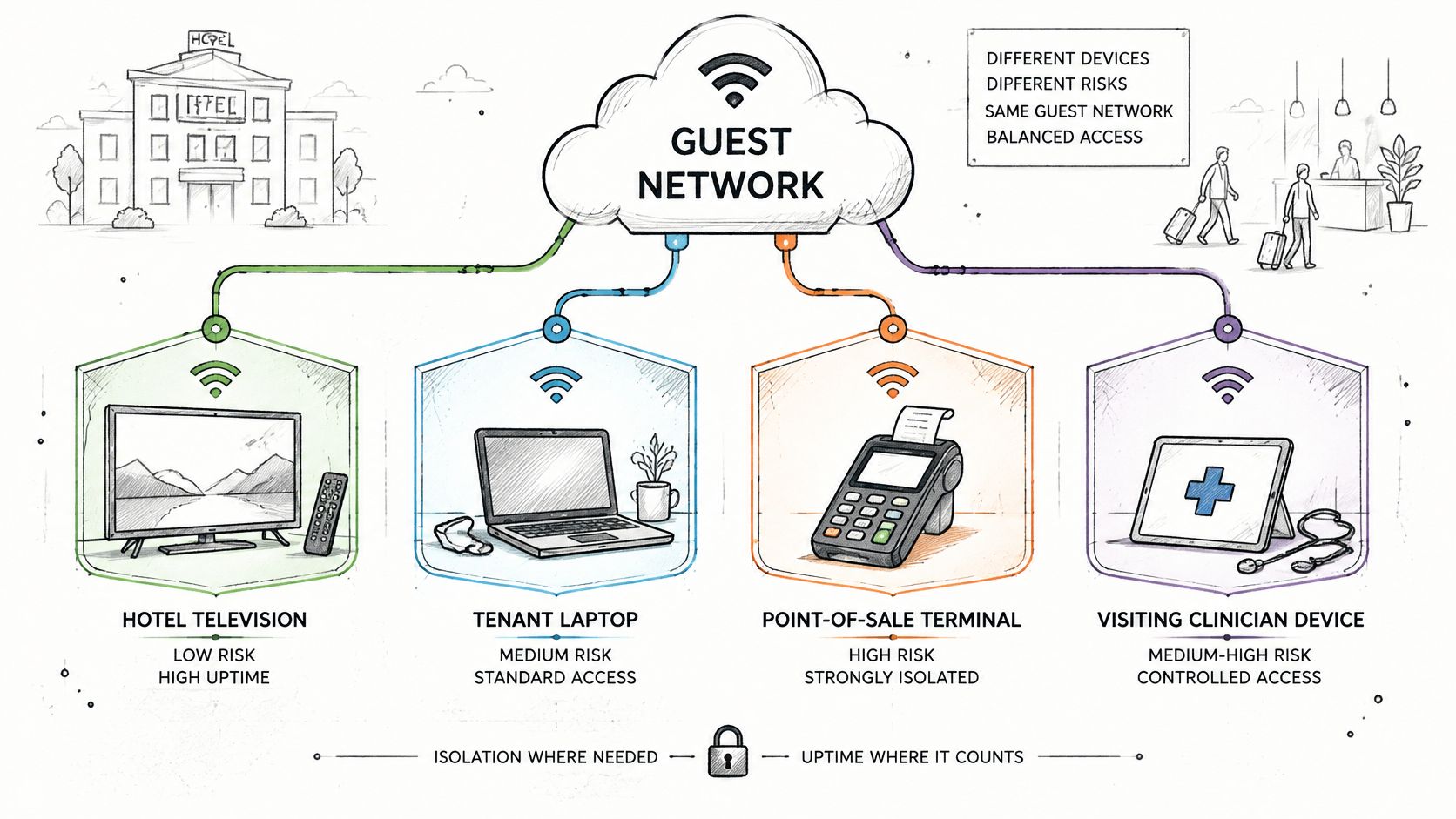
Group by function instead. Put guests, staff, contractors, residents, IoT, and payment systems in separate categories, each on its own VLAN with default-deny rules between them. A category earns a path to another category only when a named service needs it.
Devices that cannot take certificates
Plenty of operational hardware can't do EAP-TLS and never will. Don't solve that by handing it the staff password. Give it a unique pre-shared key bound to its MAC address, on a device VLAN for its class, so you can revoke one television or sensor without touching the rest of the fleet.
Then control where it can go. A thermostat or smart lock usually needs its vendor's cloud endpoints and nothing else, so use an egress allow-list and filtered DNS rather than open internet access. That limits the damage if the device is compromised and makes its normal traffic pattern easy to recognise.
Take a smart lock as the test case. It sits on a device VLAN, guests can't reach it, and its key belongs to the hardware rather than to whichever guest holds the room this week. The key stays valid across changeovers and ends only when you replace the device.
That approach matches NIST IR 8350, NIST's 2025 foundational IoT guidance, which focuses heavily on WiFi-based device scenarios and treats IoT connectivity as needing dedicated security and trust considerations rather than a generic guest VLAN. NIST also states that segmentation between smart speakers, biometric devices, and other health-care systems can limit an attacker's ability to move from a weak device into more sensitive systems.
A VLAN-only design can look compliant on a diagram while shared credentials and unmanaged devices stay wide open underneath it.
Monitor for anomalous cross-segment traffic, especially denied attempts from device VLANs. A leak sensor trying to reach a file server isn't a curiosity. It's your earliest warning.
Filtering, Monitoring and Spotting Abuse
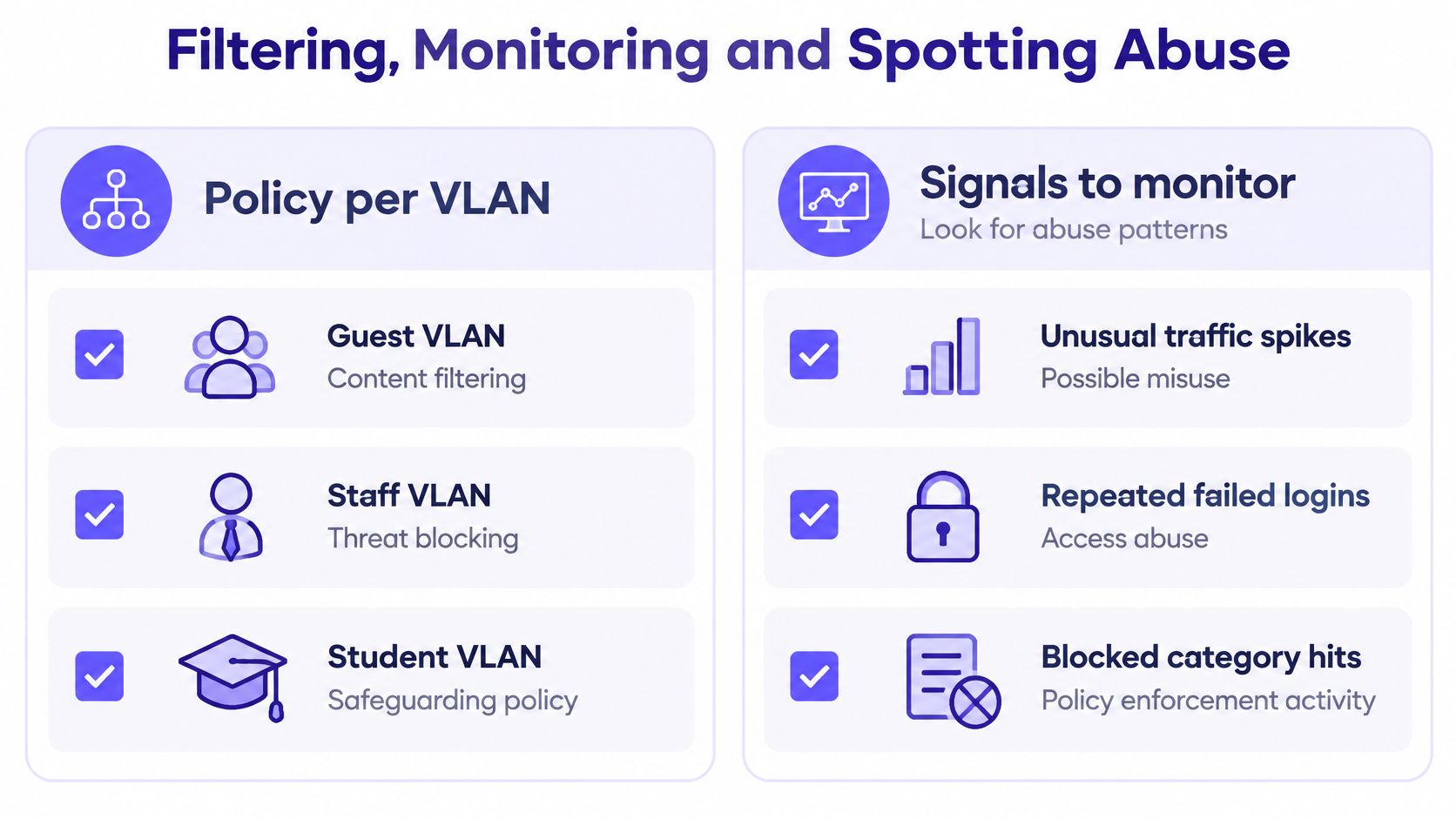
Filtering works best as a policy per VLAN, not as one setting for the whole building. A guest VLAN gets content filtering, a staff VLAN gets threat blocking, and a student VLAN gets a safeguarding policy. Same infrastructure, different duties.
For guests, DNS filtering carries a lot of weight because you can't install certificates or agents on their devices, and you shouldn't try to decrypt their traffic. A protective DNS policy lets you block malware, phishing, and unwanted categories at the lookup stage while keeping the connection fast.
Signals worth alerting on
- Authentication failures above a threshold: For example, more than five failed attempts from one client in ten minutes.
- Unusual DNS behaviour: One device making far more queries than normal, especially to new or blocked domains.
- Denied guest-to-internal attempts: Any attempt from the guest VLAN toward an internal address should raise an alert, not wait for a weekly report.
- Bandwidth far above the per-client limit: A sign of bulk download, tunnelling, or a misconfigured limit.
- Portal changes: Any change to the captive-portal page or its certificate that you didn't schedule.
Build a baseline before you chase anomalies
Record normal daily authentication counts and peak hours for each site. A busy Saturday at a hotel, a match day at a stadium, or enrolment week at a school will look like an attack if you have no baseline to compare against. Baselines also stop the opposite error, where a real spike on a quiet Tuesday gets dismissed as normal load.
Keep authentication, DHCP, DNS, and firewall logs linked by a device or session identifier. An analyst should be able to trace one visitor from portal sign-in, through address assignment and DNS activity, to disconnect, inside a single investigation. If that takes four exports and manual matching on timestamps, you'll abandon it under pressure.
There's a difference between a log that exists and a log someone can use. Test the link once a quarter with a device you control, and time how long the trace takes.
Confirm Your Compliance Duties Before You Launch
A guest network usually falls under a rule through its path to other systems, not through its purpose. If guests can reach a cardholder system or a patient record, that rule applies even though the network is just for guests. Purpose doesn't reduce scope. Reachability does.
| Rule or Standard | Applies When | Guest Network Requirement | Evidence to Keep |
|---|---|---|---|
| GDPR (EU and UK) | Portal collects personal data from visitors | Lawful basis, data minimisation, retention limit and consent record | Data map and retention schedule |
| CCPA and CPRA (California) | Personal data collected from California visitors | Notice at collection and opt-out rights for sale or sharing | Privacy notice and data flow records |
| PCI DSS v4.0.1 | Guest network can reach cardholder data systems | Segmentation keeps guest traffic out of the cardholder environment; wireless keys change when people with access leave | Segmentation test results and key change log |
| HIPAA (US healthcare) | Guest network shares a path with systems holding ePHI | Access and audit controls on every system reachable from guests | Risk analysis and access logs |
| CIPA (US schools receiving E-rate) | Students use the network | Internet safety policy and filtering of harmful content | Filter configuration and written policy |
| ISO/IEC 27001 | Customers or boards ask for certification | Documented access control, logging and review procedures | Statement of applicability and log review records |
Work through the duties in order
- Map what the guest zone can reach. Start from the VLAN map and the reachability test, not from assumptions.
- Decide which rules apply per site type. A hotel, a school, and a clinic carry different duties on the same template.
- Document the design and keep test results. Auditors want evidence that segmentation works, which is why your PCI compliance for WiFi evidence should include dated reachability results rather than diagrams alone.
- Set a revocation procedure for leavers. A departing staff member's key or certificate gets removed within a set period. A shared key makes that impractical, because changing it means reissuing access to everyone who still needs it.
- Schedule re-tests after every change. Firewall and access point changes are where compliant designs drift.
Purple Access collapses WiFi networks into three SSIDs, Open for guests and BYOD, Secure for staff and trusted users, and xPSK for things, tenants and communities. Returning guests use a Passpoint or OpenRoaming profile on the Secure network, with no portal on return, and the profile works at every property that runs it. Smart locks, thermostats, and leak sensors get individual MAC-bound xPSK keys on a device VLAN per class, unreachable from guests, and the key outlives every guest until the device is replaced.
Whatever you deploy, ask for the same three pieces of evidence before launch. A VLAN map, a reachability test log, and a revocation test record. If a provider can't produce all three, they haven't shown that their guest design works. They've shown that it connects.
If you're ready to replace shared passwords and flat guest access with separated, identity-driven networks that you can test, Purple Access gives you open, secure, and xPSK networks on the access points you already own, with per-device revocation and VLAN assignment built in. Visit us to plan your three-network design and see how guest, staff, and device access can run cleanly side by side.