WiFi Network Design: How to Plan, Build and Test It
Published
The coverage heat map looks perfect. You've got full bars across the venue, yet the card terminals freeze during the lunchtime rush and staff walk toward the stockroom to reconnect their handsets. Another access point might help, but you haven't established whether the failure is radio capacity, roaming, authentication or the path beyond the wireless network.
WiFi network design starts with service requirements, not ceiling locations. Treat capacity, coverage, identity and acceptance testing as one engineering process. The useful deliverable isn't a colourful map. It's a network whose behaviour you can measure, explain and reproduce across sites.
Table of Contents
- Defining Requirements Before Placing Access Points
- Sizing Capacity Across 2.4, 5 and 6 GHz Bands
- Mapping Coverage, Channels and Overlap Zones
- Consolidating SSIDs and Planning VLANs for Segmentation
- Choosing Hardware and Validating Under Real Load
- Running a Pilot and Keeping Your WiFi Design Current
Defining Requirements Before Placing Access Points
Start at the payment counter while the venue is busy. Ask which transaction fails, which device runs it, where the operator stands and whether the problem happens while stationary or moving. Record the application symptom before deciding it's a wireless fault.
Then walk the rest of the site with operations staff. A facilities drawing tells you where rooms are, but the people using them can tell you where guests queue, staff congregate and mobile equipment changes direction.
Build a requirements sheet around device classes
Create a one-page requirements sheet with a row for each device class in each operational area. Keep assumptions visible rather than burying them inside a design tool.
| Requirement | What to record |
|---|---|
| Device population | Device model, supported bands, ownership and authentication capability |
| Busy-period concurrency | Associated devices and devices actively using applications |
| Application demand | Required upload and download throughput, plus sensitivity to delay |
| Movement | Stationary use, roaming routes and indoor-to-outdoor transitions |
| Availability | Acceptable interruption, recovery expectations and business impact |
| Access policy | Required services, prohibited destinations and identity owner |
Don't give cameras, guest phones and payment terminals the same application profile. Ask the application owner what successful operation looks like, then measure representative traffic where possible. Separate continuous demand from bursts, and distinguish a device being connected from it actively transferring data.
Record roaming and recovery requirements explicitly. A staff handset moving through a doorway needs a different acceptance test from a sensor that wakes, authenticates and sends a reading.
Define constraints before approving expenditure
Document operating hours, maintenance windows, cabling restrictions, existing equipment and responsibility for upstream services. If the project includes carrier contracts or connectivity costs, Dallas-based teams can find Dallas telecom cost optimization advice from Beyond Surplus as a separate commercial workstream. Don't let a procurement discussion replace the application requirements.
Finish the sheet with named owners and unresolved questions:
- Operations owner: Confirms the busiest conditions and the consequence of interruption.
- Application owner: Approves throughput, latency and recovery expectations.
- Network owner: Records dependencies and defines how each requirement will be tested.
- Security owner: Approves who and what may access each service.
Practical rule: If nobody can describe how a requirement will be tested, it isn't ready to drive an equipment purchase.
Avoid targets such as “excellent coverage” or “fast guest WiFi”. They don't tell an engineer what to build, and they give operations no meaningful basis for accepting it.
Sizing Capacity Across 2.4, 5 and 6 GHz Bands
An access point's headline speed isn't its usable application capacity. Wi-Fi 6 has a theoretical maximum rate of 9.6 Gbit/s, but its design emphasis includes efficiency in dense environments, not speed alone, as the IEEE's history of Wi-Fi standards explains. Don't divide a venue's traffic requirement by a datasheet rate and call that an AP count.
The first capacity decision is which clients can use which bands. Capacity available to modern laptops doesn't automatically help older payment terminals or sensors.
Planning facts by Wi-Fi band
| Band | Key spectrum fact | Planning implication |
|---|---|---|
| 2.4 GHz | A longstanding Wi-Fi band with legacy-device support | Inventory devices that depend on it and size their demand explicitly |
| 5 GHz | An established enterprise band alongside 2.4 GHz | Maintain a separate capacity budget for clients that can't move to 6 GHz |
| 6 GHz | The US allocation opened 1,200 MHz for unlicensed use in April 2020, according to the Wi-Fi Alliance's Wi-Fi 6E paper | Additional spectrum supports more channel choices, but shorter propagation than 2.4 GHz and client compatibility still constrain the design |
The spectrum allocation above is a US planning fact, not a global channel plan. Establish the applicable regulatory domain before modelling available channels.
Client adoption also argues against treating the bands as one capacity pool. In Q1 2025, Wi-Fi 7 represented 11.8% of dependent-access-point revenue, while reported 6 GHz client adoption in enabled enterprise environments was roughly 20–50%, according to the IDC enterprise WLAN analysis. Those figures provide context, not a substitute for your own inventory.
Model airtime rather than total bandwidth
Build the busy-period model separately for each band and operational area. Start with concurrent active clients, their application demand and measured performance on representative devices.
- Estimate offered traffic: Combine active-client counts with application upload and download requirements.
- Translate demand into airtime: Use observed client throughput rather than the advertised radio rate.
- Include operating overhead: Allow for authentication activity, management traffic, retransmissions and competing transmitters.
- Test the client distribution: Model what happens if capable devices remain on an older band instead of moving as expected.
Channel width is a reuse decision as well as a throughput decision. A wider channel may suit an isolated, demanding workload, while narrower channels may serve a crowded floor more effectively. Reserve the final width decision for the measured channel plan.
Choose migration triggers that you can observe: sustained congestion, an increased population of compatible clients or a new application requirement. Buying Wi-Fi 7 access points doesn't establish that the site can benefit from their full capability. Size the network you need to operate through the transition, not just the one you hope to own later.
Mapping Coverage, Channels and Overlap Zones
Walk the site before trusting the floor plan. Mark mounting restrictions, racks, busy circulation routes and spaces where inventory changes. Treat each uncertain construction detail as something to measure, not a wall-loss value to guess.
Use the following sequence to keep placement tied to evidence.
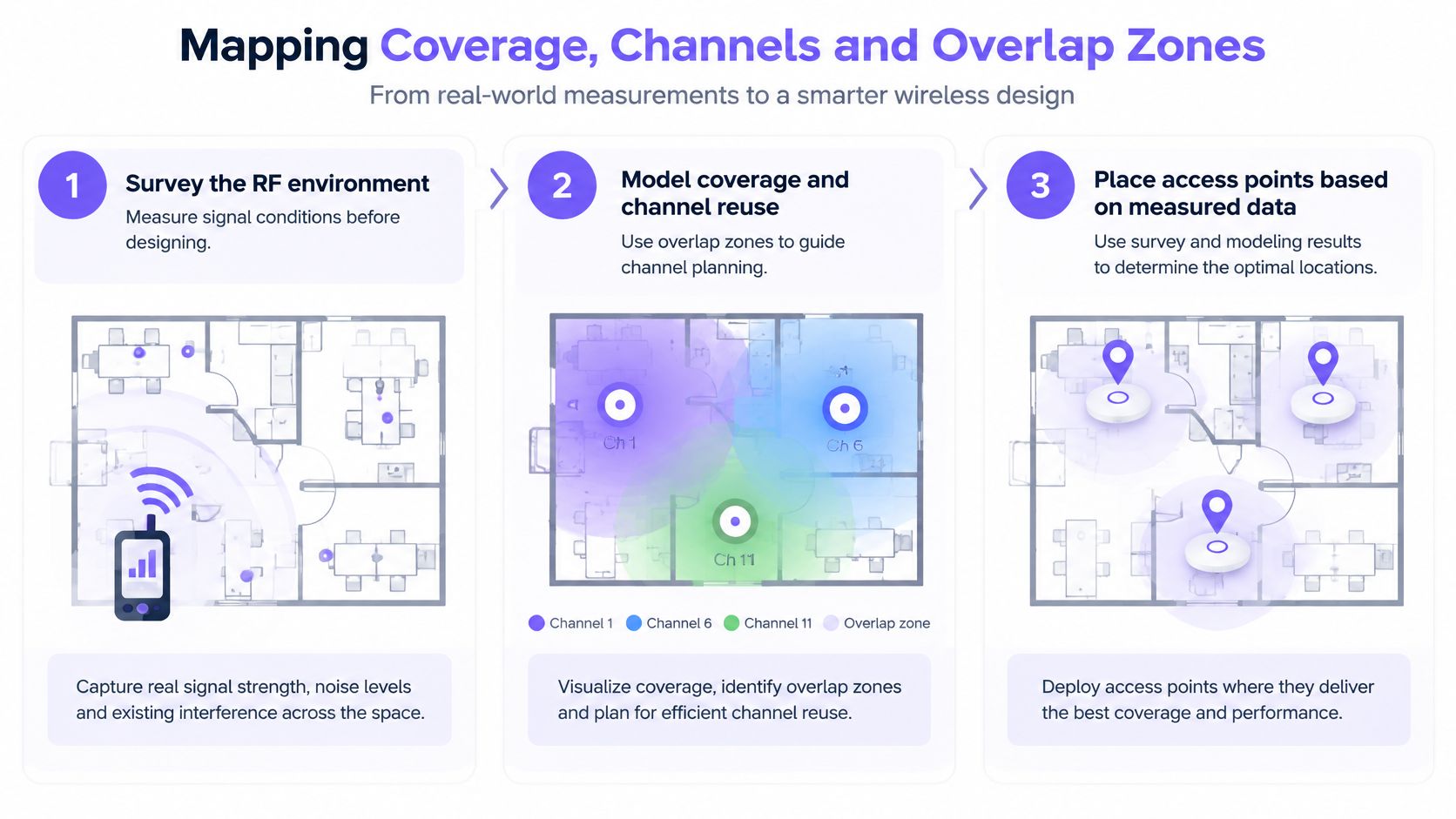
Survey before modelling
Measure the existing RF environment across the service areas and movement routes. Record signal conditions, neighbouring activity and interference observations alongside the location and time of each measurement. A quiet, empty venue isn't an adequate representation of every operating condition.
The IEEE wireless LAN design guidance identifies channel reuse, co-channel interference, overlap zones, transmit power and antenna type as core design variables. It also explains that moving from 20 MHz to 40 or 80 MHz reduces independently reusable channels by roughly twofold or fourfold, respectively, which can increase contention where cells overlap.
Use that trade-off to compare candidate layouts. Don't select wider channels just because the hardware supports them.
Model placement, power and handoff zones together
Create a predictive layout using the requirements sheet and survey observations. Change AP locations, antenna choices and power settings together, then inspect whether the proposed cells serve both stationary users and moving devices.
- Check shared-channel neighbours: Identify APs that may compete within the same operational area.
- Inspect handoff routes: Examine doorways, aisle ends and transitions, not just room centres.
- Challenge uniform power settings: Don't use maximum transmit power everywhere as a substitute for placement work.
- Record mounting assumptions: Note orientation, access restrictions and any location that depends on new cabling.
Excessive overlap can look reassuring on a signal-strength map while leaving users competing for airtime. Conversely, reducing overlap without considering movement can leave an application interruption at the boundary. Evaluate both against the requirement, not against how attractive the heat map looks.
A coverage prediction is a model to challenge, not evidence that the installed network has passed.
For projects involving replacement equipment and installation logistics, network upgrade planning with Reworx Recycling is a relevant resource to keep alongside the technical work. Keep the RF model, installation scope and equipment disposition decisions distinct so each has an accountable owner.
End this stage with a versioned design: proposed AP locations, channel-width assumptions, power approach, expected overlap and unresolved survey questions. Don't order around a model whose critical assumptions are still undocumented.
Consolidating SSIDs and Planning VLANs for Segmentation
A department name isn't a security boundary. Before creating another SSID, ask whether the group needs a different discovery and onboarding experience or a different authorization policy.
This comparison illustrates the difference between naming networks and designing enforcement.
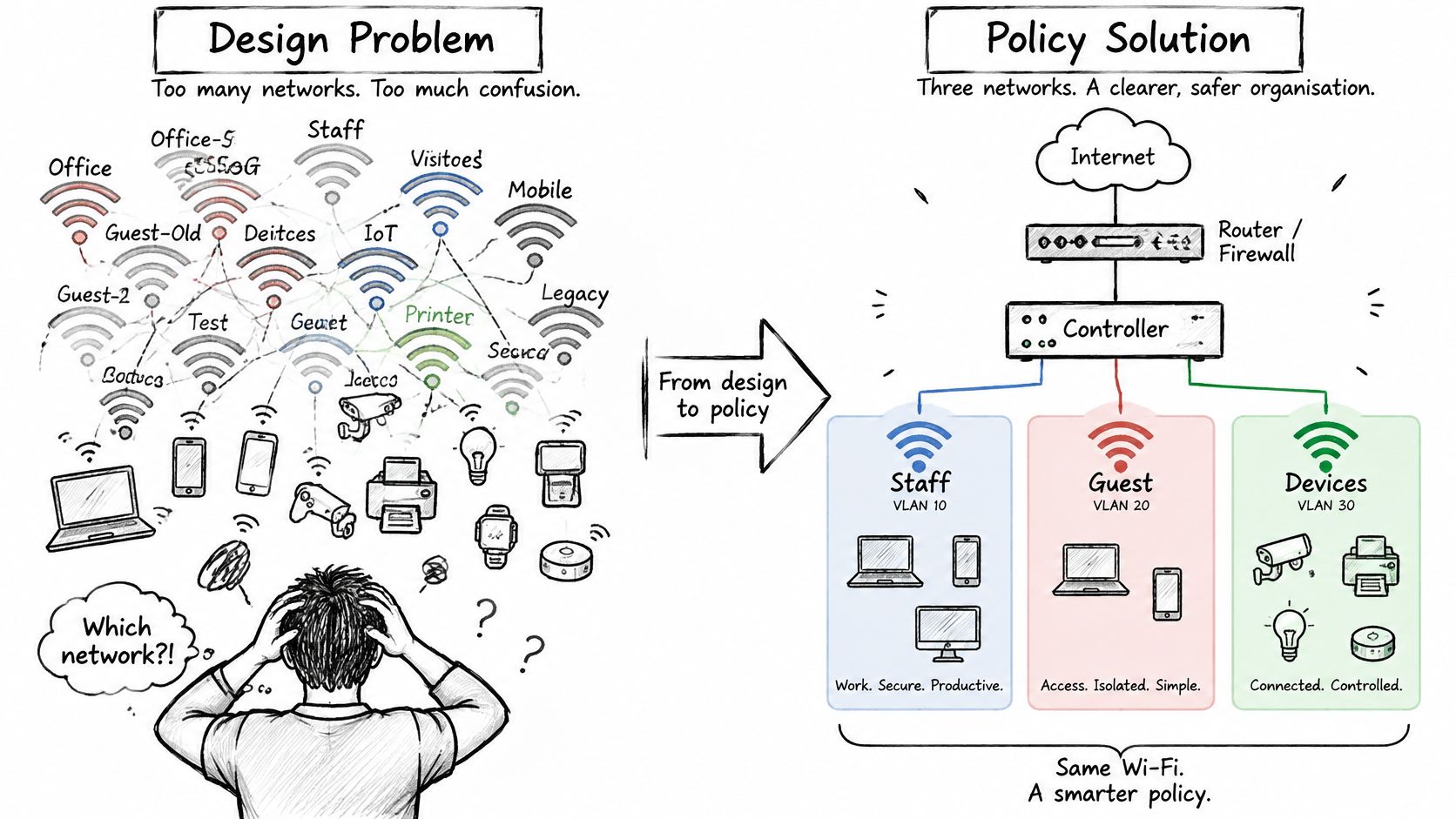
Compare SSID sprawl with trust-based access
| Design choice | Department-by-department SSIDs | Trust-based network model |
|---|---|---|
| Guest onboarding | Separate names for visitor groups | Open network for guests and BYOD onboarding |
| Trusted users | Staff networks divided by team | Secure network with individual authentication |
| Devices and tenants | Additional names and shared credentials | Key-based network with policy assigned by identity |
| Authorization | Often inferred from the selected SSID | Explicitly enforced through VLANs and access controls |
At Purple Access, we consolidate these roles into Open, Secure and xPSK on existing access points. Secure supports certificate-based staff access, while xPSK provides unique device, person or tenant keys with individual VLAN, policy and bandwidth assignments. You can revoke a key without changing everyone else's access.
Use the three-SSID planning resource to map existing groups before changing production configuration. Consolidation should preserve necessary distinctions in policy, not flatten them into a shared trust zone.
Build an authorization matrix
For every class, record the authentication method, assigned VLAN or equivalent enforcement policy, permitted destinations and explicit denials. Include guests, employees, managed endpoints, payment systems, cameras and building-control devices.
NIST's WLAN security guidance recommends separating externally accessible wireless networks from internal ones, preventing inappropriate connections between them, governing dual-connected clients and conducting periodic technical security assessments. Treat those as enforcement requirements rather than SSID naming conventions.
A payment terminal may need an approved transaction service without needing access to neighbouring terminals. A camera may need its recorder without reaching staff laptops. Write those paths explicitly, including exceptions for discovery or management, and assign an owner to each exception.
For a visual companion to the policy discussion, use the video below.
Onboarding convenience remains a separate decision. RecensioAI's Wi-Fi QR tool comparison is relevant when evaluating QR-based connection workflows, but a convenient connection method mustn't be mistaken for proof of device trust.
Test prohibited paths as deliberately as permitted ones. Verify guest isolation from internal management and payment services, test clients using simultaneous network connections, and confirm that revocation removes access. Logs should identify the principal and the policy decision so the help desk can explain an outcome without guessing which password someone used.
Choosing Hardware and Validating Under Real Load
Strong signal readings don't establish that applications work under contention. Nor does a successful speed test from an engineer's laptop establish that the least capable operational device can authenticate, roam and recover.
Choose hardware against the documented workload, then make acceptance depend on observed service.
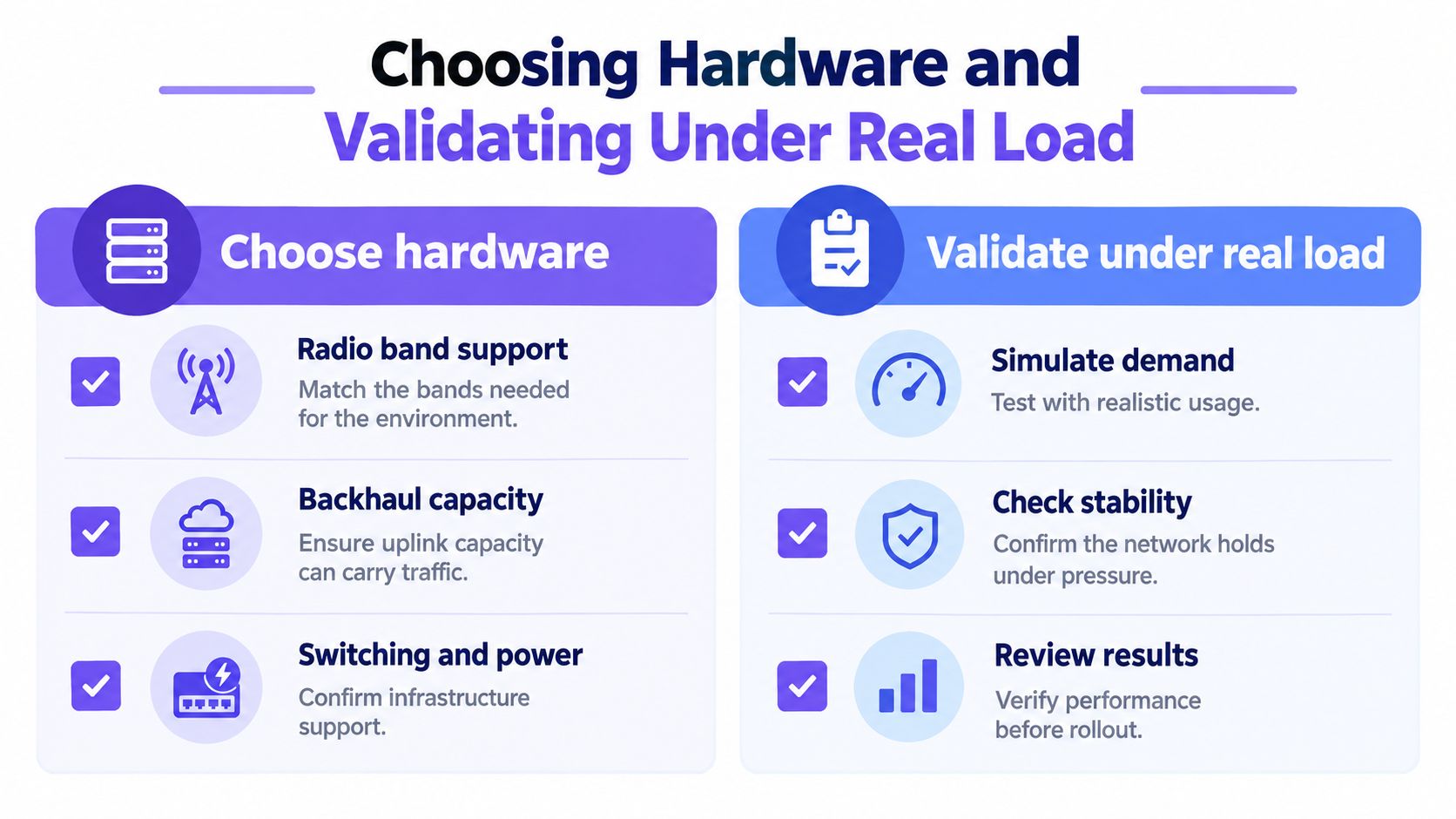
Select against the whole traffic path
Assess radio-band support, antenna suitability, client compatibility, management controls and the ability to export useful telemetry. Check the switching path and power delivery against the proposed radio configuration rather than assuming the existing infrastructure is sufficient.
Separate compatibility from capacity. Equipment may support the required authentication method yet still be unsuitable for the traffic, mounting position or operating environment.
Use the hardware compatibility guidance when assessing existing access points. Retain equipment that meets the design and testing requirements, rather than replacing it merely to standardize the badge on the ceiling.
Make acceptance a go or no-go decision
Set service-level objectives by device class before testing. Specify acceptable throughput, latency, packet loss, authentication time and recovery behaviour with the application owner. Choose the throughput and latency percentiles in advance so nobody can select a flattering summary after the test.
The reliability problem is operational, not cosmetic. An IDC smart-distribution study describes dead zones affecting mobile devices, robotics and IoT, alongside problems with misconfiguration, bandwidth and interoperability. Use that as a reason to test complete workflows, not as evidence that your site has the same fault.
Run an acceptance checklist that can stop cutover:
- Representative clients: Use actual payment terminals, handsets, sensors and guest-device types.
- Concurrent demand: Reproduce application mixes across neighbouring service areas, not just on an isolated AP.
- Location results: Record percentile throughput and latency at working positions and along movement routes.
- Infrastructure load: Measure per-AP traffic and aggregate switch throughput while the wireless tests run.
- Prediction comparison: Investigate material differences between modelled and observed downlink performance.
- Failure recovery: Exercise agreed interruption scenarios and record application recovery, not merely reassociation.
Keep test conditions with the results: client model, software version, location, occupancy, traffic mix and configuration revision. Without that context, an apparent improvement may reflect a different test rather than a better network.
Cutover gate: A failed critical workflow stays a failed test even when the signal reading is excellent.
Classify each failure before changing settings. Determine whether it follows the location, device, identity or application path, then retest after a controlled change. Otherwise, you can't tell which adjustment fixed the fault or whether another service regressed.
Running a Pilot and Keeping Your WiFi Design Current
Choose a pilot that exposes the design's difficult assumptions. The quietest office is convenient, but it won't tell you much about a busy venue with mixed devices, moving staff and tenant-owned equipment.
Select a site with representative operational pressure and a local team willing to document failures. Define the evidence required for expansion before the pilot goes live.
Judge the pilot on operational evidence
At the pilot site, compare support tickets with authentication records, policy decisions and the acceptance results. A reduction in complaints isn't enough if staff have stopped reporting an unresolved problem or adopted a workaround.
Build a compact evidence pack:
- Ticket classification: Separate onboarding, authentication, roaming, application and capacity issues.
- Policy evidence: Retain records showing who connected and which authorization applied.
- Exception register: Document temporary permits, owners and removal conditions.
- Operational sign-off: Ask staff to demonstrate the critical workflows under busy conditions.
Use the visibility and audit resource to frame the evidence your operations team needs to retain. Give the help desk enough context to investigate a failed connection without granting unnecessary administrative access.
After the pilot is live, judge it on tickets and audit evidence. Roll out to the remaining sites in waves you set, with each site using the same three SSIDs. Keep the naming and identity model consistent while allowing the RF implementation to reflect each building.
Keep the design under change control
A standard policy model doesn't mean copying AP locations or power settings between properties. Record site-specific differences, preserve the approved configuration baseline and use the same acceptance criteria wherever the business requirements match.
Review segmentation after application, VLAN and wireless-policy changes. Confirm that temporary exceptions still have a valid purpose, and repeat the relevant prohibited-path tests. An undocumented permit shouldn't become a permanent dependency merely because nobody remembers why it exists.
Schedule reassessment around changes that affect the design:
- Client changes: New device fleets or altered authentication capabilities.
- Physical changes: Refitted rooms, relocated racks or changed inventory patterns.
- Application changes: Different traffic demand or tighter continuity requirements.
- Operational changes: New opening patterns, tenant arrangements or peak-use areas.
Key takeaway: A maintainable WiFi design connects every configuration decision to a requirement, an identity policy and a repeatable test.
This week, gather the current SSID list, device inventory, busiest-area floor plan and unresolved support tickets. Identify the requirement behind each existing network and the evidence missing from its acceptance record. That gives the next design conversation something more useful than an AP shopping list.
Purple Access offers a 45-minute design session where a Purple network engineer maps your current SSIDs onto Open, Secure and xPSK networks using the access points you already own, and you keep the resulting plan. Bring your device inventory and current network list to Purple Access to turn those requirements into a practical design and pilot discussion.