Bandwidth Usage Measurement: Methods, KPIs and Setup
Published

You run a hotel, a campus, or a chain of venues. The monthly report says the uplink is only partly used. Then evening arrives, the guest network slows down, and the tickets show up anyway. That gap is what weak bandwidth usage measurement looks like when it stops at a monthly total.
Average volume is a useful baseline. It does not describe the busy hour, the direction of the traffic, or which group was on the air at 9 p.m. Encryption makes the old shortcut worse, because port numbers and payload inspection no longer name the application with any confidence.
What still works is narrower. Count bytes in both directions at a named point, sample often enough to see the shape of demand, and attribute usage to a session, a VLAN, or a key. Label anything finer as an inference. The setup below covers which source answers which question, which KPIs deserve an alert, and how to prove the numbers on one site before you publish them everywhere.
Table of Contents
- Pick the Method That Matches Your Question
- KPIs That Show Demand, Not Just Volume
- How to Set Up Measurement in Eight Steps
- Sampling Versus Full Capture and What Each Costs
- Attributing Usage When Most Traffic Is Encrypted
- Why Your Numbers Disagree and How to Reconcile Them
- Validate on One Site Before Reporting Company-Wide
Pick the Method That Matches Your Question
A hotel group can sit at about 35% of uplink capacity across the day and still take guest complaints every evening. The average answered a capacity question. The guests were asking a busy-hour question. Bandwidth usage measurement only helps when the source matches the question, so most sites need two feeds before anyone draws a chart. One feed is for totals and trend. The other is for attribution.
You rarely need new hardware. Six sources already sit on the access points, the controller, the router, and the authentication service.
| Source | What It Reports | Granularity | Best For | Overhead |
|---|---|---|---|---|
| SNMP interface counters (ifHCInOctets, ifHCOutOctets) | Bytes in and out per port or radio | Per interface, polled every 1-5 minutes | Uplink trend and capacity planning | Low |
| NetFlow v9 or IPFIX | Flow records with source, destination, ports, bytes and packets | Per flow, typically exported every 1-5 minutes | Top talkers and who talks to what | Medium, from export and CPU load |
| sFlow | Sampled packet headers plus interface counters | 1 in N packets, scaled to estimates | Fast links (10G and above) and near-real-time top talkers | Low, sampling runs in hardware |
| Per-SSID and per-VLAN counters | Bytes and client counts per wireless network or VLAN | Per SSID, VLAN and access point | Guest versus staff load and airtime cost of each SSID | Low |
| RADIUS accounting (Acct-Input-Octets, Acct-Output-Octets) | Bytes per authenticated session | Per session, interim updates every 5-15 minutes | Attributing usage to a user, device or key | Low |
| DNS and protective DNS logs | Domain queries by policy or category | Per query | Category-level insight without payload inspection | Low to medium |
Match the counter to the question
SNMP counters are the totals source. Poll the 64-bit objects, ifHCInOctets and ifHCOutOctets. A 32-bit octet counter on a 1 Gbps port wraps in about 34 seconds at full rate, so a five-minute poll on the old object invents negative or nonsense deltas. Per-SSID counters show client load and the airtime cost of each wireless network. RADIUS accounting ties bytes to a user, a device, or a key, which is the attribution feed when payloads are encrypted.
Mobile demand is large enough that mixing it into a fixed-site total hides the constraint that matters. Global internet traffic reached 1 zettabyte of mobile broadband end-user traffic in 2023, according to the ITU Facts and Figures 2024. A venue uplink and a cellular offload path are different measurements.
Pick one primary totals source and one attribution source for each site before you configure anything. Adding a third feed later is easy. Untangling two unlabeled feeds after a month is not.
KPIs That Show Demand, Not Just Volume
A usable baseline counts the total volume at the end-user access point, downloads and uploads added together, over one consistent period, usually a calendar month. The European Commission metadata, drawn from ITU methodology, defines fixed-broadband traffic that way, and it keeps mobile-broadband traffic separate by excluding wholesale and walled-garden traffic. That boundary matters on a venue network too. Customer usage is not the same thing as backbone capacity or traffic that never leaves the operator.
Name the measurement point in every report. Say whether management and control frames are excluded. Without those controls, two sites with the same users will not compare.
Practical rule: If a KPI does not state the point, the direction, the sample interval, and the period, it is not ready to alert on.
Formulas you can check by hand
Average throughput is total bytes multiplied by 8, then divided by seconds in the period. Peak throughput is the highest 1-minute or 5-minute sample, not the monthly mean. The 95th percentile sorts every sample and takes the value at 95%, so one file copy does not set the busy level. Busy-hour volume is the bytes in the single highest hour, and that hour is what you size for. Concurrent active clients counts devices that passed data in the same window. Airtime utilisation is the share of time the channel was busy, taken from the access-point radio counters, and it is often the wireless limit while the uplink still looks fine. Upstream share is upstream bytes divided by total bytes.
| KPI | How to Calculate | What It Tells You | Worked Example |
|---|---|---|---|
| Total volume | Sum of bytes in and out over the period | Capacity baseline and monthly trend | 40 GB per day across 30 days equals 1.2 TB per month |
| Average throughput | Bytes x 8 divided by seconds | Mean load | 40 GB per day equals about 3.7 Mbps average |
| Peak throughput | Highest 1-minute or 5-minute sample | Burst demand | The busiest 5-minute sample on that uplink |
| 95th percentile throughput | Sort samples and take the value at 95% | Sustained busy level without rare spikes | The 95% mark across a month of 5-minute polls |
| Busy-hour volume | Bytes in the highest-traffic hour | Sizing for the worst hour | 9 GB in the 9 p.m. hour |
| Concurrent active clients | Clients passing data in the same sample window | Contention and airtime pressure | 45 clients passing data in one 5-minute window |
| Airtime utilisation | Channel busy time from AP radio counters | Wireless congestion | Share of time the channel stays busy |
| Upstream share | Upstream bytes divided by total bytes | Video calls, cloud backup, uploads | 2 GB upstream of 10 GB total equals 20% |
Those worked figures are arithmetic checks, not a target for your sites. A site at 3.7 Mbps average can still be saturated for an hour.
Alerts before the dashboard
Set a threshold before the first report goes out. A reasonable start is to flag any site whose 95th percentile stays above 80% of uplink capacity for a full busy hour, and to investigate any channel whose airtime stays high across consecutive evenings. Adjust both after a month of baseline. Report by site, SSID, and VLAN. A single estate average will hide the property that is failing, which is why a per-location usage view belongs next to the raw counters.
Before you publish a number, you should be able to state its measurement point, direction, sample interval, and period in one sentence.
How to Set Up Measurement in Eight Steps
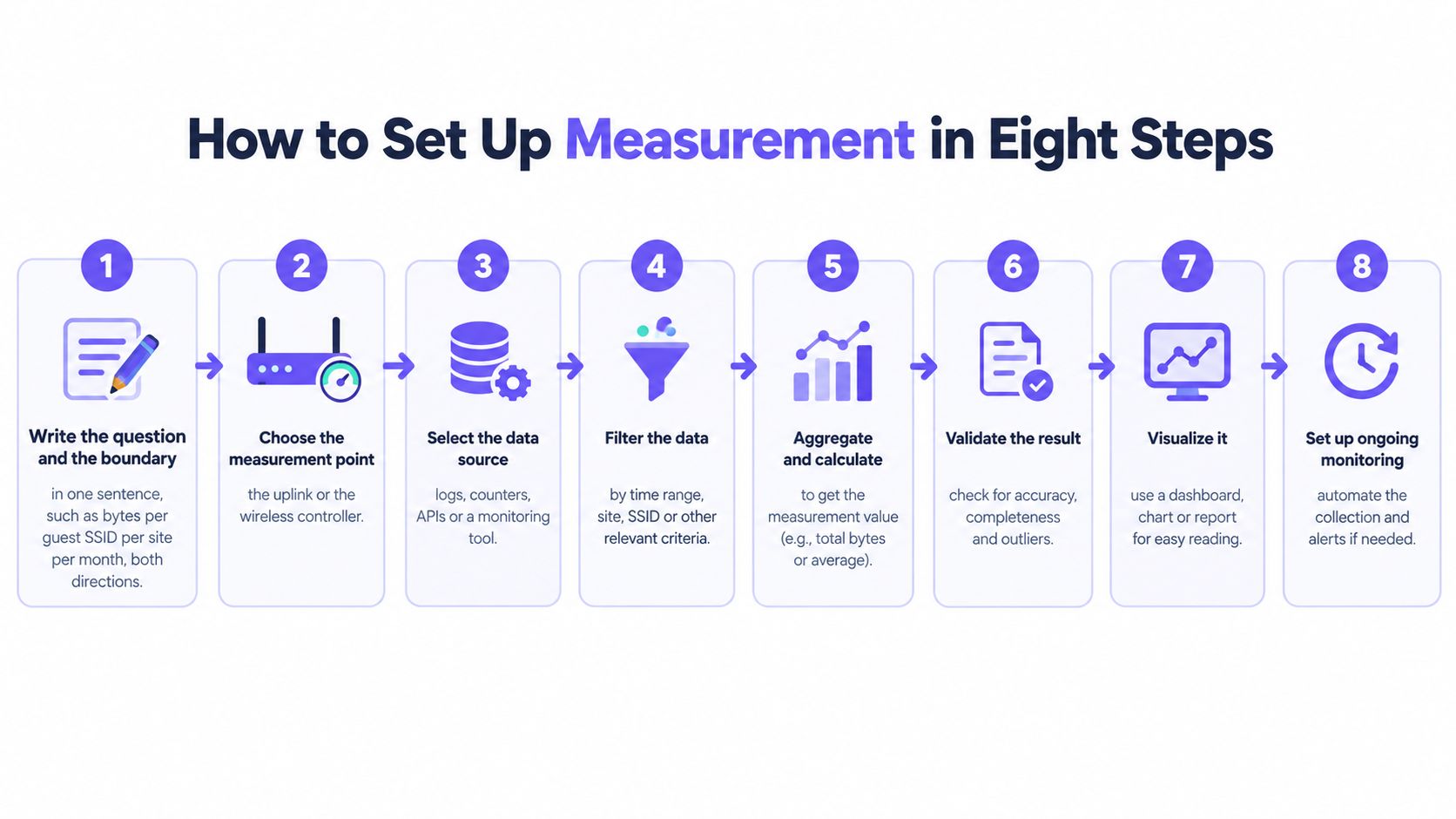
Write the collection design before you touch a device. The eight steps below are the minimum that survives a year of staff changes and a firmware upgrade.
Write it down, then collect
Write the question and the boundary in one sentence. Example: bytes per guest SSID, per site, per month, both directions. If the sentence names two questions, you will build two half-finished reports. The common slip is starting from a dashboard template instead of the ticket you are trying to explain.
Choose the measurement point. The uplink or the wireless controller gives totals. The core router gives flows. The edge firewall gives external traffic only, and it will miss LAN-to-LAN transfers. Do not add those three together. The slip is treating them as duplicates of one number.
Enable 64-bit counter polling. Use 1-minute intervals on busy uplinks and 5-minute intervals for long trends. One-minute data shows the burst that a five-minute average flattens. Polling the 32-bit object is the slip that corrupts the busiest ports first.
Export flows to a collector. Set the active timeout to 1-5 minutes so a long session appears before it ends. Without that timeout, a video call looks like it used nothing until the guest disconnects. Watch CPU and export drops on the router. A collector that falls behind silently under-counts.
Tag every series. Site, SSID, VLAN, and access point name have to be on the record when it is stored. Untagged data cannot be sliced later, and renaming an SSID next quarter will not repair history. The slip is assuming the device hostname is a stable site key.
Turn on RADIUS accounting with interim updates. Fifteen minutes is a practical interval. Interim records keep a long session visible, and they survive a client that never sends a clean stop. If you wait for disconnect, overnight sessions vanish from the daily report whenever the stop is lost.
Retention and a known transfer
Set retention on purpose. Keep 13 months of 5-minute totals so you can compare the same week next year. Keep 7 to 14 days of raw flows. Full flow history for every site costs more than it teaches. The slip is keeping raw flows forever because nobody set a delete job.
Validate with a known transfer. Download a 10 GB file on one device and confirm the totals move by about the same amount, within a few percent, on the counter you chose as primary. Do this before anyone trusts a chart. Skipping validation is how a wrapped counter or a one-way flow export ships as a capacity plan.
If step 8 fails, stop. Fix the counter, the timeout, or the missing path. Do not roll the same config to the next site.
Sampling Versus Full Capture and What Each Costs
Totals come from counters, top talkers come from unsampled flows, fast links are sampled, and full capture is for short forensic windows. Accuracy, storage, and privacy move in opposite directions, so one method for every question will either lie or fill the disk.
| Approach | Accuracy | Storage and Overhead | Privacy Exposure | Best For |
|---|---|---|---|---|
| Interface counters polled every 5 minutes | Exact byte totals | Very small | None | Totals, trend and billing checks |
| Unsampled flow records (NetFlow or IPFIX) | Exact per flow, minus export loss | Moderate, grows with flow count | Low, headers only | Top talkers and port-level application hints |
| sFlow at 1 in 1,000 to 1 in 4,000 packets | Estimate, weaker for small flows | Low | Low, headers and truncated payload | Fast links of 10G and above |
| Full packet capture | Exact, every packet | Very high, several TB per day on a busy 10G link | High, may hold personal data | Short forensic windows during incidents |
Where each method breaks
Interface counters are exact for bytes and silent about who sent them. Use them when a bill or a capacity argument has to be defensible. They will not name a talker.
Unsampled NetFlow or IPFIX records every flow, which is what you want for top talkers. Export loss and a overloaded collector still drop records on a busy router, so the flow sum can sit under the interface counter without anyone misconfiguring the match. Treat that gap as a health signal, not as unused capacity.
sFlow samples in hardware, often around 1 in 1,000 to 1 in 4,000 packets on access and core links, then scales the samples into a volume estimate. It stays cheap on 10G and faster links. Small flows can vanish. Messaging, DNS, and a crowd of short HTTPS sessions are exactly where the estimate is weakest, so do not bill from sFlow and do not use it to prove a single device's usage.
Full packet capture is exact, and on a busy 10G link at line rate it can produce several terabytes a day. The payload may contain personal data your policy does not allow you to keep.
If the answer must be exact for a dispute, use counters. If it must hint at applications, use flow records with headers only. If it is a one-off incident, capture for under an hour, then stop the capture when the window closes.
Attributing Usage When Most Traffic Is Encrypted
Payload inspection is a weak basis for naming applications. Recent measurements indicate that HTTPS represented more than 95% of observed requests by the end of 2025, as reported in Help Net Security's summary of Cloudflare's 2025 internet trends. QUIC, encrypted DNS, shared CDNs, VPNs, and privacy features make port-based labels even less dependable.

Encrypted traffic does not make bandwidth usage measurement impossible. It changes the evidence. You can still measure bytes, packets, timing, direction, connection counts, retransmissions, and latency. Where policy allows, you can add destination category or an authenticated identity. You cannot claim the payload told you the application.
A stack that states its confidence
Build attribution from records you can defend.
- RADIUS session bytes (high confidence): Acct-Input-Octets and Acct-Output-Octets tie volume to an authenticated session, a device, or an xPSK key. "This device consumed 8 GB" can be high confidence when the accounting path is complete.
- Per-VLAN counters (high confidence for the group): Guest, staff, tills, and IoT each land on a VLAN, so group load does not depend on decrypting anything.
- DNS policy categories (medium, and labeled): Category totals give application-like insight. "Video consumed 5 GB" is an inference. Say so on the report.
- Aggregate flow records (low for the app name): Headers still show who talked to which address and how many bytes moved. A shared CDN address is not an application.
Randomised MAC addresses break device counts. One phone can look like two devices across days, which inflates the client total and splits its bytes. Count sessions per person or per key when the policy gives you that identity. For a retail floor, the same idea shows up in how you separate shopper traffic from staff traffic on a shared radio, which is part of sound retail WiFi design.
The trade-off in plain terms is in this short walkthrough.
Keep identity-linked records only for troubleshooting, capacity planning, and compliance. Delete them on a schedule. A confidence label on every figure costs nothing and stops a category guess from being treated as a bill.
Why Your Numbers Disagree and How to Reconcile Them
The monthly average can look healthy while users complain every evening. Those two statements are often both true. Combined fixed and mobile traffic is also a moving target. The ITU's 2023 traffic statistics put average annual growth from 2019 to 2023 at about 30%, with the sharpest rise at the start of the pandemic in 2020. Growth on its own does not explain a bad evening. The shape of the day does.
OpenVault's Q1 2025 broadband report shows why a single mean misleads capacity work. U.S. subscriber average usage reached 663.2 GB per month, up 9.5% year over year, while business peak-hour downstream usage rose 21.2% and upstream usage rose 23.6%. Business downstream demand peaked at 1 p.m. Residential upstream and downstream demand peaked around 9 p.m. A hotel or a residential property can look modest on the monthly chart and still fail at a predictable hour. Cutting monthly gigabytes does not fix that complaint. Moving load off the peak, or fixing airtime and contention, often helps guests more than a larger aggregate pipe.
Read the mismatch before you buy bandwidth
| Symptom | Likely Cause | Check |
|---|---|---|
| Counters show 30% of capacity, but guests still complain | Averages hide evening peaks or airtime contention | Compare busy-hour 95th percentile and channel utilisation |
| Flow totals sit 15% below interface counters | Sampling error, asymmetric routing or an exporter missing from one path | Compare on an unsampled link and confirm every path exports flows |
| Per-SSID totals do not add up to the AP total | Management traffic excluded, or clients roaming mid-sample | Align timestamps and confirm which frames each counter includes |
| RADIUS totals exceed device counts | Duplicate sessions after reconnect or counters reset on reauthentication | Group by session ID and check reset handling |
| One site uses twice as much as an identical site | Different user mix, cached updates or a VLAN tagging error | Break down by VLAN and top destination categories |
| Usage jumps the day after a rollout | Cloud updates or a new device class joined the network | Check DNS categories and the exact time of the rollout |
Fix time alignment first, then sampling, then attribution. Later errors compound the earlier ones.
A two-times gap between identical sites is often a VLAN tag or a different mix of devices, not a mysterious application. Confirm the clock, the exporter, and the session key before you rewrite the capacity plan. One organisation-wide average is not a model of every location.
Validate on One Site Before Reporting Company-Wide
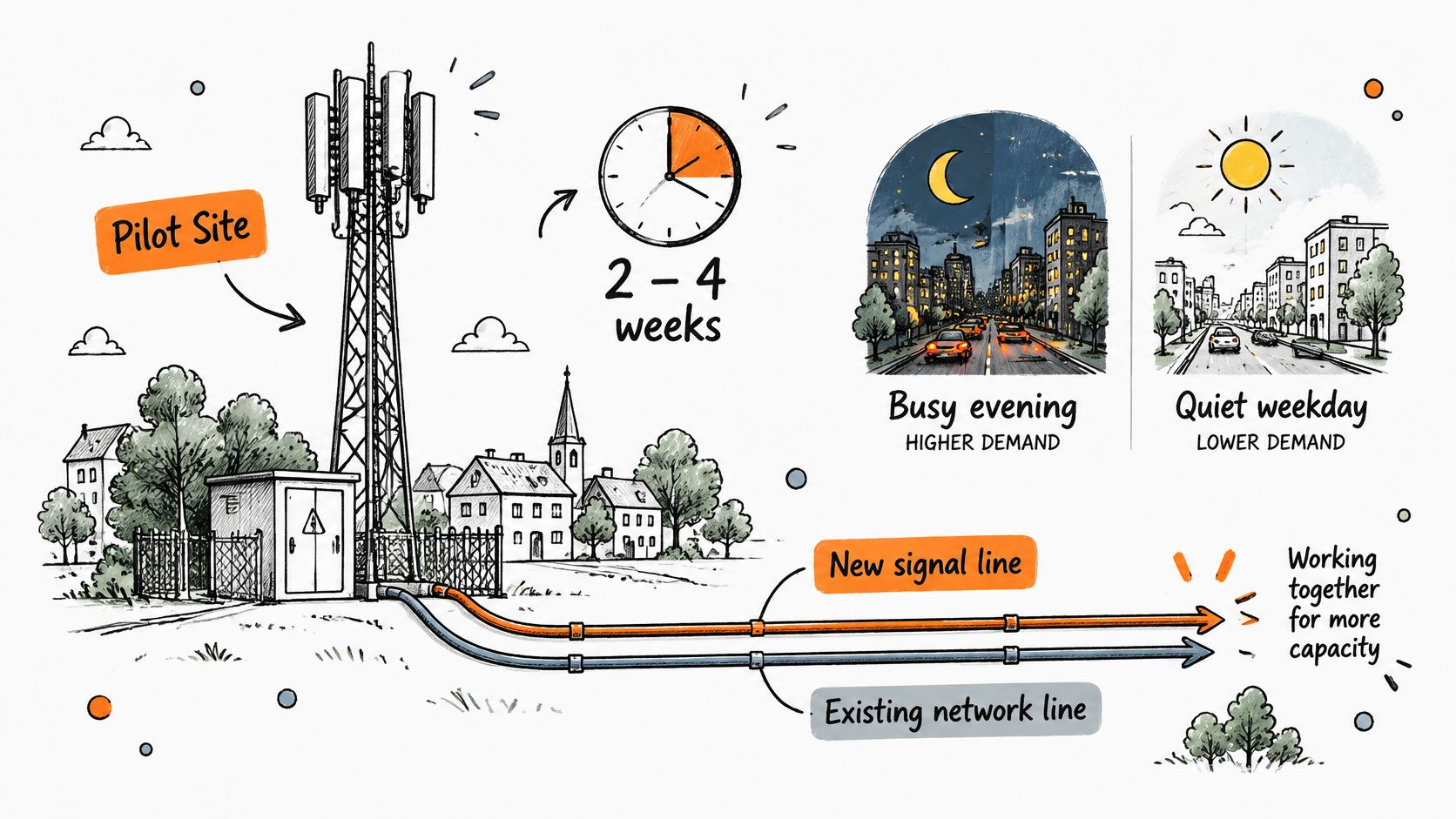
Do not roll a new measurement design to every property on day one. Run a pilot on one representative site for two to four weeks. The window has to include at least one busy evening and one quiet weekday, or you will only prove the average you already distrust.
Keep the new collection beside the network you run today. Do not replace the existing counters until the new series agrees with them, within about 5% on total bytes. A parallel run is how you catch a wrapped counter, a missing exporter, or a VLAN that was never tagged.
Judge the pilot on two tests, not on how complete the dashboard looks.
- Tickets: Do the busy-hour figures line up with complaints you already hold? If the chart is calm during the worst evening, the sample interval or the measurement point is wrong.
- Audit: Can someone answer a real question, such as which VLAN a device used on a given day? If the trail cannot answer that, attribution is not finished.
We prove a design on one site first, on the access points that site already has, beside the live network, and we judge it on tickets and audit evidence before a wider rollout. A 45-minute design session is enough for an engineer to map today's SSIDs onto open, secure, and xPSK on that hardware, and you keep the plan. Network health monitoring then drills from the estate to a location and a piece of hardware, with speed tests, authentication rates, and download and behavioural data so misuse is visible rather than guessed. The radio plan still has to be sound. Measurement will not repair a channel plan that was never designed, which is why WiFi network design stays a separate piece of work.
Set the reporting rules before the second site. Use the same period and the same sample interval everywhere. Label confidence. Report by site, SSID, and VLAN, and give every dashboard a named owner. Roll out only when the pilot reconciles with the counters and the team can answer its top three questions from the data. If it cannot, go back to the mismatch checks. Widening a broken baseline just publishes the error faster.
Purple Access puts open, secure, and xPSK on the access points you already run, with cloud RADIUS accounting you can tie to a user, a device, or a key, plus health views that separate a quiet monthly average from a bad busy hour. Prove it on one site against your tickets and your audit trail before you change the rest of the estate. See how that fits your venues at Purple Access.