IoT network segmentation guide for real fleets
Published
72% of healthcare VLANs mixed IoT and IT assets in a 2020 Unit 42 IoT threat study. That's the problem with treating a VLAN name as a security control: a network labelled IoT can still put medical equipment, printers, phones and ordinary computers within reach of each other.
IoT network segmentation should deliver demonstrable containment, not a longer list of VLANs. For multi-site IT and facilities teams, the useful questions are which devices share a trust zone, which communications are approved, and whether a compromised endpoint can complete an attack path to something valuable.
Table of Contents
- When a Separate IoT VLAN Still Leaks
- IoT Zones and the Flows You Allow
- How to Segment an IoT Fleet in Four Phases
- Keys and Compensating Controls for Dumb Devices
- Monitoring, Containment and Common Failures
- Prove One Site Before You Copy the Design
When a Separate IoT VLAN Still Leaks
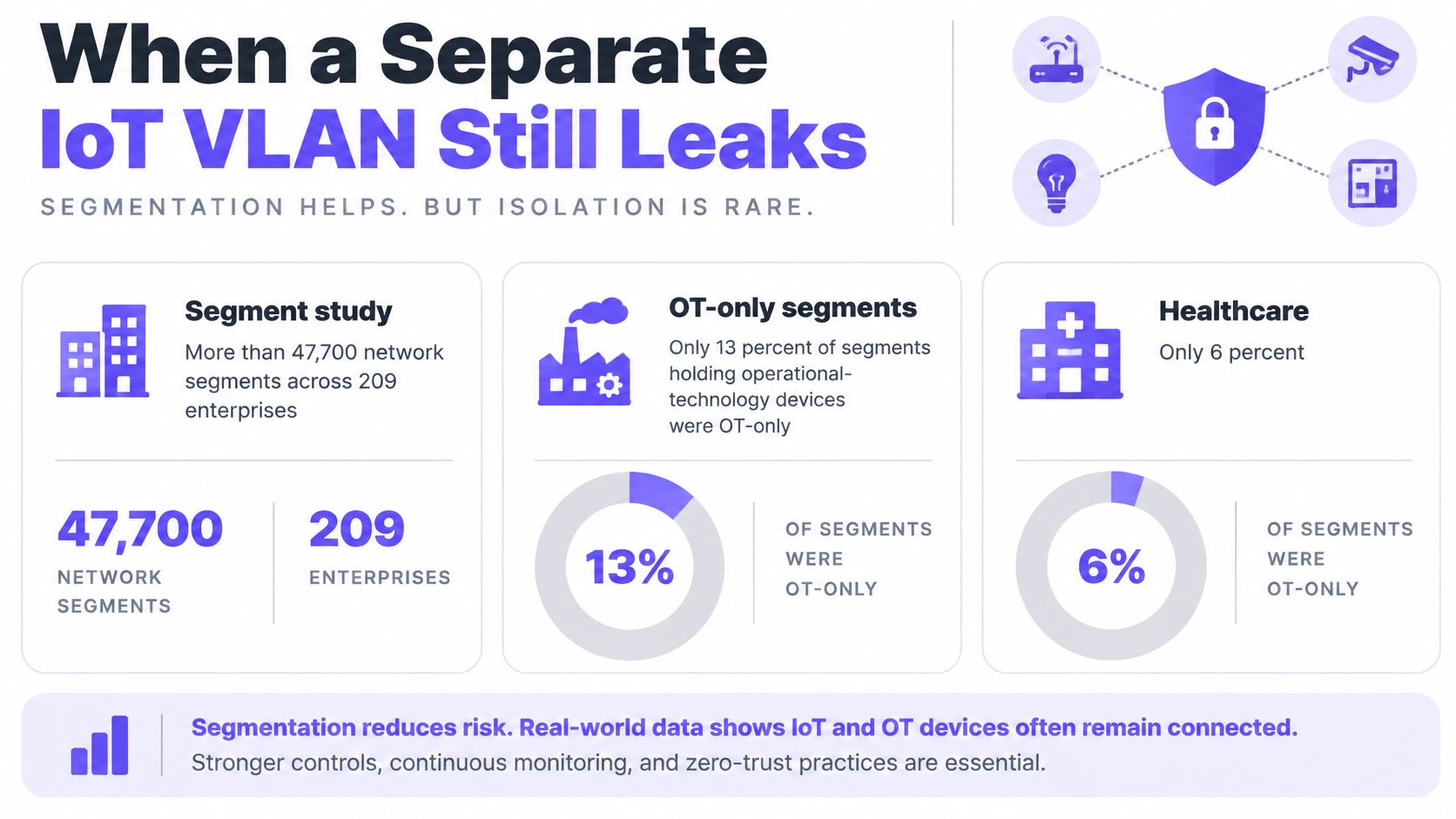
Only 13% of segments containing operational-technology devices were OT-only, while just 6% of healthcare segments containing medical devices were dedicated solely to medical equipment, according to a Security Boulevard analysis covering more than 47,700 network segments across 209 enterprises. A separate segment clearly doesn't guarantee a sensible grouping of assets.
Cameras, building controllers, printers and VoIP phones don't belong together merely because none of them runs a conventional desktop. Their owners, maintenance arrangements and consequences of failure differ. Combining them creates a shared exposure that a tidy network diagram can conceal.
The distinction is visible in the segment composition below.
What the VLAN boundary doesn't do
A VLAN separates a Layer 2 broadcast domain. It doesn't automatically encrypt traffic, prevent spoofing, replace shared passwords or block east-west movement within that VLAN. It also doesn't prevent packet capture where traffic is accessible through broadcast, mirroring, misconfiguration or a successful local attack.
An inter-VLAN firewall can reject a camera's connection to a payment network while leaving camera-to-camera traffic untouched. If peer isolation matters, enforce it through private VLANs, access-port controls, wireless client isolation or an appropriate distributed policy.
Containment means smaller trust zones, classified by ownership, purpose, sensitivity and operational role, with an explicit allowlist between them. Zone exclusivity is a useful check, but it isn't sufficient: an exclusively camera segment can still have excessive outbound permissions.
For hotels, hospitals, campuses, retail estates and multifamily buildings, the deliverables should include:
- A zone and flow map: Every device class has an owner, a destination list and a reason for each connection.
- A controlled migration: Dependencies are tested before the pattern reaches other properties.
- A fallback for weak identity: Devices without certificate support receive compensating controls.
- A failed attack path: A representative endpoint cannot establish a prohibited connection.
Logical separation without approved flows is still an over-permissive network.
IoT Zones and the Flows You Allow
IoT trust zones and allowed flows
| Zone | Example devices | May reach | Must not reach | Primary control |
|---|---|---|---|---|
| Guest and resident | Phones, laptops, short-stay BYOD | Internet, captive portal, DNS | Room IoT, tills, cameras, staff VLANs | Client isolation and a guest VLAN |
| Corporate IT | Staff laptops, printers on the user LAN | Identity, file and app services | OT, cameras, payment segments | 802.1X or certificate-assigned VLAN |
| Building systems | HVAC, lighting, access control | BMS and named cloud endpoints | User workstations and guest WiFi | IoT VLAN plus destination allowlist |
| Cameras | IP cameras, NVRs | Assigned NVR and approved video services only | Medical, payment, identity systems | Private VLAN and east-west deny |
| Clinical or safety OT | Imaging, pumps, PLCs | Named clinical or operational servers only | Guest, corporate, cameras | Higher-security zone and firewall |
| Payment | Tills, PIN pads | Payment processor only | Workstations and other IoT | Dedicated VLAN and no inbound from IoT |
| Vendor DMZ | Jump host, update broker | Time-bound path to an approved device class | Flat route into every VLAN | Logged, expiring access |
Treat these rows as starting policies, not complete application specifications. Approved infrastructure services, such as DNS and time synchronisation, need separate documented rules. Corporate users who operate clinical applications should reach the application service, not receive unrestricted access to the clinical device subnet.
NIST's IoT cybersecurity guidance identifies network segregation and segmentation as measures supporting network integrity, including preventing devices from attacking neighbours, eavesdropping or compromising other devices on the same segment. Being inside the perimeter isn't evidence that a device deserves access.
Separate function from physical location
Facilities teams often group equipment by cupboard, floor or installation contractor. Those are useful inventory attributes, but poor substitutes for a trust boundary. An access controller and a lobby display can share a switch without sharing permissions.
For a facilities-side starting point, HighFlow Energy's guide to understanding embedded device communication provides context for discussing connected systems with the people responsible for them. Bring that discussion back to concrete interfaces: which controller talks to which service, who manages it, and what happens when the path fails.
Cameras need particular care. An NVR is an approved destination, not permission for every camera to talk to every other camera. If the recorder initiates connections instead, write the policy in that direction and restrict camera-originated sessions separately.
Broker vendor access rather than extending trust
Place the vendor access service in the DMZ, not the operational device merely because a contractor maintains it. Require the vendor to authenticate to a jump host or broker, then grant a scoped maintenance path with an expiry and session logs.
Private VLANs can isolate endpoints sharing switching infrastructure. VRFs can keep tenant routing tables separate, but neither removes the need for controlled route exchange and firewall enforcement.
Short-stay guests should remain separate from room TVs, thermostats and tills. Long-term residents who need personal casting or device discovery require a deliberately scoped resident network, not a blanket guest-to-IoT exception.
Before changing a switch, tick every current device class onto a row. Split any row whose members need materially different permissions. Firewall policy, not the VLAN ID, makes that row real.
How to Segment an IoT Fleet in Four Phases
Pilot the change at a representative site before turning it into an estate-wide template. The rollout needs both a technical owner and an operational owner who can confirm that equipment still performs its job.
Use the visual as a rollout overview, then build the dependency and policy records underneath it.
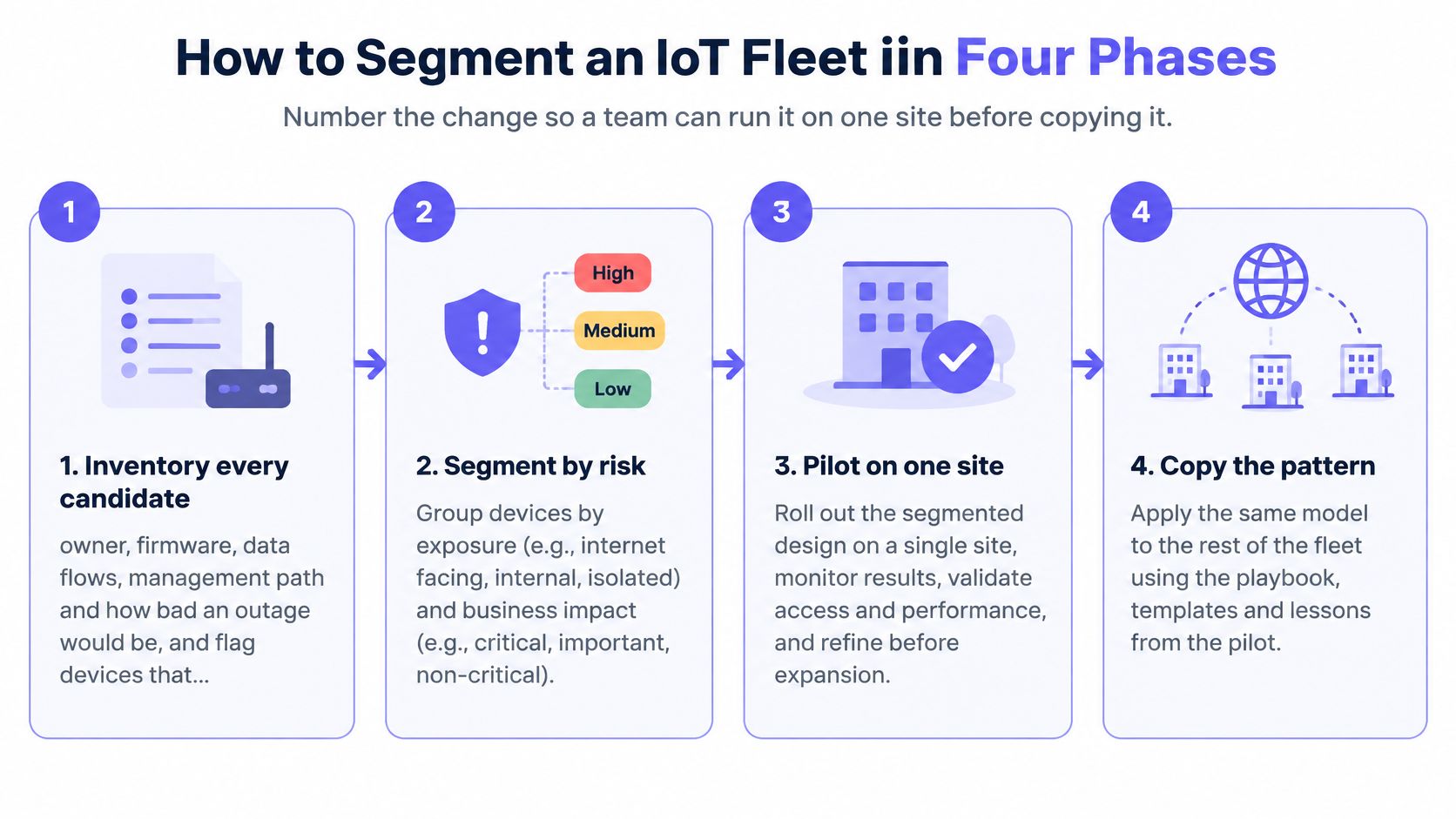
Build the evidence before enforcing the boundary
Inventory candidate devices and services. Record ownership, model, firmware, switch port or wireless association, observed flows, management path and business criticality. Flag endpoints that can't accept a certificate, and identify the person authorised to approve an outage.
Check: Reconcile discovery results with switch tables, wireless controller records and the facilities asset register. Unexplained devices stay unresolved, not classified as harmless.Map dependencies before isolation. Capture DNS, NTP, identity, cloud endpoints, update servers, vendor support and inter-device protocols. Watch discovery traffic too: a resident phone finding a TV through mDNS is different from that phone initiating a media session.
Check: Have the operational owner complete a normal workflow, including restart and recovery, while the team records the required connections. A quiet endpoint isn't necessarily dependency-free.
For wireless deployments, review WiFi network design alongside the security change. Assign VLANs or VRFs by role where supported instead of creating an SSID for every equipment category. Extra SSIDs add beacon overhead and another configuration surface to maintain.
Enforce narrowly, then test failure
Write least-privilege rules at each trust boundary. Name the source role, destination service, protocol, port, direction and business owner. Reject broad subnet-to-subnet permits offered as a shortcut. As a hypothetical camera policy, allow the camera role to reach its assigned NVR on TCP 443 and RTSP on TCP 554, deny other east-west sessions and log denials. Confirm the actual camera transport first, because the product may require different media flows.
Check: Verify that routing, administrative access and local peer controls match the intended policy, not just the VLAN assignment.Move a device class incrementally. Watch denied traffic and approve only dependencies that an owner can justify. Test a simulated camera compromise, rejected access to the management plane, DNS resolution, certificate renewal, loss of cloud connectivity and expiry of vendor access.
Check: Confirm both successful business workflows and unsuccessful prohibited connections.
CISA's microsegmentation guidance cautions that finer segmentation reduces lateral-movement opportunities while increasing design and maintenance complexity, and that legacy or IoT devices may not support modern controls. Choose granularity that the team can operate.
Procurement requirement: Specify what a device must still do when connectivity is restricted. Don't discover its dependence on unrestricted internet access during containment.
Use the walkthrough below alongside a written change record, not instead of acceptance testing.
Keep the previous configuration available as a rollback artifact during the maintenance window, rather than leaving permissive rules active. Remove the rollback dependency after expected traffic works, unexplained denials are resolved and the operational owner signs off.
Keys and Compensating Controls for Dumb Devices
Thermostats, TVs, concession equipment and vendor-managed boxes may never support certificate-based admission. Some can authenticate only with a WiFi key; others provide little more than a MAC address and an inconsistent traffic profile.
The IEEE Industrial Electronics Society survey on industrial-IoT traffic fingerprinting identifies obstacles including unknown devices, changing environments, limited generalisability and scarce evaluation data. Treat a fingerprint as evidence to assess, not an identity you can trust indefinitely.
VLAN, per-device key and microsegmentation
| Method | Best for | What it stops | What it misses |
|---|---|---|---|
| Shared class VLAN | A device class with the same destinations | Unapproved guest and IT access, when boundary rules enforce it | Lateral movement inside the VLAN |
| Unique key and VLAN | Apartments, concessions, room TVs and tills | A leaked key granting building-wide access | A dual-homed box bridging zones |
| Profile microsegmentation | Clinical and OT fleets | Unapproved east-west access between unlike devices | Devices that cannot be identified reliably |
Choose the smallest manageable credential scope
A shared class VLAN is reasonable when its members need the same destinations and peer exposure is acceptable. It isn't a default holding area for equipment the team hasn't identified.
Use a unique pre-shared key per device, person or tenant where certificates aren't practical. Bind the credential to the intended policy and segment, and apply a bandwidth limit appropriate to the role. Key uniqueness alone doesn't create isolation; the controller, switching and firewall configuration must enforce the assignment.
The operational value of per-device IoT key management is targeted revocation. A failed camera should receive a new credential when replaced, rather than inheriting a copied key that may remain in a contractor's notes.
For payment equipment, coordinate network requirements with processor onboarding. Sambapay's guide to choosing a merchant services provider is useful commercial context, but the network handover still needs an explicit endpoint and protocol list. Don't translate a supplier relationship into general internet permission.
Compensate when identity remains weak
Profile microsegmentation suits equipment whose function, criticality and threat level justify tighter separation. It also requires maintained profiles, exception handling and a safe response when classification changes.
For identity-poor devices, combine controls rather than trusting a single signal:
- Discover passively: Compare observed behaviour with the declared device role without assuming active probing is safe.
- Constrain destinations: Use supplier- or location-based admission, narrow destination lists, protocol allowlists and DNS controls.
- Prepare quarantine: Define a restricted policy that preserves only the recovery services the device needs.
- Practise revocation: Measure isolation in minutes, including session termination and reassociation, rather than assuming a disabled key ends an existing session.
Expire contractor exceptions on a recorded date. Close vendor access after the approved work, and require reapproval for a new task.
For resident services, reflect mDNS only within the resident's private network. AirPlay discovery should work inside that boundary without exposing neighbouring apartments. Keep discovery permissions and actual media-session permissions aligned.
Monitoring, Containment and Common Failures
A monthly review should produce evidence that operators can act on, not just a green dashboard. CISA's IoT device risk and mitigation guidance recommends isolating IoT from critical networks and warns that equipment connected across segments, or policy noncompliance involving removable media, can undermine the boundary.
Five monitoring measures and their telemetry
| Measure | Telemetry source |
|---|---|
| Share of IoT assets with an assigned zone | Asset inventory matched to zone map |
| Share of inter-zone flows explicitly approved | Firewall rule export checked against the zone chart |
| Unauthorized flows blocked | Deny log counts by zone |
| Mean time to revoke a device or key | Revocation timestamps from the key or NAC system |
| Containment verified in exercise | Tabletop or attack-path test records |
Define the denominator for each percentage. Assigned assets should be measured against discovered IoT assets, not merely the devices already entered in the approved register. Otherwise, missing inventory makes the result look better.
Feed investigations from authentication failures, newly observed MAC addresses, attempts to reach identity or payment services, and DNS requests outside approved patterns. Use bandwidth usage measurement to identify role mismatches, such as a thermostat credential suddenly carrying sustained bulk traffic. A spike is a reason to investigate, not proof of compromise.
Give the night shift a containment runbook
- Quarantine or revoke. Isolate the endpoint and terminate existing access where supported. Confirm it cannot reconnect under another available credential.
- Verify the block. Check enforcement logs and repeat connection tests against prohibited peers, tills and domain controllers. A policy change without observed enforcement is not closure.
- Find alternate paths. Inspect dual-homed cabling, forgotten VPNs, cellular management paths and removable-media procedures. Network quarantine does not remove an independent connection.
- Recover with fresh identity. Replace or reimage the device as appropriate, issue a new key and record any temporary exception's owner and age.
- Repeat the attack-path test. Retest after relevant firmware changes, acquisitions and site cutovers, when dependencies or topology may have changed.
A high deny count doesn't prove good segmentation. It can mean successful blocking, a broken application or an ownerless exception waiting to happen.
Fix recurring failures at their source
- Shared WiFi credentials: Issue individually revocable keys instead of distributing the camera password.
- Unrestricted outbound internet: Replace blanket access with destination and protocol rules.
- IoT sessions to laptops: Remove unapproved IoT-to-workstation paths.
- Permanent contractor access: Enforce expiry and use port templates that reject inappropriate equipment on OT ports.
- SSID sprawl: Assign network roles dynamically instead of advertising another equipment-specific SSID.
- Stale exceptions: Review an exception-age report weekly and close entries without an accountable owner.
Use this acceptance standard for device-only zones: a segment has failed if an unauthorised test device in it can open a session to payment infrastructure, identity infrastructure or a different tenant. Record the attempted service and enforcement evidence so the result can be reproduced.
Prove One Site Before You Copy the Design
Pick a property this month: a hotel floor, clinic wing, concession area or apartment block. Inventory that site, assign every device class to the zone chart and migrate cameras or room equipment first. Keep the scope small enough that the facilities team can validate the actual service, not just network reachability.
Make the pilot acceptance-based
Require a quarantined camera to fail its attempted connections to tills, identity services and another tenant. Measure the time between the isolation decision and verified enforcement. Capture the rule set, test results and operational sign-off as the template for the next property.
Rollout gate: Copy the design only when another engineer can reproduce both the permitted workflow and the blocked attack path.
Purple Access supports that pattern with three SSIDs: Open for guests and BYOD, Secure for staff and trusted users, and xPSK for things, tenants and communities. Cloud RADIUS uses identity to assign the appropriate network and VLAN; an xPSK can be unique per device, person or tenant, with its own VLAN and bandwidth limit. The planner lets you tick what connects today and see where each group lands, while estate, site and access-point health views and authentication rates help operators investigate the rollout.
That simplifies admission without replacing firewall policy or containment testing. Book the design session around your actual estate and bring the pilot's device list, dependencies and failed attack-path evidence.
Purple Access offers identity-based network assignment, individually scoped xPSKs and a planner for consolidating access without combining unrelated trust zones. Visit Purple Access to book a network-engineer-led design session for your property type and define a pilot with explicit permitted flows, revocation checks and containment tests.