VLAN segmentation guide: Design, map and test your network
Published
A network can have a guest WiFi name, a staff network and a collection of device networks, yet still leave a guest laptop one permissive rule away from a staff server. The VLAN list may look tidy, but the useful question is whether a device can reach anything it shouldn't.
VLAN segmentation gives you a practical way to separate traffic on shared switching infrastructure. It doesn't prove that separation is secure. Start with the groups and their necessary connections, assign devices by identity where possible, then test the paths that should be allowed and blocked.
Table of Contents
- A Reference VLAN Map for Guests, Staff and Devices
- How to Design Segments from Your Asset Inventory
- Mapping Identities to VLANs Through RADIUS
- Segment Rules That Limit Lateral Movement
- Keeping VLAN Assignments Accurate as Devices and People Change
- Testing That Segmentation Actually Holds
- Confirm the Segment Map and Pilot One Site
A Reference VLAN map for guests, staff and devices
A VLAN splits one physical switching fabric into separate broadcast domains, so devices in one logical network aren't automatically in another. IEEE 802.1Q tags Ethernet frames with a VLAN Identifier, or VID, which switches use to keep traffic associated with the right virtual LAN, as described in the IEEE 802.1Q standard.
Here's a starting map for a venue with visitors, staff, building devices, contractors and tenants. The VLAN numbers are example assignments, not universal requirements. The contractor and tenant IDs are filled in as 50 and 60 to show one way to reserve space for groups that need their own segment.
| Segment | Network | VLAN | How devices join | Reachable from this VLAN |
|---|---|---|---|---|
| Guests and BYOD | Open | 10 | Captive portal or Passpoint, with consent recorded | Internet only, client isolation on |
| Staff laptops and phones | Secure | 20 | EAP-TLS via MDM, or SSO through Entra ID, Okta or Google Workspace | Named internal servers and printers only |
| Locks, thermostats, leak sensors | xPSK | 40 | One MAC-bound key per device | Vendor cloud only, unreachable from guests |
| Maintenance contractors | xPSK | 50 | Time-limited key, no MDM required | Only the systems needed for the job, access ends on the job's last day |
| Tenants or concessions | xPSK | 60 | One key per tenant | Own VLAN, separate from shoppers and centre systems |
Treat the table as a map of intended access, not proof that the access works as written. VLANs provide logical separation and can make a growing network easier to operate, but the VID itself doesn't create a fine-grained security policy. Trunking, access-port assignment, routing and boundary rules must all match the design.
VLANs remain a common foundation: in an Omdia survey of 352 healthcare and manufacturing security leaders, 64% used or planned to use VLANs. The same survey found that nearly 50% had experienced an incident involving lateral movement in the preceding year, a reminder that network zones need controls beyond the VLAN label (Omdia's microsegmentation report).
Draft your own version of this table, with owners and reachable systems, before touching any switch configuration.
How to design segments from your asset inventory
Start with the question teams often skip: what must talk to what? VLAN numbers come later. Assigning IDs before you know what devices exist and what they need to reach creates segments that are hard to justify and harder to maintain.
CISA's guidance for securing network infrastructure recommends grouping devices with similar purposes and separating components with different security requirements. For higher-risk environments, that can mean distinct IT and operational-technology VLANs, with Layer 3 access controls and application-aware firewalls.
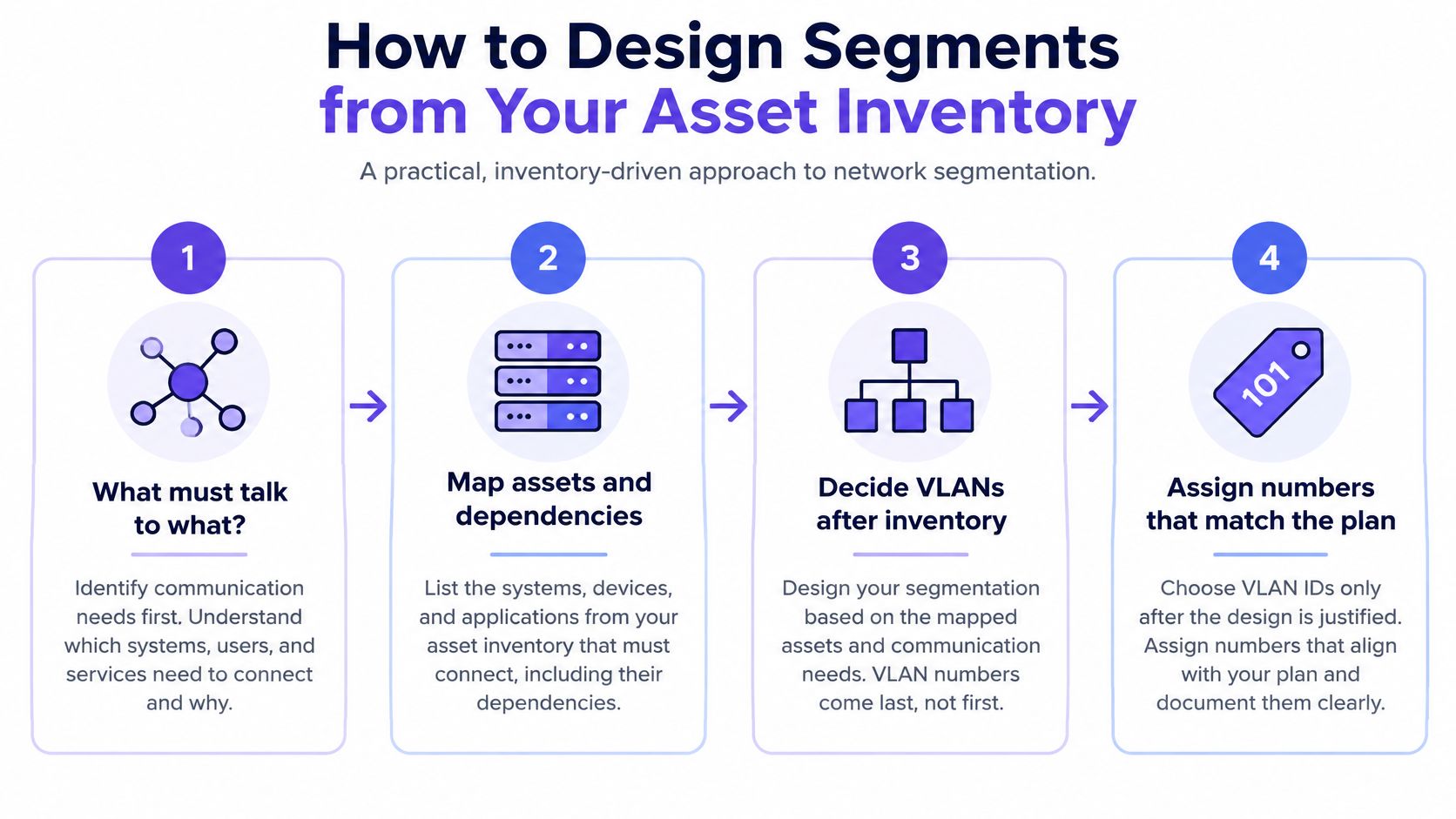
Use this sequence to turn the inventory into a working design:
Inventory devices and owners. List endpoints, systems and management interfaces, including cameras, tills, building controls and network equipment. Record who owns each asset and who can approve its access. Unknown devices tend to end up wherever someone can get them online, which is how they inherit access no one intended.
Group by purpose and risk. Separate guest devices, employee endpoints, payment systems, cameras, building controls, servers and network management. Similar business functions can share a zone when their access needs and risk are comparable.
Record the minimum legitimate flows. For each required connection, capture the source, destination, protocol and port. If the team can't name why a flow is needed, treat it as a candidate to remove rather than an exception to allow.
Create one VLAN and IP subnet per group. Keep higher-risk operational technology separate from IT where the environment calls for it. Choose the boundaries to reflect business and security needs, not the physical location of a switch.
Put inter-VLAN routing at a controlled boundary. Route through a firewall or a Layer 3 control point where the team can apply policy. Don't leave routing open just because the VLANs have different names.
Deny first, then add narrow exceptions. Scope each approved rule to the required protocol, port, direction and destination. Record an owner's approval for every exception.
Log boundary decisions from the start. Make permitted and denied flows visible so that teams can review what the rules do.
A restaurant group, for example, might separate point-of-sale terminals from kitchen displays. If the only required interaction is a POS system sending a transaction to a card terminal on one port, allow that specific path rather than opening general access between the two VLANs.
A numbering scheme can make policy easier to read. One example is reserving ranges by zone, such as 10 for guests, 20 for staff and 40 for devices, leaving gaps for later groups. Matching a subnet's third octet to its VLAN ID can also make firewall rules easier to scan, provided the scheme fits the existing address plan.
For a rule you can review today, ask: Can I name the owner and the business flow behind it? If not, don't put it in the approved design.
Mapping identities to VLANs Through RADIUS
A device doesn't have to join the same VLAN as every other device on a shared wireless network. With identity-based assignment, authentication determines the network placement.
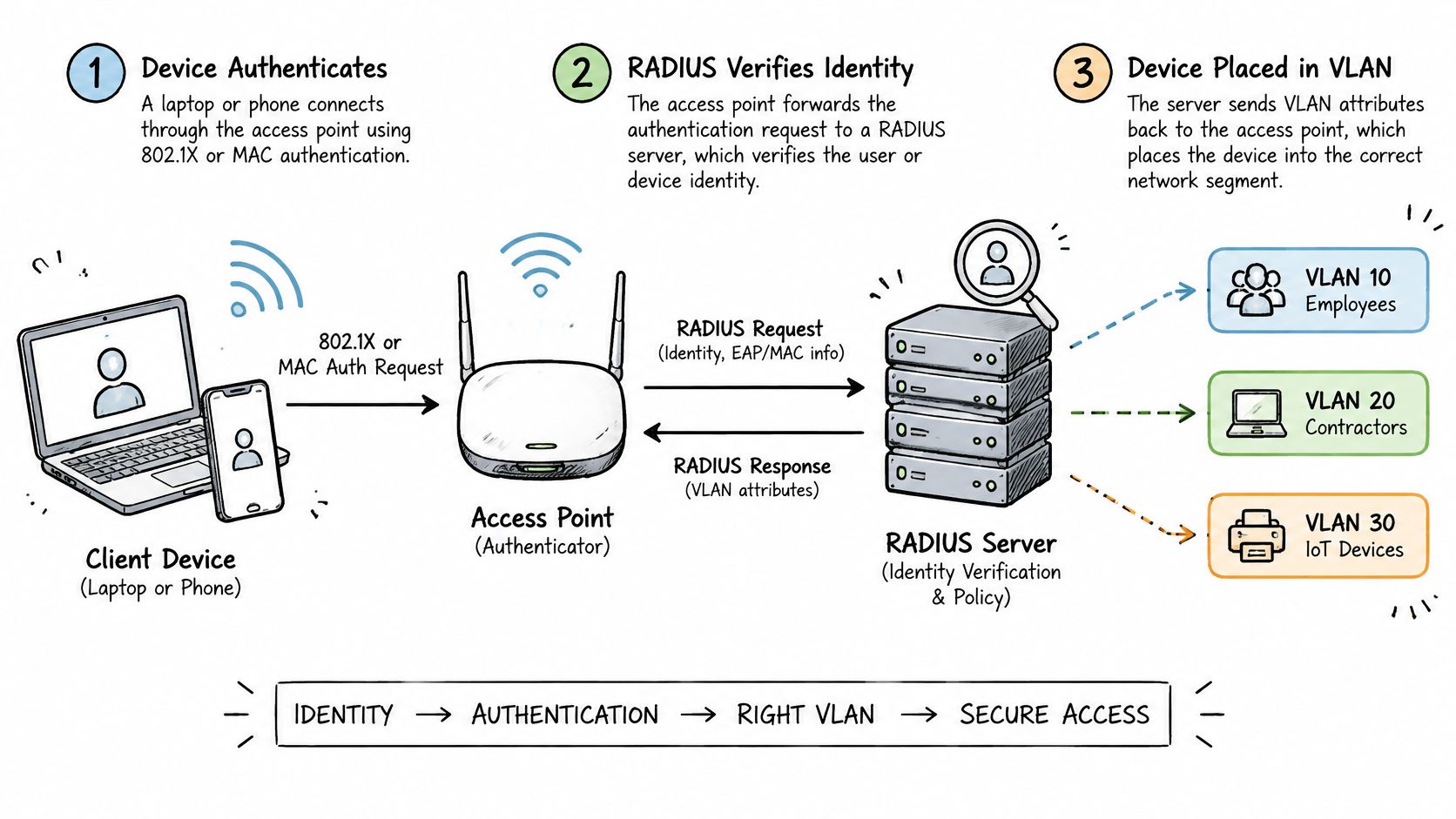
What happens during a join
A typical 802.1X join follows a clear sequence. The device sends an authentication request through the access point or switch, and the network forwards it to RADIUS. RADIUS checks the identity and, if it accepts the request, returns VLAN attributes. The switch or access point then places that session on the assigned VLAN.
The attributes commonly used to identify the VLAN are Tunnel-Type set to VLAN, Tunnel-Medium-Type set to 802 and Tunnel-Private-Group-ID set to the VLAN number. Those values need to match the IDs configured in the network; a correct identity paired with an incorrect attribute can put a device in the wrong segment.
Apply the mapping to people and devices
For staff, EAP-TLS can use certificates issued through mobile device management. A managed employee laptop presents its certificate during authentication, and the identity policy can place it in the staff VLAN. This avoids relying on a shared WiFi password as the basis for access.
A second path starts with a staff identity provider. Group membership from Entra ID or Okta can be passed through SAML and SCIM so that, for example, a member of the Finance group receives the staff VLAN while a contractor group receives its own VLAN. For a deeper look at the access-control side of this setup, see WiFi access control and identity-based access.
Some devices can't run 802.1X. For those, a MAC-bound key can provide an individual credential and a defined VLAN assignment. Use a per-device key where you need to revoke one device without changing the access of other devices using the same network.
Conditional Access and device posture should be part of the join decision when the environment requires them. If a device fails a required rule, refuse it at authentication instead of placing it on a supposedly safer VLAN and assuming the risk is contained.
Write the group-to-attribute-to-VLAN mapping in a table before configuring RADIUS. Include the fallback behavior too: if RADIUS is unreachable, an existing session stays connected, but new joins fail closed rather than landing on the staff VLAN. A disabled account should be rejected at its next join, with authentication logs recording when and why. VLAN assignment happens at login; it isn't automatically reevaluated during the session unless you add policy to do that.
Segment rules that limit lateral movement
A device in a trusted VLAN isn't trusted just because of where it joined. NIST distinguishes network segmentation from zero trust: VLANs create subnet-level zones, while access policies are often enforced at gateways for groups of hosts. Zero trust doesn't grant implicit access based on network location (NIST Special Publication 800-215).
Use a flow matrix as the working policy. The conditions matter as much as the allow or deny decision.
| Source | Destination | Rule | Condition |
|---|---|---|---|
| Guests (VLAN 10) | Internet | Allow | Client isolation blocks peer devices |
| Guests (VLAN 10) | Staff (VLAN 20) | Deny | No route, deny by default |
| Staff (VLAN 20) | Guests (VLAN 10) | Deny | No route, deny by default |
| Staff (VLAN 20) | Named file server | Allow | Only the required ports |
| Devices (VLAN 40) | Vendor cloud | Allow | Outbound only, to fixed destinations |
| Devices (VLAN 40) | Staff (VLAN 20) | Deny | Controller reached through one approved gateway |
| Contractors | Building controls | Allow only by exception | Owner approval and an end date are required |
The guest rule permits internet access while keeping guest devices from initiating connections to one another. The two guest-to-staff rules deny access in both directions rather than relying on one side's policy to protect the other. Staff can reach a named file server only on the ports its service requires. A device can contact its vendor's cloud service outbound, but the vendor connection shouldn't become a path into staff devices. If a contractor needs to reach building controls, grant access only for the approved job and remove it on the agreed end date.
Controls within a VLAN matter too. Devices in the same VLAN can generally reach one another unless another control stops them. Use client isolation for guest and device networks where peer communication isn't needed, and host firewalls on staff endpoints to limit local connections.
Keep these segment-level safeguards in place:
- Remove default access: Put unused switch ports outside the default VLAN and disable them where practical.
- Avoid an active native VLAN: Set the native VLAN to an unused ID.
- Limit trunks: Allow only the VLANs required on each switch link.
- Protect management: Put network management on its own VLAN and provide no route to it from guest networks.
More VLANs don't automatically mean better security. NIST's guidance supports isolating critical resources into separate trust zones and progressively dividing infrastructure where doing so improves containment and monitoring. But fewer, risk-based zones can be safer and easier to operate than a long list of narrow VLANs, provided enforcement considers identity and policy. In an Omdia survey of healthcare and manufacturing security leaders, 99% were deploying or planning microsegmentation, while only 9% had it protecting their critical systems (Omdia's survey on the microsegmentation gap).
As a practical rule, if two groups have the same access requirements and risk, they may belong in one zone. For more detail on isolating visitor access, use this guide to guest network security.
Keeping VLAN assignments Accurate as devices and people change
An employee leaves, a contractor finishes a job, or a lock is replaced. Each change can leave an outdated credential tied to a VLAN, so access records need to follow the identity and lifecycle of each person or device.
| Event | Action | Timing | Effect on access |
|---|---|---|---|
| Employee leaves | Disable the account; RADIUS rejects the next join | Same day | Staff VLAN access ends |
| Device replaced | Revoke the MAC-bound key and issue a new one | Before installation | Replacement joins its device-class VLAN |
| Long-stay guest checks out | Key expires on its end date set at issue | End date | Guest VLAN access ends |
| Contractor job finishes | Time-limited key expires | Job's last day | Contractor VLAN access ends |
| Tenant moves out | Revoke that tenant's key only | At move-out | Other tenants stay connected |
A building lock with a MAC-bound key keeps its key and VLAN through guest changeover. The credential belongs to the hardware, not the departing guest. Revoke it when the lock is replaced, not when a guest checks out.
For high-risk assets such as building controls and payment systems, require explicit change control before altering a VLAN assignment. For guest and other temporary access, set an expiry date on the credential so access ends without relying on manual cleanup.
Across multiple sites, keep a shared VLAN plan and record legitimate local differences in it. Otherwise, switch configurations can become the only record of how a location is set up. Review exceptions and unused keys regularly, and remove those without a current owner. Judge the process by whether identities still map to the intended segments and whether access ends when it should, not by the number of VLANs in the map.
Testing that segmentation Actually Holds
Test reachability, not VLAN count. For each intended path, verify that the allowed connection works and that prohibited paths fail from the device or segment that would initiate the traffic.
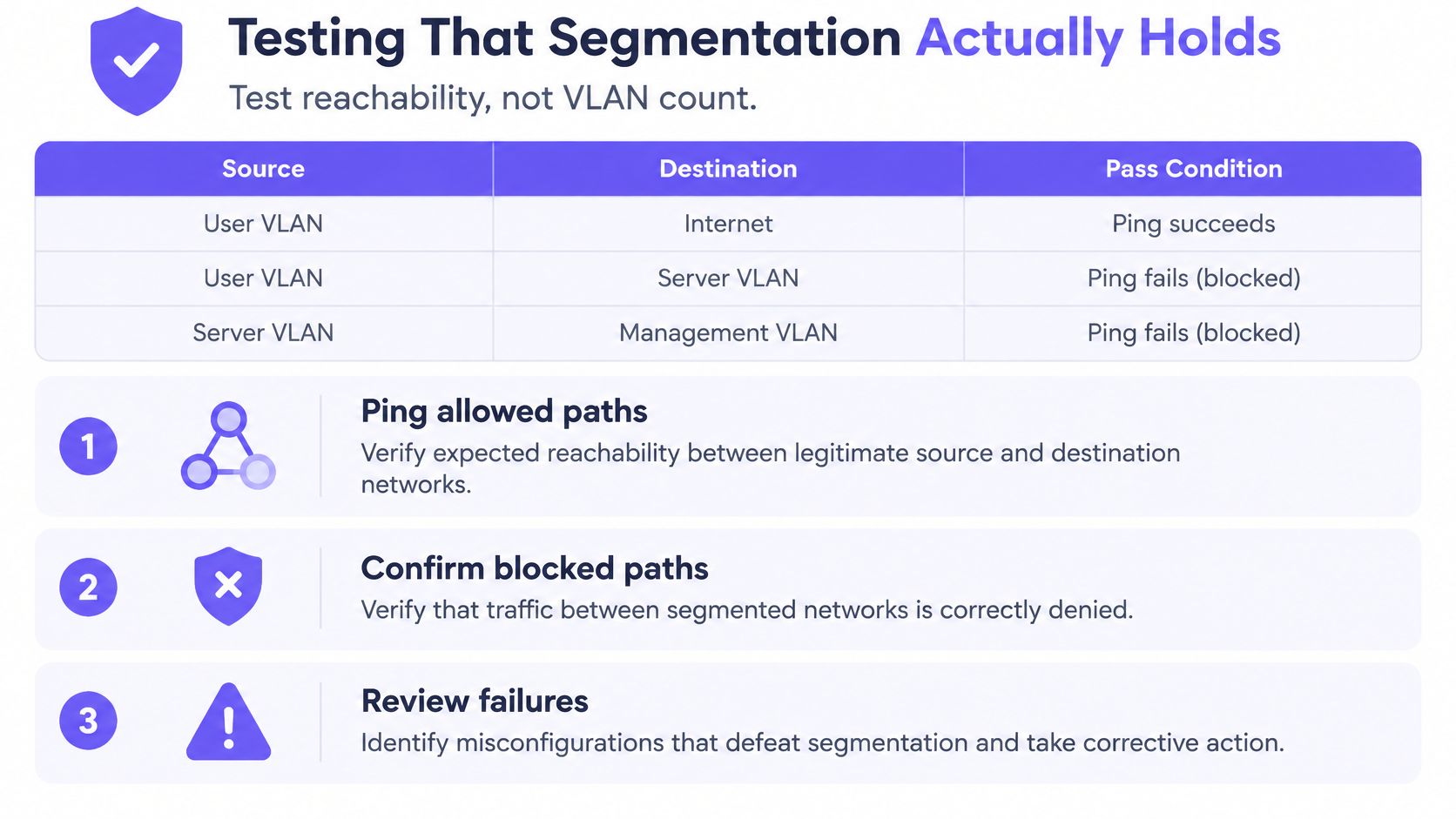
| Test | From | To | Pass when |
|---|---|---|---|
| Lateral reach | Guest VLAN 10 | Staff VLAN 20 | Zero connections succeed |
| Peer reach in guest VLAN | Guest device A | Guest device B | Blocked by client isolation |
| Trunk leak | Access port | Unused VLAN | No frames are tagged for the unused VLAN |
| Device exposure | Guest VLAN 10 | Lock controller | Connection is refused |
| Exception check | Staff VLAN 20 | Named file server | Only the approved port is open |
Logical separation can fail through ordinary configuration mistakes. A trunk can carry traffic for VLANs that don't belong on that link. A native VLAN can expose traffic in an unexpected way. An unmanaged switch port can put a device into the default VLAN, while permissive routing or an overly broad firewall rule can reopen paths the design meant to block.
Use three checks, then retest changes
First, perform an authenticated configuration review of switches and firewalls. Check VLAN membership on access ports, allowed VLANs on trunks, the native VLAN, routing interfaces and the rules that permit inter-VLAN traffic.
Second, run vulnerability scans on each segment. A scan can reveal systems that shouldn't be present, exposed services that need review and differences between the intended map and the deployed network.
Third, arrange a penetration test that attempts lateral movement from each lower-trust VLAN into higher-trust zones. A test should exercise realistic paths, not just confirm that the network has separate VLAN names. For guidance on checking the authentication path itself, see how to test RADIUS authentication.
After a firewall change for a point-of-sale vendor, retest from the guest VLAN to the POS system and confirm that guest traffic is still blocked. Then test the vendor exception from its approved source and confirm that only its approved port is open.
Run these checks after every relevant change:
- Verify allowed paths: Confirm required applications still connect.
- Verify denied paths: Attempt connections that policy says must fail.
- Check port and VLAN assignment: Confirm test devices land in the intended segment.
- Review boundary logs: Confirm permitted and denied decisions are recorded.
- Record approval: Keep an owner and reason for every active exception.
Treat a test as passed only when unauthorized paths fail, boundary decisions are logged and each exception has a documented owner. When a test fails, fix the rule and rerun the same test before closing the ticket.
Confirm the segment map and pilot one site
A reliable rollout begins with an agreed map and a site where the team can verify the design against real devices. Use this decision path:
- Confirm each group with its owner. Match the group to a VLAN, an identity source and the systems it needs to reach.
- Use the planner. Tick what connects to the network today and check where each group would land across the three networks.
- Pilot one site. Run the reachability tests with the site's owners and confirm that everyday services still work.
- Roll out only after the pilot passes. Keep exceptions tied to named owners before applying the configuration elsewhere.
Purple Access uses three SSIDs instead of seven, with identity deciding the VLAN and each resident, tenant or device group placed in its own segment. Its planner lets teams map what connects today to the three networks, and expert design sessions can review the plan before rollout.
A VLAN is a boundary you have to prove, not a label you assign.
Run the planner or book a design session before changing switch configuration.
Purple Access can map open, secure and xPSK networks to identity-driven VLAN assignments on existing access points, with revocation and audit logging. Use the Purple Access planner to map your current device groups, then validate the reachability rules before rollout.