How to test RADIUS authentication step by step
Published
You're at a site with a laptop, an access point, and a RADIUS server that "should already be fine." Someone pinged it. UDP 1812 is open. A dashboard probe even came back green. None of that tells you whether a staff device lands on the staff VLAN, or whether a revoked certificate still gets a session.
How to test RADIUS authentication is a chain of proofs, not one login. Treat every Access-Accept as a hypothesis. You still have to check the method, the attributes, the source address, and what the network does when the server, the directory, or the certificate is wrong.
Start with one controlled request. Then widen the cases until a false pass has nowhere to hide.
Table of Contents
- Send Your First Test With radtest
- Why Access-Accept Does Not Prove Network Access
- Test Cases Every RADIUS Deployment Needs
- Measure Load and Latency With radclient
- Failure Paths, Failover and Security Checks
- Read Logs to Confirm Each Test Result
- Decide When RADIUS Is Ready for Rollout
Send Your First Test With radtest
The command you can run in the next five minutes is radtest testing password 127.0.0.1 0 testing123. The FreeRADIUS radtest manual defines that as a controlled Access-Request with five inputs: username, password, server address, NAS-Port, and shared secret. PAP is the default. The same utility can also send CHAP, MS-CHAP, or EAP-MD5.
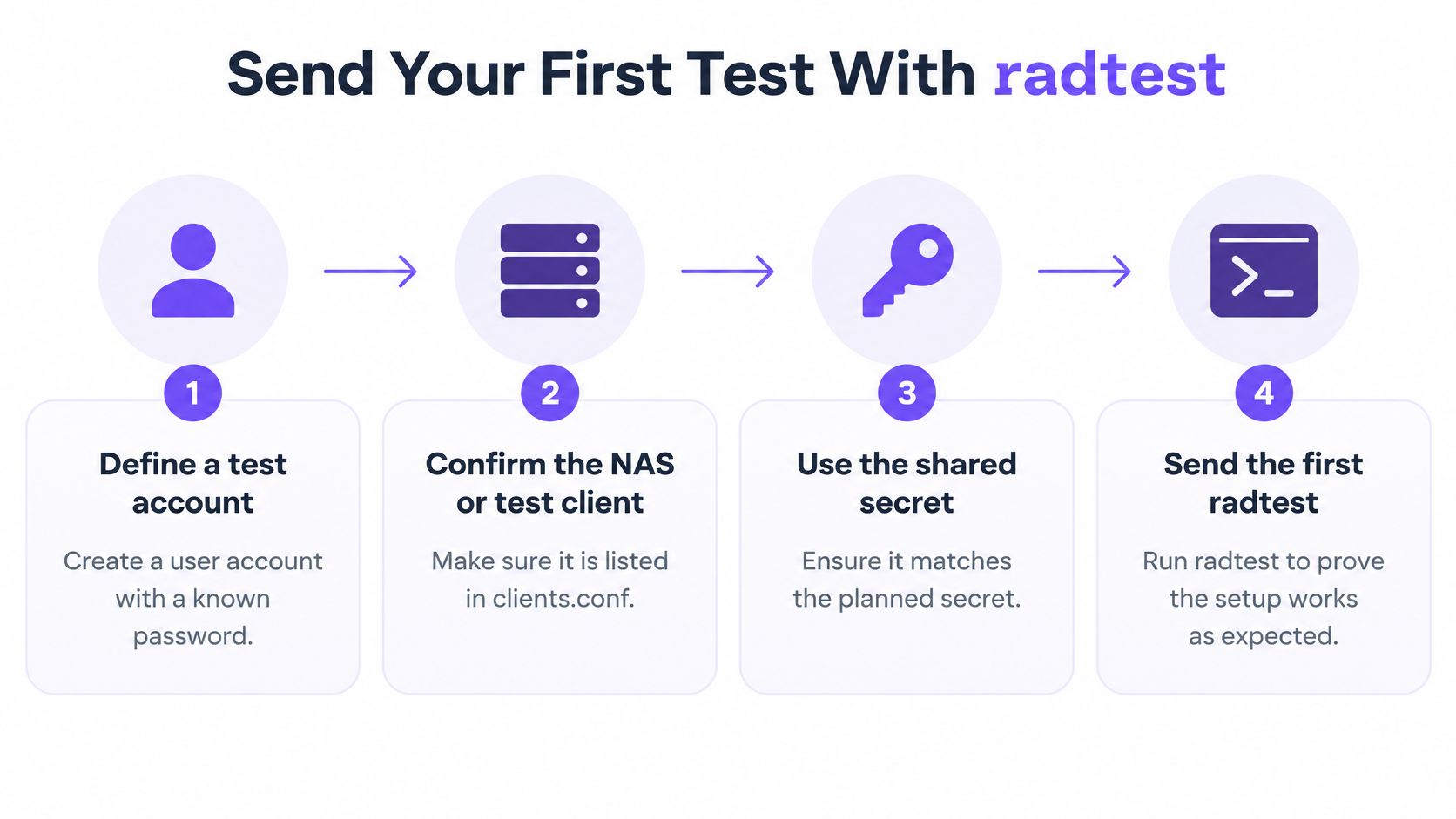
Run the baseline before you change anything else
- Define a test account. Put a known username and password where the server will find them. You want a credential you can type without hunting through a directory.
- List the client. The host or NAS you send from must be in
clients.confwith the secret you will type. An unknown source is a different failure from a bad password. - Start the server in debug mode. Every packet and rejection reason should print on the terminal. A silent failure wastes the run.
- Send the five inputs. Username, password, server, NAS-Port, secret. A NAS-Port of
0is enough for this first proof. - Read the code, then the reason. Access-Accept means the server approved those credentials. Access-Reject means it refused them. Debug output separates an incorrect shared secret, an unknown client, invalid credentials, and a policy failure.
- Repeat from the NAS. Source the same request from the access point or switch address, not only from localhost. Clients are commonly authorized by source address and shared secret together.
Reachability is not the result. The packet has to arrive, and the authorization decision has to be the one you expected. On an accept, inspect returned attributes such as VLAN, service type, or framed address. An accept that names the wrong VLAN is not a pass, even when the code looks clean.
After that basic accept, the same manual lists eight methods that can work for the example account: PAP, CHAP, MS-CHAPv1, MS-CHAPv2, PEAP, EAP-TTLS, EAP-GTC, and EAP-MD5. Don't chase all eight today.
Practical rule: Save one Access-Accept from the real NAS address and one Access-Reject from a wrong password. Those two notes are the baseline every later case is judged against.
Why Access-Accept does not prove network Access
A green infrastructure test is the false pass I would not sign off on. It often only shows that some request got some reply.
The Meraki RADIUS troubleshooting guide states that its dashboard test uses PEAP with MS-CHAPv2. That test fails, or gives no meaningful validation, for EAP-TLS, because the access point has no client certificate. Certificate wireless has to be tested with a real supplicant that holds the right certificate and trust chain.
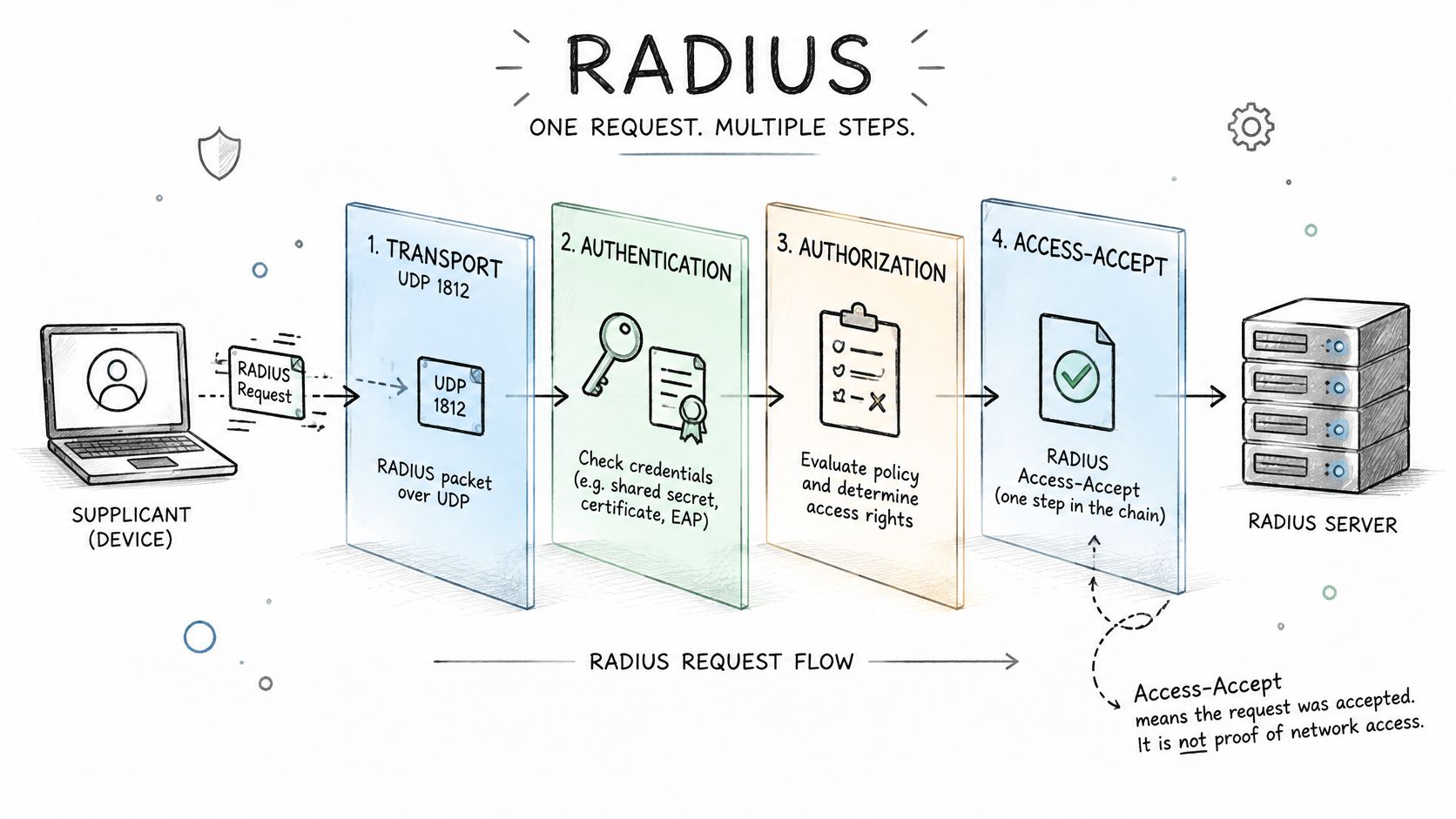
Four layers, four different questions
Transport asks whether anything answered. A timeout is not a reject.
Authentication asks whether the password or certificate was valid for that identity.
Authorization asks whether the reply carried the VLAN, role, or ACL you meant to send.
Reachability asks whether the endpoint got the expected address, DNS policy, and access to the resources that segment should allow.
A pass on one layer says nothing about the other three. The same Meraki guidance, read alongside FreeRADIUS EAP behaviour, describes a successful EAP-TLS test as a multi-packet Access-Request and Access-Challenge exchange, then real client network access. A single connectivity probe is not that test.
Check the server name the supplicant trusts, the CA chain, certificate expiry, and the device clock. Clock drift fails a good certificate. Say a staff laptop authenticates and then sits on the default VLAN instead of the staff segment. The Accept was genuine. The network placement was wrong. That is the miss most checklists never record.
Keep separate rows for password users, EAP-TLS devices, xPSK identities, and directory-driven policy. A PAP accept must not stand in for a certificate join.
Prove EAP-TLS on a spare device
- Issue a test client certificate from the same CA the server trusts.
- Install the certificate and the CA chain on a spare laptop or phone.
- Confirm the supplicant validates the server name you configured.
- Connect and capture the challenge exchange, not a one-packet probe.
- Confirm the session ends on the expected VLAN with real network access.
A short view of that exchange makes the capture easier to recognise when your own trace is noisy.
Test cases every RADIUS deployment needs
A valid credential can produce an Access-Accept while the user lands on the wrong network. Test each layer separately: request handling, authentication, authorization attributes, and the endpoint's actual access. The FreeRADIUS performance testing guide covers load as well as correctness. Include negative cases too: invalid credentials should return Access-Reject, while malformed requests, an unrecognized NAS, and an incorrect shared secret must not produce a successful login.
The radtest workflow is long-established and still uses the same five inputs. For tunneled methods, test the inner authentication server separately on UDP port 18120. Use an MS-CHAP inner test when PEAP is the outer method. This helps isolate whether a failure sits in the outer EAP exchange, the certificate or TLS setup, or the inner credential check.
An Access-Accept is a hypothesis to verify, not proof of correct network access. The FreeRADIUS implementation guide describes how a NAS can discard an unsupported VLAN attribute or map a missing one to a default VLAN. Check the returned attributes, then verify the endpoint's address, VLAN, ACL, DNS policy, and reachability. EAP-MD5 does not provide the key material wireless needs, so an EAP-MD5 accept is not evidence of wireless readiness. Use it only for limited wired testing.
Decide the intended segments before running authorization tests; WiFi access control explains how to structure that policy.
Nine rows that count as the minimum
| Test case | How to run it | Expected result |
|---|---|---|
| Baseline accept | Run radtest with a valid test account from the NAS IP |
Access-Accept with the expected VLAN attribute; confirm the endpoint lands on that VLAN |
| Wrong password | Run radtest with an incorrect password |
Access-Reject with a logged reason |
| Wrong shared secret | Send from a client configured with a mismatched secret | No Access-Accept; secret error visible in debug output |
| Unknown NAS | Send from an IP address not defined as a client | Dropped or rejected and logged |
| Valid EAP-TLS device | Connect a real supplicant with a valid certificate and trusted chain | Access-Accept and the correct VLAN for its group; confirm network access from the device |
| Expired or revoked certificate | Connect a device with an expired or revoked certificate | Access-Reject, with no fallback to a default network |
| Directory group change | Move the test user to another group, then re-authenticate | VLAN or role changes to match the new group, or access is refused |
| Primary server unavailable | Block UDP 1812 to the primary or stop it | Failover to the secondary within the timeout, with the same policy applied |
| Accounting start and stop | Start a session, then end it | Start and stop records match the session |
For each row, record the request arrival, response code, round-trip latency, selected policy, returned attributes, and accounting start and stop. Repeat each test to catch intermittent UDP loss. A single clean run can miss a wrong VLAN or an inconsistent policy decision.
An accept that puts the client on the wrong network is a failed test.
Measure load and Latency With radclient
A quiet accept hides queueing. Volume testing needs a tool built for a batch, not another single login.
- Build an authentication file of randomized usernames and passwords. Mix valid and invalid entries so rejects are counted, not treated as noise.
- Send the file and time the batch with the Unix
timecommand whileradclientdrives the server. - Record the raw counts. Total requests, accepts, rejects, timeouts, error responses, and elapsed time.
- Calculate rates. Acceptance rate should match the valid share of the file. Reject rate should match the invalid share. Also take average and percentile latency.
- Repeat at the busy hour. A morning check-in or a school start will show queueing that a lunchtime lab run never will.
| Metric | How to calculate it | Target |
|---|---|---|
| Total requests | Count of lines sent from the authentication file | Equals file length |
| Acceptance rate | Accepts divided by total requests | Matches the valid share of the file |
| Reject rate | Rejects divided by total requests | Matches the invalid share of the file |
| Timeouts and errors | Count of no-reply and error responses in the run | Zero on a clean path |
| Average latency | Mean response time across all requests | Within your latency target at peak |
| Elapsed time | Unix time output for the full batch | Stable across repeat runs |
Separate the tunnel from the account store
If acceptance rate is lower than the valid share, don't blame "load" until you know which half failed. For PEAP, test the inner method on its own with an MS-CHAP request against the inner server. An inner accept with a broken outer join points at certificates or TLS settings. An outer handshake that dies on the inner check points at the account store, the password hash, or the group the policy expects.
Keep these timings in the same log as the functional results. A later firmware or directory change should be compared with that baseline, not with a feeling that "it felt slower."
If timeouts climb only at peak, fix capacity or the path before you add sites. A server that is correct and slow will still fail clients that give up first.
Failure Paths, failover and security Checks
A working exchange can still be unsafe. Troubleshooting that only asks whether UDP 1812 got a reply stops too early.
Juniper's 2025 security bulletin describes Blast-RADIUS exposure in the RFC 2865 Response Authenticator. A local attacker who can modify traffic can potentially turn a valid response into another response through an MD5 chosen-prefix collision. "Authentication succeeded" is not evidence the deployment is protected.
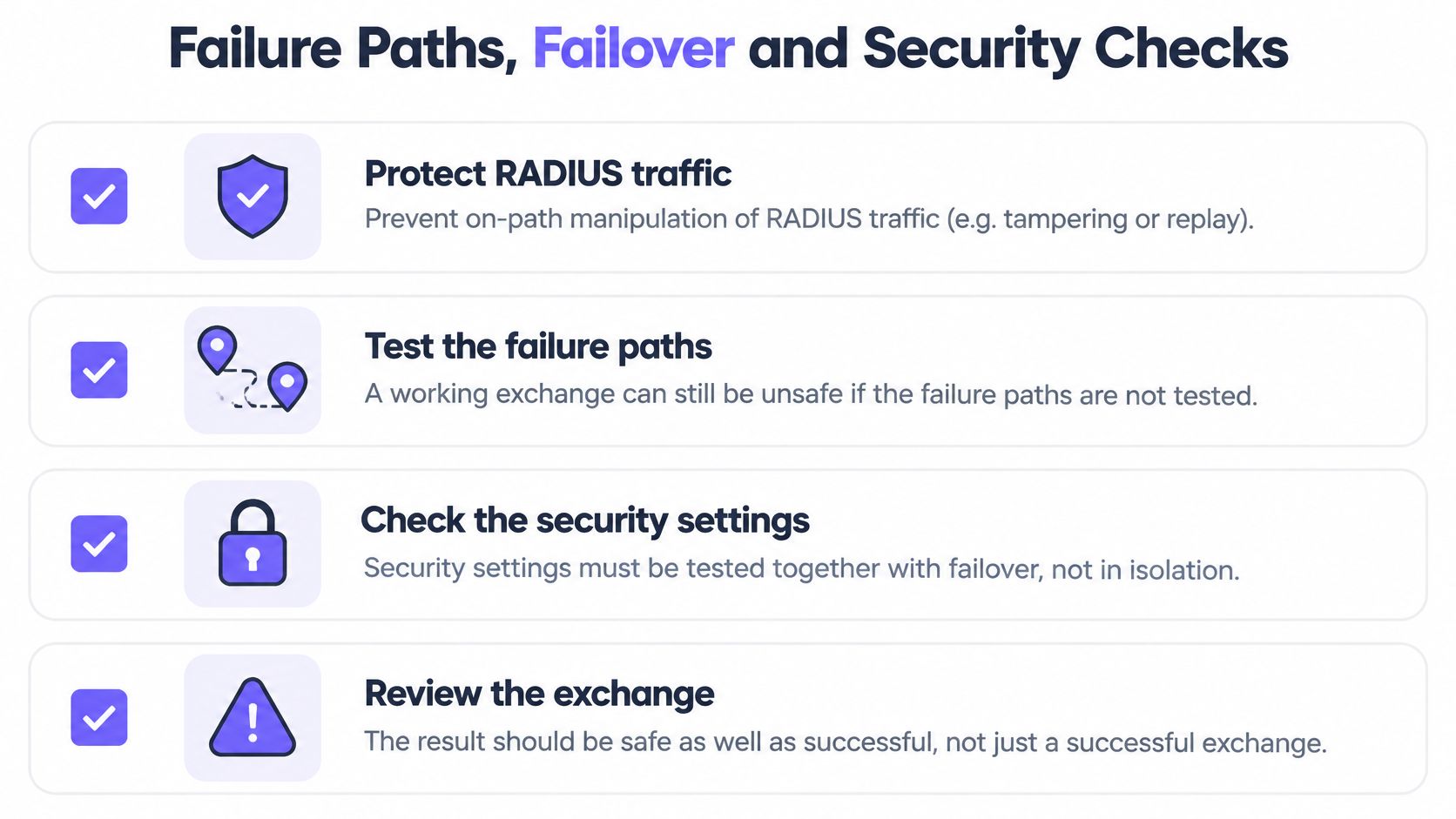
Checks that belong in the same run as failover
Protect the path where the platform allows it. Confirm on-path manipulation is blocked, and that Message-Authenticator validation is enforced on packets that require it.
Turn off weak methods. Obsolete EAP types should be disabled, not left "just in case." If you are still choosing between certificate and password outer methods, compare them in EAP-TLS vs PEAP before you leave both enabled.
Fail the server on purpose. Each scenario below should show the intended fail-closed or controlled fallback, plus a log line, an alert, and a user experience you can explain to a site manager.
| Failure scenario | How to trigger it | Pass condition |
|---|---|---|
| Timeout | Block UDP 1812 to the server | Fail closed or controlled fallback, logged and alerted |
| Access-Reject | Use a wrong password | Access denied with no fallback network |
| Expired certificate | Device with an expired certificate | Access-Reject with no default VLAN |
| Revoked certificate | Device with a revoked certificate | Access-Reject with no default VLAN |
| Unknown NAS source IP | Send from an undefined address | Dropped or rejected and logged |
| Incorrect shared secret | Mismatched secret on the client | No Access-Accept and secret error in debug output |
| Unreachable directory | Stop directory connectivity | Refused or controlled fallback per policy |
| Delayed authorization response | Add delay to the authorization reply | Timeout handled without open access |
What regional failover has to preserve
Another server answering is not policy consistency. When you stop the primary, compare VLAN, bandwidth limits, revocation status, and audit attributes from the backup with the primary. A guest who fails over into a staff segment is a failed test, even if the join was fast.
Mark any scenario that falls back to open access as failed, whether or not the user gets online. Write each result into the same test log as the functional baseline so a later failover change is obvious.
Read Logs to confirm each test result
Every test should leave a trace you can match to a test ID or a known account. On a busy estate, that label is how you find your run without scrolling past everyone else's morning.
For each authentication, line up these fields:
- Identity and device: who or what joined, not just a MAC you hope is yours.
- Method: EAP-TLS, PEAP, or an individual PSK. A method you didn't deploy is a finding.
- Place: access point, SSID, and site.
- Decision: VLAN and role returned, or the reject reason.
- Time: timestamp that sits inside the window you tested.
Our authentication log is built for that match. One estate-wide query shows every accept and reject with identity, device, enrolment state, method, access point, SSID, site, VLAN, role, reason, and timestamps. Use it when a site has many access points and you need to see whether the same failure is everywhere or only on one controller.
Three patterns that mean the notes are wrong
The reason doesn't match the test. You sent a bad password and the log says unknown client. You tested the wrong thing, or two faults stacked.
The accept names the default VLAN. Credentials worked. Placement didn't. Don't close the case.
Accounting started and never stopped. The session record is incomplete, so you can't prove the client left when you think it did. Compare start and stop with the session you ran, not with a nearby user's.
Set an alert for reject spikes during the test window so a bad shared secret doesn't look like "users typed badly." Keep the log extract with the test notes. That extract is the audit evidence when someone asks, weeks later, what you proved.
Decide when RADIUS is Ready for rollout
Go live only when the evidence meets five gates. A confident engineer is not one of them.
- Every matrix row passes on each NAS type you deploy, including each SSID or access policy you intend to keep.
- Failover keeps the same VLAN, policy, and revocation behaviour as the primary. A second server that answers with a different role fails this gate.
- No failure scenario falls open. Wrong password, dead directory, expired certificate, and a delayed reply must not drop the user onto an unrestricted network.
- Load stays inside your latency target at peak, with acceptance rate matching the valid share of the test file.
- Logs show the expected reason and VLAN for every run you claim as a pass.
Hold the wider rollout until those five are true on a real site, not only in a lab VLAN.
We let you prove this on one site first. Put the new open, secure, and xPSK networks on the access points that site already runs, beside the network it uses today, and judge the result on tickets and audit evidence before any other site changes. During that pilot, the log should answer two questions without a meeting. Which devices joined on which VLAN, and which accept or reject reason showed up most often.
Extend only when tickets and the audit extract show no unexpected rejects and no devices on the wrong segment. Keep the matrix as a standing regression suite. Rerun it after every certificate renewal, firmware update, or directory change, against the same baseline, before users see the change. For how that pilot site should be drawn, start from WiFi network design and test the design you intend to keep, not a temporary SSID you will delete next week.
Purple Access gives you cloud RADIUS that places each device on the open, secure, or xPSK network by identity, with the VLAN and the reject reason visible in the authentication log. If you want that test plan run against the access points you already have, start with one site and read the result before you roll further. Visit Purple Access and put the first site on a baseline you can defend.