What is Passpoint? Secure automatic WiFi explained
Published
Passpoint is a Wi-Fi Alliance certification based on Hotspot 2.0 that lets a device join a participating network automatically when it holds valid credentials, instead of picking an SSID and typing a password.
If a phone can roam between mobile masts without asking you to log in each time, why does WiFi still ask returning visitors to find a network name, wait for a web page and prove themselves again? That gap is usually treated as normal. It isn't a technical limit. It's what happens when access is built around a shared password or a portal page rather than an identity the device already carries.
Table of Contents
- What Passpoint Is and Why It Is More Secure Than Open Hotspots
- How Passpoint Connects Without a Password Prompt
- How Devices Get a Passpoint Profile
- Passpoint, Captive Portals and OpenRoaming Compared
- Where Passpoint Is Deployed and What It Does Not Do
- Decide Whether Passpoint Fits Your Network
What Passpoint is and why it is more secure than open hotspots
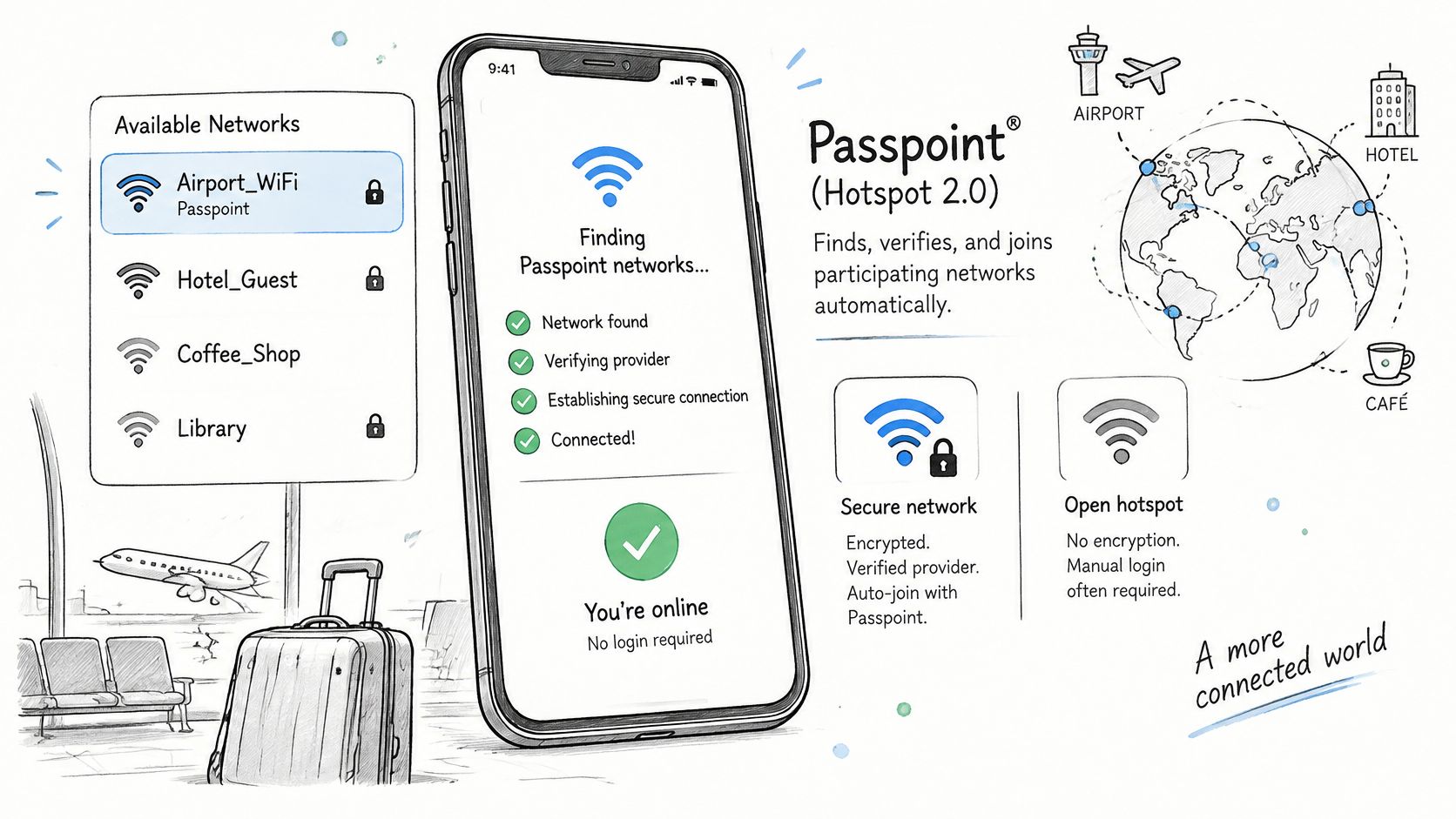
Passpoint, also called Hotspot 2.0, is the Wi-Fi Alliance certification program that lets a device find, verify and join a participating network automatically when it holds valid credentials. According to the Wi-Fi Alliance Passpoint technology overview, it uses IEEE 802.11u for pre-association discovery, IEEE 802.1X for authentication, and WPA2-Enterprise or WPA3-Enterprise for encrypted access.
Passpoint is a Wi-Fi Alliance certification based on Hotspot 2.0. It uses 802.11u to discover networks before connecting, 802.1X to check identity, and WPA2-Enterprise or WPA3-Enterprise to encrypt the link.
Think of it as a member's card accepted at partner venues. You enroll once, the card stays in your wallet, and staff at each site check the card instead of asking you to sign a guest book. An open hotspot works the other way. You look for the right door, retype a password everyone shares, and repeat the process on your next visit.
Where the standard came from
The Wi-Fi Alliance introduced Release 1 in 2012, initially targeting secure hotspot access and inter-provider roaming, then introduced Release 2 in 2014 with online signup and support for enrolling non-SIM devices. That history matters because Passpoint wasn't designed as a nicer login page. It was designed to move public WiFi toward credential-based roaming.
Why the security model is stronger
An open captive-portal network generally has no per-device credential at the WiFi layer. The portal may collect an email address or voucher after association, but that doesn't prove each device's identity in the same way, and it doesn't by itself encrypt the wireless link. Certified Passpoint uses 802.1X and EAP instead of a shared key, so the network checks a credential tied to a device, user, SIM or provider.
The Wi-Fi Alliance Passpoint security guidance states that Passpoint requires Protected Management Frames, which helps prevent management-frame spoofing and certain deauthentication or impersonation attacks. It also identifies Layer 2 traffic inspection, proxy ARP, multicast-to-unicast conversion and group-key randomization as mechanisms that can reduce client-to-client exposure on public hotspots.
Credential choice still changes the result. EAP-TLS can give each device a certificate, provide mutual authentication and allow targeted revocation. SIM-based EAP binds access to mobile-operator credentials. Security therefore depends on the credential type and backend design, and the backhaul between hotspot and provider core still needs protection.
That's also the limit to keep in mind. A lost, unsecured device can hold a valid profile, and weak backend policy can waste strong authentication. Automatic access improves the WiFi layer, but it doesn't replace good device controls or network design. Venues sorting out everyday performance issues still need the basics too, and this guide on how to improve WiFi for video meetings is a useful reminder that authentication, coverage and bandwidth solve different problems.
How Passpoint connects without a password Prompt
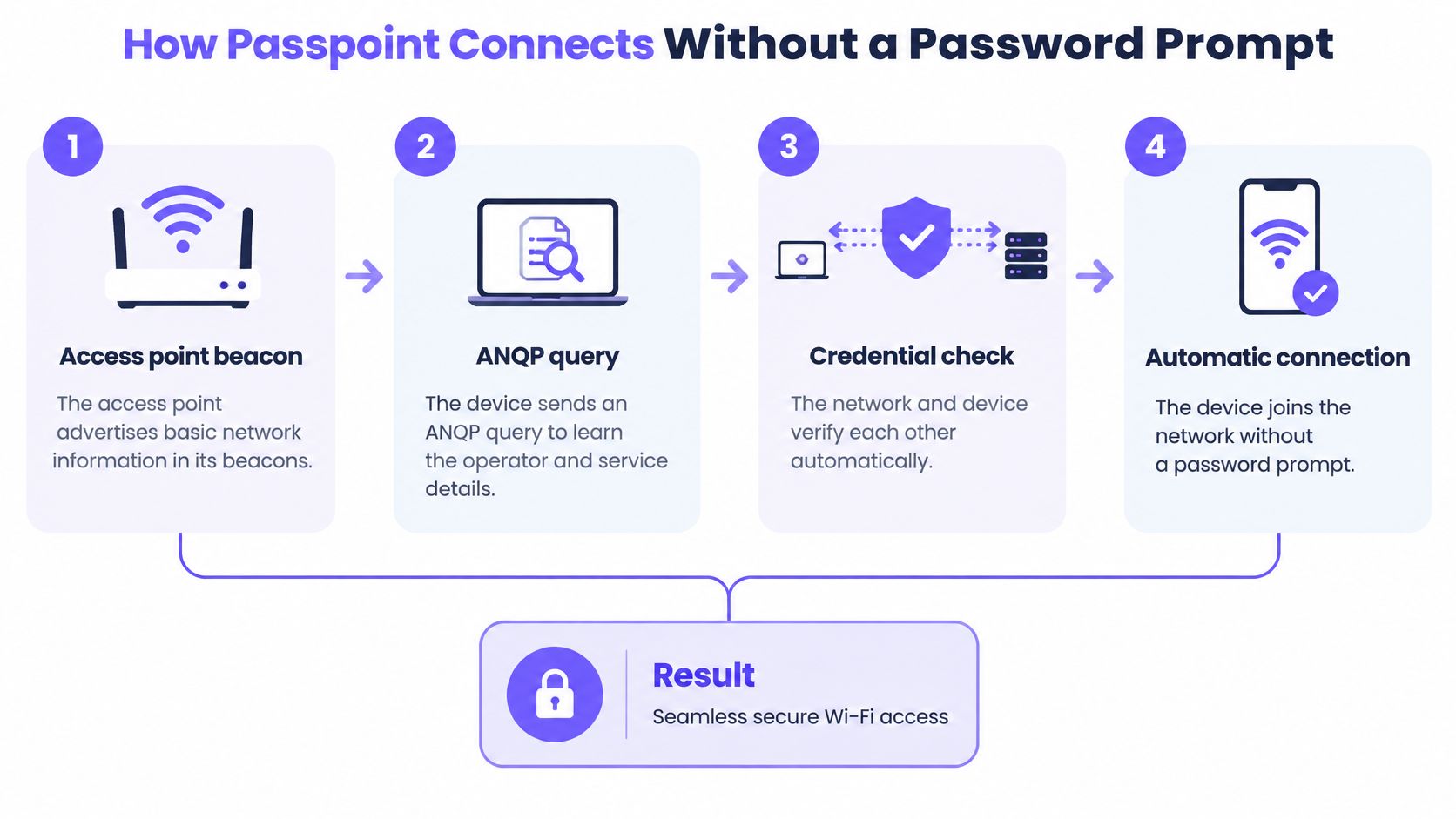
The connection feels instant because most of the work happens before association. Your device asks what the network is, checks whether it already trusts that provider, and only then joins and authenticates.
The diagram below summarises the same sequence in four stages.
The six steps in order
- Access point beacon: The access point advertises basic network information in its beacons. This tells a compatible device that more detail is available before it commits to joining.
- ANQP query: The device sends an Access Network Query Protocol query to learn the operator identity, connectivity type, roaming partners and supported services. Cisco describes ANQP as the query and response mechanism for network capabilities in its Hotspot 2.0 technical note.
- Profile comparison: The device compares those answers with the provisioned subscription or credential profile it already holds. This prevents trial-and-error joining of networks it has no right to use.
- Network selection: If there's a match, it selects an eligible network without you choosing an SSID. If there isn't a match, it doesn't invent access.
- EAP authentication: It runs an enterprise EAP method, most often EAP-TLS with a device certificate, or EAP-TTLS with tunneled credentials. If you're weighing certificate authentication against password-based methods, this comparison of EAP-TLS and PEAP authentication methods explains the practical trade-offs.
- AAA and RADIUS decision: The access network passes the request to a home AAA or RADIUS service. That service decides whether the device is permitted and what policy it receives.
The split between steps is the point readers often miss. ANQP handles discovery. AAA handles permission. ANQP doesn't grant access, and RADIUS doesn't choose among nearby networks. Each solves one half of the problem.
The short video below walks through the connection flow visually, which helps if beacon, query and authentication still sound like one event.
Common slip: A device without a valid profile can't use Passpoint just because the access point supports it. It falls back to ordinary WiFi and asks for credentials, a portal login or a shared password.
You can verify the result without packet captures. Look for a saved provider profile in the device WiFi settings, then leave and return. A working Passpoint connection reconnects without a portal page appearing first.
How devices Get a Passpoint profile
Automatic joining starts with a one-time provisioning step. A device needs a profile or identity before it can recognise a participating network, compare what that network advertises and present the right credential.
That profile is the key input in the whole system. Without it, the device has nothing to match, no trusted provider to select and no credential to send. With it, the same enrollment can be reused on later visits instead of starting over at a login page.
Provisioning routes compared
| Route | Credential | Where it fits |
|---|---|---|
| Online signup | Account created on the device during enrolment | Devices without a SIM, Release 2 onboarding |
| SIM-based EAP | Mobile-operator SIM credentials | Carrier offload |
| EAP-TLS certificate | Device certificate issued by the provider | Enterprise identity with targeted revocation |
| OpenRoaming identity | Identity from a participating identity provider | Roaming across participating networks |
| Manual provider profile | Provisioned profile on the device | Managed fleets and provider-led enrollment where IT installs the profile directly |
Online signup asks the most of the user at first, but it solves an important gap. It lets a device without a SIM enroll itself, so a laptop or tablet isn't excluded just because it has no mobile subscription. After that first enrollment, later connections don't need the signup flow again.
SIM-based EAP puts the identity work elsewhere. The mobile operator credential already exists in the phone, which suits carrier offload where the provider wants eligible handsets to move onto WiFi without handing out passwords. The venue still needs the right roaming arrangement and backend route.
EAP-TLS certificates suit organisations that manage devices directly. The provider issues a certificate to the device, mutual authentication checks both sides, and IT can revoke that one certificate if the device is lost or leaves service. For mixed personal and work devices, our guidance on BYOD onboarding for venue networks shows how enrollment choices affect support and control.
An OpenRoaming identity comes from a participating identity provider. The user enrolls once with that provider, and networks that accept that identity can authenticate the device when it arrives. A manual provider profile follows the same logic on a smaller scale, with the provider or IT team placing the configuration on the device.
What to check before you depend on a profile
Device and operating system support varies, so confirm support on the actual phones, laptops and tablets your users carry before planning a deployment. Don't test only on a new flagship phone if staff use older handsets.
You can also check whether provisioning worked. The profile should appear in WiFi settings, and the device should reconnect without a portal page. After authentication, RADIUS authorization attributes can place guests, staff and managed devices into separate segments, so the route you choose affects not just joining, but where the device lands.
Passpoint, captive Portals and OpenRoaming compared
Start with the side-by-side view, then use the notes below to interpret it.
| Aspect | Passpoint | Captive portal | OpenRoaming |
|---|---|---|---|
| How the device connects | Automatic selection from advertised network information | Manual network choice, then a web page | Automatic through an OpenRoaming-enabled Passpoint profile |
| Login on each visit | No, when valid credentials are present | Yes, the portal page appears each time | No, the profile reconnects |
| Credentials used | Certificates, SIM credentials or a provisioned profile | Guest details, voucher, social login or SMS code | Identity from a participating identity provider |
| Encryption | WPA2-Enterprise or WPA3-Enterprise with 802.1X | Often open or shared key, depending on the venue | Inherits WPA2-Enterprise or WPA3-Enterprise from Passpoint |
| Standards basis | IEEE 802.11u, IEEE 802.1X, Hotspot 2.0 | Vendor-specific web authentication | Built on Passpoint, governed by the Wireless Broadband Alliance |
| Typical venue | Carriers, airports, large venues | Cafés, hotels, most public WiFi | Roaming across participating networks for enrolled users |
How to read the differences
- Captive portal: The user joins manually, then a web page stops them at every visit to collect details, a voucher or acceptance of terms.
- Passpoint: The device connects automatically once a profile is present, using enterprise authentication and encryption.
- OpenRoaming: This is an identity framework built on Passpoint, so it extends which credentials participating networks accept. Our explainer on OpenRoaming WiFi for venues covers how that federation works in practice.
These options overlap rather than compete. A hotel, for example, can use a portal for a first-time guest who has no profile, then offer profile enrollment so the same guest reconnects automatically tomorrow. A carrier customer may skip the portal entirely if the SIM credential and roaming arrangement already match.
Adoption is moving toward that federated model. The Wireless Broadband Alliance survey reported by Telecoms.com found that in 2024, 81% of 180 globally surveyed WiFi industry executives said they planned to deploy OpenRoaming in 2025 or 2026. Treat that as an adoption signal, not proof that every venue should join a federation now.
Arrival test: If a login page appears on every visit, you're seeing a portal. If the device connects silently with an enrolled profile, you're seeing Passpoint, possibly with OpenRoaming behind it.
That simple test prevents a lot of confusion in vendor conversations. Ask what credential the device presents, not just whether the experience feels smooth. A remembered shared password can also reconnect automatically, but it isn't identity-based access.
Where Passpoint is Deployed and what it does not Do
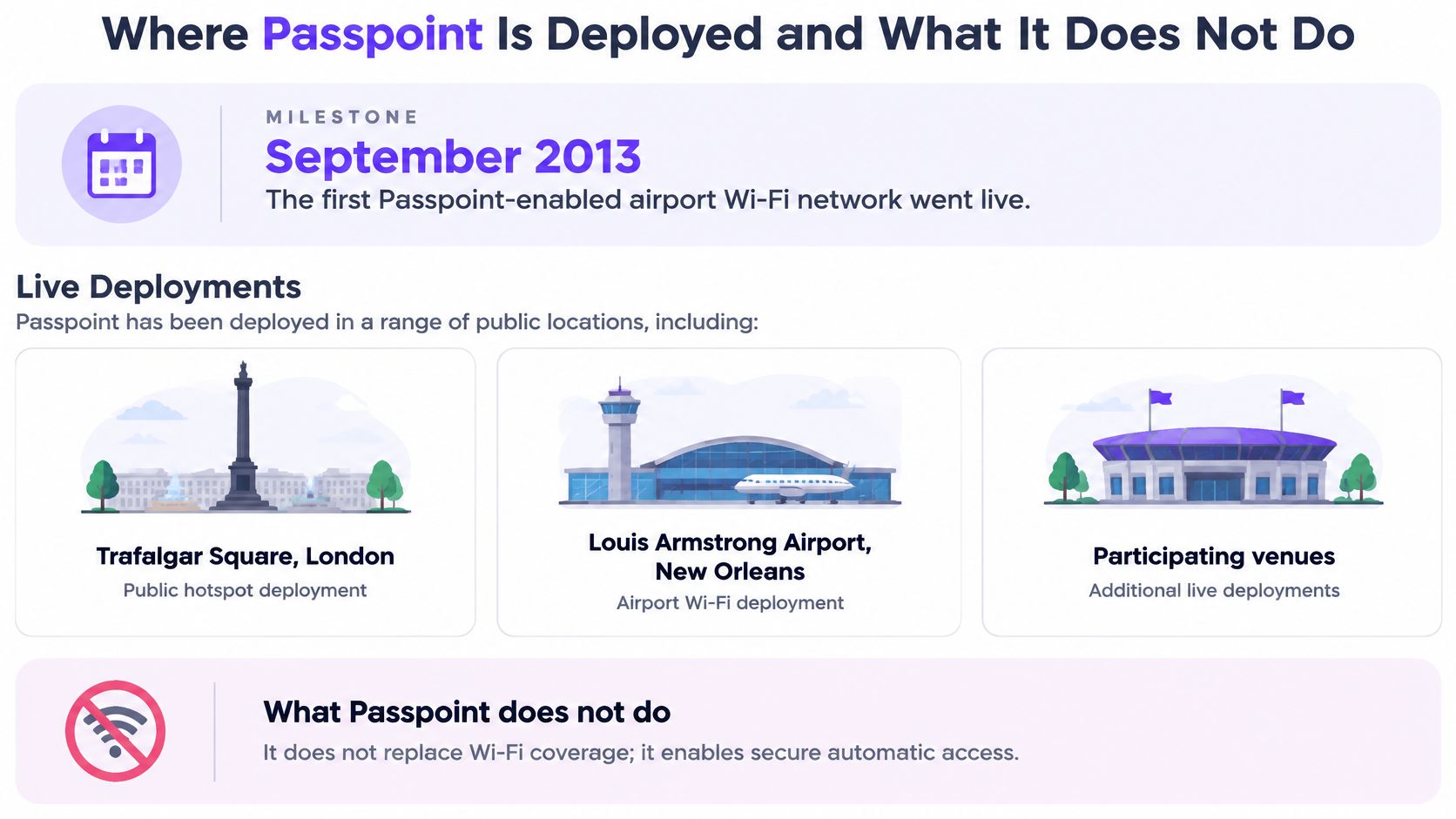
Passpoint left the lab early. The Wi-Fi Alliance deployment announcement reports that the first Passpoint-enabled airport WiFi network was implemented in September 2013, followed by deployments including Trafalgar Square in London, Louis Armstrong Airport in New Orleans and John Wayne Airport in California.
In a Wi-Fi Alliance survey associated with the early Passpoint program, 84% of respondents expressed interest in automatic hotspot discovery and authentication. During that early phase, the Alliance reported approximately 75 Passpoint client devices. It later described Passpoint as enabled in a majority of mobile devices and reported a deployment covering 13,000 locations in China across restaurants, cafés, supermarkets and shopping malls.
Say a traveller installs one eligible profile before a trip. The same phone can join the airport network on arrival, then join a café down the road, without a login page at either stop. The phone isn't remembering two SSID passwords. It's matching each advertised network against the identity and roaming information in its profile.
Four misconceptions to correct
- Passpoint is not OpenRoaming: OpenRoaming is an identity framework built on Passpoint. Passpoint can work within one provider's estate without that wider federation.
- It doesn't work from nothing: A provisioned profile must exist before automatic joining. Support in the access point alone isn't enough.
- Not every phone supports it: Device and operating system support varies. Check the fleet and guest devices you expect, then keep a fallback for the rest.
- It doesn't make a network unhackable: It doesn't secure a stolen device, fix weak backend policy or compensate for poor segmentation after authentication.
Passpoint proves identity and encrypts access. It doesn't replace every captive portal, repair weak network design or make a lost device safe.
That last point matters for buying decisions. A café with mostly one-time visitors may still need a straightforward portal, while an airport with repeat travellers and carrier partners gains more from automatic roaming. The right answer depends on who returns, which identities they carry and what the backend can enforce.
Use one rule of thumb when you hear a broad claim. Ask whether it names the credential, the encryption and the backend. If it can't name all three, you're hearing a marketing label rather than a security design.
Decide whether Passpoint fits your network
Use a yes-or-no test before you discuss products. Passpoint fits when many users return, devices can hold profiles, you need identity-based segmentation, and your access points support the standard. If most answers are yes, automatic access removes repeated work without giving up per-device control.
A captive portal still fits better for occasional visitors, devices without profile support and venues with no identity provider. That's not a failure. A one-time guest who needs ten minutes of WiFi may be better served by a clear portal than by an enrollment flow they'll never reuse.
Many venues should run both. Keep the portal for casual visitors and first enrollment, then let returning guests, staff or residents use a profile. The decision isn't portal or Passpoint for everyone. It's which route fits each group.
Pilot one site before you roll out
Start on one site, beside the network you run today, so existing users aren't disrupted while you test. Purple Access lets customers prove the solution on one site first by putting open, secure and xPSK on the access points the site already has, then judging the result on tickets and audit evidence before rolling out.
Judge that pilot on evidence you can inspect. Track connection success, count support tickets, review authentication logs and test revocation on a device you control. If a revoked profile still joins, or staff can't tell which identity authenticated, fix that before adding sites.
You can also use a 45-minute design session where a Purple network engineer maps your SSIDs onto open, secure and xPSK networks on the access points you already own, and you keep the plan. That gives you a concrete design to test rather than a general promise about smooth access.
Three actions for this week
- Confirm support: Check Passpoint support on your access points and on representative user devices.
- Confirm the identity route: Decide whether you'll offer provider profiles, certificates, SIM-based access or OpenRoaming.
- Choose one pilot site: Pick a site with returning users and measurable support demand, then define success before you switch anything on.
If returning users still face a portal or a shared password on every visit, Purple Access can help you put open, secure and xPSK networks on the access points you already own, with Passpoint and OpenRoaming on the secure network. Start with the 45-minute design session to map your current SSIDs, keep the plan, and pilot the result on one site before you roll it out.