Open roaming WiFi Explained: Log in without portals
Published
If your WiFi access points support OpenRoaming, why might a visitor still be unable to connect? Because automatic login depends on more than the radio hardware. The device needs a usable profile, an identity provider must authenticate it, and the venue must accept that provider's credentials.
For IT teams and venue managers, OpenRoaming WiFi is best understood as a different way to establish trust, not a promise that every visitor will connect automatically. It can remove repeated login screens, but it doesn't remove your responsibility for access policy, fallback connections or privacy.
Table of Contents
- What OpenRoaming Replaces and Why Portals Are Going
- Guest Access Methods Compared Side by Side
- How a Device Logs In Without Asking
- How to Validate an OpenRoaming Rollout Before Go-Live
- Privacy Trade-Offs Behind Automatic Access
- Confirm Your Pilot Plan Before Replacing Guest Portals
What OpenRoaming Replaces and Why Portals Are Going
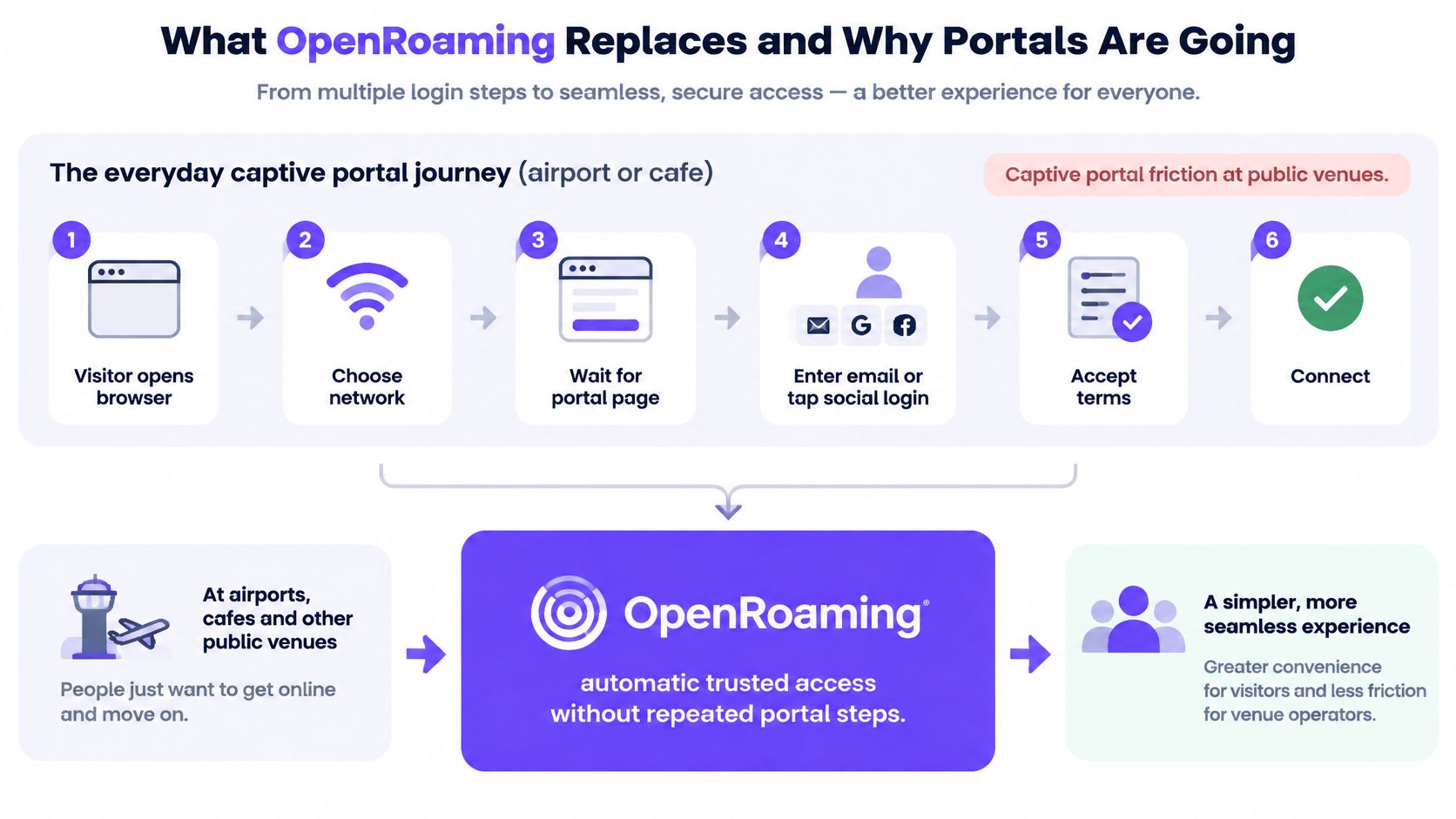
A traveller arrives at an airport, chooses the guest network and opens a browser. They wait for a captive portal, enter an email address or select a social login, then accept the terms. At the café outside the terminal, they repeat the process.
Nothing about that second registration helps the device remember that its owner already has a trusted identity elsewhere. Each venue treats the visitor as a fresh onboarding task.
OpenRoaming, built on Wi-Fi CERTIFIED Passpoint, changes that relationship. Instead of asking the person to complete another browser form, the network can accept a credential the device already holds.
Think of a hotel loyalty keycard accepted at participating partner hotels, rather than a registration form you must complete at every reception desk. Each hotel still decides which doors that card can open.
The device carries the introduction
The arrangement has distinct participants:
- The device holds a profile. This tells it which participating networks it can use and which credential to present.
- The identity provider vouches for the user. That organisation authenticates the credential rather than requiring every venue to maintain a separate guest account.
- The venue authorises access. It accepts the trusted authentication result and decides which network resources the device may reach.
Once the profile exists, the device does the routine connection work. The visitor doesn't have to choose a sign-in button every time they enter a participating location.
The contrast is easiest to see as a change in the visitor's journey.
Less interaction, not less responsibility
Removing the form doesn't mean giving every authenticated visitor unrestricted access. The venue still controls VLAN assignment, access policy and logging. A recognised guest identity should lead to guest permissions, not access to staff applications or building-management systems.
Nor does automatic onboarding eliminate the need to explain acceptable use and data handling. Those notices need a suitable home in enrolment and ongoing service communications rather than relying entirely on a portal interruption.
OpenRoaming is therefore a federated roaming identity framework, not one vendor's WiFi product. Its practical value comes from separating who authenticates the visitor from who operates the network, while allowing the venue to retain control.
Guest Access Methods Compared Side by Side
| Access method | What the visitor does | Portal shown | Credential held | Best fit |
|---|---|---|---|---|
| Captive portal guest login | Opens a browser page, picks a sign-in method, accepts terms | Yes | None, or a social or SMS login | First-time visitors with no profile |
| Passpoint or OpenRoaming profile | Installs the profile once; device joins automatically | No | Profile with identity certificate or credential | Returning guests and frequent travellers |
| EAP-TLS secure network | Device enrols through mobile device management | No | Device certificate | Staff-managed devices |
| Per-device pre-shared key | Device joins with its own unique key | No | Unique key per device, user or tenant | Residents, tills and IoT fleets |
A profile helps only when the device supports it and its identity provider is accepted by the venue. Keep a portal-based route available for visitors who don't meet those conditions.
Match the method to the person or device
A captive portal remains useful for someone arriving without an established relationship with your organisation. Depending on the service, sign-in might use SSO, Google, Apple, Facebook or an SMS one-time passcode, with acceptance and consent recorded appropriately.
A Passpoint or OpenRoaming profile suits someone who returns or travels between participating properties. Passpoint handles profile-based network discovery and authentication; OpenRoaming adds the federation that allows independently operated networks and identity providers to trust one another. They're related, but they aren't interchangeable names for every deployment.
EAP-TLS suits managed staff equipment because administrators can provision device certificates through mobile device management. It isn't a competing roaming federation. It's an authentication method that can also sit underneath profile-based access.
A per-device pre-shared key suits equipment that needs a practical, individually revocable credential. A till or thermostat shouldn't need a browser, and retiring one device shouldn't require changing a password across an entire estate.
Plan for coexistence
A venue can offer these methods alongside one another. Map identities to appropriate VLANs and enforce firewall rules between them, rather than assuming different network names alone provide isolation. A guest should reach the internet without gaining a route to payment systems or employee services.
When comparing guest WiFi solutions, assess the onboarding journey for each audience rather than choosing one login method for everyone.
The profile itself needs an enrolment route. A venue or participating identity provider can offer installation, but eligibility depends on that provider's relationship with the access network. Test the device families your visitors carry, including their operating-system versions and profile-installation restrictions.
Decision rule: List your visitor and device groups first. Assign each a primary access method, an owner for its credential and a usable fallback.
That exercise often reveals that the goal isn't to abolish portals. It's to stop asking already eligible users to complete them unnecessarily.
How a Device Logs In Without Asking
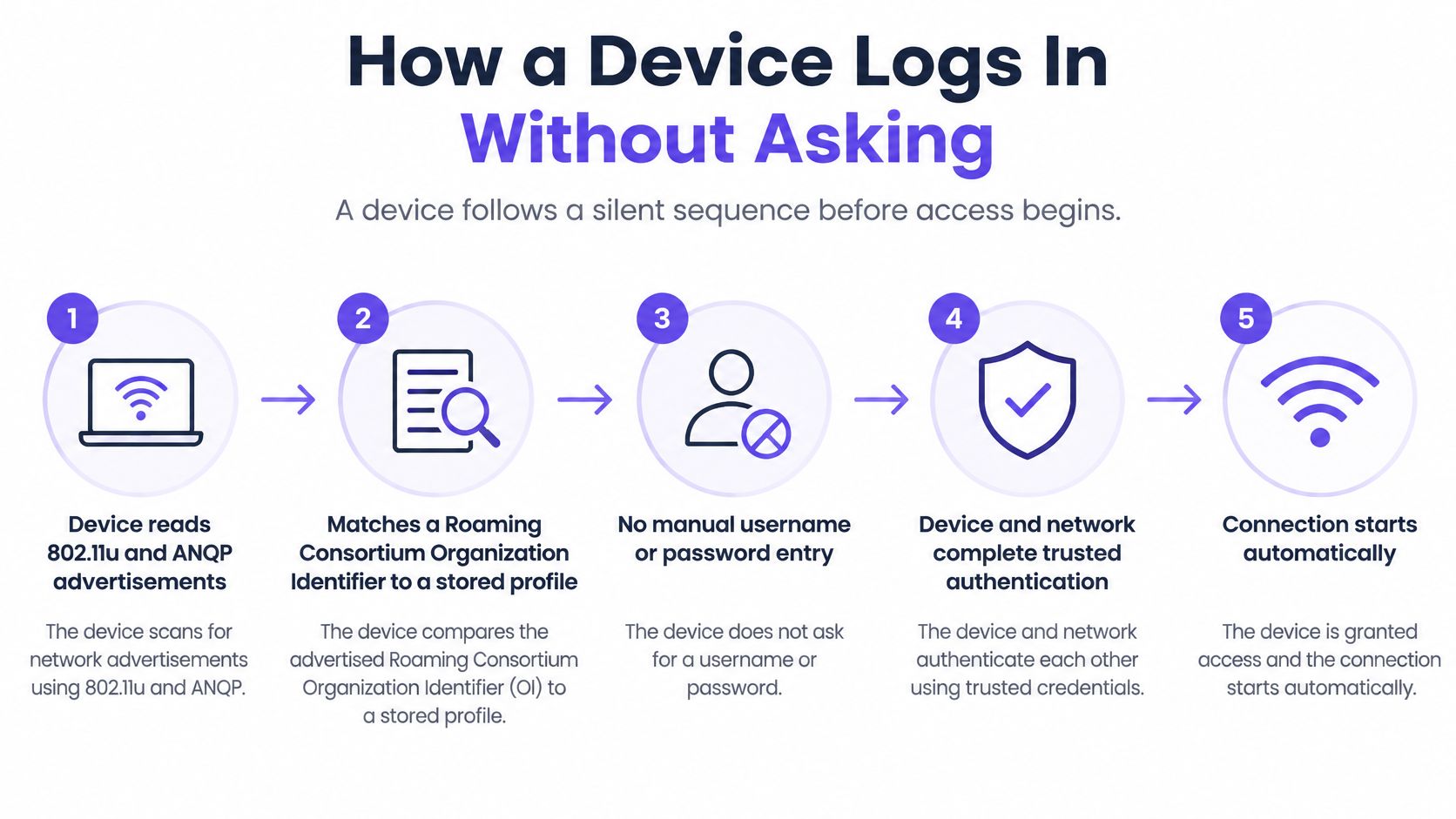
- Discover and match. The device reads 802.11u and ANQP network advertisements, then matches a Roaming Consortium Organization Identifier, or RCOI, to a stored profile. The visitor doesn't manually select an SSID.
- Begin authentication. The device starts an 802.1X exchange using an Extensible Authentication Protocol method, usually shortened to EAP.
- Forward the request. The access point or its controller passes the authentication exchange to the access provider's RADIUS infrastructure.
- Find the identity provider. The authentication infrastructure uses the realm in the user identity to route the request towards the appropriate provider.
- Check the credential. The identity provider validates the certificate, SIM-based credential or account information and returns an authentication result.
- Apply local permissions. The venue's infrastructure applies the authorised VLAN and access policy before allowing normal user traffic.
The Wireless Broadband Alliance's OpenRoaming overview describes the combination of Passpoint, federated identity and policy that supports this exchange, including realm-based routing and certificate-backed trust between providers.
The ordering matters. A captive portal commonly asks the browser to complete an access step after the device has joined the network. Here, the device completes enterprise authentication before ordinary data access begins. The browser isn't the authentication interface.
This diagram shows the same journey from the device's perspective.
Which credential does the device present?
A profile isn't necessarily a certificate. It contains configuration that tells the device how to discover and authenticate to an eligible network, and the underlying credential follows the selected EAP method.
| EAP method | Credential the device holds | Typical network |
|---|---|---|
| EAP-TLS | Client certificate and associated private key | Enterprise and mobile device management-managed devices |
| EAP-SIM | SIM card key | Mobile carrier subscribers |
| EAP-AKA | USIM key for authentication and key agreement | Carrier subscriber networks |
| EAP-AKA′ | USIM key with stronger key derivation | Carrier subscribers on newer AKA deployments |
| EAP-TTLS | Username and password inside a TLS tunnel | Staff or guest accounts authenticated through a certificate-validated server |
With EAP-TLS, the device proves possession of the private key associated with its certificate. With SIM-based methods, the carrier's authentication infrastructure validates the subscriber credential. With EAP-TTLS, the client must validate the authentication server's certificate before sending the inner credentials.
That distinction matters during procurement. An access point supporting Passpoint doesn't establish that every credential type in your intended visitor population will work through the complete authentication path.
Trust also exists between providers
RadSec carries RADIUS signalling over TLS between participating infrastructure. Mutual TLS allows the peers to validate one another using certificates, so certificate issuance, trusted roots, renewal and expiry all require operational ownership.
DNS-based RADIUS peer discovery helps an access provider locate the appropriate authentication peer for an identity realm. It avoids treating every new provider as a reason to reconfigure individual access points, although routing and federation policy still have to permit the relationship.
Before a live trial, an engineer should confirm the installed profile, advertised RCOIs, realm routing and supported EAP methods as a single chain. Capture client and authentication logs together: a device that never selects the network has a different fault from one whose credential is rejected after successful discovery.
How to Validate an OpenRoaming Rollout Before Go-Live
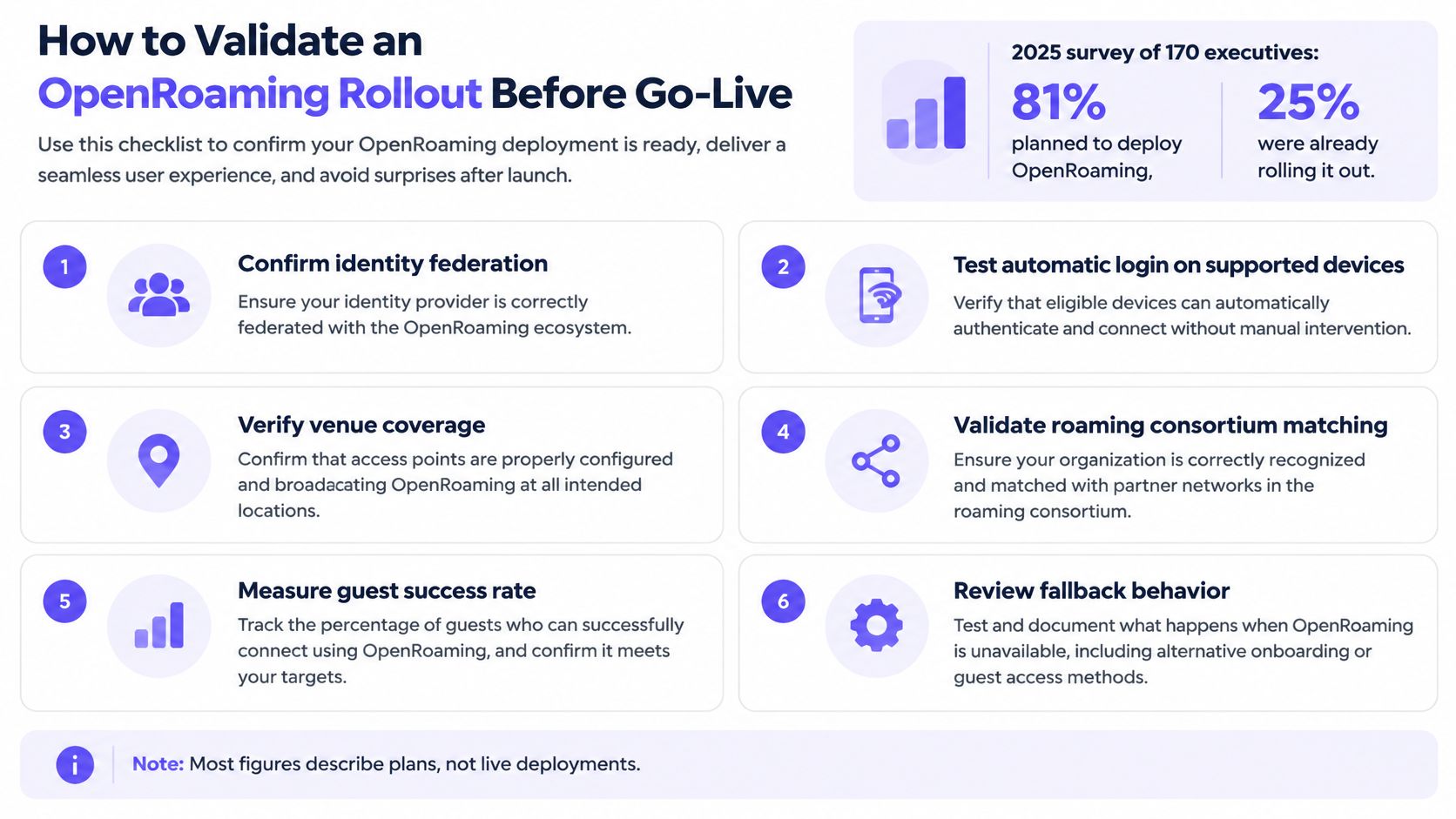
In a 2025 WBA survey of 170 industry executives, 81% planned to deploy OpenRoaming, while 25% were already rolling it out, according to CDG's account of the WBA survey. Those are planning and rollout measures, not proof that a particular visitor can connect at your venue.
Use a readiness checklist to turn a compatible infrastructure claim into a tested user journey.
Test the complete authentication chain
- Confirm federation participation. Identify who issues the credentials and how the venue trusts that provider. Record the support owner on each side.
- Exercise real client profiles. Use the device families your venue serves, including an unmanaged visitor device rather than only an engineer's prepared laptop.
- Verify RCOI and realm matching. Compare advertisements and routing with the provider's configuration so a discovery mismatch isn't mistaken for a bad password.
- Inspect certificate chains and expiry. Check client-facing authentication trust and RadSec peer trust separately.
- Validate peer discovery. Confirm that DNS-based discovery reaches the intended authentication infrastructure.
- Break the preferred path deliberately. Test an unavailable provider and an unsupported profile, then verify that the visitor can find and use the portal alternative.
- Check policy and measurement. Confirm VLAN placement, isolation and accounting across operators, including what your guest analytics can observe.
- Rehearse revocation. Disable a lost device's credential and test both subsequent authentication and the handling of an existing session.
A useful testing discipline is to assess test relevance beyond passing results, as discussed by 99tests. A successful connection from a preconfigured test phone doesn't prove the arrival journey works for your intended visitors.
Set an explicit release gate
Make the authentication dependencies part of your WiFi network design, not an afterthought to radio coverage. Trace failures across client, access point, RADIUS and identity provider.
Newcastle runs the world's first city-wide OpenRoaming network on Purple, and we're a certified WBA identity broker. Those credentials don't replace venue-level acceptance testing.
Go or no-go: Require the discovery, trust, authentication and fallback checks to pass on contrasting device families before considering portal removal for a defined audience.
Privacy Trade-Offs Behind Automatic Access
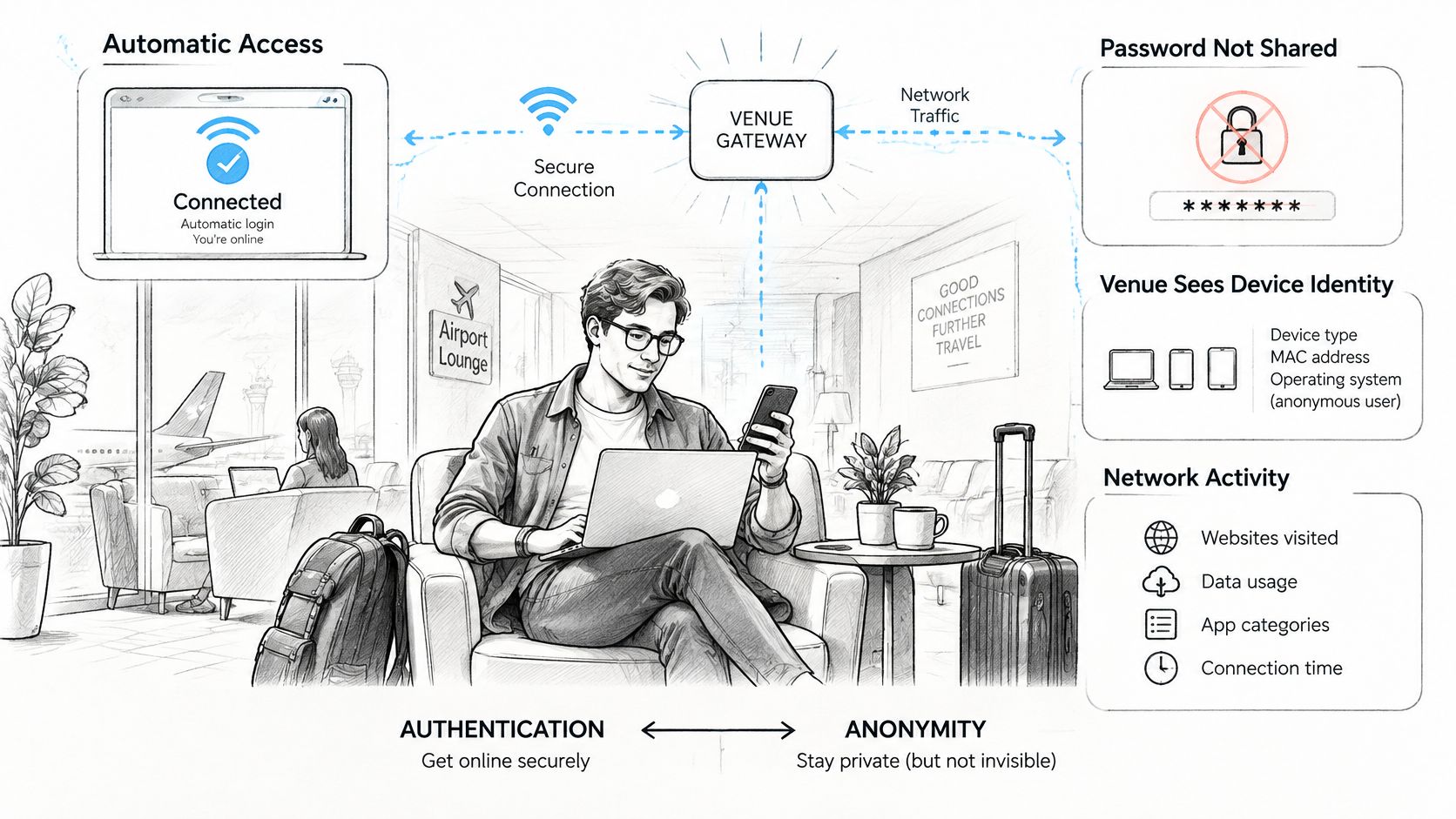
Secure authentication isn't anonymous use. A device can connect without typing a name into a portal while still generating records that distinguish it from other devices and associate it with a location.
Westermo's OpenRoaming certification announcement provides context for identity-provider-mediated authentication and persistent identifiers. The practical question for a venue isn't whether access is encrypted. It's who can see which identifiers, for what purpose and for how long.
An automatic connection may look uneventful to the visitor, even though several organisations participate behind it.
Authentication and anonymity answer different questions
The identity provider can authenticate someone without giving the venue their password. The venue can nevertheless receive information needed to authorise access, assign policy, account for a session or investigate abuse.
Depending on the provider, network, agreement and applicable law, records may include authentication events, accounting records, device identifiers, location information or pseudonymous identifiers. A pseudonym isn't automatically anonymous: an organisation may be able to link repeated sessions or connect that identifier to an account.
Consider a stadium visitor whose access is intended only for an event. The operator should define which connection records remain afterwards and why. Don't treat a useful event-access credential as permission to build an indefinite attendance history.
An employee's managed device presents a different case. Its credential may remain active throughout employment, but that doesn't justify retaining every location-linked session for the same period. Credential validity, security-log retention and engagement-data retention need separate decisions.
The video offers an additional way to explain automatic connectivity to stakeholders.
Make the data flow reviewable
Include these questions in your guest network security review:
- Identity-provider disclosure. Name the organisations involved and explain what each receives, including any cross-border processing.
- Certificate validation. Record who owns trust settings and how changes are reviewed.
- Pseudonymous identifiers. Establish whether they persist, who can resolve them and whether separate datasets can be linked.
- Accounting records. Specify the fields collected and who can access or export them.
- Retention periods. Assign a purpose and deletion rule to each record category, including backups.
- User notice and consent. Identify data-controller roles, the relevant processing basis and how minors, employees, residents and visitors are informed.
- Immediate credential revocation. Give users a clear lost-device reporting route and operators a tested action.
Consent isn't a universal substitute for determining the appropriate legal basis, and a hidden policy page isn't meaningful notice. Have privacy and legal owners review the actual flow rather than a generic description of secure WiFi.
Minimal-data access is a design choice. Automatic login alone doesn't deliver it.
Confirm Your Pilot Plan Before Replacing Guest Portals
Start with a bounded pilot after the technical acceptance checks succeed in a controlled environment. Choose a site where you can observe both repeat users and people arriving without any existing profile.
Give the pilot a measurable decision
- Choose a representative site. Include reception or venue staff in the trial so they can report confusing enrolment and fallback instructions.
- Retain the existing guest route. Make its network name and instructions easy to find for visitors outside the pilot.
- Enrol a defined cohort. Start with managed staff devices and returning guests whose profile eligibility you can verify.
- Measure the arrival experience. Record first-attempt connection success, authentication failures and how often eligible users still need the portal. Separate discovery failures from credential rejection.
- Document the data flows. Approve retention, notice, access permissions and lost-device handling before expanding the cohort.
- Expand against acceptance criteria. Agree what constitutes success before reviewing results, and keep a rollback owner available.
Don't measure success solely by the absence of a portal. A device that joins the wrong VLAN or leaves a visitor unable to find fallback access hasn't passed.
Evaluate the service against the same test
If you're evaluating our service, Purple Access supports Passpoint and OpenRoaming, and our free Connect licence includes the guest portal and free OpenRoaming. Returning guests use a profile on the Secure network without a portal on return, and that profile works at every property that runs it. Test those behaviours against your device mix, and confirm the licensing and pricing of any additional capabilities before including them in the rollout.
The strongest reason to proceed is a demonstrated improvement for a specific audience, not the availability of a new access-point setting. Keep the pilot focused on the people whose connection journey you can meaningfully improve.
Which visitor group loses the most time at the portal today, and does a profile fix that group?
Purple Access offers a guest portal alongside Passpoint and OpenRoaming, so you can test automatic access without removing the route other visitors still need. Visit Purple Access to explore the Connect licence and discuss a pilot covering profile enrolment, identity-based policy and fallback on your existing access points.