What Is RADIUS Authentication? How It Works and why
Published
RADIUS authentication uses a central server to decide whether a user or device may join a network and what it may do once inside, so an access point asks that server instead of checking its own password list. But if a login succeeds, who decides whether that device can reach staff systems, use only guest internet access, or stay connected indefinitely?
That's the part a simple password-check explanation misses. RADIUS is also a policy channel: the network equipment receives instructions about how to treat the connection, not just whether to allow it.
Table of Contents
- What RADIUS Means and Why It Was Created
- How a RADIUS Login Works, Step by Step
- EAP-TLS and Certificates for Strong Device Identity
- RADIUS Attributes That Decide Network Access
- Common RADIUS Use Cases and What Each Decides
- Limits and Misconceptions to Avoid
- Decide Whether RADIUS Fits Your Network
What RADIUS Means and Why It Was Created
RADIUS stands for Remote Authentication Dial-In User Service. Technically, it's a protocol, a shared set of rules for exchanging messages, rather than the server itself. A RADIUS server implements those rules and makes access decisions.
Consider an organisation with wireless access points, office switches, and a remote-access gateway. If each device maintained its own credentials, administrators would have to update separate lists whenever someone joined or left. Centralising those decisions gives the equipment a common place to ask.
That problem predates enterprise WiFi. According to the RADIUS history, Livingston Enterprises developed the protocol in 1991, responding to a Merit Network request associated with controlling access to NSFNET, an early internet backbone. Dial-up servers could consult a shared authentication server instead of maintaining independent credentials.
The shared guest list
Think of a venue with several entrances. Each door has a bouncer, but every bouncer consults the same guest list. The list can also distinguish ordinary admission from backstage access, while the venue records who entered and left.
RADIUS separates those responsibilities into AAA:
- Authentication establishes who the user or device is.
- Authorization determines which services and network resources it may use.
- Accounting records session activity, including connection and disconnection events.
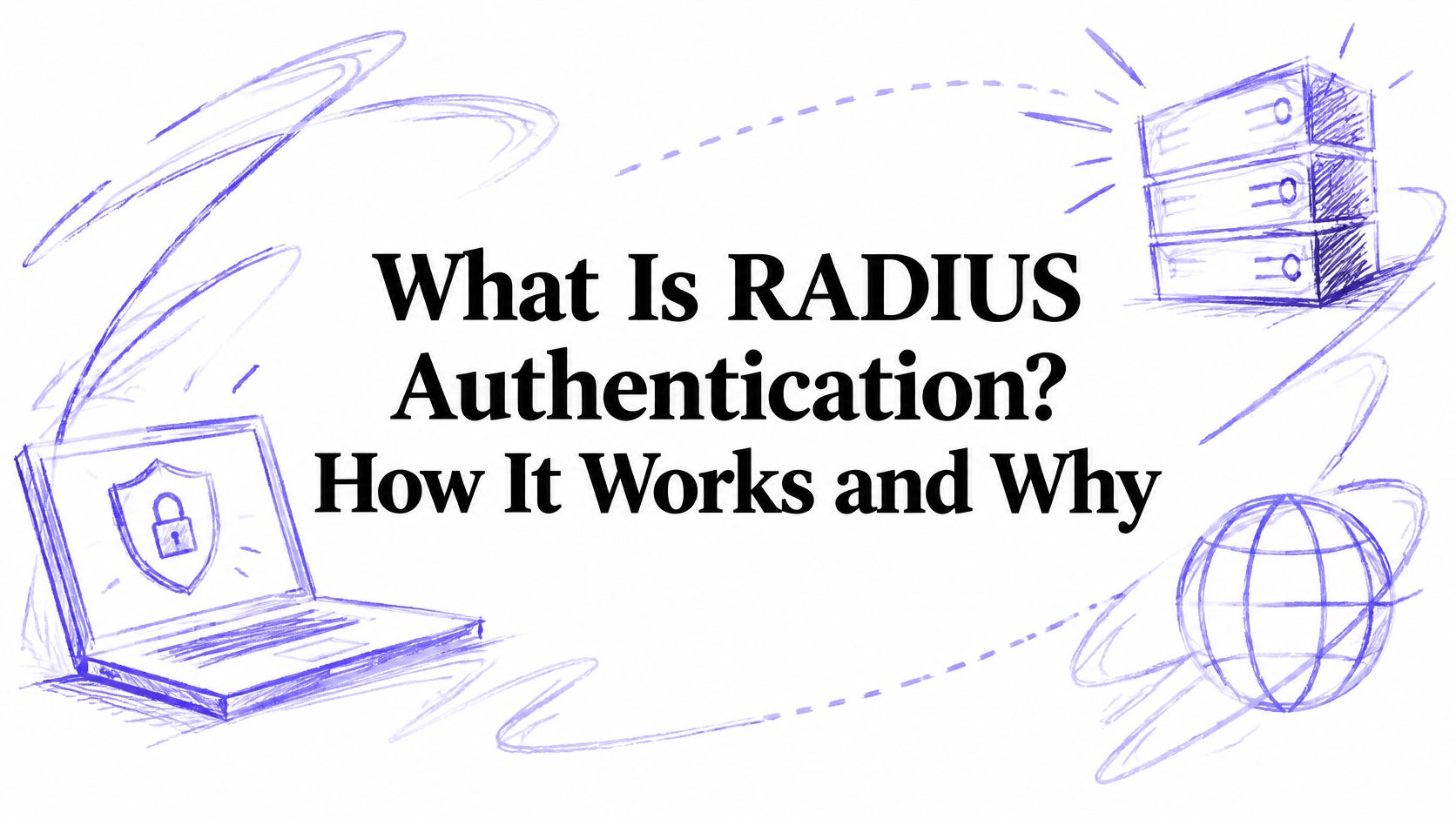
The illustration shows the distinction between a device requesting access and the server deciding whether to permit it.
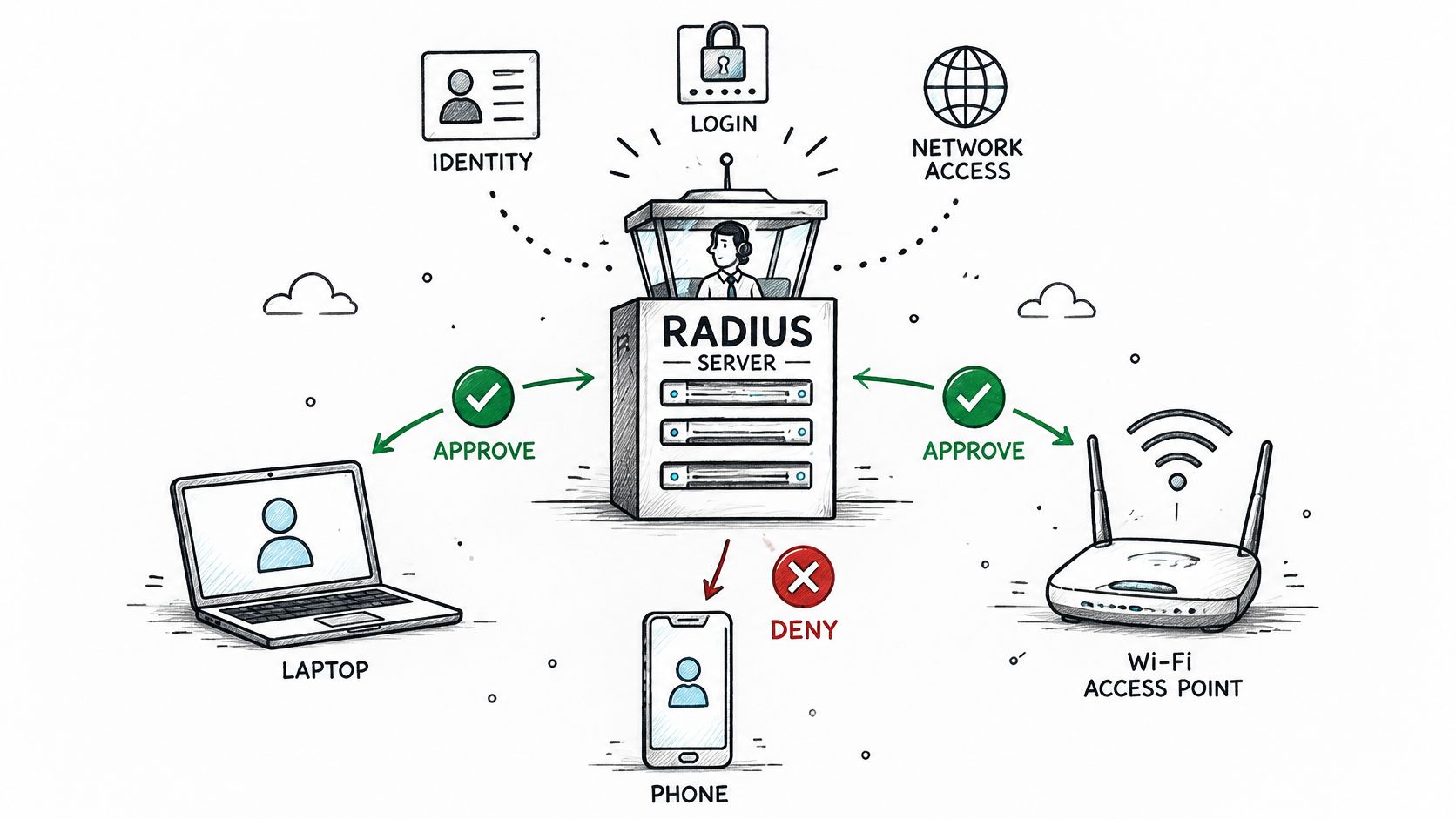
The equipment enforcing the result is called a Network Access Server, or NAS. Despite the name, it might be an access point, switch, wireless controller, or virtual private network gateway.
For teams coordinating physical connectivity and identity controls, Southern Tier Resources' broadband deployment and maintenance is a relevant infrastructure resource. Keep the responsibilities distinct: installing and maintaining connectivity isn't the same task as defining who may use it.
RADIUS remains foundational in enterprise WiFi, remote access, and wired-port security because administrators can separate identity decisions from the equipment that enforces them, while using a common protocol across vendors.
How a RADIUS login Works, Step by Step
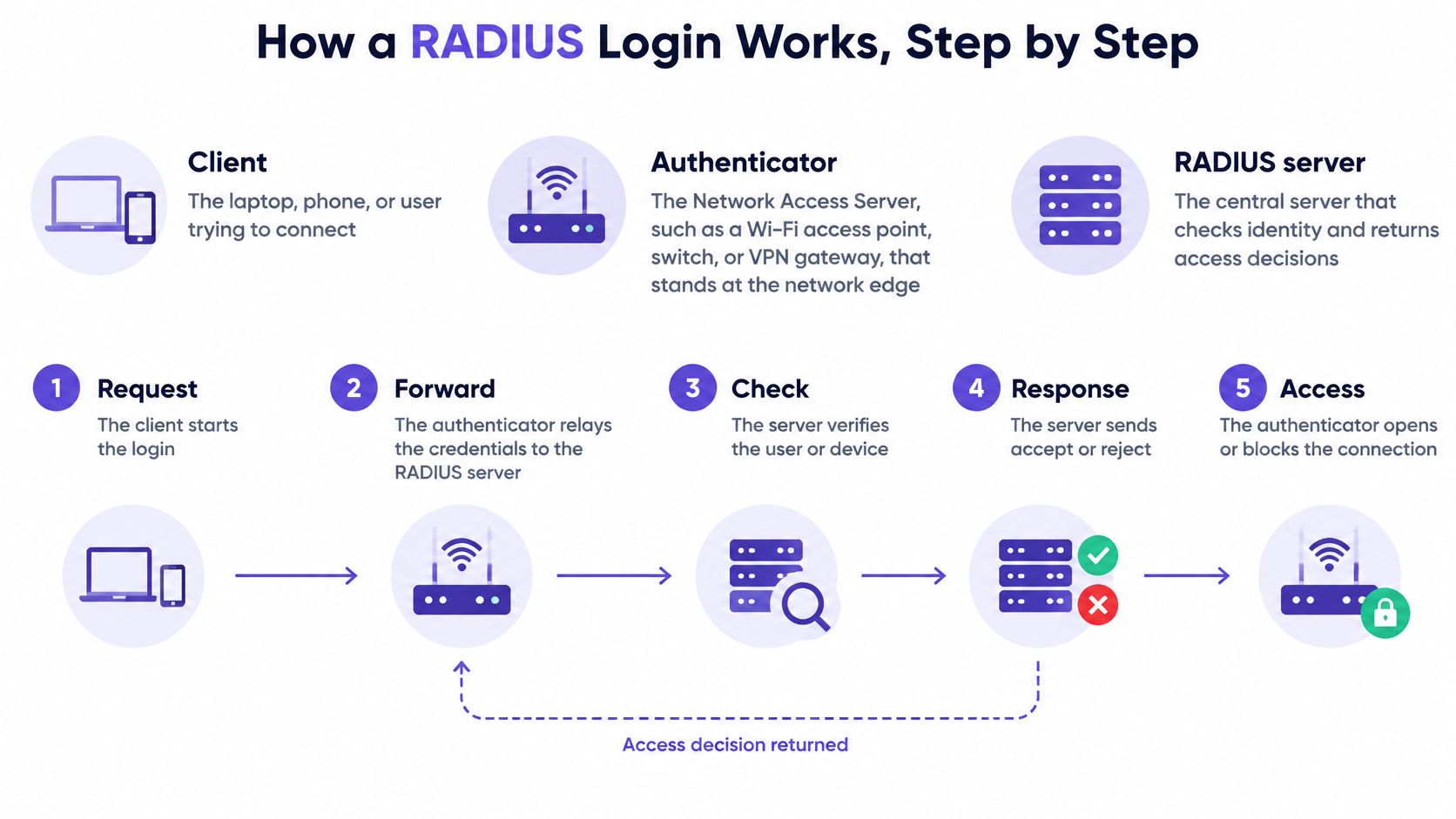
Start by separating the participants:
- Endpoint or supplicant means the laptop, phone, or authentication software requesting access.
- Authenticator means the NAS that controls the connection.
- Authentication server means the RADIUS server that evaluates identity and policy.
There's a naming trap here. In protocol documentation, the RADIUS client is usually the NAS, not the employee's laptop. The laptop is the endpoint trying to connect.
The diagram gives a simplified view of those roles.
Follow the request and response
For traditional UDP deployments, the Wireshark RADIUS reference identifies UDP 1812 for authentication and authorization and UDP 1813 for accounting. UDP, the User Datagram Protocol, carries individual network messages without establishing a persistent transport connection.
The endpoint requests access. A laptop connects to enterprise WiFi, for example, and the authenticator begins the identity exchange. Ordinary network access remains controlled while authentication proceeds.
The NAS sends an Access-Request. It forwards authentication information and connection context to the RADIUS authentication endpoint. The request identifies both the person or device seeking access and the network equipment handling the connection.
The server checks the evidence. Depending on the authentication method, it can consult a directory, validate certificate trust, or use a token service. A directory is an identity database, not necessarily the RADIUS server itself.
A challenge continues the conversation. An Access-Challenge asks for another authentication exchange when the method needs it. It doesn't automatically mean a person must type an additional code.
The server returns a decision. Access-Accept permits access and can include policy fields. Access-Reject denies the attempt.
The authenticator enforces the response. It opens the controlled connection and applies supported instructions, such as network-segment placement. In this flow, the NAS enforces the server's decision rather than independently approving the identity.
Accounting records the session. Separate messages report session start, interim updates, and stop events. These records help administrators distinguish a successful login from a connection that remained active.
Troubleshooting rule: Find the last successful exchange before changing credentials. A request that never reaches the server is a different problem from a rejected identity.
Use Wireshark's radius display filter or the NAS authentication log to follow the sequence. Match the request, response, and session context; check whether the NAS applied the returned policy rather than stopping at an accept message.
For a visual walkthrough of the exchange, use this accompanying video.
EAP-TLS and certificates for strong device identity
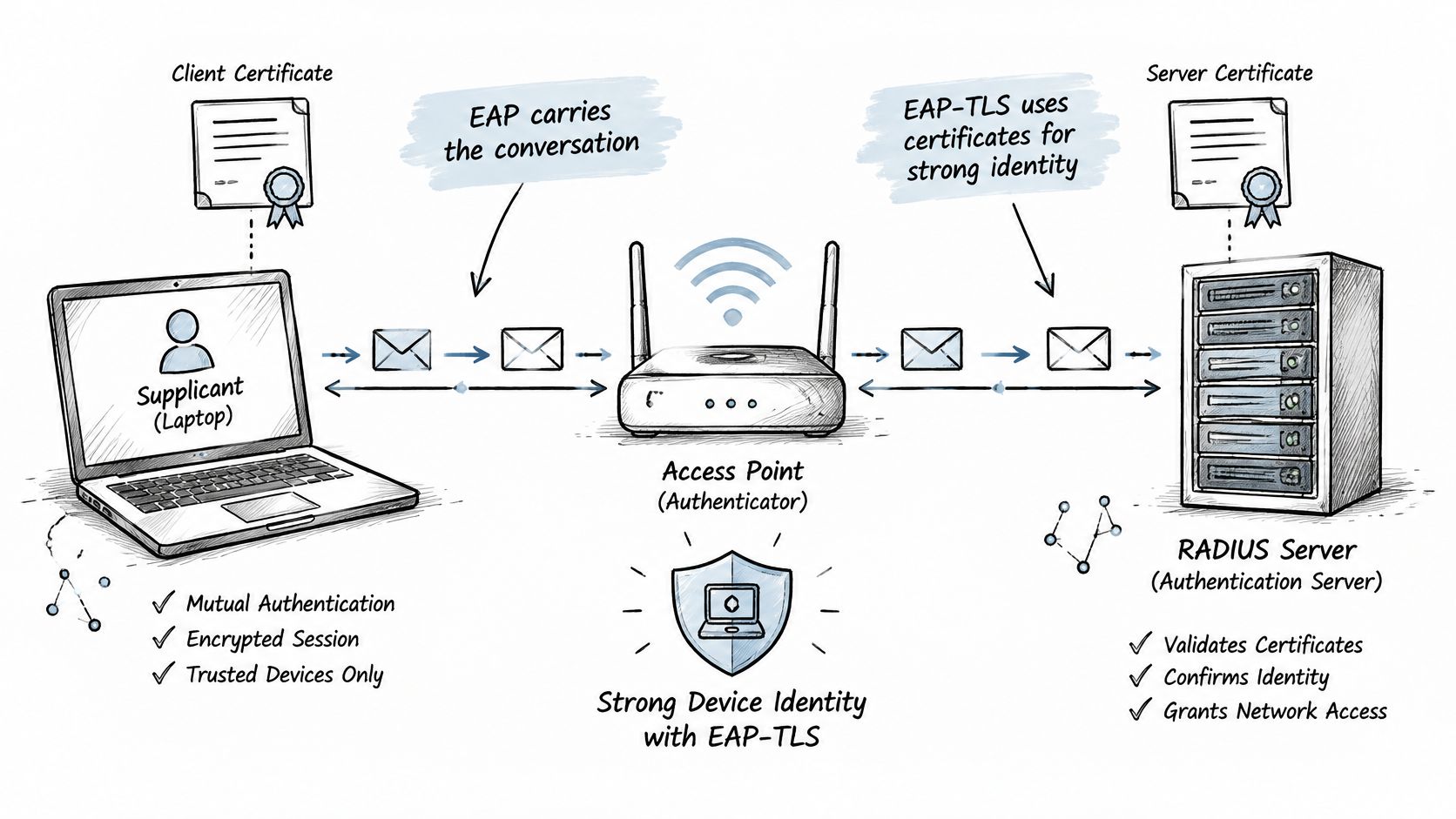
Extensible Authentication Protocol, or EAP, is a framework for carrying an authentication conversation. On enterprise WiFi and wired 802.1X, the port-based access-control standard, the authenticator relays that conversation to the server inside RADIUS EAP-Message attributes.
The access point doesn't need to implement every authentication method itself. Its job is to relay the exchange and enforce the result.
EAP-TLS uses Transport Layer Security with certificates for mutual authentication. The device proves possession of its certificate's private key, while the device also validates the server. The RFC Editor's EAP specifications describe certificate-based authentication and how authenticated identity can inform authorization and accounting.
The diagram shows the endpoint, access point, and authentication server participating in that exchange.
Certificates need an owner
A certificate binds an identity to a public cryptographic key. The corresponding private key must remain protected; copying a certificate file alone shouldn't be enough to impersonate the device.
Unlike shared-password WiFi, EAP-TLS doesn't require a common staff password. However, it does require a managed public key infrastructure, or PKI, that issues certificates and maintains trust.
Build the lifecycle into the deployment:
- Issue certificates automatically. Use mobile device management, or MDM, with Simple Certificate Enrollment Protocol, SCEP, or a supported enrollment connector.
- Install the certificate and network profile together so devices know which server identity to trust.
- Renew before expiry, including for devices that spend extended periods away from the office.
- Revoke credentials after loss, retirement, or an access-policy change, and ensure the authentication service checks revocation.
- Maintain the trust store, the device's list of trusted certificate authorities and server-validation settings.
For a password-based alternative, compare EAP-TLS and PEAP before choosing an onboarding method.
Expired certificates can cause outages. Incorrect mapping of the certificate's Subject Alternative Name, an identity field, can associate a device with the wrong policy. An unreachable server or an overly permissive fallback can create either disruption or unintended access.
Strong device identity depends on lifecycle management, not merely selecting EAP-TLS in a configuration menu.
RADIUS attributes that decide network Access
VLAN-placement attributes show why RADIUS is more than a login check. A virtual local area network, or VLAN, is a logical network segment: staff and guests can use the same access infrastructure while receiving different network access.
Attributes are labelled fields inside RADIUS messages. They carry authentication inputs, connection context, and authorization results; the RADIUS specification defines the extensible attribute mechanism that makes those policy exchanges possible.
Key RADIUS attributes and what they control
These are illustrative configuration values, not required defaults. The guest-session example expresses the timeout rule rather than prescribing a universal duration.
| Attribute | What it carries | Example value | Effect on access |
|---|---|---|---|
| User-Name | Presented identity | jsmith@example.com | Identifies whose policy applies |
| EAP-Message | Authentication exchange packets | EAP-TLS handshake data | Carries the authentication conversation |
| Message-Authenticator | Packet integrity check | HMAC value | Helps reject forged replies when required and validated |
| Tunnel-Type, Tunnel-Medium-Type, Tunnel-Private-Group-ID | VLAN placement | VLAN, Ethernet, staff VLAN identifier | Places the device on the configured staff VLAN |
| Session-Timeout | Maximum session duration in seconds | Guest-session duration converted to seconds | Ends the illustrative eight-hour guest session |
| Filter-Id | Name of a device-local filter or policy | guest-limited | Selects restrictions configured on the enforcing device |
| Calling-Station-Id | Client MAC address | AA:BB:CC:DD:EE:FF | Associates the session with a reported device address |
| NAS-IP-Address or NAS-Identifier | Requesting network equipment | ap-floor2 as NAS-Identifier | Provides context for site-specific rules |
| Acct-Session-Id | Accounting session identifier | 1A2B3C4D | Links start, interim, and stop records |
HMAC means hash-based message authentication code, a keyed integrity check. It isn't a substitute for encrypting the transport.
Several distinctions matter when reading this table. User-Name identifies the claimed identity, but the authentication method supplies the proof. Calling-Station-Id provides device context, but a reported hardware address isn't strong identity evidence by itself.
For VLAN placement, send the complete tunnel-attribute combination expected by the equipment. The target VLAN must already exist and be reachable through the relevant network paths; receiving its identifier doesn't create the segment.
Filter-Id names a policy, rather than necessarily carrying the restrictions themselves. A bandwidth cap applies only if the enforcing equipment supports and correctly maps that policy.
An Access-Accept is not evidence that the intended restrictions were applied. Verify the resulting VLAN, filter, and session behaviour on the NAS.
Accounting adds the audit trail. Matching a session identifier across connection events helps investigators distinguish separate visits from the same identity.
Test NAS definitions, shared secrets, retries, and accounting delivery alongside the attributes. A successful identity check with missing authorization fields or incomplete logs gives administrators much less control than the login result suggests.
Common RADIUS use Cases and what each decides
A shared RADIUS service can support different deployments, provided administrators define the right authentication method and policy for each.
Common RADIUS deployments and what they decide
| Use case | Enforcing device | What RADIUS decides | Typical method |
|---|---|---|---|
| Staff WiFi | Access point or controller | Admits the device and selects the staff VLAN | EAP-TLS or PEAP-MSCHAPv2 |
| Guest WiFi | Access point with captive portal | Grants access after sign-in and applies session limits | Web login or Passpoint/OpenRoaming profile |
| Remote VPN access | VPN concentrator | Verifies the user and assigns a group policy or address pool | Password with one-time code or EAP |
| Wired switch port | Network switch | Opens the port for approved devices and assigns a VLAN | EAP-TLS, or MAC authentication bypass for devices without a supplicant |
| Network device administration | Router or switch login | Confirms administrator privileges and supports accounting; command-level controls need explicit platform support | RADIUS or TACACS+ with a directory account |
PEAP-MSCHAPv2 is a password-based option: Protected EAP creates a TLS tunnel around the inner password-authentication method. It requires careful server-certificate validation and is often a transitional choice when client certificates aren't deployed.
Guest methods solve a different problem. A captive portal presents a web sign-in page, while Passpoint and OpenRoaming use supported profiles and identity arrangements for network discovery and authentication. Neither should imply staff-level access.
MAC authentication bypass, or MAB, checks a device's reported Media Access Control address when it can't run a supplicant. Because addresses can be copied, place these devices in restricted segments rather than treating the check as equivalent to certificate authentication.
Network access versus administrator access
TACACS+, Terminal Access Controller Access-Control System Plus, is another AAA protocol commonly used for equipment administration. It separates authentication, authorization, and accounting, which suits detailed administrative permission workflows.
RADIUS commonly returns authentication and authorization together. Traditional RADIUS doesn't encrypt the whole packet, whereas TACACS+ protects its packet body; neither distinction removes the need for secure transport and sound configuration.
Start with the use case where individual access matters most. For distributed staff networks, a multi-site migration from shared passwords to enterprise authentication should include endpoint readiness, policy mapping, and a tested rollback path.
Limits and Misconceptions to Avoid
An attacker changing Access-Reject into Access-Accept exposes the weakness in treating any central authentication service as automatically secure. JumpCloud's RADIUS security guidance describes how an on-path attacker can exploit applicable legacy deployments when Message-Authenticator validation isn't enforced, the risk associated with Blast-RADIUS.
Traditional RADIUS commonly uses UDP and older MD5-based mechanisms. Credential strength, response integrity, and transport confidentiality are separate concerns: improving one doesn't automatically fix the others.
Protect the policy exchange
- Require Message-Authenticator validation for relevant traffic according to current vendor guidance. Confirm that missing or invalid values cause rejection.
- Use RADIUS over TLS, also called RadSec, where supported, to protect the server-to-NAS exchange.
- Rotate shared secrets and protect their storage, or use certificate-based transport trust where the equipment supports it.
- Patch servers, switches, controllers, and access points. Test interoperability after changing validation requirements.
Security checkpoint: Check what the NAS rejects, not just what the server sends.
RADIUS also doesn't provide multi-factor authentication, or MFA, by itself. An identity provider, one-time-code workflow, or another integrated mechanism supplies additional factors; the IETF RADIUS review draft discusses why protocol and operational assumptions still matter around these integrations.
A device certificate alone isn't proof that a human completed MFA. Device authentication establishes which credential-bearing device is connecting; user MFA establishes additional evidence about the person.
Finally, disabling an identity doesn't universally terminate an already active connection. Reauthentication, session termination, or supported Change of Authorization, known as CoA, must enforce that outcome.
Treat WiFi access control as an operational system: revocation, logs, server availability, and fallback behaviour need consistent testing across sites.
Decide whether RADIUS fits your network
RADIUS fits when access should follow individual identities and group policies, rather than possession of a shared password. A small, isolated network may not need the additional infrastructure, but managed devices, staff turnover, and distinct guest or contractor permissions are strong reasons to consider it.
Choose based on the controls you need, not the number of access points. A modest site with sensitive staff systems can need stricter access decisions than a much larger guest-only network.
Build a workable deployment plan
- Map access groups. Record what staff, guests, contractors, and unattended devices should reach.
- Check equipment support. Confirm compatible RADIUS attributes, enterprise authentication, protected transport, and accounting behaviour.
- Choose onboarding paths. Use certificate-based access for managed endpoints and an appropriate portal or roaming profile for guests.
- Assign certificate ownership. Name the team responsible for enrollment, renewal, trust settings, and lost-device handling.
- Define failure behaviour. Decide whether an unavailable authentication service should block access or permit a tightly restricted fallback.
- Test before expanding. Include rejected identities, unavailable servers, policy changes, and incomplete accounting records.
A managed service is an alternative to maintaining authentication servers yourself. Our Cloud RADIUS in Purple Access sends devices to the open, secure, or xPSK network by identity, each on its own VLAN, and rejects a leaver whose account is disabled. Our cloud RADIUS carries a 99.9% uptime SLA in the contract.
For a hospitality deployment, housekeeping, reception, and operations staff can authenticate using EAP-TLS certificates delivered by MDM over SCEP, receive VLAN placement by directory group, and lose access when their account is disabled.
Start with a representative site. Confirm its groups, device types, enforcement capabilities, and failure tests before extending the configuration across the estate.
Purple Access combines managed Cloud RADIUS, certificate-based staff authentication, and identity-driven VLAN policies on your existing access points. Visit Purple Access to discuss your user groups, device onboarding, and a practical deployment plan for your first site.