Certificate based WiFi authentication: EAP-TLS guide
Published
Someone's leaving the business, and your team is deciding whether to change the staff WiFi password again. Changing it means reconnecting laptops, cell phones, reception tablets and equipment nobody remembers configuring. Leaving it alone means accepting that someone outside the organization still knows how to join.
Certificate-based WiFi authentication gives you a better way to identify trusted devices. But it also changes the work your team must do: instead of distributing passwords, you'll manage trust chains, certificate renewal, revocation, and devices that disappear into storage for months. The security improvement is real. Reliable operation takes more than selecting EAP-TLS in a wireless profile.
Table of Contents
- What Certificate-Based WiFi Authentication Means
- How the EAP-TLS Handshake Works Step by Step
- Certificates Compared With Shared Passwords and PEAP
- Building the CA and Provisioning Certificates Through MDM
- Managing the Certificate Lifecycle From Issue to Renewal
- Revoking Access When Devices Are Lost or People Leave
- Device Eligibility and Exception Planning
- Confirm Your Certificate Plan Before You Roll Out
What certificate based WiFi authentication means
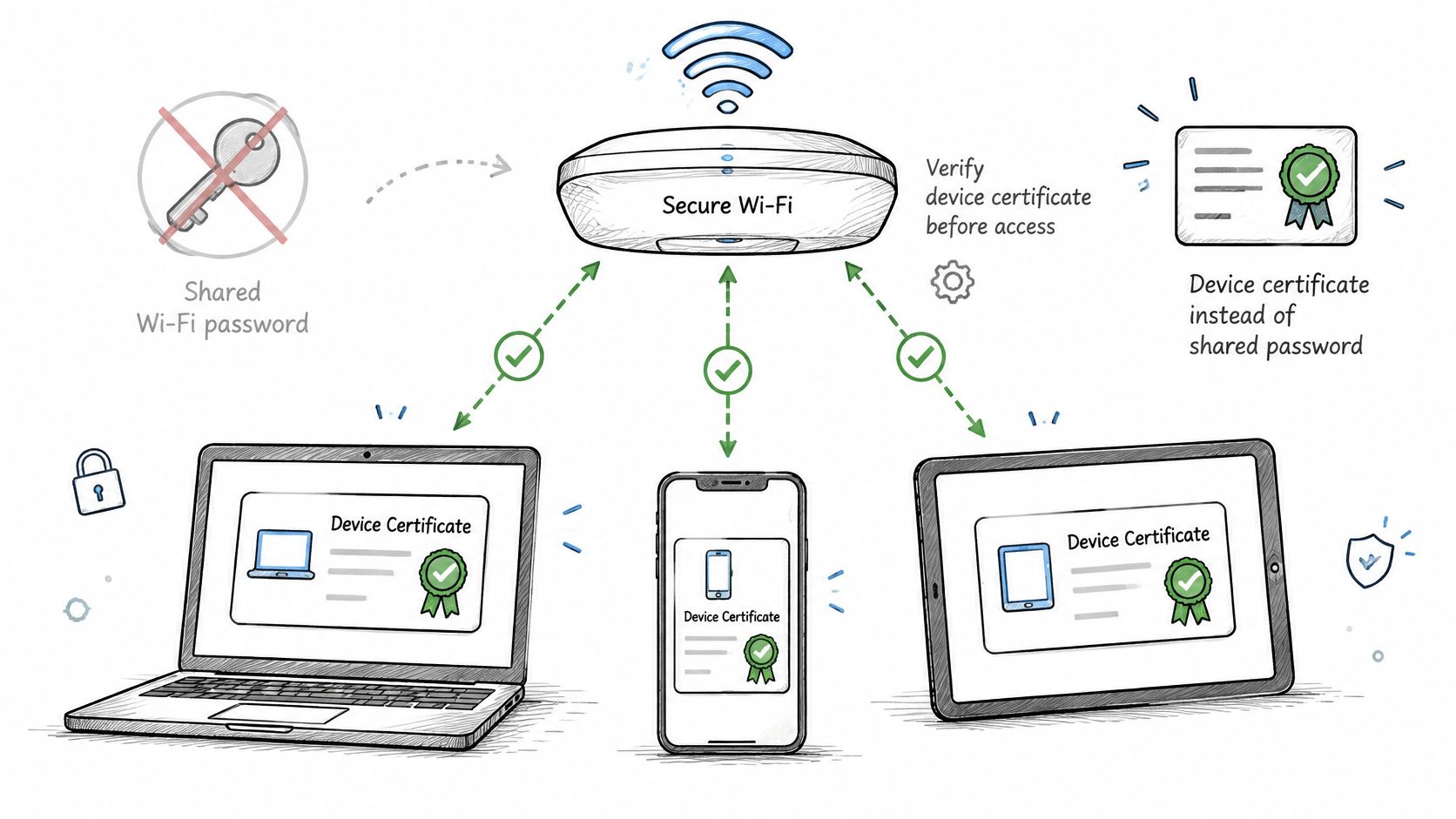
Certificate-based WiFi authentication replaces a shared WiFi password with an individual digital certificate, which the network checks before granting access. Think of a shared office door code versus an employee badge. With the code, everyone proves they know the same secret. With a badge, the security desk can identify a particular credential and cancel it independently.
Say a managed laptop needs access to the staff network. Its certificate identifies the device or its assigned user, and its protected private key lets it prove that it holds that credential. The certificate itself isn't a secret password, and copying the public certificate alone doesn't provide the corresponding private key.
The diagram shows how individual credentials replace the common password.
Where the components fit
The underlying framework is IEEE 802.1X, originally developed for wired Ethernet and adapted for wireless LANs. Microsoft's overview of IEEE 802.1X authentication) describes the framework and the role of central authentication through RADIUS.
The access point controls admission, while the RADIUS service evaluates the authentication request. EAP-TLS is the certificate-based authentication method carried through that arrangement. The device and authentication server validate each other before establishing keying material for the connection.
Keep these components distinct:
- Device certificate: Identifies the endpoint or user and works with a private key held by the device.
- Authentication server certificate: Lets the device verify that it's talking to an approved authentication service.
- Certification authority: Issues certificates that each side can validate through an explicitly trusted certificate chain.
The device and server don't necessarily need certificates from the same issuing authority. What matters is that each side trusts the appropriate issuer and applies the right validation policy.
Practical rule: Treat certificates as a network identity system, not as complicated passwords.
That distinction changes how you handle a lost laptop. You can withdraw its credential without replacing the credentials on everyone else's equipment. However, possession of a valid certificate establishes identity, not unlimited permission. Your access policy still needs to decide what that identity may reach.
How the EAP-TLS handshake works step by step
A connection involves the device's supplicant, the access point acting as authenticator, and the authentication server. The supplicant is the operating-system component that handles enterprise network authentication.
This simplified flow shows the main handoffs, rather than every protocol message.
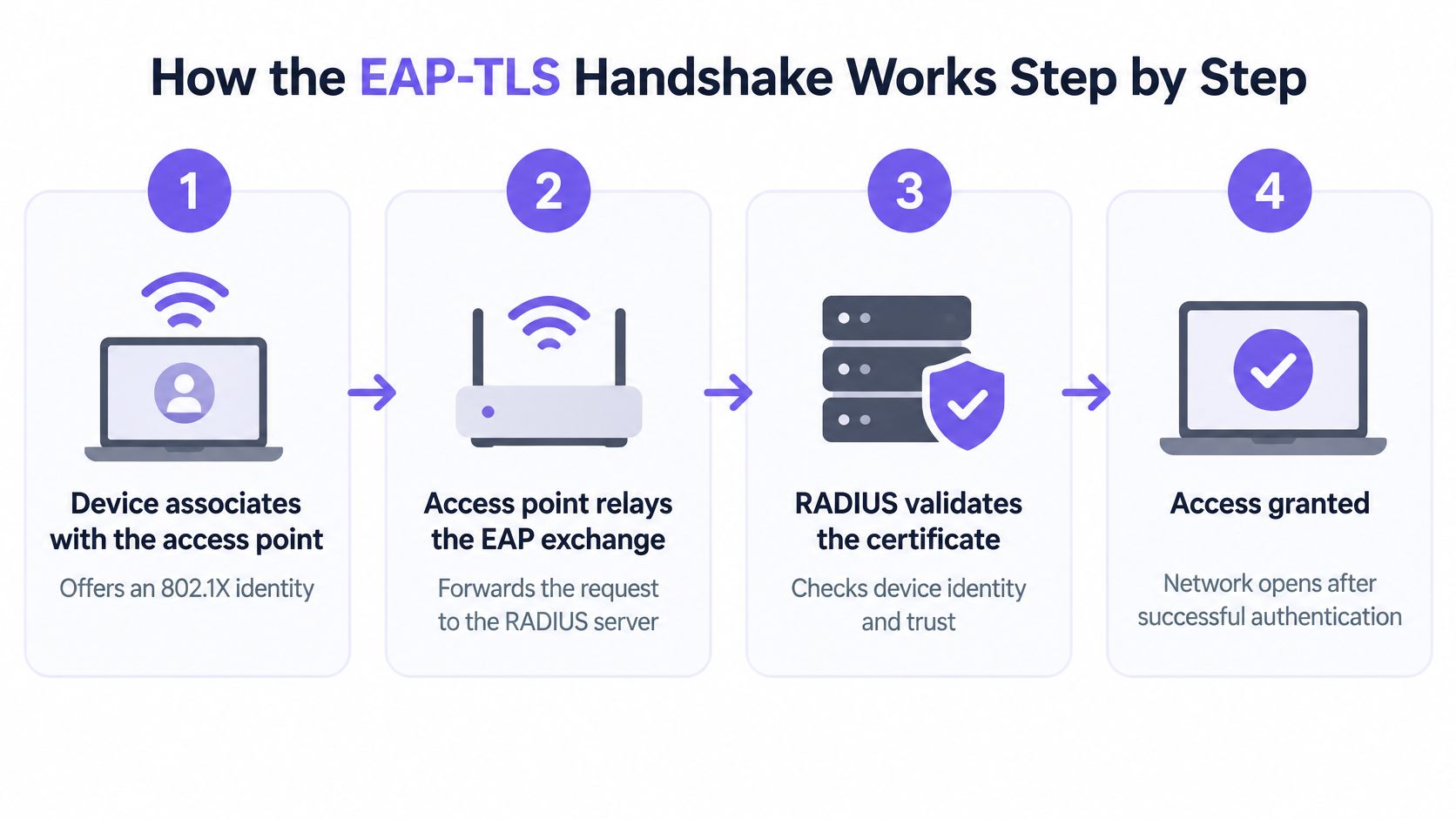
Follow the exchange and its failure points
The mutual authentication and key derivation underlying this exchange are defined in the EAP-TLS specification, RFC 5216.
The device associates with the access point. It begins the enterprise authentication exchange and supplies an identity. Association alone doesn't grant normal network access. An incorrect wireless security setting can prevent the device from reaching certificate authentication at all.
The access point relays EAP messages to RADIUS. It passes the exchange between the endpoint and the authentication service rather than issuing the device certificate itself. A RADIUS connectivity problem or incorrectly registered access point can stop the exchange here.
The server presents its certificate. The device checks the certificate chain, validity and expected server identity. An untrusted issuer, incomplete chain or unexpected server name should cause the device to refuse the connection.
The device presents its client certificate. The server validates the credential, checks applicable revocation information and evaluates the identity. A missing certificate or inaccessible private key may look like a generic connection failure to the user, even when the server logs show a specific cause.
The TLS exchange establishes shared keying material. The endpoint must demonstrate possession of its private key, not merely present a certificate file. Incompatible cryptographic settings can prevent completion even when both certificates are otherwise valid.
RADIUS returns the authentication result and policy attributes. An acceptance can include a VLAN assignment or other supported authorization attributes. A successful authentication followed by an unusable connection may indicate a VLAN or downstream policy problem rather than a certificate problem.
Configure the client to verify the server
In the supplicant profile, explicitly select EAP-TLS, configure the trusted CA and specify the expected RADIUS server names. Keep server certificate validation enabled. Don't let users bypass a warning just to get online.
Use this video alongside the protocol flow when discussing the exchange with your team.
Every connection depends on credentials being present, accessible and acceptable at authentication time. Troubleshooting therefore needs evidence from both the supplicant and RADIUS, not just an access point dashboard showing that a client failed to join.
Certificates Compared with shared passwords and PEAP
WiFi authentication methods on the same criteria
| Method | Credential on the device | Revocation scope | Accountability | Setup effort |
|---|---|---|---|---|
| Shared WPA2 or WPA3-Personal passphrase | One passphrase known to every user | Changes the key for everyone | None from the shared credential itself | Low |
| WPA2-Enterprise with PEAP-MSCHAPv2 | Username and password per user | Disables one account | Per user | Medium |
| EAP-TLS on WPA2 or WPA3-Enterprise | Unique client certificate and private key per device | Revokes one certificate | Per device and user when mapped | High, needs PKI and managed provisioning |
| WPA3-Enterprise 192-bit with EAP-TLS | Certificate meeting the profile's cryptographic requirements | Revokes one certificate | Per device and user when mapped | High, plus cipher compatibility checks |
EAP-TLS isn't synonymous with WPA3. The Wi-Fi Alliance certification record identifies EAP-TLS among supported enterprise authentication methods. Certificate authentication is an enterprise authentication choice, while the WPA profile also determines wireless security requirements.
Compare the credential, not just the label
A shared passphrase proves knowledge of a common secret. It doesn't establish which employee supplied it, although network equipment can still record connection details. Staff departures become awkward because replacing the credential means updating every device that uses it.
PEAP-MSCHAPv2 moves to individual usernames and passwords. It uses a server-authenticated TLS tunnel to protect the inner authentication exchange, so proper server validation still matters. It can provide useful per-user records, but password changes and account problems remain part of wireless support.
With EAP-TLS, the endpoint uses its certificate and private key instead of an account password during authentication. That gives administrators a device-specific credential to manage, provided the inventory maps certificates to endpoints and owners correctly.
Choose the method whose credential lifecycle your team can actually operate, not simply the strongest label in the controller menu.
Match the method to the population
Shared passphrases are a poor default for managed staff access where individual withdrawal and accountability matter. Even for guests and low-risk equipment, a common password needs a deliberate distribution and replacement policy.
Certificates suit managed laptops and cell phones because you can provision them through an existing management system. The higher-assurance enterprise profile adds compatibility work; it doesn't remove any lifecycle responsibilities. PEAP can remain a migration option where individual accounts exist but certificate provisioning isn't ready, rather than a reason to postpone an identity-based access design indefinitely.
Building the CA and provisioning certificates through MDM
A manageable deployment starts with a public key infrastructure, or PKI, whose ownership is clear. A common hierarchy keeps a root certification authority offline and uses an issuing CA for routine certificate issuance. A managed PKI service can fulfill those roles without your team operating every component locally.
The issuing CA signs device and server certificates. RADIUS must trust the client certificate chain, while endpoints must trust the appropriate server chain. Don't assume that installing a root certificate automatically configures the rest of the wireless policy.
Choose profiles before issuing certificates
A device template needs client authentication usage, a device or user identity that your policy can resolve, and a validity period governed by your renewal and recovery design.
Certificate profiles by security level
| Profile | Key and algorithm | Typical validity | Where it fits |
|---|---|---|---|
| Standard managed laptop or cell phone | Organization-approved algorithm supported across the fleet | Set by renewal and recovery policy | Mixed fleets on WPA2-Enterprise |
| Stricter managed device | Approved stronger template after endpoint testing | Set by policy and renewal capability | Modern fleets with current firmware |
| WPA3-Enterprise 192-bit | ECDSA P-384 or RSA 3072 or larger | Set by policy and renewal capability | Higher-assurance sites after compatibility testing |
| Headless or legacy device | Often unsupported | Vendor-supported lifecycle or exception expiration | Exception path |
The Wi-Fi Alliance deployment guide specifies that WPA3-Enterprise 192-bit mode restricts authentication to EAP-TLS and uses AES-256-GCM suites with P-384 elliptic-curve parameters or RSA/DH modulus sizes of at least 3072 bits. The table's higher-assurance profile must therefore be checked against the complete selected suite, not just the certificate's key label.
Certificate templates, RADIUS software, supplicants and cryptographic providers must agree. An endpoint that supports ordinary EAP-TLS may still fail under this stricter profile.
Deliver trust, credentials and configuration together
With SCEP, the management profile directs the device to generate a key pair and request a certificate. The CA signs the request; the device retains its private key in protected storage. Don't distribute the same client certificate and private key to multiple machines.
Deploy the dependencies in a controlled order:
- Trust first: Install the required trusted CA certificates.
- Credential next: Deliver the SCEP configuration and confirm successful issuance.
- Wireless profile last: Reference the intended client credential and server validation settings.
Keep group targeting consistent across dependent profiles. Use the MDM WiFi certificate profile comparison to review platform differences before standardizing the rollout. Also provide an enrollment connection that doesn't depend on the certificate the device is still trying to obtain.
Managing the certificate lifecycle from issue to renewal
A laptop that joins successfully today can fail after sitting in a closet through its renewal period. The access point may be healthy, the password hasn't changed, and the user has done nothing wrong. The endpoint no longer has an acceptable credential.
NIST's EAP requirements guidance describes the need for certificates to be provisioned before authentication, available during the exchange and verifiable, including revocation status. Those requirements make lifecycle dependencies part of network availability.
This timeline is useful for assigning ownership beyond the initial deployment.
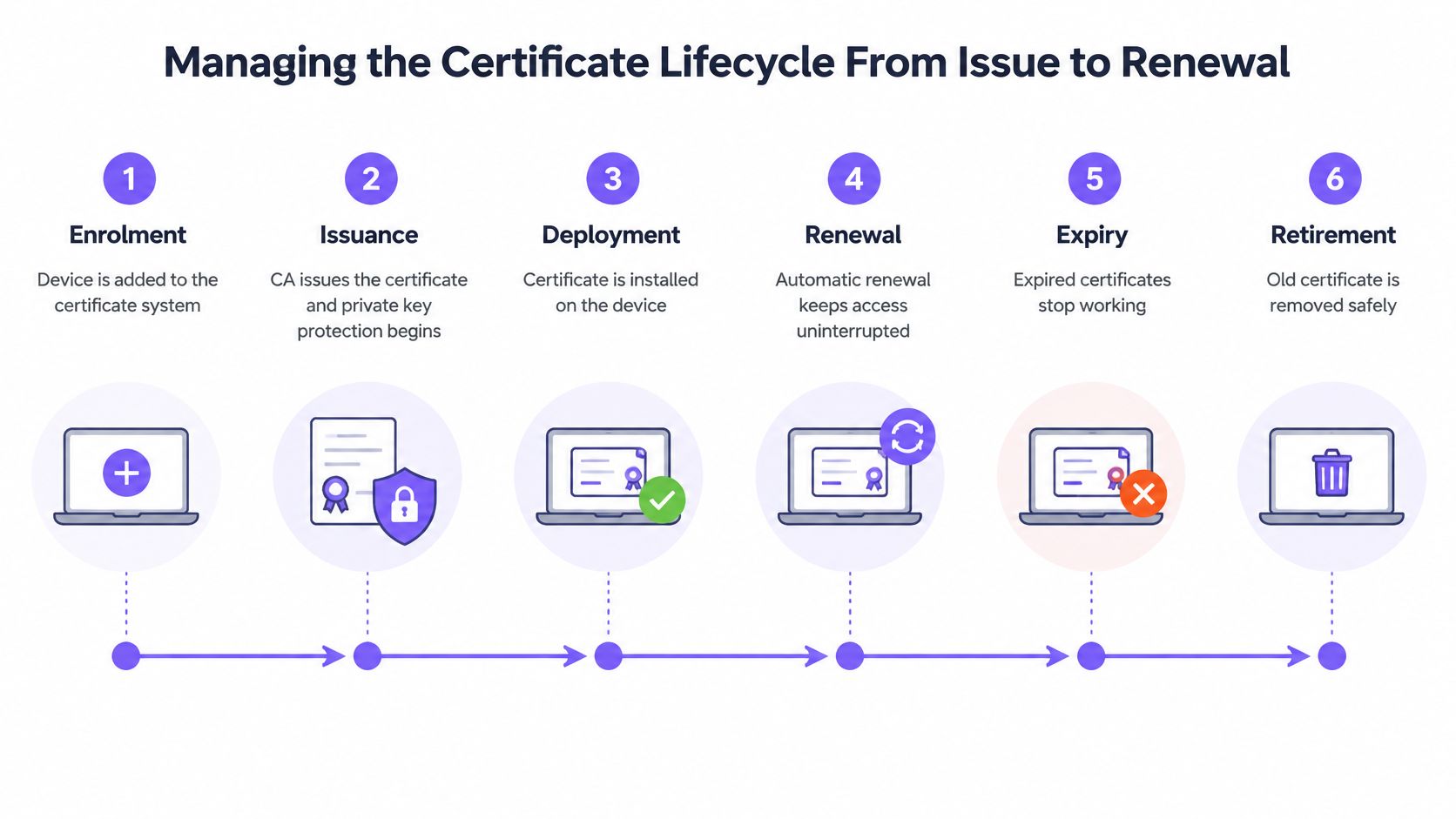
Give each stage an operational control
| Stage | Control | Failure it prevents |
|---|---|---|
| Enrollment | Monitor MDM registration and profile targeting | Device never receives an enrollment instruction |
| Issuance | Validate template permissions and request results | CA rejects requests or issues unusable certificates |
| Deployment | Verify installation and protected private-key access | Certificate exists but the supplicant can't use it |
| Renewal | Start early, monitor completion and allow tested overlap | Devices reach expiration without a replacement |
| Expiration | Alert owners and provide a restricted recovery route | Expired devices have no way to recover |
| Retirement | Withdraw credentials and remove stale inventory entries | Retired equipment retains an accepted identity |
Renewal needs proof of completion, not just an enabled automation setting. Track whether a replacement certificate was issued, installed and successfully used. During overlap, confirm that the supplicant selects an appropriate credential rather than repeatedly choosing an obsolete one.
Plan for devices that aren't online
Set the renewal window around actual device behavior. Equipment used seasonally or kept as a spare may need a different recovery process from a laptop that checks in daily. Don't assume an offline endpoint can renew because its old certificate remains listed in MDM.
Maintain an inventory linking the certificate serial number, endpoint identifier, owner, issuer, expiration and renewal state. Include the issuing CA and authentication server certificates, since their replacement can affect a much wider population.
A renewal job that ran successfully isn't the same as a device that can authenticate with its replacement certificate.
Test clock errors, operating-system rebuilds and CA chain changes. A rebuild can remove the private key; a clock error can make a valid certificate appear not yet valid; a chain change can leave endpoints without the required trust.
Assign named owners to failures involving MDM, PKI and network services. Otherwise, each team may report that its own system is healthy while the endpoint remains disconnected. EAP-TLS changes outage risk into an inventory, automation and dependency-management problem. It doesn't abolish that risk.
Revoking Access when devices are lost or People leave
A leaver's directory account is disabled, but their laptop still holds a certificate that hasn't expired. Whether it can reconnect depends on your authorization integration and revocation controls. Disabling an account and revoking a certificate are different actions, unless your configured workflow explicitly connects them.
Define the offboarding outcome in operational terms: new authentications must fail, enrollment must not issue replacement credentials, and existing sessions must end through a supported mechanism. A completed HR ticket doesn't prove any of those results.
Understand the status checks
A certificate revocation list, or CRL, publishes certificates that an issuer has withdrawn. Online Certificate Status Protocol, or OCSP, allows a validator to request certificate status from a responder.
The component validating the certificate applies the relevant status-checking policy. For client certificates, that's normally the authentication service, not the access point. If status information is unavailable, a fail-closed policy can block otherwise valid devices, while a fail-open policy can accept a credential whose revocation can't be confirmed.
Make that choice explicit. Include cached status information, publication delays and responder availability in your tests rather than assuming that clicking "revoke" changes every authentication decision immediately.
Use a complete lost-device procedure
For a missing laptop, coordinate the actions rather than treating each as a separate team's final step:
- Identify and withdraw the credential. Match the endpoint to its actual certificate serial number and revoke the relevant credential.
- Prevent replacement issuance. Disable the device's enrollment eligibility and apply the appropriate MDM retirement or removal process.
- Terminate active access. Use supported session-disconnect controls, including RADIUS Change of Authorization where the infrastructure supports it.
- Verify the result. Confirm that the session ended and a new authentication attempt is rejected.
Revocation alone doesn't necessarily terminate an established wireless session. On equipment without a supported disconnect mechanism, the session may continue until reconnection, reauthentication or another enforced session boundary. Record that limitation in the incident procedure.
Your audit record should include:
- Credential identity: Device identifier, certificate serial number and associated owner.
- Decision evidence: Revocation reason, operator and time of action.
- Enforcement evidence: Session termination time and subsequent rejection result.
- Outstanding exposure: Any session that couldn't be forcibly ended and the containment action taken.
Schedule revocation exercises. Run them after authentication-policy changes as well as during routine operational testing, so an actual lost-device incident isn't your first attempt to prove the entire path.
Device eligibility and exception Planning
Device classes and their fit with EAP-TLS
| Device class | EAP-TLS fit | Typical alternative | Key question to ask |
|---|---|---|---|
| Managed laptops and cell phones | Strong | None needed, MDM enrollment | Is MDM enrollment reliable? |
| Corporate tablets and kiosks | Good when MDM-managed | Kiosk-specific key on its own SSID | Can the private key sit in secure storage? |
| Headless IoT sensors | Poor without suitable firmware | Per-device key on an isolated VLAN | Does the firmware support 802.1X? |
| Room systems, AV and conferencing | Vendor-specific support | Dedicated SSID with per-device key | Can the vendor install and renew certificates? |
| Medical devices | Often limited | Segmented network with vendor-approved method | Is the device certified for this method? |
| Legacy operating system endpoints | Unsupported when required capabilities are absent | Quarantine VLAN with time-boxed exception | When is the exception reviewed? |
The fundamental constraint is that every EAP-TLS client needs its own certificate, not just trust in the server. NIST's wireless network guidance distinguishes this client-certificate requirement from server-only certificate authentication.
A device therefore needs a working supplicant, suitable private-key protection and a supported way to receive and replace its credential. A specification sheet saying “enterprise WiFi supported” isn't enough to establish those capabilities.
Test the whole device lifecycle
For a conference-room system, ask the vendor to demonstrate certificate installation, renewal and recovery after a factory reset. A web interface that accepts a certificate upload may solve onboarding without solving maintenance.
For medical and operational equipment, preserve vendor support requirements. Don't change a production device's authentication method solely because another product from the same manufacturer supports it.
Personal devices need a separate eligibility decision. Your BYOD onboarding design should establish what management or profile installation is acceptable before you require users to enroll.
Make exceptions narrow and accountable
A device that can't use certificates shouldn't inherit the access permissions of a managed employee laptop. Give its alternative credential a defined owner and restrict the network to its necessary destinations.
Record the following for every exception:
- Technical reason: The missing capability or vendor restriction, supported by a configuration check.
- Compensating controls: Segmentation, permitted services and the individually revocable alternative.
- Review date: A scheduled decision to renew, change or remove the exception.
- Replacement plan: The firmware upgrade, supported onboarding method or hardware replacement that would end it.
Avoid turning a temporary quarantine network into a permanent home for unidentified equipment. An exception without an owner or exit condition becomes an undocumented access policy. The defensible approach isn't certificates at any cost; it's strong managed-device authentication alongside deliberately constrained alternatives.
Confirm your certificate plan before you Roll out
A successful demonstration shows that a healthy laptop can connect. A useful pilot shows what happens when enrollment fails, a credential expires, a device is withdrawn and a dependency becomes unavailable. Approve the operating model, not just the first successful handshake.
Choose a pilot site and identify the device classes in scope before changing production access. Inventory access point capabilities, supplicant behavior and firmware versions. Where a higher-assurance profile is required, validate the selected certificate template, certificate-chain checks and extended key usage against representative endpoints.
Make this week's readiness review concrete
Use this checklist to expose missing owners and untested assumptions.
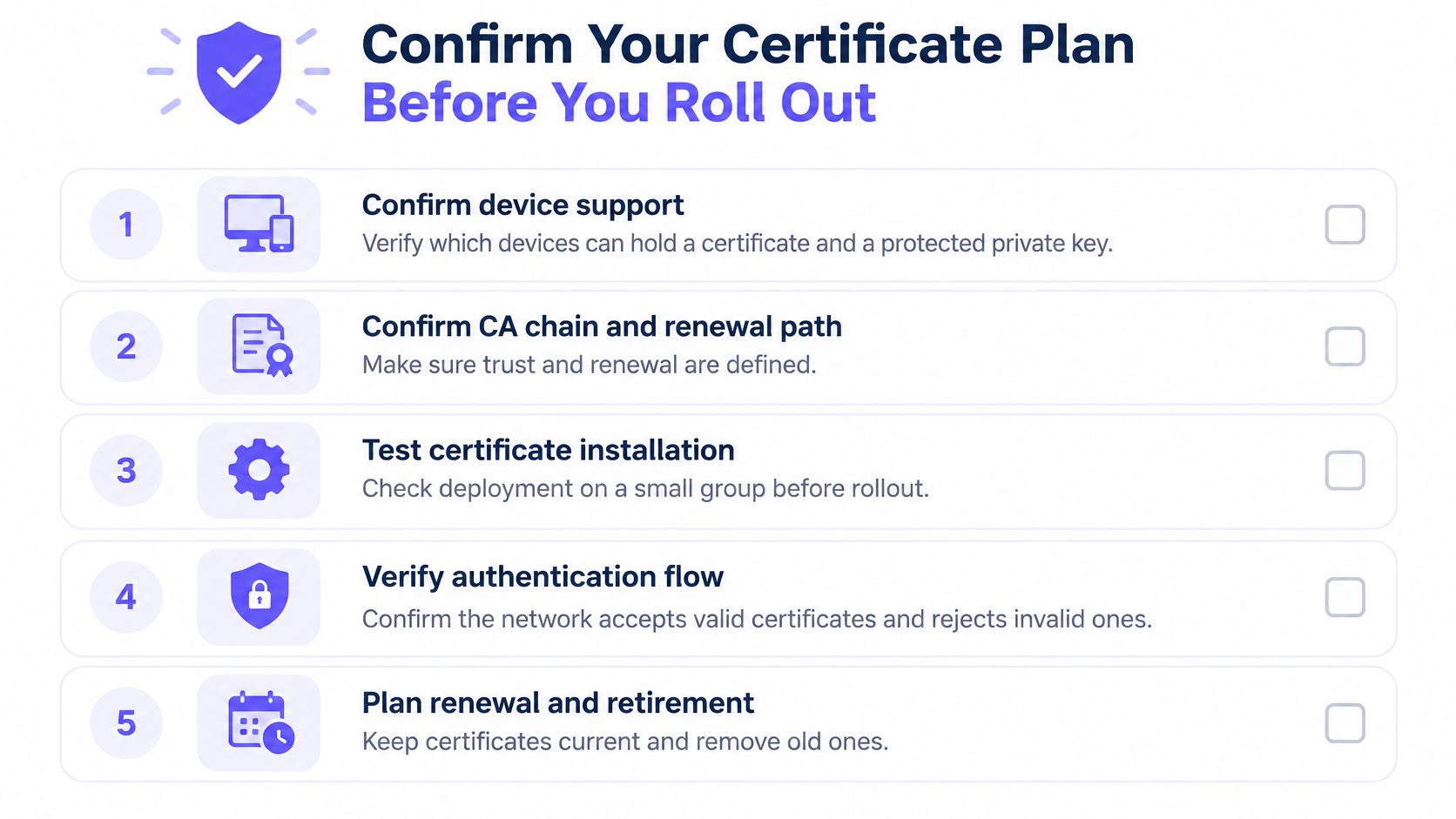
- Confirm device support: Verify that each in-scope device can store and use a protected private key, not merely import a certificate.
- Confirm trust and renewal: Assign owners for the CA chain, enrollment service, renewal monitoring and recovery path.
- Test enforcement: Demonstrate acceptance, rejection, revocation and supported live-session termination.
- Approve exceptions: Give each unsupported class a restricted alternative, accountable owner and review date.
- Set actionable alerts: Route impending expiration and failed renewal events to someone who can resolve them.
Use a repeatable RADIUS authentication testing procedure so engineers collect comparable evidence. Record the client condition, expected result, actual result and relevant failure code.
Judge the pilot by supportability
Run the certificate path beside the existing network with a defined rollback procedure. Include remote enrollment, a rebuilt endpoint, an offline spare and the operating systems your helpdesk supports. Don't choose only recently provisioned laptops.
Review help desk tickets alongside authentication logs. Separate certificate failures from wireless coverage, address allocation and VLAN problems, so the team doesn't redesign PKI to solve an unrelated fault.
Pilot acceptance should mean that managed devices normally join without user intervention, failures have named causes, and withdrawal of access can be demonstrated. Keep evidence of both successful and rejected attempts, with enough identity context to explain the decision.
Set the pilot's review date before it starts. Confirm the site, device classes, owners and acceptance criteria this week, then expand only after the team has resolved the failures and proved recovery. A smaller rollout with dependable renewal and revocation is a better foundation than a broad deployment nobody can confidently repair.
Purple Access offers certificate-based staff WiFi through MDM-delivered EAP-TLS, alongside guest and per-device access on the access points you already own. Visit Purple Access to plan a pilot at one site, validate the certificate and exception paths, and judge the result on support tickets and audit evidence before extending the rollout.