Cloud based RADIUS: Architecture and deployment guide
Published
The popular advice about cloud-based RADIUS is to choose a provider with a strong uptime SLA and point your access points at its servers. That's not enough. A healthy cloud service won't authenticate a device if the venue's WAN is down, the identity connector can't answer, or the client's certificate has expired.
The useful question isn't whether to move AAA off-site. It's which dependencies must remain available for each device to connect, receive the correct access policy, and lose access when required.
Table of Contents
- Cloud-Based RADIUS as a Hosted AAA Service
- Operational Tradeoffs Between Cloud and On-Premise RADIUS
- How Identity Attributes Drive Network Segmentation
- Authentication Resilience Beyond Uptime SLAs
- Certificate Lifecycle and Device Enrollment Realities
- Cost Model and Total Ownership
- Validate Your Deployment Requirements Before Choosing
Cloud based RADIUS as a hosted AAA service
Cloud based RADIUS is a hosted delivery model for authentication, authorization, and accounting (AAA). The provider operates the authentication infrastructure; your access points, switches, and controllers still enforce decisions locally. The decision moves off-site. The enforcement does not.
RADIUS predates the cloud by decades. As the RADIUS protocol history records, Livingston Enterprises developed it in 1991, RFC 2058 became a Proposed Standard in January 1997, and RFC 2865 and RFC 2866 followed in June 2000, defining authentication and authorization, and accounting respectively.
The exchange itself is simple. An access device, acting as the network access server, sends an Access-Request. The service evaluates it and returns an accept or reject carrying authorization attributes: VLAN assignment, ACLs, session limits. Centralizing that decision lets you replace shared passwords with individual identities, cover BYOD and IoT, and keep consistent access records across sites. Platforms such as Purple Access run as an overlay on your existing access points, directory, MDM, and SIEM, and use RADIUS CoA to end live sessions on access points that support it.
Architecture rule: Moving the decision point does not remove responsibility for the enforcement point.
Compatibility is where deployments stall. Cisco, Aruba, Juniper, and Ubiquiti differ on EAP methods, attribute handling, and firmware, so verify against the actual model in your estate rather than the brand on the datasheet. The cloud RADIUS access point configuration guide is a practical starting point for that inventory.
Assign an architecture owner, too. Identity, infrastructure, and policy sit inside that single role, and the nexus IT group architect recruitment listing shows how broad the scope runs when you hire for it.
Operational Tradeoffs between cloud and on-premise RADIUS
Cloud vs On-Premise RADIUS Operational Comparison
| Dimension | On-Premise RADIUS | Cloud-Based RADIUS |
|---|---|---|
| Infrastructure ownership | Customer operates hardware or VMs and manages applicable licensing | Provider operates service infrastructure; customer purchases a subscription |
| Patching and updates | Customer plans testing, rollout, and maintenance windows | Provider patches the service; customer still tests client and network compatibility |
| High availability design | Customer builds redundant servers and any disaster-recovery site | Provider supplies its documented redundancy; customer configures reachable endpoints and site failover |
| Identity source integration | Direct AD or LDAP integration is common; other connectors require implementation-specific support | Cloud identity connectors may use APIs and OAuth; private directories can still require a connector or proxy |
| Certificate lifecycle | Customer operates or integrates a CA and enrollment tools | Managed PKI may automate issuance and renewal; verify whether coverage includes clients and servers |
| Scaling elasticity | Customer sizes capacity and adds resources | Provider manages service capacity within contractual limits; test authentication bursts |
The distinction is operational ownership, not a different authorization protocol. The RFC Editor's RADIUS collection documents the separation between access equipment and the shared authentication service. Either deployment model can use that separation effectively.
Cloud hosting removes server administration from your team's workload. It doesn't eliminate client configuration, policy testing, troubleshooting, or responsibility for a broken identity connector. Equally, on-premises deployment doesn't automatically mean weak availability: a well-operated local service can be appropriate where WAN independence is a hard requirement.
Avoid false binaries
Hybrid designs deserve serious consideration. A cloud policy service with a supported local proxy can retain a local authentication path, but a forwarding proxy alone doesn't provide offline authentication. Establish whether it can validate credentials, cache authorization, preserve attributes, and enforce cache expiry without upstream access.
Identity integration needs similar scrutiny. SAML and OAuth aren't interchangeable with EAP credential validation. A connector that imports groups or supports portal sign-in may not validate the password-based EAP method your clients use. Ask for the precise authentication flow, including which system handles credentials and which dependencies it contacts during a join.
Managed PKI also isn't a uniform service. Server-certificate renewal is useful, but it doesn't solve client enrollment, trust-profile distribution, device recovery, or offboarding.
- Choose cloud for operational fit: It's attractive when identity already lives in a cloud platform and staff don't want to maintain authentication servers.
- Retain local capability for a defined requirement: WAN-independent admission, unusual integrations, or strict processing boundaries can justify it.
- Document shared responsibility: Assign ownership for service incidents, network transport, enrollment, and policy errors before signing.
Don't accept automatic updates as a promise of zero disruption, or multi-region hosting as proof that your controllers will fail over correctly. Require documented behavior and demonstrate it with your equipment.
How identity attributes Drive network segmentation
Authentication establishes identity. Authorization determines the network access that identity receives. The access point forwards the device's EAP exchange to RADIUS; the service validates the authentication method and evaluates identity information against policy.
The following flow shows the components involved. RadSec is an explicit transport choice, not an automatic property of cloud hosting.
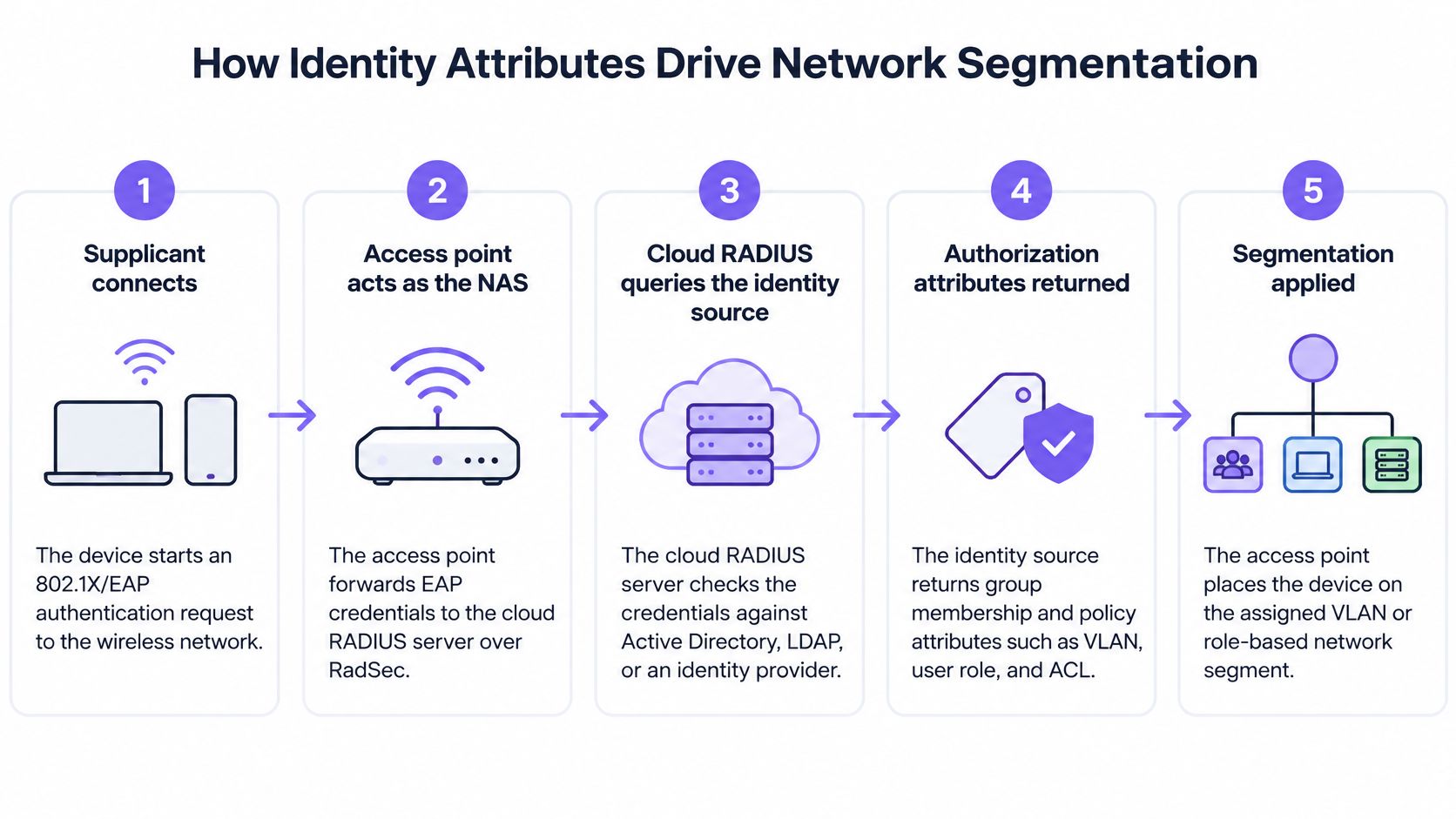
The identity source supplies information such as group membership; RADIUS constructs the authorization response. With EAP-TLS, validation centers on the client certificate, although policy evaluation may also use directory information.
| Attribute or attribute family | Practical outcome |
|---|---|
| Tunnel-Type, Tunnel-Medium-Type, Tunnel-Private-Group-ID | Identify the assigned VLAN using the tunnel-attribute combination |
| Session-Timeout | Limits the authorized session duration |
| Filter-Id | Names a filter or ACL that the enforcement device must understand |
| Vendor-Specific attributes | Carry supported vendor policies, such as bandwidth controls or device-specific settings |
Treat the attribute dictionary and policy mappings as controlled configuration. The extensible attribute model in RFC 2865 supports authorization data, but a successful Access-Accept doesn't prove that the access point applied the intended segment.
Test the resulting access, not just the login
For a hypothetical hospital, staff could receive the staff VLAN with role-appropriate clinical access, contractors an internet-only segment, and medical IoT a restricted device segment. Devices requiring MAC authentication bypass need explicit exceptions, because a MAC address isn't strong proof of identity.
Validate the assigned VLAN, DHCP scope, routing, and actual permitted destinations. The VLAN segmentation guide provides useful context for connecting identity policy to network boundaries.
The accompanying video offers another view of the access workflow.
Dynamic assignment can reduce SSID sprawl, but only when the underlying VLANs and filters exist throughout the intended path. For conventional RADIUS, explicitly design firewall rules for UDP 1812 authentication and UDP 1813 accounting, along with monitoring and retry behavior. Ordinary HTTPS connectivity doesn't establish RADIUS reachability.
Authentication Resilience Beyond uptime SLAs
Platform uptime and successful user authentication are different measurements. A provider can meet its service commitment while a property cannot admit staff because its local circuit has failed.
The Cloud4Wi cloud-versus-on-premises discussion highlights why availability planning must include local connectivity, identity dependencies, cached access, and fallback security. Build your acceptance tests around those failure boundaries rather than a dashboard showing that the cloud endpoint is healthy.
Failure Modes and Fallback Options
| Failure | Who reconnects | Fallback |
|---|---|---|
| Venue WAN down | Existing sessions may persist; reconnects require a supported local authentication mechanism | Local authenticating proxy or tightly restricted emergency PSK |
| Identity provider outage | Requests requiring live identity validation fail; certificate-based requests may continue if policy has no live dependency | Bounded cached authorization where supported |
| CA or MDM outage | Devices with valid certificates can generally authenticate; enrollment and renewal are impaired | Renew early and provide a documented recovery workflow |
| AP-to-RADIUS path blocked | Clients using the blocked transport can't complete new authentication | Supported RadSec path, alternate endpoint, or local service |
A cached session isn't the same as cached authentication. Keeping an already-connected laptop online tells you little about whether it can reconnect after roaming, restarting, or reaching its reauthentication deadline.
Likewise, an IdP outage doesn't necessarily stop every EAP-TLS request. Determine whether the service requires a live group lookup, account-status check, or external revocation service. Test the actual policy rather than assuming all methods share the same dependencies.
Make degraded operation explicit
For every fallback, record what happens to VLAN assignment, policy freshness, and revocation. A cached identity without cached authorization may land on the wrong network. An offline authorization cache may continue admitting someone whose account was disabled after the last synchronization.
An emergency access method is acceptable only when its reduced privileges, activation owner, and removal procedure are documented.
A local proxy helps only to the extent that its offline functions support the required authentication method. Cloud endpoint failover addresses provider-side failures; it can't repair a failed venue circuit. A secondary WAN path addresses connectivity, but won't fix an unavailable identity dependency.
Use RadSec, RADIUS over TLS, where supported to protect the transport and avoid reliance on an exposed legacy UDP path. It can offer an alternative where UDP is blocked, but it won't bypass every firewall or restore a dead WAN connection. Where native support is absent, evaluate a protected tunnel or suitable proxy rather than sending legacy RADIUS unprotected across an untrusted network.
Run outage tests during a controlled change window. Include a new device, a returning device, and a revoked identity, then verify admission, segmentation, and recovery after connectivity returns.
Certificate lifecycle and device enrollment Realities
Passwordless WiFi still needs a complete credential lifecycle. EAP-TLS requires trusted certification authorities, correctly configured client profiles, enrollment, renewal, and an enforceable revocation process. The Keytos cloud RADIUS discussion identifies PKI and deployment dependencies as material parts of operating the service, not optional extras.
Client profiles must validate the expected RADIUS server identity and trust chain. Installing a certificate without configuring server validation leaves an important part of mutual authentication unfinished.
Give every lifecycle task an owner
- Issuance: Define who enrolls corporate, BYOD, contractor, and IoT devices. Use MDM-backed enrollment or a supported protocol such as SCEP where appropriate; confirm client support before selecting a workflow.
- Recovery: Provide a bootstrap path for non-domain devices and for users whose expired certificate prevents them from reaching enrollment services.
- Offboarding: Revoke credentials and terminate active sessions through supported disconnect or CoA behavior. Certificate revocation alone doesn't necessarily end a live connection.
- Compatibility: Test older clients and access points against the required EAP, TLS, RadSec, and wireless security settings.
Schedule renewal before expiry and alert on failed enrollment, not just impending expiration. A wider renewal window helps devices survive a temporary MDM interruption, but it won't restore the enrollment service.
Operational safeguard: Test renewal on a device that has been offline, not only on one that checks in every day.
Cost model and Total ownership
On-premise RADIUS places infrastructure and operating labor on your budget. Cloud RADIUS shifts service hosting into a subscription, but it doesn't remove every local cost.
Compare both models over your expected hardware refresh cycle, using the same requirements for availability, enrollment, logging, and support. A basic authentication server and a managed identity-access service aren't equivalent quotes.
| Cost category | Include in the comparison |
|---|---|
| On-premises infrastructure | Compute, operating-system and application licensing, backups, monitoring, and disaster recovery |
| Cloud subscription | Billing unit, minimum commitment, included authentication methods, support, and service limits |
| Resilience | Local proxy resources, alternate connectivity, and emergency-access operation |
| Device lifecycle | MDM, enrollment tooling, certificate recovery, and legacy-client support |
| Network compatibility | Firmware work, RadSec proxying, and equipment replacement where necessary |
| Engineering | Migration, policy translation, acceptance tests, incident handling, and documentation |
The cloud RADIUS pricing guide helps structure the commercial comparison. Confirm current pricing and whether the billing unit is a user, device, site, or access point rather than assuming quotes count the same thing.
Request a written list of inclusions and exclusions. In particular, separate certificate issuance from client enrollment, and service availability from support response.
Don't value staff time at zero just because the existing server is already paid for. Equally, don't count theoretical labor savings unless the migration retires maintenance tasks or infrastructure.
Validate your deployment requirements before Choosing
Start vendor evaluation with written requirements owned by the teams that will operate the network. A demonstration using a clean laptop and a single access point isn't sufficient evidence for a mixed estate.
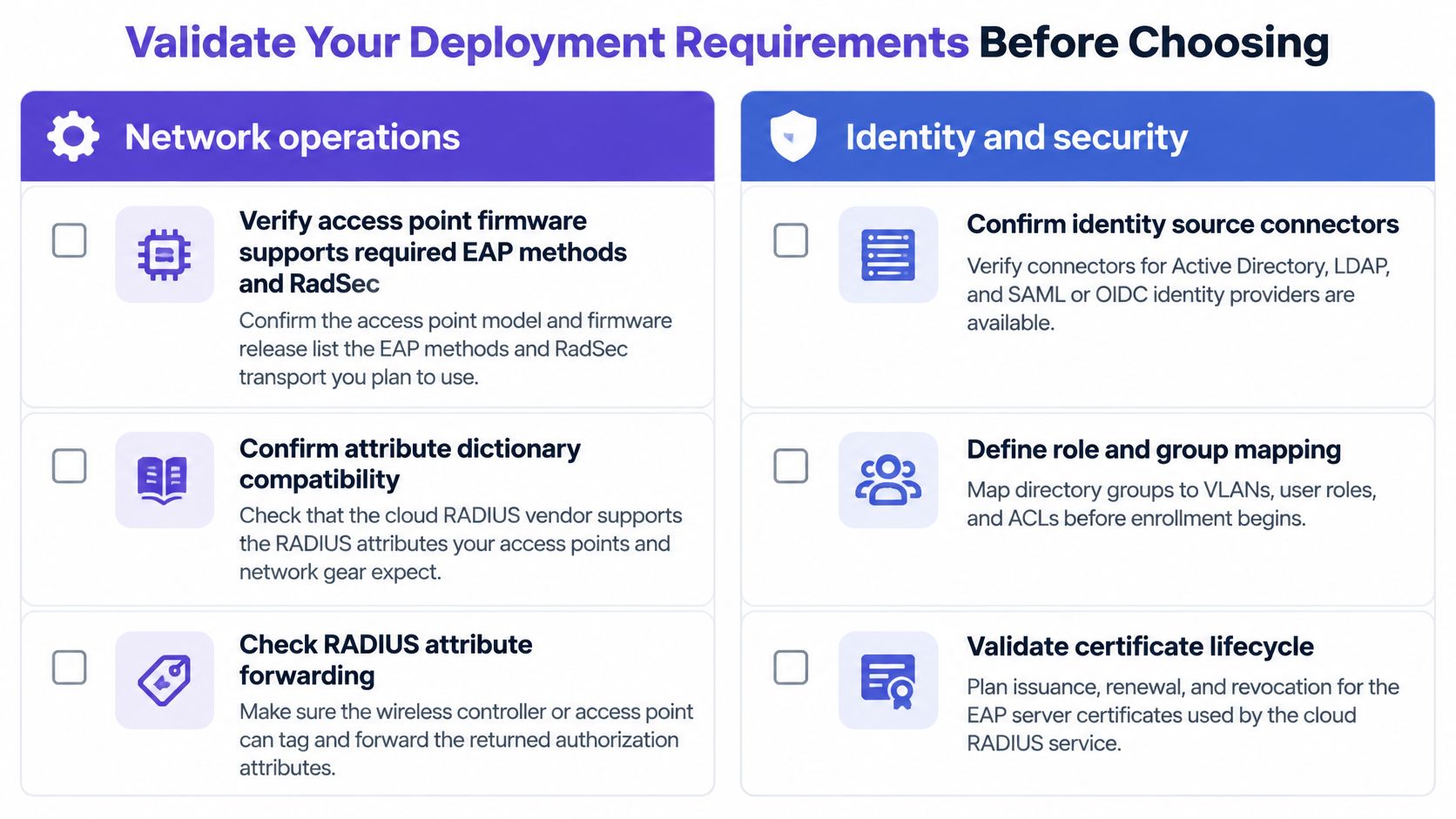
Use this checklist to organize the technical review, then add your site-specific failure and recovery requirements.
Assign acceptance criteria by role
- Network operations: Record access point models and firmware, required EAP handling, transport support, and attribute dictionaries. Demonstrate endpoint failover, inspect returned attributes, and verify enforcement with traffic tests.
- Identity and security: Audit CA trust and expected server names in client profiles. Measure account-disable and session-termination behavior, and confirm log export, retention, and access controls.
- Facilities and property management: Map staff, guests, tenants, concessions, and IoT to approved access policies. Name an onboarding owner for each group and an authorized person who can activate emergency access.
- Service management: Document escalation boundaries, rollback conditions, and the evidence required to close an authentication incident.
For mixed estates, our Purple Access cloud overlay supports Cisco Meraki, HPE Aruba, Ruckus, Juniper Mist, Ubiquiti UniFi, Cambium, Extreme, and Fortinet access points. Our Cloud RADIUS replaces Cisco ISE, Aruba ClearPass, Microsoft NPS, and FreeRADIUS, usually in a weekend, with managed PKI that issues and auto-renews every certificate. Treat that migration window separately from the time needed to approve policies and validate devices.
Run a pilot with representative managed laptops, cell phones, BYOD, and constrained IoT equipment. Exercise the failure matrix, measure authentication success and recovery times under stress, and inspect the resulting access permissions. Approve rollout only when your team can explain both a failed join and an incorrectly authorized successful join.
Purple Access offers managed cloud RADIUS and PKI for identity-driven access on your existing wireless infrastructure. Visit Purple Access to arrange an engineer-led design session, bringing your access point inventory, identity flows, and outage requirements so you can define a measurable pilot before migration.