Hospital WiFi network design: Segmentation and uptime
Published
The most popular hospital WiFi advice starts with newer access points, more coverage and a separate guest network. That's the wrong starting point. A hospital WiFi network should begin with a harder question: which clinical workflows become unsafe when connectivity fails, and which connections must never be allowed?
Treat wireless as part of a patient-safety system, not an upgraded waiting-room amenity. Before procurement, produce three working documents: a segment map, a clinical failover table and an acceptance test matrix. Those deliverables make engineers, clinical teams and facilities agree on what the network must do, what it must block and how they'll prove it works.
Table of Contents
- Which Users and Devices Share the Network
- Which Clinical Devices Can Rely on WiFi Alone
- How to Plan Coverage and Capacity Before Installation
- How to Validate Roaming and Interference on Site
- Enforce Trust Boundaries and Govern Identities
- How to Monitor and Prove Compliance Over Time
- Map Your Segments Before You Buy Hardware
Which users and devices share the network
Before buying access points, identify who connects and what happens if their traffic reaches the wrong place. A visitor's phone and a telemetry monitor may share radio infrastructure, but they must not share trust.
That mismatch isn't new. A global survey of more than 100 healthcare IT professionals reported in 2016 by Becker's Hospital Review found that 77% of hospitals used wireless networks primarily for guest access, while 64% connected medical devices through wireless networks. Those are historical findings, not a current adoption benchmark, but they expose the design problem: guest service and clinical infrastructure coexist.
Traffic classes, segments and access rules
Use this as a proposed policy map, not a requirement to create a separate SSID for every row.
| Traffic class | Typical devices | Segment | Access method | Allowed destinations |
|---|---|---|---|---|
| Guests and visitors | Personal phones and laptops | Open network, guest VLAN | Captive portal or Passpoint | Internet only |
| Patients | Own phones and tablets | Open network, patient VLAN | Captive portal | Internet only |
| Staff corporate devices | Managed laptops and phones | Secure network, staff VLAN | EAP-TLS certificate | Clinical apps and EHR |
| Clinician personal devices | Physician-owned phones and tablets | Restricted BYOD VLAN | MDM enrolment and certificate authentication | Approved EHR app only |
| Clinical workstations and carts | Workstations and mobile carts | Clinical VLAN | Certificate or individual device key | EHR and clinical systems |
| Biomedical devices | Infusion pumps, monitors, telemetry | Biomedical VLAN | Individual device key | Approved vendor servers only |
| Building and IoT systems | Badges, sensors, HVAC, lifts | IoT VLAN with device-specific policies | Individual device key | Named backend only |
| Contractors and vendors | Engineers' laptops | Contractor VLAN | Time-limited credential | Assigned systems only |
Allowed destinations must become enforceable rules. Replace “vendor servers” with the approved application endpoints, and record necessary supporting services such as name resolution and time synchronization separately. Don't turn a narrow application requirement into unrestricted server-network access.
Building controls and communication badges also need different policies even if the inventory groups them together. Facilities owns a lift controller; clinical operations may own a badge workflow. Their administrative access and outage consequences aren't interchangeable.
Practical rule: Every row needs a named owner, a credential lifecycle and an explicit destination list before engineers build the segment.
Keep device capability in the inventory. MDM enrolment is a management prerequisite, not an authentication protocol, and older biomedical equipment may not support certificates. Record that limitation as an exception with an owner, rather than weakening the policy for the whole class.
Which clinical devices can Rely on WiFi alone
Consider continuous patient telemetry. A monitor that remains associated with an access point hasn't necessarily delivered its measurements or alarms to the receiving application. Clinical assurance must cover the complete workflow, including what staff do when remote visibility disappears.
The ASHE guidance on wireless medical telemetry highlights interference, security and interoperability limitations in unlicensed wireless bands and recommends considering licensed medical telemetry spectrum when uninterrupted monitoring is essential. Licensed spectrum is a design option, not a substitute for validating the monitoring system.
Device classes, connectivity suitability and failover tests
The following is a planning template. Clinical engineering must confirm that each fallback exists, is manufacturer-supported and is usable by staff.
| Device class | WiFi suitability | Fallback if the link drops | Failover test |
|---|---|---|---|
| Continuous patient telemetry | WiFi only after validating overlapping coverage and clinical continuity; consider licensed medical telemetry where monitoring must not drop | Validated local alarm and wired backup where supported; otherwise an approved alternative monitoring workflow | Switch off an access point on the monitored ward in a controlled test |
| Infusion pumps | WiFi with redundant access-point coverage and approved disconnected behavior | Validated local device alarm and manual checks | Restart an access point and log reconnect time |
| Mobile EHR carts | WiFi with validated roaming | Wired docking station and approved downtime workflow | Walk the cart along the full ward route |
| Communication badges | Policy-separated SSID or VLAN with validated QoS | Wired handset or pager | Place test calls during an access-point restart |
| Guest devices | Best-effort WiFi | Not required for care | Not tested for clinical use |
A pump's loss of network connectivity and its loss of treatment delivery are different failure modes. Confirm which functions continue locally, which remote functions stop and how clinicians detect the change. Never assume a local alarm replaces centralized surveillance.
Test dependencies, not just radios
Overlapping coverage helps only if the endpoint can use the surviving access point. Validate device interoperability, authentication behavior and the remaining radio's capacity under failure conditions.
Include RADIUS failover in the clinical failover table. Test new authentications and reauthentications when the primary authentication service or its regional connection is unavailable; an existing session staying connected doesn't prove either will work.
I would reject a design that treats WiFi 6 or WiFi 7 as its clinical safety argument. Newer radio capabilities don't establish acceptable alarm delivery, application continuity or recovery behavior. Run disruptive tests with test devices or approved simulation, under clinical change control, never by casually switching off infrastructure serving live care.
How to plan coverage and capacity before installation
Procurement should follow a design that accounts for both the building and the endpoints. An access point placed for a modern laptop may not serve a low-power medical device adequately, even when the laptop's survey results look good.
Build the plan around device-specific requirements, not a universal signal-strength target. Use manufacturer documentation and clinical workflow requirements to define acceptable service, then make those requirements part of the purchase acceptance criteria.
Build the planning package
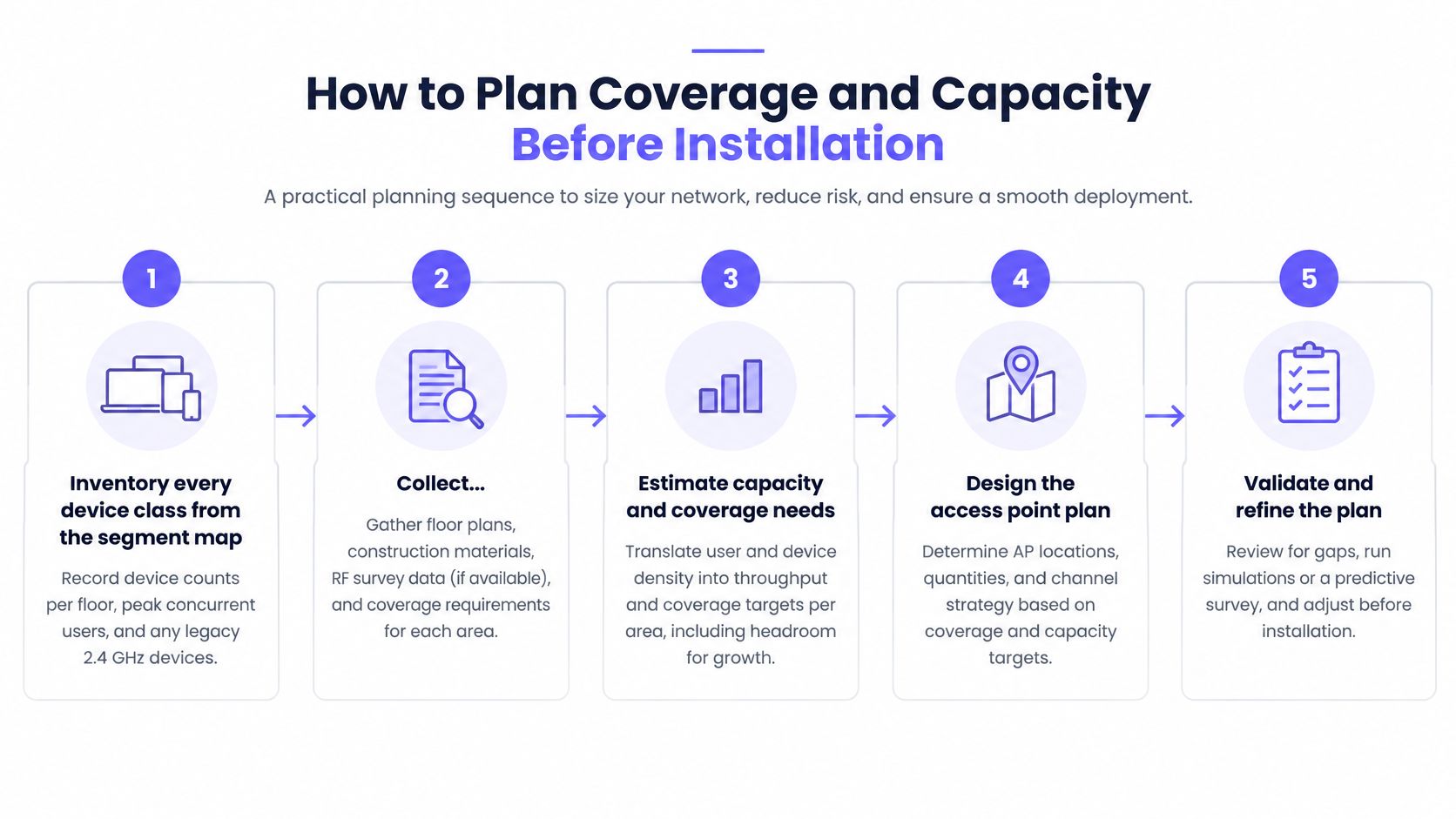
Inventory every device class from the segment map. Record devices per floor, peak concurrent use, supported bands and legacy 2.4 GHz equipment, including devices that remain powered but transmit infrequently. The common mistake is counting staff accounts instead of active endpoints and overlooking equipment moved between wards.
Collect floor plans and investigate construction. Mark concrete walls, lead-lined imaging rooms, glass partitions, lift shafts and equipment stores, assigning attenuation assumptions that engineers can validate on site. Don't treat every wall as the same material or trust an architectural drawing to describe later refurbishments.
Build the predictive RF model. Place access points against the requirements for patient rooms, treatment spaces and movement routes, accounting for endpoint transmit capability as well as access-point power. Avoid solving every weak area by increasing transmit power, because the endpoint still needs a usable return path.
Model capacity separately from coverage. Estimate concurrent application demand, airtime use and the load displaced onto neighboring radios during an outage. A covered room can still fail under contention, so don't use a reassuring coverage plot as evidence of sufficient capacity.
Develop the channel and antenna plan. Control co-channel overlap in corridors and patient wings, and identify where directional or patch antennas could shape coverage more effectively than omnidirectional antennas. Don't prescribe wide channels everywhere without considering channel reuse, device support and the surrounding RF environment.
Write pass-or-fail thresholds before installation. Define acceptable association, authentication, packet loss, latency and application continuity for every critical device class and route. Leaving thresholds until commissioning encourages teams to accept whatever the installed network happens to deliver.
Use the planning visual as a workshop aid, while retaining the detailed engineering checklist.
Resolve installation constraints early
Facilities should confirm mounting positions, cable routes, power arrangements and maintenance access before the model becomes an installation order. A technically ideal location isn't useful if engineers can't service it without disrupting an isolation room or entering a restricted clinical area.
Identify shared failure points too. Adjacent access points won't provide meaningful resilience if the same failed switch or power source removes both from service. Document the infrastructure dependencies that the failover test must exercise.
A predictive model is a design hypothesis. The signed planning package must explain how the hospital will test it.
The sign-off package should contain the RF model, capacity assumptions, acceptance thresholds and a marked list of spaces needing special treatment. Clinical engineering and IT should review it together, with facilities confirming that the proposed installation is achievable.
How to validate roaming and interference on site
Don't accept the deployment until the post-installation survey demonstrates the agreed thresholds for every critical device class and route. The Ekahau healthcare WiFi connectivity guide describes predictive planning followed by on-site validation of coverage, capacity, interference and roaming. The important operational distinction is that prediction proposes performance; field testing establishes whether the installed system delivers it.
Acceptance test locations and what to measure
| Test location | What to measure | Repeat when |
|---|---|---|
| Ward corridors | Handoff time, packet loss and application-session continuity | Walking routes at peak occupancy |
| Elevators | Roaming continuity between floors | With the lift in normal use |
| Imaging departments | Co-channel interference and packet loss | While scanners are operating |
| Patient rooms | Coverage, capacity and device association | With representative biomedical traffic |
| Sterilizer areas | Interference associated with microwave sterilizer operation | While sterilizers are running |
Use an RF survey tool, a spectrum analyzer where appropriate, controller telemetry and endpoint or application logs. A survey adapter can characterize the environment, but it can't prove that a particular badge or pump behaves correctly.
Capture the handoff and the application outcome
Walk real handoff routes. Follow the paths staff use in practice, including room entry, corridor turns and movement between floors. Record the endpoint model, firmware, route and direction so another engineer can reproduce the test.
At each transition, capture association timing, authentication completion, packet loss and whether the application session continues. Distinguish a successful radio roam from an application timeout: users care whether the call, chart update or monitoring feed survives.
Then measure latency, capacity and co-channel and adjacent-channel interference at the test locations. Compare a quiet-period run with peak occupancy and representative biomedical traffic, rather than extrapolating from an empty ward.
- Operating equipment: Repeat measurements around imaging and sterilizer areas while equipment is in normal operation, subject to local safety procedures.
- Observed interference: Use measurements to distinguish RF interference from shielding, congestion or an upstream application fault.
- Failed results: Assign an owner, corrective action and retest requirement instead of averaging the failure into a building-wide score.
Don't assume every scanner creates interference on the WiFi channel. Establish the relationship through controlled observation, spectrum measurements and timestamps; shielding and room construction can also explain poor service.
Acceptance criterion: Sign-off requires logged results by route and device class, not a heat map that looks reassuring.
Store the actual measurements alongside the agreed limits, test conditions and application outcome. If a device passes only with a particular driver, firmware version or configuration, record that dependency so a later upgrade triggers the right regression test.
Enforce trust boundaries and Govern Identities
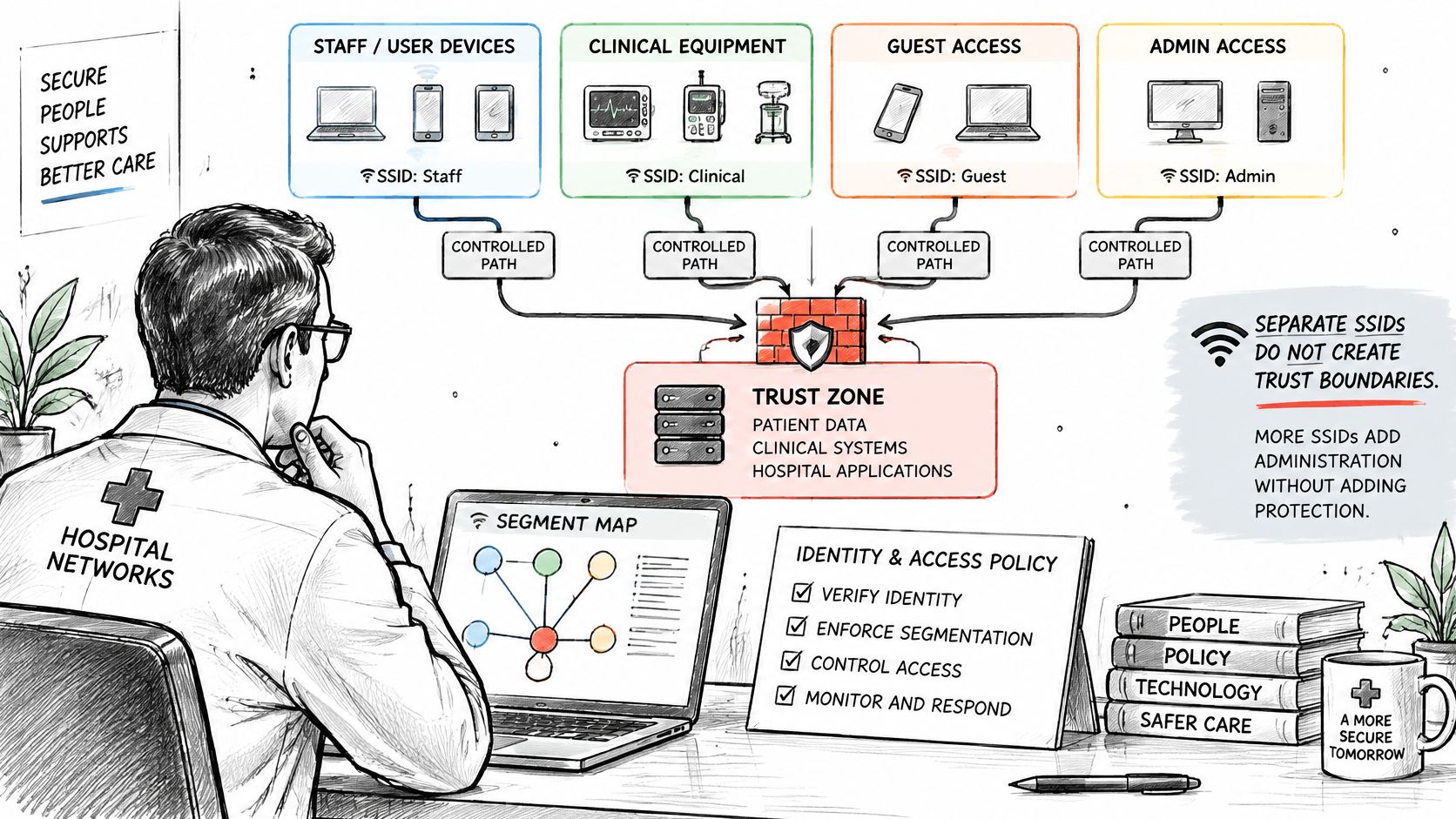
Separate SSIDs alone don't create trust boundaries. If the firewall freely routes between their VLANs, the hospital has renamed a flat network rather than secured it.
NHS England's network segmentation guidance recommends separating corporate wireless zones from public access and identifies client isolation as a way to help prevent lateral movement. Implement those boundaries in forwarding policy, not just in the network names displayed on a phone.
Make the identity-to-policy relationship visible to the people administering it.
Replace shared trust with explicit permissions
Assign each traffic class a policy and segment, then apply default-deny inter-segment rules. Permit the required destinations and protocols, including documented infrastructure dependencies, and block unnecessary client-to-client communication. Separate administrative access from normal device operation.
Use EAP-TLS certificates for managed staff endpoints and a unique supported certificate or key for biomedical and IoT devices. Returning visitors can use Passpoint without gaining clinical privileges. An onboarding method must never determine authorization more broadly than the user's approved role.
The AHIMA healthcare wireless-security survey update%20-%20Retired.pdf) found that 32% of hospitals weren't using technology to enforce BYOD policies. Treat that historical finding as a reminder to test enforcement on unmanaged endpoints, not as a description of today's hospitals.
A useful WiFi access control design connects authentication, authorization and revocation. Record who issued each credential, what it permits and what event should disable it.
Prove that exceptions can be removed
Cisco's healthcare wireless report identifies wireless security exposure that makes ongoing identity governance an operational concern. Build a revocation procedure that removes a compromised device or contractor without changing credentials across an entire ward.
Give contractor access an expiry and a named sponsor. For legacy devices that can't meet the preferred authentication policy, document compensating restrictions, an accountable owner and a review condition. An exception without those fields is unmanaged access.
Use the accompanying video as supporting context, not as evidence that the hospital's controls work.
Run explicit negative and positive tests:
- Rogue association: An unapproved endpoint must not obtain trusted access.
- Guest-to-clinical traffic: Attempts must be denied and produce usable evidence.
- Biomedical-to-workstation traffic: Unapproved connections must fail without breaking the device's approved backend connection.
- Revoked credentials: Test both fresh authentication and the handling of an already-connected session.
- Approved workflows: Confirm that permitted applications still function after restrictions are applied.
Success means verified enforcement of allowed paths. Record the identity, assigned policy, attempted flow and observed result, including legitimate traffic that must remain available.
How to monitor and prove compliance Over time
Monitoring should tell operators whether clinical service remains usable and whether access still matches policy. An access point reporting healthy status proves neither.
Map each segment to applicable obligations with the hospital's privacy, security and clinical engineering teams. Don't assume that a VLAN label establishes compliance or that every jurisdiction imposes the same logging requirements.
Give every control an owner
| Control area | Named signal or evidence | Accountable owner |
|---|---|---|
| Guest and patient privacy | Portal data collected, access permissions and retention settings | Privacy lead |
| Clinical and staff access | Authentication records, role changes and policy assignments | Identity team |
| Biomedical requirements | Approved configuration and manufacturer-supported connectivity | Clinical engineering |
| Unauthorized traffic | Denied flows and attempts outside destination allowlists | Security operations |
| Clinical service quality | Application availability, latency and failed transactions | Clinical application owner |
Alert on an unknown device joining a clinical or biomedical segment, unusual authentication failures and attempted access outside the approved destination list. Route alerts to someone who can distinguish an onboarding mistake from an incident and initiate the appropriate response.
Use bandwidth usage measurement alongside application telemetry to investigate congestion. Total throughput alone won't show whether a clinical transaction stalled while guest downloads continued normally.
Keep evidence usable during an incident
Set a fixed log-review schedule and record the reviewer, findings and follow-up action. Restrict access to logs and agree retention with privacy and security owners, since connection records can contain sensitive identifying information.
Assign each ward a clinical recovery objective approved by its clinical owner. State when degraded service triggers the fallback workflow, who declares it and how staff learn that normal operation has resumed.
- Policy consistency: Compare intended rules with deployed configurations across sites and legacy access points.
- Change triggers: Revalidate after relevant firmware, application, building or device changes.
- Evidence package: Keep acceptance results, failover records, exceptions and log-review decisions together.
An auditor or incident responder should be able to establish what was tested, under which configuration, when it passed and who accepted the remaining risk. Keep evidence tied to configuration versions rather than scattered across screenshots and personal folders.
Map your segments before you Buy Hardware
Build and sign off the segment map before ordering access points. Bring clinical engineering, IT, facilities and clinical operations into the review, and resolve ownership disagreements while they're still entries in a document rather than live access exceptions.
For each class, decide whether it needs a distinct SSID, a VLAN assignment, a device-specific policy or a unique credential. Those are different design choices. An IoT network segmentation plan should separate devices by required communication and consequence of failure, not merely by equipment label.
Make the purchase conditional on proof
Attach coverage and application thresholds to each clinical row, along with its fallback and acceptance test. Include the installation constraints and infrastructure dependencies so the purchase decision reflects the complete system, not just the radio specification.
Our Purple Access planner lets you tick what connects today and see where each group lands across three SSIDs: Open for guests and BYOD, Secure for staff and trusted users, and xPSK for things, tenants and communities. Use that grouping exercise to simplify access design without confusing SSID consolidation with clinical validation.
Before approval, require agreement on the survey scope, test endpoints and evidence needed for sign-off. Reserve the on-site validation work in the project plan rather than leaving it as an optional expense after installation.
This week, take these actions:
- Mark the floor plan: List the device classes and the clinical routes they use.
- Assign accountability: Name an owner for every class, including contractor and legacy-device exceptions.
- Book validation: Schedule the on-site survey and obtain agreement on the acceptance matrix before procurement.
The purchasing decision should follow a testable design. It shouldn't define one.
Purple Access offers identity-led Open, Secure and xPSK networks, with Cloud RADIUS assigning devices by identity to the appropriate network and VLAN. Visit Purple Access to use the planner to map your hospital's connection groups, then take that map into your clinical engineering review alongside your failover table and acceptance tests.