RADIUS vs LDAP: Which protocol your network needs
Published
Search for RADIUS vs LDAP and you'll meet the same advice in a dozen different fonts: they are alternatives, so pick whichever fits your stack, and if you already run Active Directory you can probably skip the RADIUS server. That last clause is where networks break. Dropping RADIUS does not simplify authentication. It removes the layer that makes the access decision, which means no VLAN assignment at the access point, no policy applied per device, and no accounting record of the session afterwards.
The two protocols sit at different points in one chain. A directory holds identity data: who someone is, which groups they belong to, whether the account is enabled. RADIUS takes that identity, compares it with network context, and returns a decision the access point can act on. A directory has no opinion about which VLAN a Finance laptop should join at nine on a Monday.
Procurement spending points the same way. Investment concentrates on the access-decision layer, the NAC and AAA/RADIUS segment, rather than on directory software alone, because the directory already exists in most organizations and the decision layer is what must be built.
What follows is a layer-by-layer comparison for enterprise WiFi: which protocol does which job, where the login sequence fails when a directory is asked to do work it was never specified for, and how to size, secure and test the result.
Table of Contents
- RADIUS and LDAP at a Glance
- How a WiFi Login Moves Between RADIUS and LDAP
- Authentication, Authorization and Accounting Compared
- Connecting RADIUS to Cloud and On-Premises Identity
- Security Trade-offs in Transport and Shared Secrets
- Performance and Scaling Under Real Load
- Choose RADIUS, LDAP or Both for Your Network
RADIUS and LDAP at a Glance
RADIUS decides whether a device or user gets onto the network, and with what settings. LDAP stores the identities, groups and attributes those decisions rest on. That one sentence settles most of the confusion in the comparison, because it separates the decision from the data.
The functional split is written into the standards themselves. LDAP exposes directory operations over stored entries and attributes. RADIUS carries authentication, authorization and configuration information between an access device and an authentication server, as a University of Maryland Baltimore County comparison of the two protocols sets out. Read the table below against your own environment.
| Criterion | RADIUS | LDAP |
|---|---|---|
| Primary purpose | Network access AAA: authentication, authorization, accounting | Access to directory data: read and manage identities, groups, attributes |
| Typical position | Between access device and policy or identity source | Identity repository, usually behind RADIUS |
| Typical clients | WiFi controllers, VPN gateways, switches, firewalls | Applications, admin tools, directory-integrated services |
| Returns network authorization | Yes: VLAN IDs, session limits, access policies | No core support for network decisions |
| Session accounting | Yes: session start, stop and usage records | No built-in equivalent |
Start with the position row. A RADIUS server sits in the path of every association: the WiFi controller, VPN gateway, switch or firewall sends it an Access-Request and waits for an answer. An LDAP server sits behind that exchange, answering questions about accounts and groups. Move LDAP into the path and something still has to translate a directory search into a VLAN assignment, and that translator is the component most homegrown designs forget to build.
The outputs row decides what your controller can do. RADIUS returns a VLAN identifier, a session timeout, a bandwidth policy or a filter, and it logs the start, stop and usage of the session. LDAP returns attributes about a person or a device. Nothing in its core protocol turns those attributes into an enforceable session limit.
Removing RADIUS from a WiFi design doesn't remove a login step. It removes the enforcement and audit layer, and leaves the directory holding a job it was never specified to perform.
Find the row that matches the access decision you need to control. If the answer is a VLAN, a bandwidth cap, a session limit or a record of who was online, that decision belongs to RADIUS, and the directory's role is to supply the identity data behind it.
How a WiFi login Moves between RADIUS and LDAP
LDAP arrived as RFC 1777 in March 1995, designed to reach X.500 directories without the resource demands of the heavier Directory Access Protocol. RADIUS grew out of Livingston Enterprises' PortMaster access servers and reached the IETF as RFC 2058 in January 1997, later replaced by RFC 2138 and then RFC 2865, a lineage the original RADIUS specification records. One protocol was built to read directory entries. The other was built to decide whether a connection could come up at all.
Here's the path a single association takes across both of them.
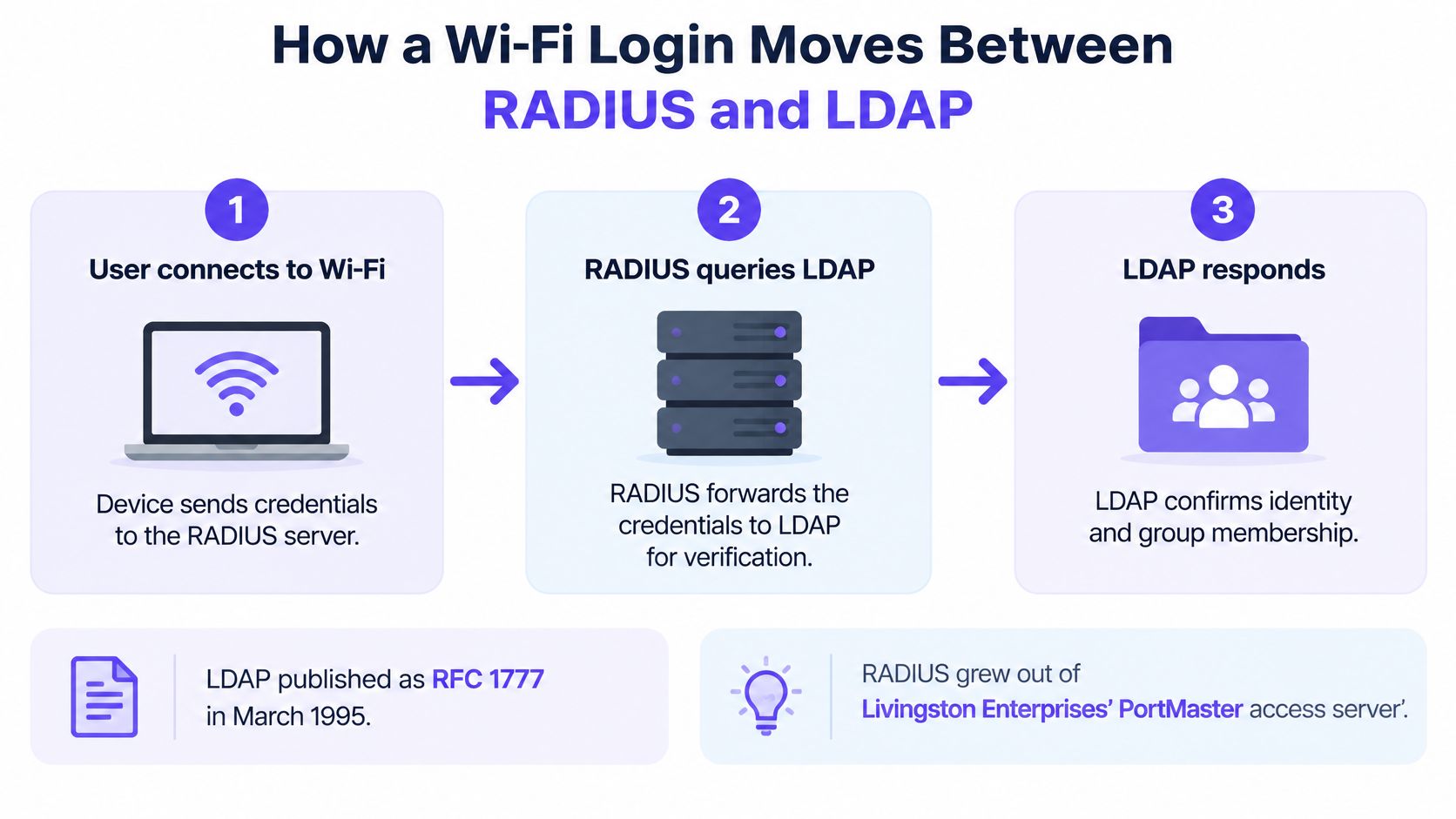
The device asks to join the SSID. The supplicant associates and the access point packages an Access-Request containing the identity string, the calling station address, the NAS identifier and any certificate material. In the log this appears as an Access-Request against the access point's name. If the SSID runs 802.1X, the EAP conversation begins here, and how 802.1X authentication works covers that exchange in detail.
RADIUS checks the credential. Depending on the SSID, that's a password inside a PEAP tunnel, an EAP-TLS client certificate, or an individual pre-shared key tied to one device. The log line shows the EAP method and the outcome of the cryptographic check.
RADIUS queries LDAP or the identity provider. With the credential validated, the server asks for account status and group membership. The proof is an LDAP bind followed by a search whose result contains the user's distinguished name.
Policy maps identity to a network outcome. The policy engine weighs group membership, device posture, certificate status and site context, then returns accept or reject along with a VLAN and a bandwidth limit. The log shows the name of the rule that matched, which is the single most useful field when someone asks why a laptop landed on the wrong network.
RADIUS returns the decision and attributes. An Access-Accept carries the VLAN identifier and any session limits, and the controller applies them to the port or the wireless client. The proof is the Access-Accept with the tunnel attributes inside it.
Accounting start and stop messages close the loop. The controller reports session start, interim updates and stop, with duration and byte counts. That's the record you reach for during an audit or a billing query.
Diagnostic order: when someone can't connect, walk these six steps in order and stop at the first one with no log entry. Blaming the directory is a reflex, and it's usually the wrong one.
An empty LDAP search result only means something after you've confirmed the Access-Request arrived and the credential passed. Until then you're reading the last step of a chain you haven't checked.
Authentication, authorization and accounting Compared
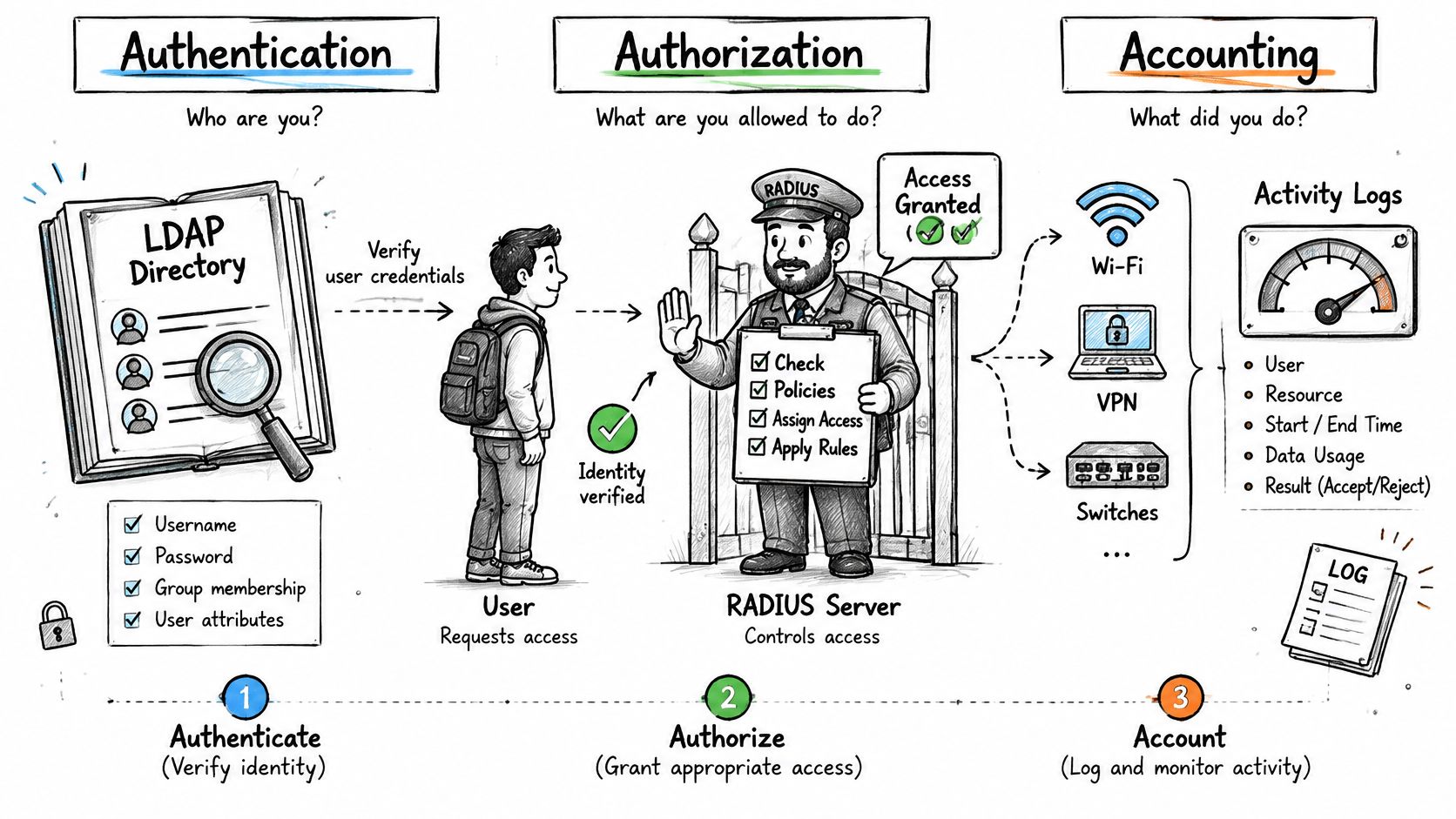
The three A's get compressed into the word "login", which is exactly why the comparison goes wrong. LDAP can confirm who a person is and which groups they belong to. It doesn't decide what their device may do on a particular network segment.
The protocols solve different technical problems rather than substituting for each other. LDAP is a TCP-based directory-access protocol, normally on port 389 or LDAPS on 636, built for searching users, groups and attributes. RADIUS is an AAA protocol for WiFi controllers, VPN gateways, switches and firewalls, traditionally on UDP 1812 for authentication and 1813 for accounting, and it can return VLAN identifiers, session limits and access policies that LDAP doesn't provide as part of its core protocol, as Casdoor's comparison of RADIUS and LDAP explains.
Two logins, one directory
A finance analyst opens a laptop on Monday morning. The certificate is valid, the directory says staff and finance, and RADIUS returns the corporate VLAN with a 10 Mbps limit and an eight-hour session timeout. The directory supplied the group. The limit came from the policy layer, and the controller enforced it.
Now disable a contractor's account at 10:15. The next association is rejected because the directory reports the account as disabled, and if the estate is configured properly the live session ends too, through a disconnect message to access points that support it. Skip that second half and a disabled account keeps browsing until the session times out on its own.
Accounting is where the split becomes an operational problem rather than a design preference. RADIUS records session start, stop and usage, so you can answer who was connected, from which access point and for how long. LDAP has no equivalent built-in session tracking, which leaves a directory-only design reconstructing sessions from DHCP leases and controller client tables.
The practical version of this is one authentication log across every site. The log in Purple Access answers questions such as which unit's devices are online at each building and on which VLAN, which long-stay keys are still live after their end date, and which corporate client's staff authenticated today.
List which of the three functions each of your current systems performs. Most estates find directory everywhere and authorization nowhere in particular, which is the gap RADIUS fills.
Connecting RADIUS to cloud and On-Premises Identity
The identity lookup is the part most designs leave vague. RADIUS doesn't store users, so it has to ask something, and what it asks determines how quickly a group change reaches the network.
A classic directory such as Active Directory or OpenLDAP gets queried by the RADIUS server over LDAP or LDAPS with a read-only service account. Three settings must be right before any VLAN mapping works: the bind credentials, the search base, and the group attribute. Set the search base too high in the tree and queries crawl and return duplicate group matches. Set the group attribute wrong and every user authenticates successfully but lands in the default VLAN, which looks like a policy bug and isn't one.
Three routes to a cloud identity provider
A synchronised LDAP-compatible directory. A service holds a copy of the cloud directory and answers LDAP binds locally. Straightforward for the network team, at the cost of a copy with its own sync lag and its own outage to monitor.
Federated validation inside RADIUS. The RADIUS server handles the sign-in against the provider directly, so there's no directory mirror to keep alive. Group claims have to arrive in the authentication response for VLAN mapping to work.
A provisioning feed. SCIM keeps group membership current in a local store that RADIUS reads. Membership is only as fresh as the last provisioning cycle, which matters when someone leaves at lunchtime.
Our Secure network takes the second and third routes, integrating with Entra ID, Okta and Google Workspace over SAML and SCIM, with group membership driving the VLAN. That's also the model behind our Cloud RADIUS service, where the directory stays authoritative and the enforcement point is hosted.
A four-step test for whichever route you pick
Confirm where the authoritative account and group data live. One directory, not three partially synchronised ones.
Choose the lookup route for each site. A regional site with poor latency to a central directory needs a local answer, not a longer timeout.
Change a test user's group and sign in again. The VLAN should follow at the next association, not after a server restart.
Disable the test account and attempt to connect. A reject plus an ended live session is the pass condition.
Each route adds a dependency, and dependencies are what failure planning has to account for. A lookup route nobody can describe at two in the morning isn't a design, it's an assumption.
Security Trade-offs in transport and shared secrets
Age gets blamed for RADIUS security incidents, and age isn't the cause. Transport and configuration are. A directory on plain port 389 leaks bind credentials just as happily as a RADIUS server whose shared secret is the word "testing".
Traditional RADIUS over UDP authenticates clients with a shared secret and doesn't protect every attribute, so the strength and rotation of that secret carry real weight. The secret belongs to a device pair. An access point, a controller and a VPN gateway should not share one string, because rotating a shared string means a maintenance window across the estate instead of a change to a single device.
LDAP can protect the whole connection with TLS, through LDAPS on port 636 or StartTLS on 389. Plain LDAP on 389 sends everything unprotected, including the bind password your RADIUS service account uses, and that account usually has read access across the entire directory.
| Option | Transport | Port | Protection |
|---|---|---|---|
| RADIUS over UDP | UDP | 1812 authentication, 1813 accounting | Shared secret; does not protect every attribute |
| RADIUS over TLS or DTLS | TLS or DTLS | 2083 (RFC 6614) | Encrypted transport; evaluate where confidentiality is required |
| Plain LDAP | TCP | 389 | Unprotected unless upgraded |
| LDAPS or StartTLS | TCP with TLS | 636 (LDAPS) | Whole connection protected by TLS |
Where confidentiality and stronger operational controls are required, RADIUS over TLS or DTLS is the option to evaluate, because it encrypts the whole exchange instead of relying on a shared secret to obscure one field.
Five configuration changes that matter more than protocol choice
Use long, unique shared secrets per device pair and rotate them on a schedule you can keep.
Restrict RADIUS traffic to management networks. An access point that can reach the RADIUS server from a user VLAN is an access point someone else can use as a probe.
Enable RADIUS over TLS where the hardware supports it. The Cloud RADIUS access point configuration guide walks through the controller side of that setup.
Require LDAPS or StartTLS with certificate validation. An unvalidated certificate turns encryption into decoration.
Log every reject and review the failures for patterns. A burst of rejects against one identity across many access points is a credential problem, not a coverage problem.
The weakest link in most estates is a default secret on one forgotten access point or a certificate check nobody switched on, not the choice between two protocols.
Performance and scaling under real load
Speed comparisons between RADIUS and LDAP measure different work, so there is no universal winner. Published benchmark evidence is highly implementation-dependent, and any claim that one protocol is categorically faster should be treated as noise.
In one comparative study of LDAP and RADIUS authentication performance, the tested implementations differed by 12.0 requests per second in throughput, 0.37 seconds in response time and 894.45 milliseconds under stress load. The hardware, directory layout, cryptographic method and workload are not specified, so treat it as a single datapoint rather than a capacity figure you can port to your site.
The split that plans capacity is authentication method. Typical per-core rates on modern hardware fall into ranges like these:
| Method | Approximate rate per core | CPU cost |
|---|---|---|
| PAP (password) | 5,000 to 10,000 per second | Lowest |
| PEAP with MSCHAPv2 | 500 to 1,000 per second | Moderate |
| Full EAP-TLS handshake | 100 to 300 per second | Highest |
Read those rows together and certificate onboarding costs 20 to 50 times more CPU per authentication than a plain password check. That ratio decides how many cores an EAP-TLS rollout needs, and it is why a pilot that only tested passwords tells you almost nothing about production.
Per-core cost is only half the picture, because RADIUS rarely works alone. In most estates it is the front layer of the access chain, and every PEAP or PAP check ends in an LDAP bind or a Kerberos exchange against the directory behind it. When that directory saturates, RADIUS latency climbs even while the RADIUS server itself sits idle. An estate running LDAP lookups without RADIUS in front loses the layer that enforces the decision and records it, so a slow directory becomes an unexplained outage with no accounting trail to reconstruct it.
What to measure before you buy capacity
Sustained authentications, measured separately for PAP, PEAP and EAP-TLS rather than averaged across them.
p95 and p99 latency, because the mean hides the queue that forms when a floor of laptops reconnects after a controller reboot.
Retransmissions and duplicate requests, which rise when a server is saturated.
Failover recovery time, timed from a real server stop rather than a planned switchover.
Backend directory latency on its own, since an LDAP or identity-provider delay shows up as RADIUS slowness in every dashboard you own.
RADIUS scaling also needs retry engineering. RFC 2865 notes that the protocol lacks built-in congestion-control provisions, so retransmit timing and retry counts have to be deliberate. A controller that retries aggressively during an outage turns one slow server into a storm of duplicate requests.
For scale reference, Purple Access runs on the largest cloud RADIUS in the world, handling 500 million logins a year, with 99.999% uptime, a 99.9% cloud RADIUS SLA and multi-region failover. Size your own deployment from your measured baseline. A rate table from another estate's hardware tells you what to test, not what you will get.
Choose RADIUS, LDAP or both for your network
The decision splits by situation rather than by preference.
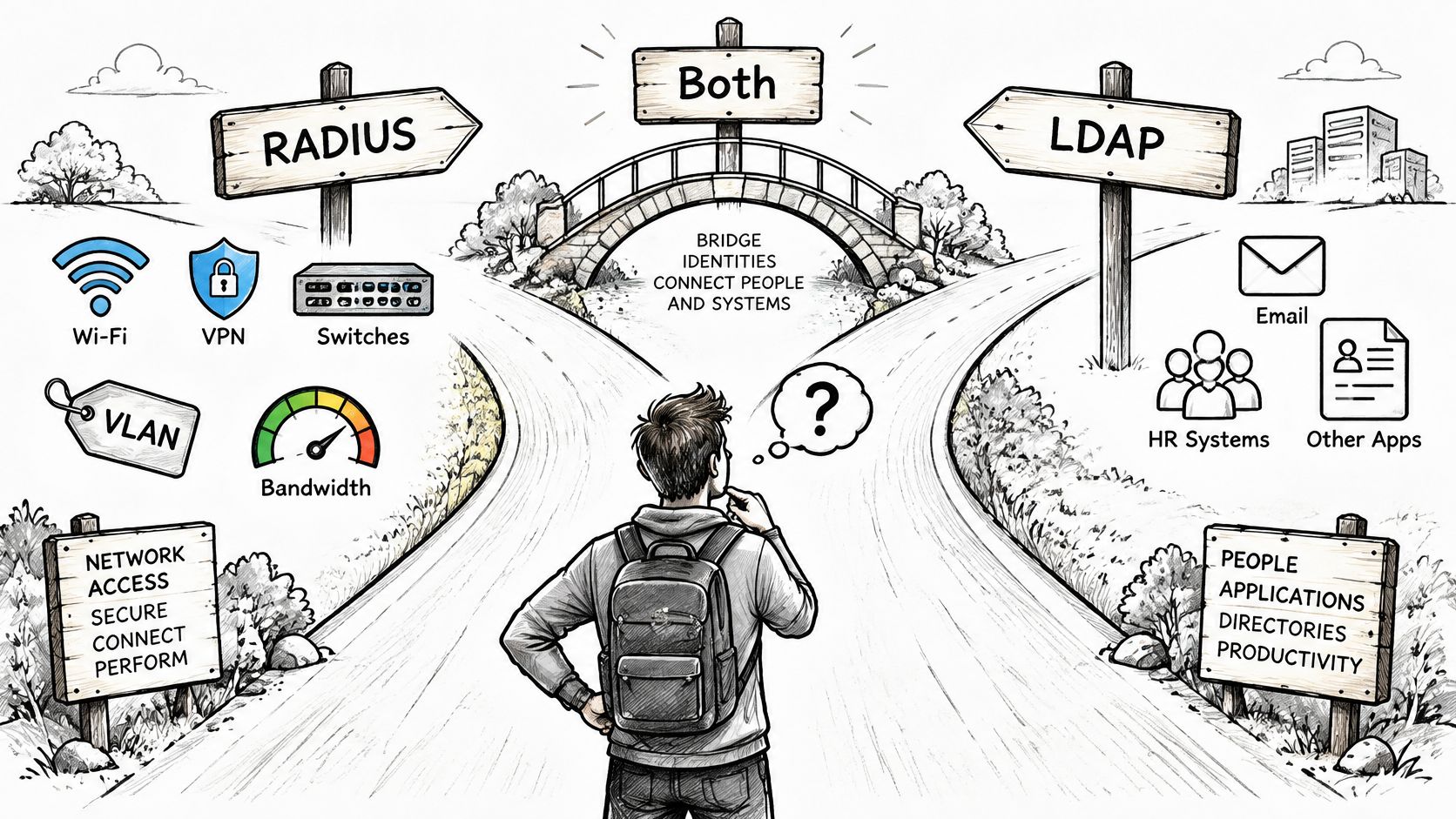
Choose RADIUS when you have to control access on WiFi, VPN or switches and you need VLAN, bandwidth or accounting results. Choose LDAP alone when the only consumers are applications performing directory lookups. Combine them when identity lives in a directory and network access has to follow group membership, which covers most enterprise estates.
The framing of RADIUS and LDAP as a replacement decision is the weakest part of most comparisons. As Cloud RADIUS's analysis of LDAP versus RADIUS puts it, choosing LDAP instead of RADIUS can remove the enforcement and audit layer rather than simplify authentication. That's the cost you're accepting, and it rarely appears in the same conversation as the supposed simplicity gain.
| Scenario | Needs RADIUS | Needs LDAP | Why |
|---|---|---|---|
| Corporate WiFi with per-group VLANs | Yes | Yes | Directory holds groups; RADIUS maps them to VLANs |
| VPN access with per-user policy | Yes | Often | Gateway enforces session limits and policy |
| Application single sign-on only | No | Yes | Applications read directory attributes directly |
| Guest or IoT segmentation by device | Yes | Optional | Device identity and policy decided per session |
| Multi-site estate with central identity | Yes, at each site or in the cloud | Yes | Directory stays authoritative; RADIUS enforces locally |
Designing failure behavior before you design policy
Multi-site estates fail in one of three ways: the directory is unavailable, its data is stale, or it's reachable only from some regions. Decide in advance whether the policy engine fails closed, serves cached results for a bounded period, or drops users into a restricted VLAN. Record the answer per site.
Take a housekeeping team as the test case. Certificates come from an MDM over SCEP, the VLAN comes from directory group membership, and access ends when the account is disabled. If any of those three pieces resolves through a different route at the second site, you'll find out during an incident unless you test it deliberately.
In our Cloud RADIUS, every device goes to the open, secure or xPSK network by identity, each on its own VLAN, and a leaver whose account is disabled is rejected. Adding RADIUS and the splash URL to the controller you already run takes under 15 minutes for the Open network, which makes a pilot cheap enough to run before committing to an architecture.
For a walkthrough of the enforcement side of this decision, watch the video below.
Six planning steps to the pilot
Count the enforcement points that need a decision: controllers, switches, VPN gateways, one line each.
Name the authoritative identity source and write down its owner, not just its hostname.
Map each group to a VLAN and a bandwidth limit, including the default for anything unmatched.
Choose transport and certificate method per access point, since older hardware may not support RADIUS over TLS.
Define failure behavior for a directory that's down, stale or unreachable from a region.
Pilot at one site, measuring p95 latency and confirming that a disabled test account is rejected and its live session ended.
Let the pilot settle the argument. If a directory-only variant can't reject a disabled account and end an existing session, it hasn't simplified anything, it has moved the control you needed into a place that never had it.
Purple Access runs the access layer this article describes as a hosted service: Cloud RADIUS with identity-driven VLANs, EAP-TLS certificates issued and renewed through managed PKI, and one authentication log across every site that shows each accept and reject with identity, device, method, access point and VLAN. If you're weighing a directory-only design against one that keeps an enforcement layer, visit Purple Access and put a single site through the pilot steps above before you commit the estate.