Remote authentication dial in user services explained
Published
A staff laptop joins your corporate WiFi automatically, a guest gets internet access, and a payment terminal connects through the same access points. Then someone asks why the guest can't reach the terminal, or what happens if your authentication service goes offline. A successful connection alone doesn't answer either question.
That's where remote authentication dial in user services, usually called RADIUS, becomes important. The useful way to understand RADIUS isn't just as a login server. It's a decision point between identity and network access, with consequences for which segment a device enters, what it can reach, and what your equipment should do when no answer arrives.
Table of Contents
- What RADIUS Is and the Three AAA Jobs
- How an Access Request Travels from Device to Server
- How RADIUS Places Each Device in Its Own Segment
- RADIUS Compared with TACACS+ and Diameter
- Security Limits of RADIUS and How to Verify Protection
- Design Safe Failure and Verify It Before Rollout
What RADIUS Is and the Three AAA Jobs
Your staff laptop connects without anyone typing a password at the access point. It might have a certificate installed by your mobile device management platform, or MDM. The access point asks a RADIUS server whether to admit that laptop and which access policy to apply.
RADIUS stands for Remote Authentication Dial-In User Service. Strictly speaking, it's a protocol, not a particular server product. A RADIUS server implements that protocol and returns access decisions to network equipment.
Think of a building reception desk. The receptionist doesn't necessarily maintain the employee directory, but checks it before issuing a badge. The badge might allow entry to reception and the meeting rooms, not the finance office.
The three AAA functions RADIUS performs
RADIUS organizes that work into authentication, authorization, and accounting, collectively called AAA.
| Function | Question it answers | Typical example |
|---|---|---|
| Authentication | Who or what is this? | A staff laptop presents a device certificate |
| Authorization | What may it access? | A till is placed on its own VLAN with limited access |
| Accounting | What happened and for how long? | Session start, stop and data used are logged |
Authentication and authorization aren't interchangeable. A valid identity can still be refused access because it doesn't meet the policy for that network. Equally, an accepted identity shouldn't automatically receive unrestricted access.
Accounting creates a record of the connection, rather than a recording of everything someone does online. Session identifiers, timestamps, and usage records help operators investigate access and troubleshoot disconnections.
The diagram separates these responsibilities.
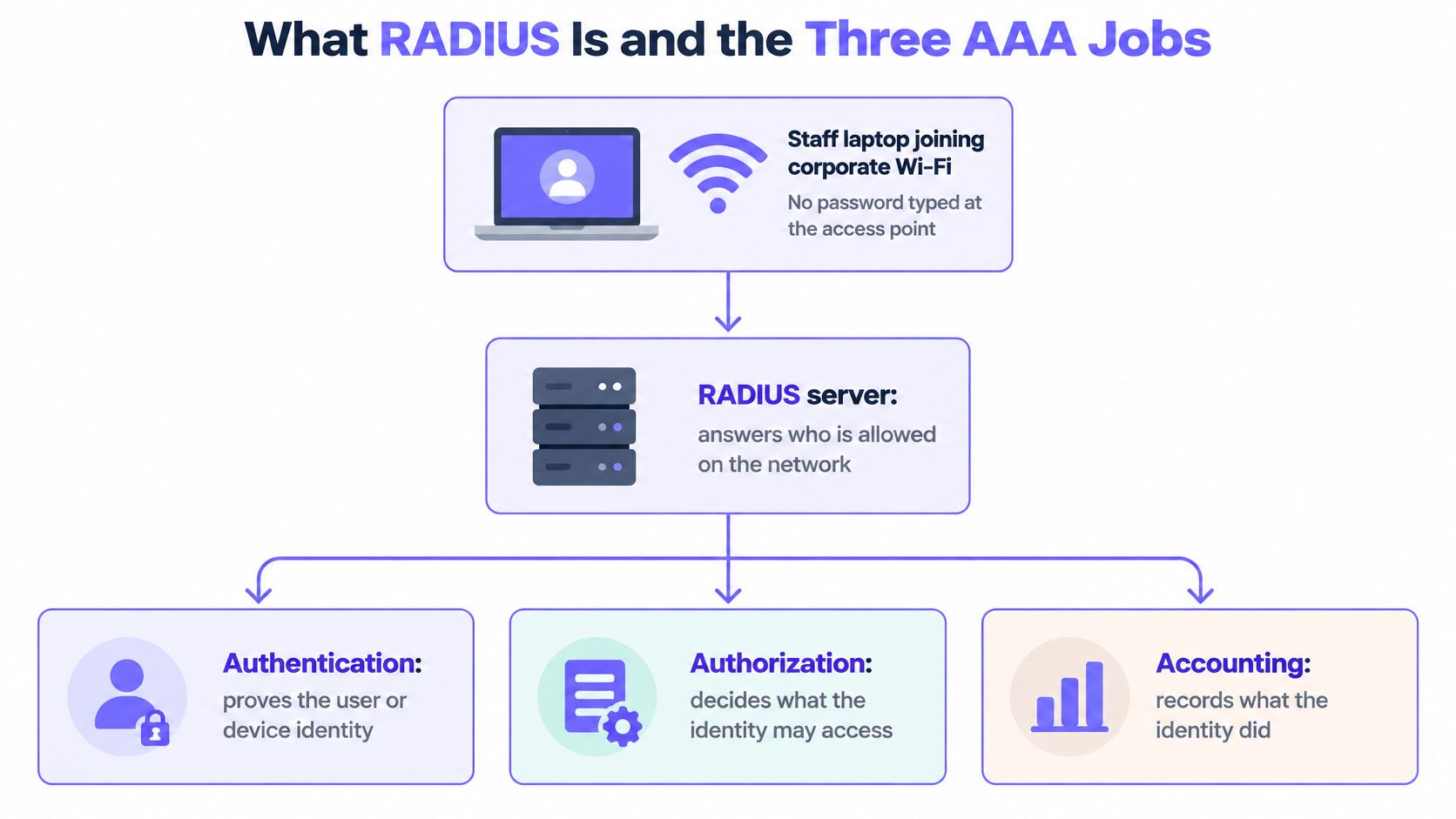
RADIUS originated in the early 1990s to centralize distributed dial-up authentication, then its centralized model extended to wireless, VPN, and enterprise network access, as documented in the RADIUS specification and its historical acknowledgments.
Practical distinction: The RADIUS server makes the access decision; the network equipment enforces it.
The identity records can live in a separate directory or credential service. The access point or switch is the RADIUS client, not the place where your organization must store its identities.
How an Access request travels from device to server
Start by separating the actors. The supplicant is the device asking to connect. The authenticator is the access point or switch controlling admission, while a VPN gateway performs the equivalent access-control role for remote connections.
In RADIUS terminology, that network device is the Network Access Server, or NAS. Despite its name, it might be an access point rather than a server in your equipment room.
The request follows this path.
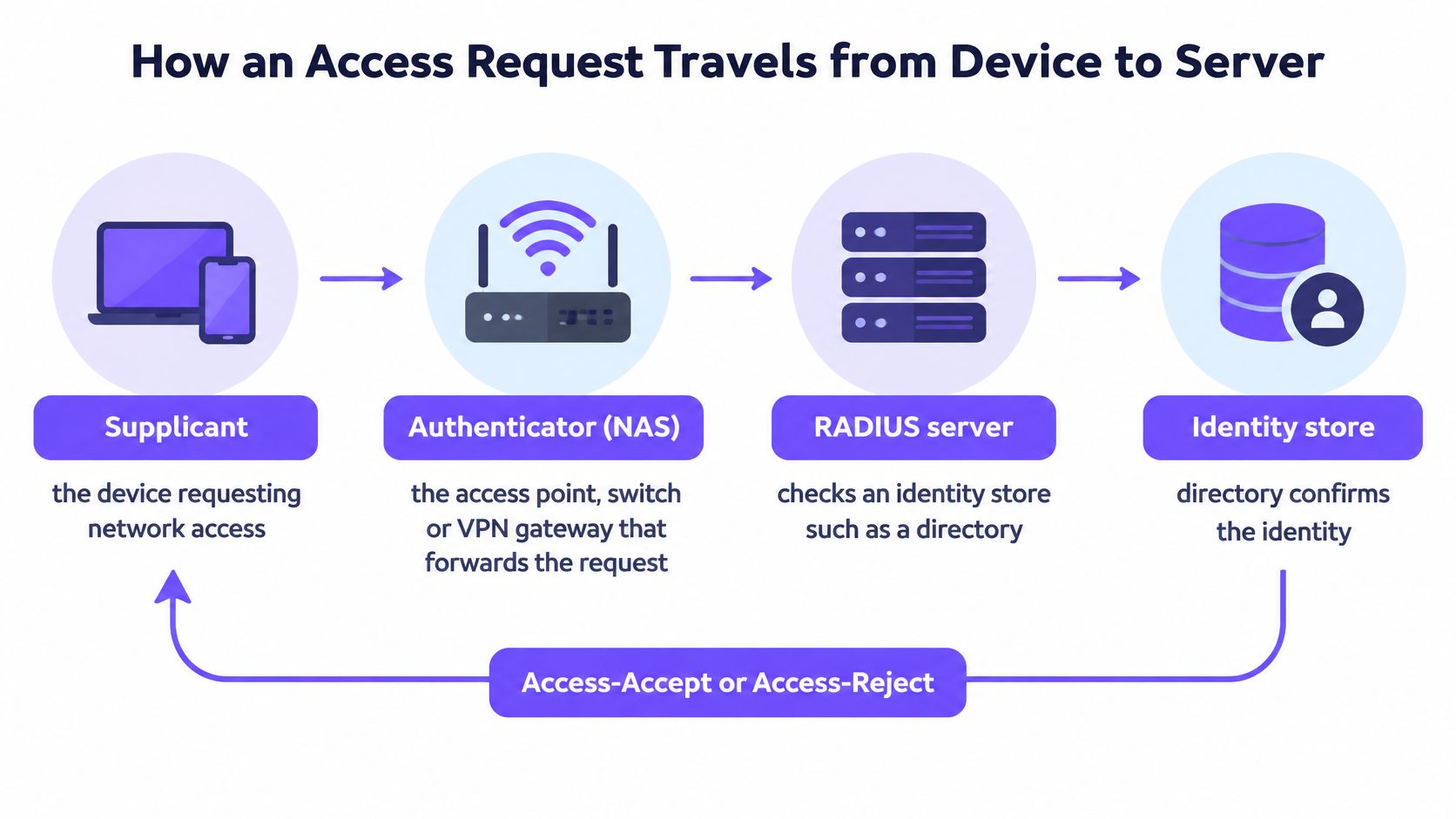
Follow the exchange
The device begins authentication. The laptop contacts the access point and starts the configured authentication method. That might involve a certificate rather than a typed password.
The NAS sends an Access-Request to the RADIUS server. For conventional RADIUS, this travels over UDP and carries connection details together with authentication information.
The server evaluates the identity. It uses the configured authentication method and identity integration, which might involve a directory lookup or certificate validation. Certificate authentication checks proof of possession and trust, not just whether a username exists.
If the exchange needs more information, the server returns an Access-Challenge. The device's response travels back through the NAS, and the exchange can continue until the server can decide.
The server returns its decision. An Access-Accept includes applicable authorization attributes; an Access-Reject denies admission. A correct credential doesn't override a policy that prohibits access.
The NAS applies the accepted policy and reports session activity through Accounting-Request messages. Start, interim update, and stop records describe the session's lifecycle.
RADIUS message types and what each one means
| Message | Sent by | Meaning |
|---|---|---|
| Access-Request | Access point or NAS | Here are the credentials or authentication messages; please check them |
| Access-Challenge | RADIUS server | More information is needed, such as a one-time code |
| Access-Accept | RADIUS server | Authentication and policy permit access; apply the attributes that follow |
| Access-Reject | RADIUS server | Credentials or policy do not allow access |
| Accounting-Request | Access point or NAS | Session started, updated or stopped |
For wired and wireless 802.1X authentication, Extensible Authentication Protocol, or EAP, messages travel inside the RADIUS exchange. Methods such as EAP-TLS and PEAP determine what the server validates. With these methods, the access point relays EAP messages rather than needing to read the protected credentials.
When troubleshooting, use Wireshark to locate the Access-Accept on a conventional RADIUS capture and inspect its attributes. For TLS-protected transport, use server-side diagnostics or an appropriately authorized capture point instead. Then compare the answer with the policy the NAS applied, not just the laptop's connected icon.
How RADIUS Places each device in its own segment
Say a hotel has a housekeeping tablet, a reception laptop, and a guest phone using the same access-point infrastructure. They need different access: housekeeping applications, reception systems, and guest internet respectively. Sharing radio hardware shouldn't mean sharing permissions.
The image shows how the access point can enforce separate network segments.
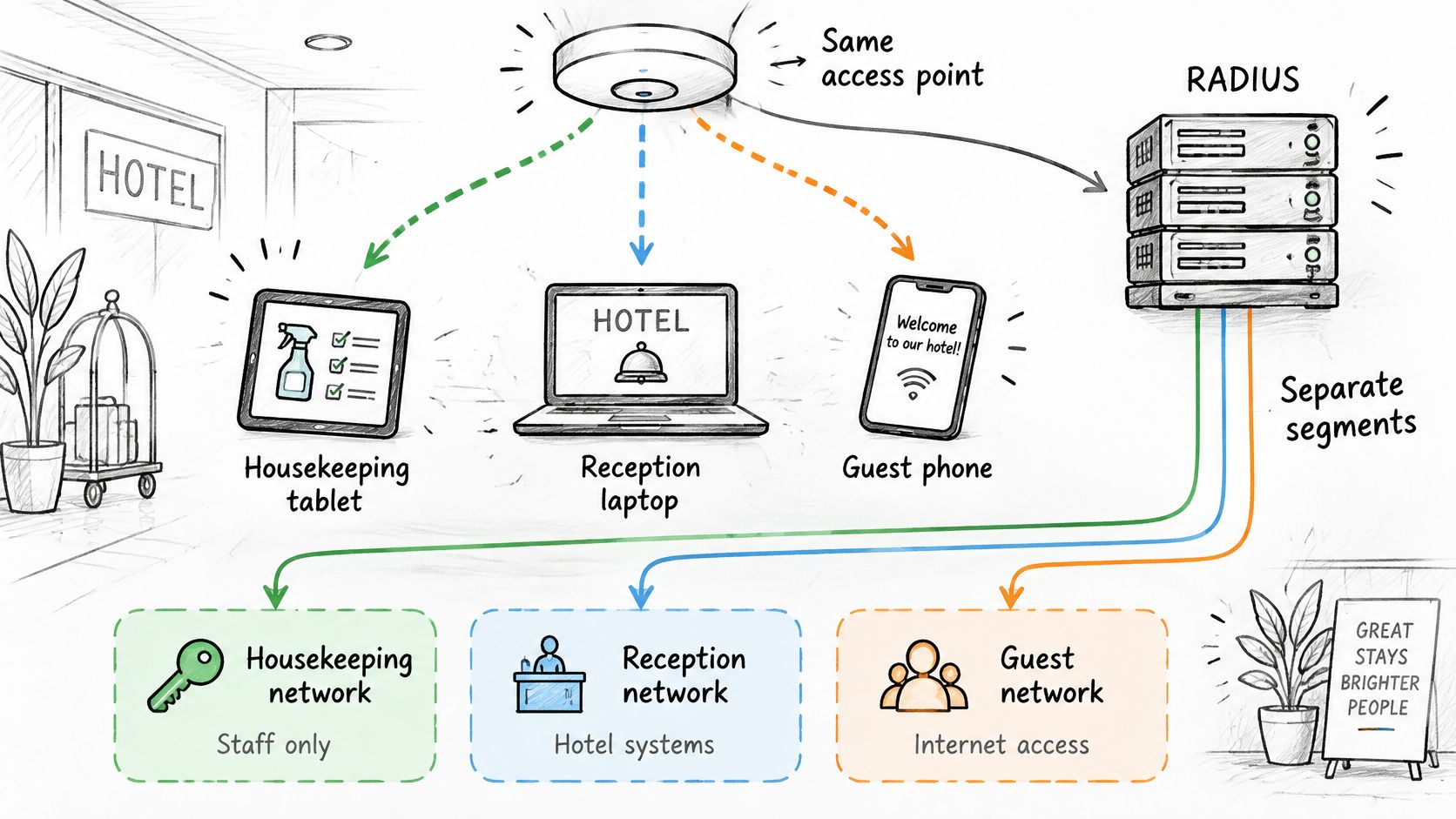
A VLAN is a logical network segment. RADIUS can return a VLAN assignment in the Access-Accept, and the switch or access point applies it to the authenticated port or session. The physical infrastructure still needs the corresponding VLANs and routing configuration.
Turn directory groups into network policy
For dynamic VLAN assignment, the server can return these tunnel attributes:
- Tunnel-Type: Set to VLAN to identify the requested tunnel type.
- Tunnel-Medium-Type: Set to the IEEE 802 media value expected by the equipment.
- Tunnel-Private-Group-ID: Set to the intended VLAN identifier.
Directory group membership can drive those values. A housekeeping group maps to the housekeeping segment, while reception staff receive a different policy. In our Secure network, integrations with Entra ID, Okta, and Google Workspace let group membership drive the VLAN.
Purple Access offers open, secure, and xPSK networks. Our Cloud RADIUS uses identity to direct devices to the appropriate network and VLAN, and rejects a leaver whose account is disabled. Housekeeping, reception, and operations staff can authenticate using MDM-delivered EAP-TLS certificates rather than a shared staff password.
This video provides another view of the access model.
Check the boundary, not just the label
An SSID is the wireless network name a user sees. It isn't, by itself, proof that devices are isolated, and a VLAN assignment doesn't automatically create firewall rules.
For effective VLAN segmentation, configure the permitted traffic between segments and test it. The housekeeping tablet should reach its required application without gaining access to reception systems.
A successful login proves admission. A traffic test proves whether the intended boundary is enforced.
Before rollout, authenticate a test device, inspect the returned VLAN attribute, and confirm its actual placement. Missing attributes, unsupported mappings, or a permissive default VLAN can undermine an otherwise sensible identity policy.
RADIUS Compared with TACACS+ and Diameter
| Protocol | Transport and port | What is encrypted | Typical use |
|---|---|---|---|
| RADIUS | UDP, with separate authentication and accounting service ports | In conventional password-based RADIUS, the password attribute is hidden, not the whole packet | WiFi, VPN and switch 802.1X access |
| TACACS+ | TCP, using its designated administration service port | Entire packet body, not the header | Administrator login and command control on routers and switches |
| Diameter | TCP or SCTP, using its designated service port | Protection relies on TLS or IPsec | Mobile and roaming networks |
Use RADIUS for user and device admission, and TACACS+ for administrator command control. Diameter belongs mainly in telecom-oriented architectures rather than being a routine replacement for enterprise WiFi authentication.
The deciding question is what you're trying to authorize. A staff laptop needs permission to join a network segment. A network administrator needs permission to log into a router and perhaps run a diagnostic command without changing its configuration.
Admission and administration are different jobs
RADIUS combines an authentication result with the authorization attributes needed to establish network access. That fits an access point deciding whether to admit a device and which role to apply.
TACACS+ separates authentication, authorization, and accounting more explicitly. For device administration, you can use it to distinguish permission to log in from permission to execute particular commands. Your equipment must support the command-authorization behavior you intend to enforce.
An organization can therefore run both protocols, often through separate services or configurations. Its wireless infrastructure asks RADIUS about endpoint access, while its management interfaces ask TACACS+ about administrator activity. There's no contradiction because the decisions protect different entry points.
Don't choose by the encryption column alone
The phrase entire packet body doesn't mean the entire communication path needs no further protection. Shared-secret handling, implementation updates, management-network isolation, and transport security remain important design considerations.
Likewise, Diameter's reliable transport doesn't make it a drop-in upgrade for an access point expecting RADIUS. The network equipment, identity integrations, and operational tools must support the chosen protocol.
Choose the protocol your devices support for the job you need, then verify its security properties separately. Replacing a familiar protocol with a more complex one won't fix an incorrect authorization policy or an untested fallback configuration.
Security Limits of RADIUS and how to verify protection
MFA doesn't automatically make a RADIUS deployment trustworthy. It strengthens the identity check, but a network device must also be able to trust the authentication response it receives. Those are separate security requirements.
The 2024 Blast-RADIUS disclosure showed that, under specific conditions, a man-in-the-middle attacker could forge an Access-Accept, obtain access without guessing credentials, and potentially bypass MFA without the RADIUS server knowing about the unauthorized session, according to the Isle of Man Cyber Security Centre's Blast-RADIUS advisory.
The weak point isn't necessarily the user's password. It can be the exchange between the access equipment and the server.
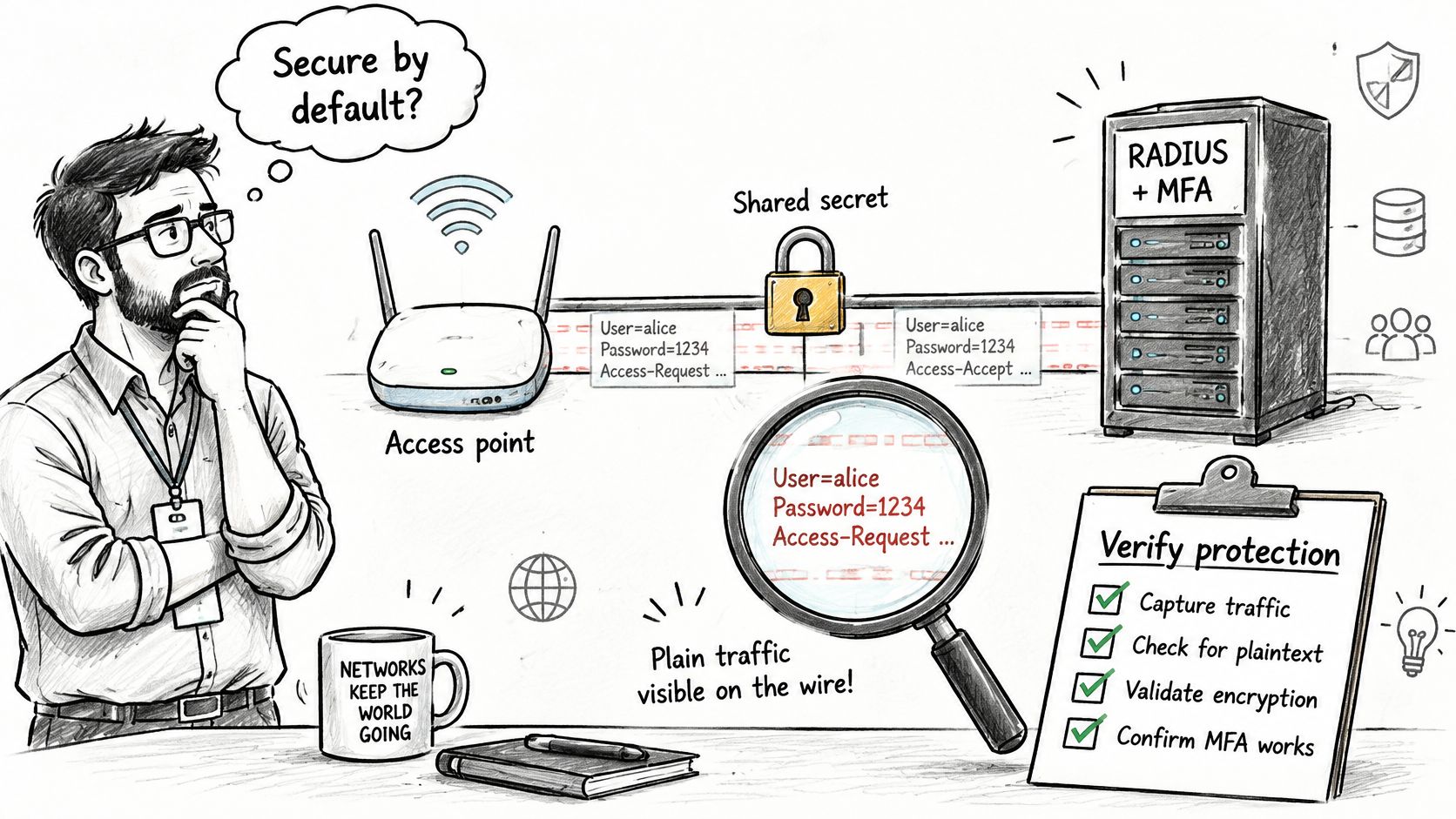
Protect both the message and its transport
Conventional RADIUS uses a shared secret between the NAS and server, but that isn't equivalent to modern end-to-end confidentiality. Password hiding in a legacy password method such as PAP shouldn't be mistaken for encrypting the whole exchange.
Require Message-Authenticator processing as the immediate integrity measure, following updated client and server guidance. Updating only the server leaves unanswered questions about what access points, gateways, and proxies send and enforce.
For longer-term transport protection, plan for RADIUS over TLS, commonly called RadSec, or another appropriately protected path. A protected EAP method and protected RADIUS transport address different parts of the connection, so don't treat either as a universal substitute for the other.
Verify the estate, not just a setting
- Inventory every RADIUS client: Include switches, access points, VPN gateways, and proxies, with their firmware and supported transport options.
- Confirm enforcement at both ends: Check Message-Authenticator generation and validation, including the treatment of missing or invalid values.
- Exercise legacy methods: Test PAP, CHAP, and MS-CHAP paths wherever they remain enabled rather than assuming the main WiFi test covers them.
- Inspect negative results: In a controlled test environment, confirm that malformed or unprotected requests are rejected and that logs explain why.
- Validate certificate trust: Configure supplicants to trust the intended authentication server identity rather than accepting arbitrary server certificates.
Keep evidence of those tests alongside the client inventory. A dashboard showing MFA enabled can't demonstrate that a legacy gateway rejects a forged response.
Security takeaway: Identity assurance and trustworthy message delivery must both hold before the NAS grants access.
Design Safe Failure and verify it before rollout
RADIUS usually runs over UDP. That means the network access server, not the server, owns retransmission timers and alternate-server behavior, as RFC 2865's UDP transport guidance sets out. Treat timeout and retry values as part of the access policy. A delayed answer is often useless for an interactive login, and an uncontrolled retry chain leaves users waiting while nobody knows which server answered.
A timeout is not an Access-Reject. The request may never have arrived, or the response may have been lost on the way back. Your access equipment therefore needs an explicit policy for uncertainty, much like a reception desk that cannot reach the security office: it must decide whether to hold the visitor, send them to a waiting area, or admit them on an old pass.
Choose what happens when no answer arrives
| Failure outcome | User experience | Security consequence |
|---|---|---|
| Fail closed | New access is denied | Preserves the admission boundary, at the cost of availability |
| Fail open | Device enters a fallback or guest VLAN | Can bypass intended segmentation if that segment is too permissive |
| Retain cached access | Existing or previously known devices continue working | Access can outlast an account or credential revocation |
A restricted guest fallback may be intentional for a particular service. It should not become emergency access to staff systems, payment infrastructure, or management interfaces. Cached access also needs a defined lifetime and scope. Document which credentials or decisions the NAS retains, what happens during reauthentication, and whether a directory change can take effect while the primary service is unavailable.
Separate revocation from the next login
Disabling an account and disconnecting its live sessions are different operations. On supporting equipment, RADIUS Change of Authorization, or CoA, can change or terminate an active session without waiting for a fresh login. Purple Access uses RADIUS CoA on its Secure network to end a disabled account's live sessions at every site, with live-session termination dependent on access-point support. It also supports revoking an individual key without affecting other keys, so removing a contractor or device does not require disconnecting everyone else. Test that behavior while a device is actively transferring traffic. Record when you disable the identity, when the session ends, and whether an immediate reconnection is refused.
Build a rollout checklist with evidence
The IETF draft on deprecating insecure RADIUS practices points toward TLS-based transport. Treat that migration as a compatibility project too, because legacy equipment may not handle the required transport or attributes correctly.
Before expanding beyond a pilot, verify these controls:
- Default deny: Unknown identities and unresolved requests do not receive privileged access.
- Restricted fallback: No broad emergency VLAN grants unintended reachability.
- Bounded caching: Document and test how long cached credentials or decisions remain usable.
- Tested alternate endpoints: Simulate an unreachable primary server, not merely a clean service shutdown.
- Independent audit records: Preserve accept, reject, timeout, and fallback decisions with identity, site, and applied policy.
Use a repeatable RADIUS authentication test procedure and include a legacy access point in the pilot. Test an alternate endpoint's authorization answer as carefully as its reachability.
Measure correctness as well as availability
Track authentication latency, failover time, authorization correctness, and revocation propagation time. Watch retry rates too, because increased retransmissions can expose WAN loss, routing problems, or an overloaded backend before users report failed connections. A geographically distributed service can remain reachable while returning stale directory information or inconsistent policy. Compare the returned attributes and actual access at each tested site, including during failover and recovery.
Finish the pilot with a written answer to a concrete question: Does the current deployment fail closed, and can the team prove it? Keep packet evidence, controller results, traffic tests, and revocation logs together so the answer survives the next firmware or policy change.
Purple Access provides managed Cloud RADIUS with identity-driven open, secure, and xPSK networks, VLAN assignment, and targeted revocation. Visit Purple Access to plan how your existing access points can enforce the right access decisions, and identify the failover and revocation tests your rollout needs.