What is 802.1X authentication? Roles, EAP and Setup
Published
A laptop moves from a desk to a meeting room, the cable clicks into the wall port, and the link light comes on. Then nothing. No address, no intranet, no mail, just a small warning icon in the corner of the screen. The same person's phone is on the staff WiFi and syncing normally, which makes the silence at the wired port more confusing than it looks.
Nothing is broken. The port has decided that access is conditional, and the condition is proof of identity. That behaviour is 802.1X authentication, and once you can see the three roles and the messages between them, most of the mystery goes away.
Table of Contents
- 802.1X as a Gate That Stays Closed Until Checked
- The Three Roles Behind Every Connection
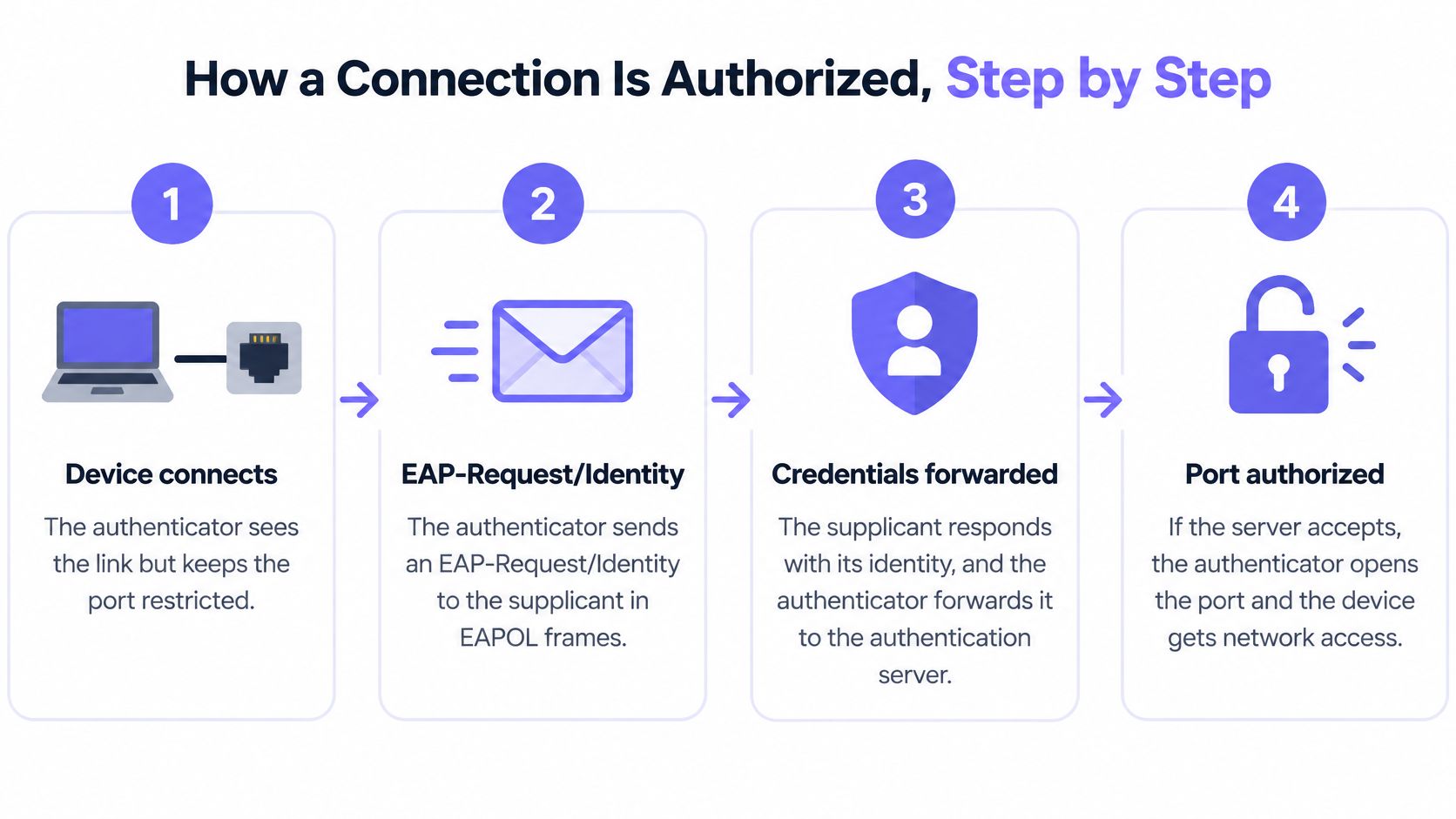
- How a Connection Is Authorized, Step by Step
- Diagnosing a Device That Fails to Join
- Choosing an EAP Method Between Certificates and Passwords
- Where 802.1X Runs in Real Networks
- Devices That Cannot Authenticate and How to Handle Them
- Confirm the EAP Method and Certificate Plan Before You Deploy
802.1X as a gate that stays closed until checked
A laptop connects to an Ethernet port in a conference room. The link light comes on, but the laptop cannot reach the network. The port is waiting for proof of identity.
802.1X authentication is an IEEE standard for port-based network access control. It lets an administrator restrict a wired port or wireless network until a connecting device has been authenticated and authorized, as the IEEE 802.1X standard describes.
A turnstile offers a useful comparison. It stays locked until a guard checks a badge. The turnstile allows the check to happen, but holds back entry until the badge is approved.
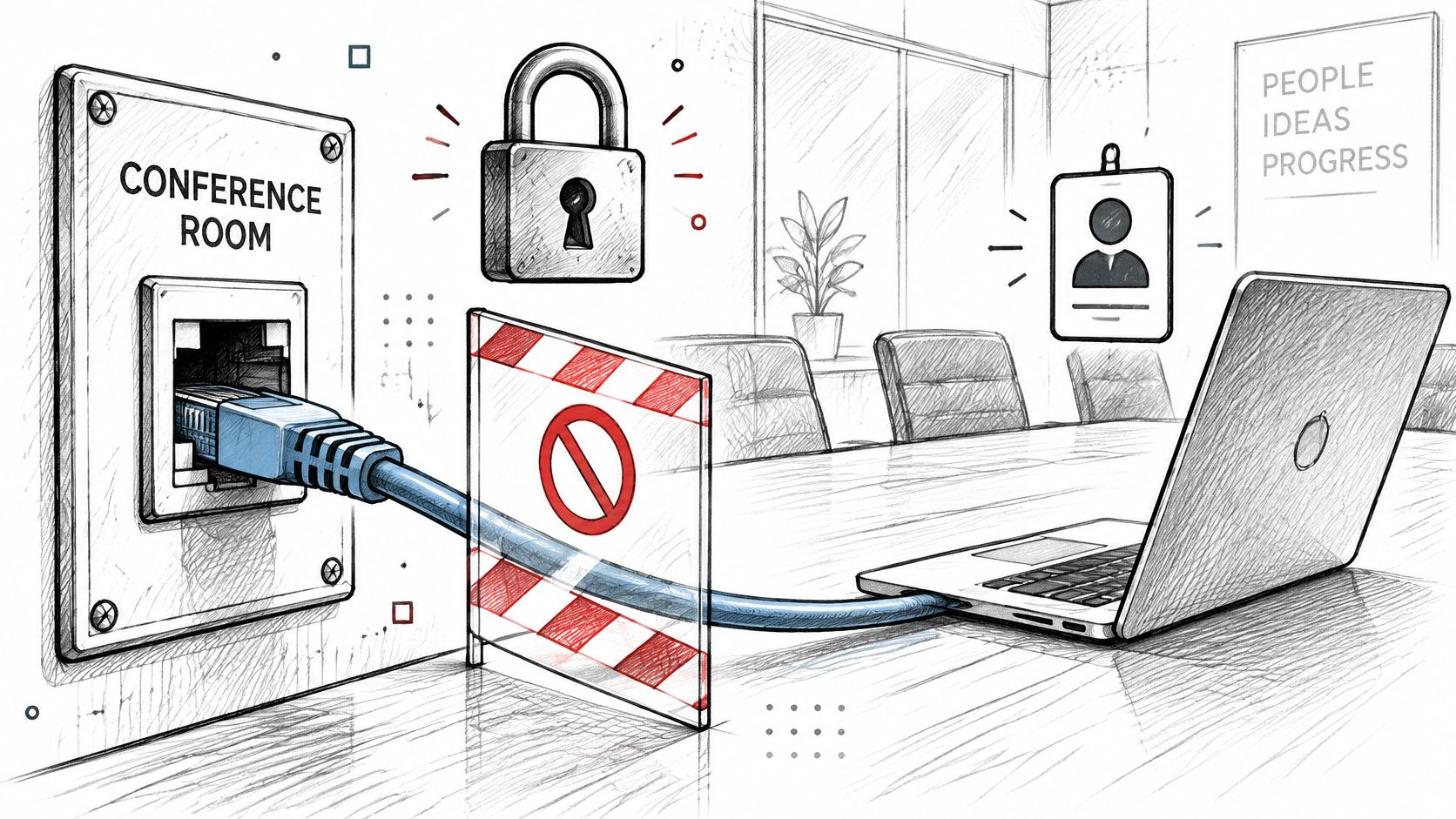
An 802.1X-controlled port works similarly. Before authentication succeeds, it allows authentication traffic but restricts ordinary network access. After approval, normal traffic can flow. A connected device can therefore have an active cable or WiFi link without having access to the network.
A shared WiFi key works differently: anyone with the passphrase can connect, and a leaked key may remain usable until it is changed. 802.1X can assess each connection against its own identity and policy, allowing access to be granted, limited, or refused for that identity.
The test that matters: unplug the cable, reconnect it, and watch whether the machine gets an address before or after it is asked to prove its identity.
The standard has been revised over the years and consolidated into the IEEE 802.1X-2020 edition. The current edition describes port-based access control for authenticated and authorized access to LAN services. The standard defines the gate; the practical work lies in choosing how a device proves its identity and keeping that proof valid over time.
Start by checking whether the switch port or WiFi network asks for credentials before granting access, or trusts any device that connects.
The three roles behind every connection
802.1X works through three logical roles, and every confusing vendor document becomes readable once you can map a sentence to one of them.
| Role | What It Does | Typical Device or Software | Decision It Contributes |
|---|---|---|---|
| Supplicant | Requests access and answers the authentication challenge | Laptop, phone, printer or sensor with an 802.1X client | None; it only proves its identity |
| Authenticator | Holds the port or WiFi link closed until the server approves | Ethernet switch or WiFi access point | Opens, limits or refuses the port |
| Authentication server | Checks credentials or certificates against directory and policy | RADIUS server, often tied to Active Directory or a certificate authority | Accept or reject, plus the VLAN or role to return |
The image below shows how those three sit in relation to one another.
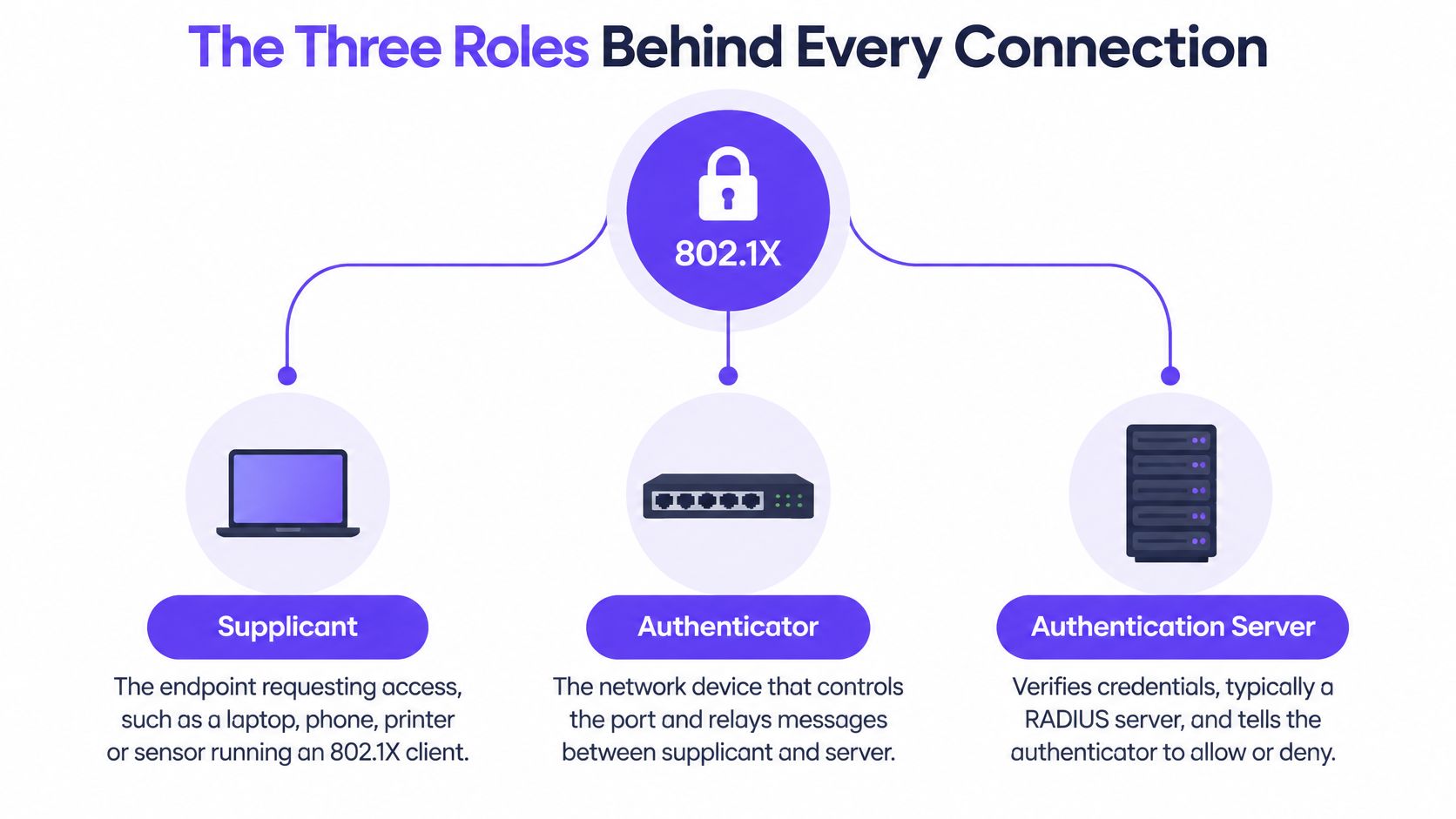
The supplicant is software on the endpoint, not the endpoint itself. Windows, macOS, iOS, Android and most Linux distributions ship a client that can present a certificate or a username, and that client is what responds when the network asks for proof.
The authenticator is the device that physically holds the door: a switch port, a wireless access point, or a controller acting for one. It's the only role that can admit or refuse traffic, and it does so on instruction.
The authentication server is where the actual judgement happens. It's usually a RADIUS service connected to a directory, a certificate authority, or both, and it returns the verdict along with any policy that should follow it. If you want the longer version of that leg of the conversation, this explanation of what RADIUS authentication does covers the protocol between switch and server.
An airline gate makes the split obvious. You show a boarding pass at the desk, the gate agent scans it, and the airline's system confirms the booking is real and the flight is yours. The agent doesn't decide who flies. The system does. The agent just refuses to let anyone past until the answer comes back.
Why the roles are kept apart
The supplicant decides nothing about its own access. That single design choice is why a compromised laptop cannot announce that it is trusted and be believed. It can lie about its identity, and the server can reject the lie.
Keep the decision central and you get a practical benefit that shows up on every change request. Disabling one account, revoking one certificate, or moving one group into a different network segment takes effect at the next authentication, across every switch and access point that consults the same server.
Rule of thumb: if changing who gets in means touching switches one at a time, the policy is sitting in the wrong place.
How a connection is authorized, step by step
The exchange follows a fixed sequence, and each message exists for a reason. Once you know the reasons, a stuck device becomes a question of which message never arrived.
The link comes up and stays closed. A device connects to a switch port or associates with an access point. The authenticator sees the link and keeps the port in an unauthorized state, permitting only the uncontrolled exchange needed for authentication, as the IEEE 802.1X working group materials put it.
The authenticator asks who is there. It sends an EAP-Request/Identity to the supplicant in EAPOL frames carried over the wired or wireless link. Only this conversation is allowed through, which is why an unauthenticated device looks connected and useless at the same time.
The device answers and the answer is relayed. The supplicant returns an identity, and the authenticator wraps the exchange into a RADIUS Access-Request toward the server. The authenticator doesn't evaluate the credential. It forwards it and waits.
The server challenges the claim. It sends whatever Access-Challenge messages the chosen EAP method requires, and the device responds with a certificate or a password inside a tunnel. This is the step where an identity stops being an assertion and gets tested.
The server decides. It validates the credential against the directory, the certificate chain and its policy, then returns Access-Accept or Access-Reject. The reasoning behind a reject usually lives in the server log, not on the device.
The port opens with policy attached. On accept, the authenticator enables the controlled port for normal traffic and applies what the server sent back, such as a VLAN or a role. On reject, the port stays as it was and the user sees a machine that appears connected and does nothing.
On enterprise WiFi there is a short epilogue. The client and access point exchange EAPOL frames during authentication, the access point relays the EAP conversation to RADIUS, and once the verdict arrives the AP and device run the wireless key handshake so that each session gets its own encryption keys. The access point enforces admission; central policy decides who may connect.
What the user actually sees
A working connection looks unremarkable: the link comes up, an address arrives on the right VLAN, and the mapped drive reconnects. Nothing announces that a certificate was validated.
A failing one looks nearly the same until you check. The cable is in, the icon says connected, and the address is either missing or from a fallback range. That invisibility is the most common source of confusion, because the device rarely reports why it was refused.
The one habit that shortens every 802.1X investigation is reading the server decision first and the endpoint second.
Diagnosing a device that Fails to join
Most failed joins fall into five causes, and the endpoint will tell you almost none of them. Work from the evidence, not from the screen.
No credential, or a stale one. The supplicant has no certificate to offer, or the password changed and the saved profile didn't. The server returns Access-Reject, and the reason names the missing method. Look in the RADIUS log before touching the device.
A certificate the server won't accept. The chain doesn't reach a trusted issuer, the certificate has expired, or it was revoked. The reject reason usually points at the certificate step. Check the certificate store on the device and the trusted roots on the server.
Clock skew. Validity dates are checked against the current time, so a device whose clock has drifted can present a perfectly good certificate and still fail. Compare the device time with the server time before you reissue anything.
A policy mismatch. Authentication succeeds and the device lands somewhere unexpected, usually because the account sits in the wrong directory group. The port shows authorized while the user reports no access, which sends people looking at the wrong layer.
An unsupported supplicant. The device offers an EAP method the authenticator isn't configured to accept, or offers nothing at all. The identity exchange stalls early, and the port status shows the session still pending.
Where the evidence lives matters as much as the order. The RADIUS accept or reject entry tells you whether the credential was judged. The authenticator's port status tells you whether the decision was applied. The certificate store tells you what the device presented. If you need a repeatable way to exercise the server side on its own, this guide to testing RADIUS authentication walks through it.
First response order: read the log entry, confirm the certificate chain and dates, then check the clock and group membership. Fixing the device first is guesswork, and it wastes the one record that already knew the answer.
Choosing an EAP method between certificates and passwords
A device joining a WiFi network may need to prove its identity before it receives normal network access. 802.1X sets up that gate; the Extensible Authentication Protocol (EAP) carries the chosen authentication method. Because EAP is an extensible framework that can run over data-link technologies without IP connectivity, a device can authenticate before it has ordinary network access.
| EAP Method | Client Credential | Client Certificate Needed | Mutual Authentication | Phishing Resistance |
|---|---|---|---|---|
| EAP-TLS | Client certificate | Yes, on every device | Yes, both sides prove identity | High, no password is sent |
| PEAP-MSCHAPv2 | Username and password inside a TLS tunnel | No, server certificate only | Server proven; client by password | Low to moderate, passwords can be phished |
| EAP-TTLS | Password or other inner method inside a TLS tunnel | No, server certificate only | Server proven; client by inner method | Low to moderate, depends on inner method |
EAP-TLS uses certificates on both sides: the client checks the network's identity, and the network checks the device or user certificate. No password travels over the connection to be stolen or replayed, making EAP-TLS a strong fit for managed laptops and phones.
PEAP and EAP-TTLS use a server certificate to establish an encrypted tunnel, then verify the user through an inner method. They avoid issuing a client certificate to every endpoint, but still rely on passwords in common configurations. A device that does not validate the server certificate may send its password to a rogue access point. The details of EAP-TLS compared with PEAP help clarify the trade-offs.
The decision the table can't show
NIST recommends EAP-TLS where possible. Its guidance explains that EAP-TLS requires an enterprise PKI and a certificate on every client device, while many other TLS-based methods require a certificate only on the authentication server, as described in NIST's guidance on EAP methods.
The method choice depends on more than protocol strength. Decide who will issue, install, renew, revoke and replace client certificates, and what users should do when a certificate expires.
A certificate must be available when the device authenticates and chain back to a trusted issuer. Plan how to track deployed certificates, check revocation, and handle renewal before expiry. Without automation, certificate management can cause outages and increase help-desk work.
Before committing, compare each option across five points: whether devices can hold the required credential, the consequences of a phished password, enrolment effort, how revocation works, and how a locked-out user regains access. A strong protocol still needs a workable renewal process.
Where 802.1X runs in real networks
A staff member joins the company WiFi, while a printer connects by cable and a guest uses a separate network. 802.1X can control access in each case, provided the device and network equipment support the chosen authentication method.
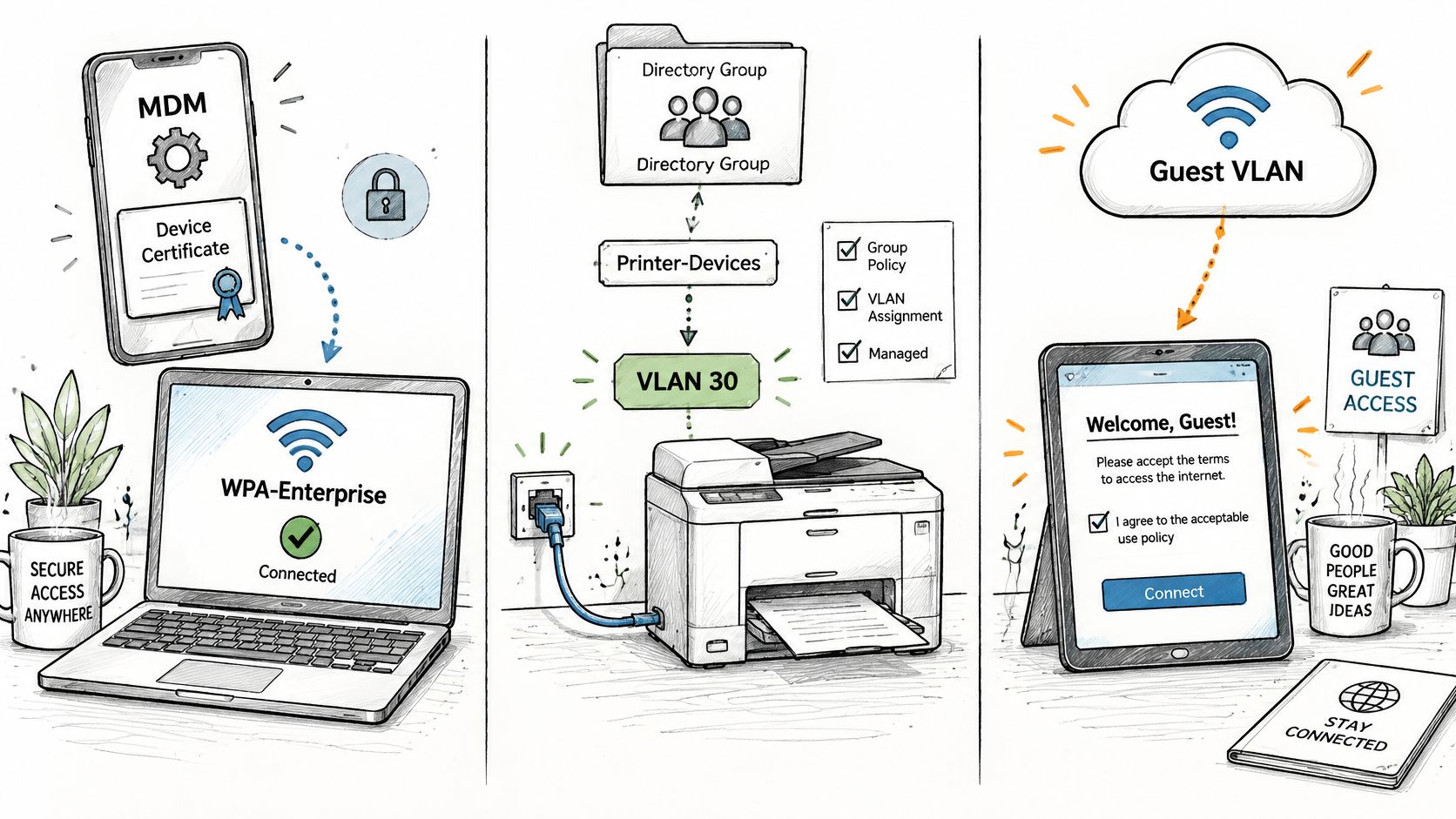
Staff WiFi. Enterprise WiFi hardware commonly supports 802.1X and EAP. A WPA-Enterprise network can use certificates installed by a mobile device management (MDM) system, with access assigned according to a user's directory group. Disabling an account can prevent that user from joining again, without an administrator editing each switch.
Wired ports for managed devices. Desk phones, badge readers and printers can authenticate through the switch port. Devices that cannot complete authentication need a controlled registration or fallback network, rather than unrestricted access. Wired ports can be overlooked: an unused office port still needs an access policy.
Multi-site estates. A shared authentication service can apply consistent policies across switches and access points at multiple sites. Central management reduces repeated configuration, but it also means that a policy or certificate error can affect many locations at once.
The network equipment handles the gate, but the authentication design determines who can pass. Before deploying, check four things:
- A RADIUS server reachable from each authenticator, with a working connection to the directory.
- A certificate authority and an enrolment process that can install certificates without visiting each device.
- Switch and access-point support for 802.1X and the EAP methods the organisation plans to allow.
- A VLAN plan that gives the authentication service a defined network for each class of device.
To see the exchange on real hardware, this walkthrough demonstrates a wired 802.1X authentication from start to finish.
Devices that cannot authenticate and how to handle them
Most introductions assume every endpoint can present a credential. Walk a building and the assumption collapses: printers, cameras, medical equipment, building controls and sensors that have no user interface, no supplicant, no certificate store, or firmware old enough to predate the idea. The persistent WLAN-IoT problem, as recent technical literature on constrained device authentication describes it, is that existing EAP approaches can impose security and computational burdens that these devices can't carry.
The tempting fix is to drop the exceptions onto a trusted flat network and move on. That's the same as leaving the side door propped open because the front door has a lock.
What works instead is an explicit exception architecture:
- Inventory and classify. List every device that can't authenticate, what it talks to, and who owns it. A spreadsheet beats a guess.
- Isolate with intent. Put each class of device on a tightly scoped VLAN, with the smallest address range that does the job.
- Restrict destinations. Permit only the servers each device needs. A camera has no reason to reach a file share.
- Monitor behaviour. Watch for a device suddenly talking to something new, which is often the first sign that its identity was borrowed.
- Set an end date. Record a replacement timeline and the compensating controls in force until then.
NIST recognises that organisations may use either IEEE 802.1X/EAP with RADIUS or weaker shared identifiers such as MAC addresses, with authentication strength determined by system impact. That nuance is worth holding onto, and so is its limit: a MAC address is an identity signal, not proof that the device is genuine. Presenting MAC-based identification as equivalent to EAP-TLS is how exception networks become the softest part of the estate.
The direction most estates are moving is hybrid access: certificate-based 802.1X for capable endpoints, controlled alternatives for legacy hardware, and progressively stronger onboarding as firmware and device platforms improve. Each refresh cycle is a chance to move a device class from the exception list onto the main path.
Questions to settle this quarter: which devices cannot authenticate, what VLAN each one needs, who reviews that list, and when each device will be replaced.
Confirm the EAP method and certificate plan before you Deploy
The work that decides whether 802.1X succeeds happens before the first production port is switched over, and a pilot is the cheapest way to find the gaps. Run your chosen EAP method on one site, beside the network it runs today, and judge it on the things that will be measured later: help desk tickets, authentication logs, and audit evidence.
Keep the scope to a single site. A failure stays contained, the rollback is trivial, and you still learn how enrolment, revocation and recovery behave on real hardware.
During the pilot, verify four things rather than assuming them:
- The certificate authority issues and renews automatically. If a person has to approve a renewal, you've built a queue, not a process.
- The RADIUS server checks revocation. A revoked certificate that still authenticates means your revocation path is decorative.
- Clocks agree. Every device and server validating certificates needs accurate time, or valid certificates will fail at random.
- The help desk has a recovery path. Someone needs a documented way to get a failed device back on without handing out a shared key.
Then take the exception list from your device survey and confirm, before go-live, which devices stay outside 802.1X, which VLAN each one uses, and when it will be replaced. That list is the part of the design most likely to be forgotten and the part most likely to trigger an incident.
This is also how we prefer to prove the work: our own approach lets a customer put the open, secure and xPSK networks on the access points the site already has, beside the network it runs today, then judge the result on tickets and audit evidence before rolling out further.
Three questions remain worth answering in writing before anyone configures a switch. Can our devices hold certificates? Who renews them, and how will we know if that stops happening? What does the first failed join look like, and who fixes it? If you can answer those with names and dates, the port configuration is the easy part.
If you're ready to move staff WiFi off shared passwords and onto certificate-based access, Purple Access runs the secure SSID on the access points you already own, with EAP-TLS certificates delivered by your MDM and Cloud RADIUS placing each device on the right VLAN by identity, and it rejects a leaver whose account is disabled. You can pilot open, secure and xPSK on a single site beside your current network, then judge the outcome on tickets and audit evidence before going further. Visit Purple Access to plan that first site.