WiFi Access Control Explained: Methods and Policies
Published
If a long WiFi password is enough, why can one leaked phrase still open every register, camera, and guest laptop on the site? Teams treat encryption as the whole job. Encryption hides traffic on the air. It does not decide who may connect, what they may reach, or how you take that permission back. WiFi access control is that second job, and the shared password is usually the weakest link in it.
Table of Contents
- What WiFi Access Control Actually Decides
- WiFi Access Control Methods Compared at a Glance
- How WPA2 and WPA3 Set the Encryption Baseline
- How 802.1X and EAP-TLS Bind Access to Identity
- Captive Portals, Per-Device Keys and Passpoint Compared
- Identity-Driven VLANs for Policy and Segmentation
- Measuring Whether Segmentation Actually Works
- Choosing Your WiFi Access Control Setup
What WiFi Access Control Actually Decides
When someone joins your WiFi, what is being checked, and by whom? Many people picture a password box. A building is a clearer picture.
Encryption is the locked corridor. It keeps conversations private from anyone standing in the hallway. Access control is the door policy. It decides who gets a key, which floors they can enter, and when that key stops working. A gym makes the same split with QR and PIN gym entry options: the lock is not the rule that says which member may walk in, and for how long.
Every network makes three decisions.
Authentication asks who or what may connect. A person, a laptop, a payment terminal, or a camera has to prove it belongs.
Authorization asks what that connection may reach. Staff apps, internet only, and a camera subnet are different doors.
Revocation asks how long the permission lasts. Session limits, expired logins, and a key you can kill for one device all sit here.
A shared passphrase answers only the first question, and it answers it for everyone at once.
Guests, staff, payment terminals, cameras, room devices, and contractors in one building need different answers. Anyone who knows the phrase is "allowed." You can't put the register on a different floor, and you can't retire one contractor without changing the password for the whole site. The methods that follow start from identity, not from a pile of network names.
WiFi Access Control Methods Compared at a Glance
WPA3-Personal for small sites, 802.1X with certificates for enterprises, per-device keys for IoT and multi-family sites, captive portals for guest access, and Passpoint for roaming users.
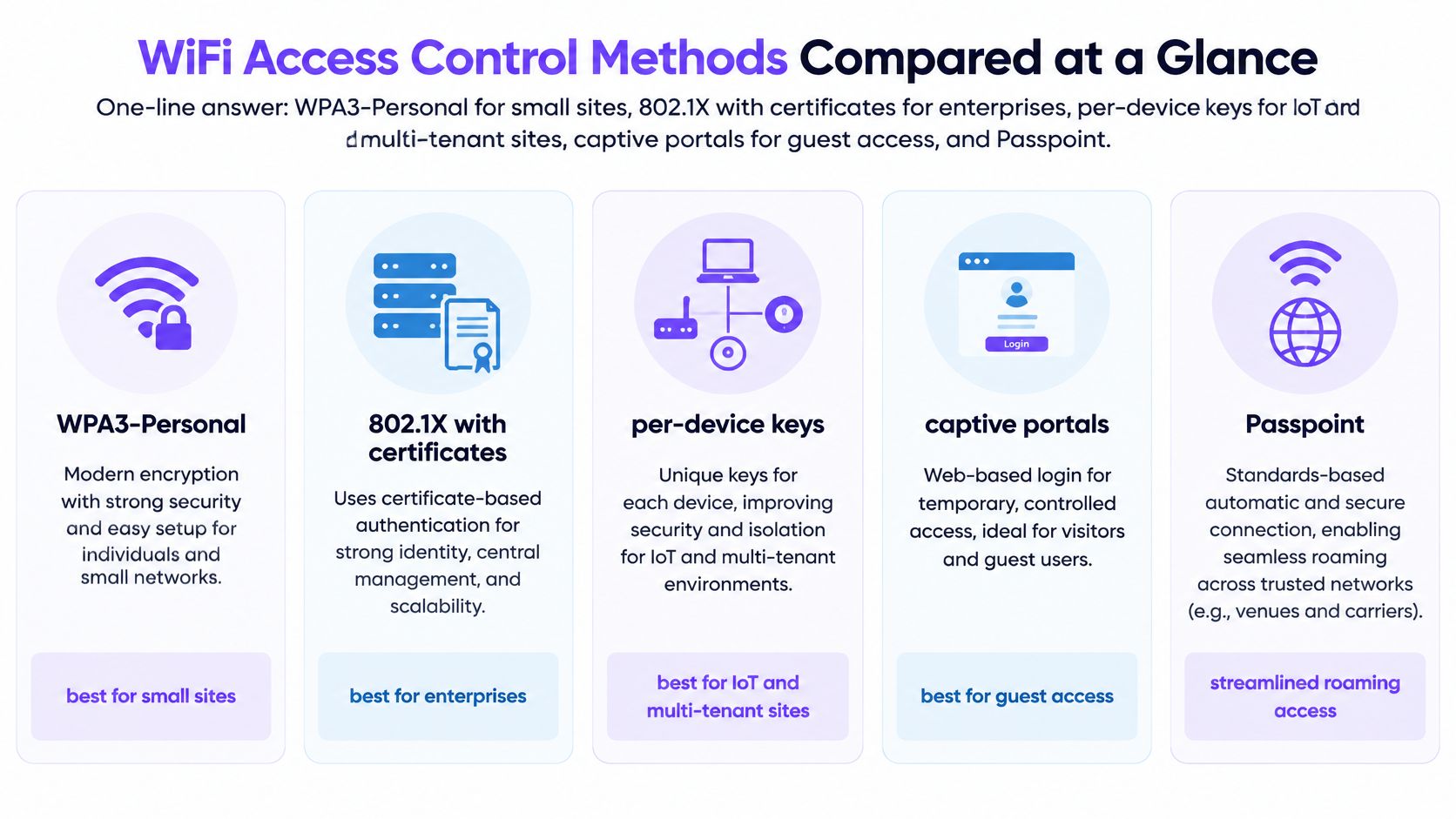
| Method | What It Checks | Typical Security Level | Best Fit | How Access Is Revoked |
|---|---|---|---|---|
| WPA2-Personal | Shared passphrase | Moderate | Homes and small offices | Change the passphrase for everyone |
| WPA3-Personal | Passphrase via SAE exchange | Strong against password guessing | Modern homes and small offices | Change the passphrase for everyone |
| WPA2/WPA3-Enterprise with 802.1X | User or device certificate or credentials via RADIUS | High | Enterprises and campuses | Revoke one identity or certificate |
| xPSK or per-device keys | Unique key per device, user or tenant | High for IoT and shared sites | Hotels, multi-family, concessions and IoT fleets | Revoke one key without affecting others |
| Captive portal | Sign-in via SSO, social login or SMS one-time passcode, with consent | Moderate; identifies users but does not secure each link | Guests and BYOD onboarding | Expire the session or the login |
| Passpoint and OpenRoaming | Roaming identity credentials | High, with no portal needed | Venues and roaming users | Revoke the credential at the identity provider |
Read the ratings as typical, not guaranteed
Those levels describe a careful deployment, not every edge case. A sloppy enterprise setup, with weak EAP methods left on and no revocation process, can be weaker than a well-run per-device key system on a hotel floor. The cipher on the air is not the control that saves you at 2 a.m.
Revocation speed usually decides the choice more than the encryption type. If losing one phone means reprinting a passphrase for a whole office, the method doesn't fit a shared building. Match the row to the situation when you pick a design at the end.
How WPA2 and WPA3 Set the Encryption Baseline
A WiFi password can protect the radio link and still be a weak way to control who gets in. WEP dates to 1997. Weaknesses in its design led to WPA in 2003, followed by WPA2 in 2004, aligned with IEEE 802.11i and using AES rather than WEP's weaker approach, as the Department of Veterans Affairs technology reference records.
WPA2 and WPA3 set the encryption baseline, but the password still matters. WPA3-Personal uses SAE, which resists offline password guessing. WPA3 Enterprise also offers a stronger security option for sensitive environments.
Transitional mode lets WPA2 and WPA3 devices use the same network. That bridge helps when a site has a mixed fleet, but it leaves WPA2 devices using the weaker option. A network's newer label does not protect an older client that still connects with WPA2.
Check each site before changing modes:
- Security mode: Confirm whether each SSID uses WPA2 or WPA3, and whether it is personal or enterprise.
- Legacy networks: Check that WEP and open networks without a portal are no longer in use.
- Client readiness: Confirm that cell phones, registers, and cameras support WPA3 before requiring it.
Encryption protects traffic over the air. Access control decides which person or device is allowed to connect. A shared password blurs that distinction: changing it can affect everyone who knows it, while a stronger cipher alone cannot identify each user.
How 802.1X and EAP-TLS Bind Access to Identity
Think of an office badge. The access point is the door. The RADIUS server is the security desk. The directory, or the certificate authority, is the staff list.
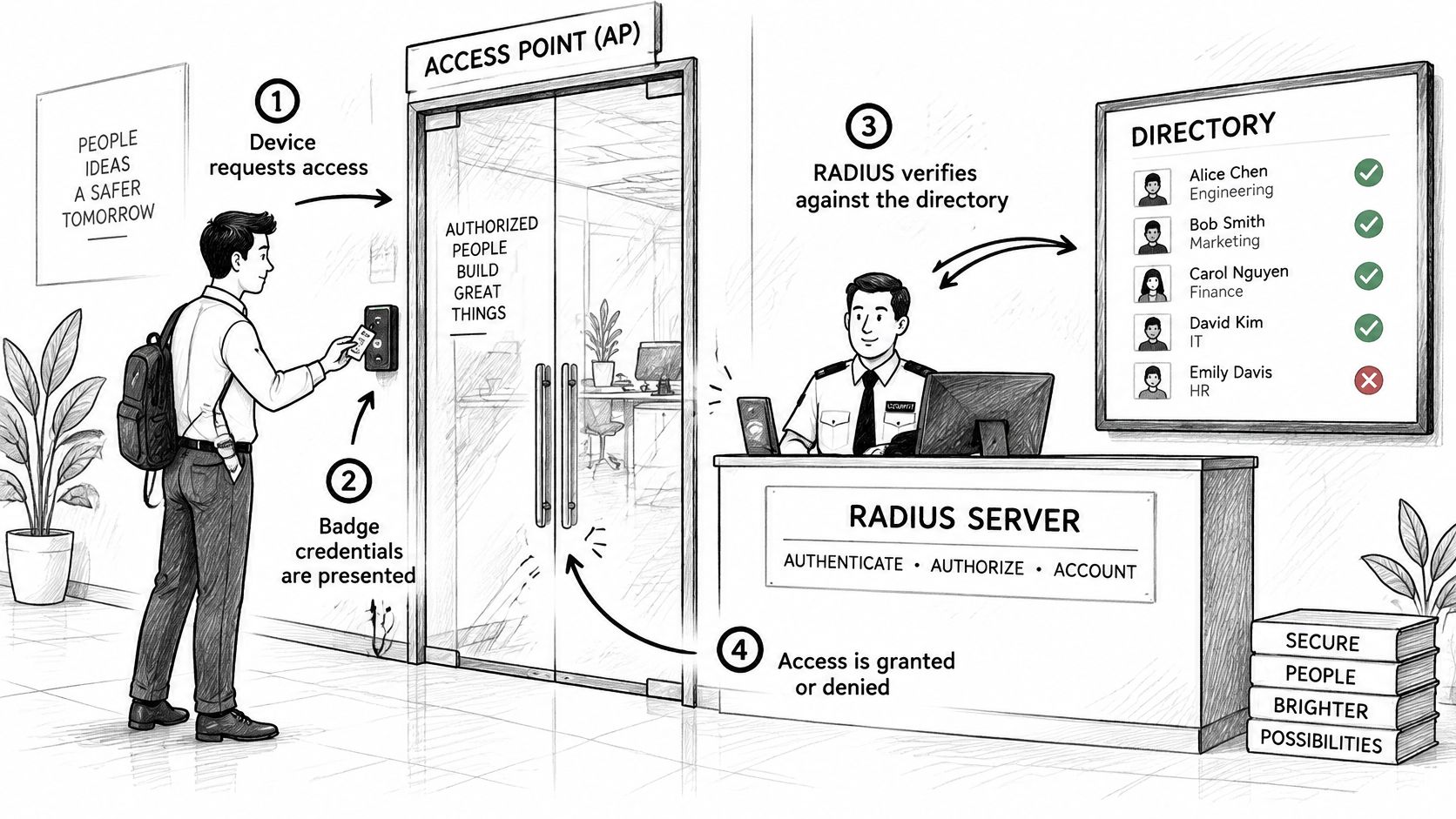
The four steps at the door
- The device associates and offers an identity, usually a certificate or a username.
- The access point doesn't decide. It forwards the request to RADIUS.
- The server checks that credential against the directory or the certificate authority.
- RADIUS returns Accept or Reject, plus attributes that shape the session, such as a VLAN or a role.
EAP-TLS is the method that makes the badge hard to copy. NIST's EAP guidance treats TLS as the protective tunnel for tunnel-based EAP and states that EAP-TLS mutual authentication requires peer certificates. The client proves it holds a valid certificate, and the client also checks the authentication server. A password method only asks the user to know a secret. A certificate can be issued by your MDM, given a short lifetime, renewed, and revoked for one lost laptop. Bind that certificate to a directory group so RADIUS can return the matching policy. Everyone else stays online.
Where clients allow it, turn off PEAP-MSCHAPv2, CHAP, and PAP. Current enterprise WLAN guidance points to EAP-TLS with AES-256-GCM and modern elliptic-curve or sufficiently large RSA parameters. A side-by-side of EAP-TLS and PEAP is worth reading before you leave the older method on "just in case."
The trap that locks the whole office
The common failure is a trust chain that never reached the devices. Every login fails at once, and the helpdesk hears "WiFi is down" rather than "the certificate isn't trusted." Push the chain with the same MDM that issues the certs, and test a fresh laptop before you retire passwords.
Decide the outage path before rollout. If RADIUS or the certificate authority is unreachable, do existing sessions stay up, do new devices land on a limited onboarding network, and how long do cached credentials remain valid? Test each path. A badge system that fails closed with no plan will empty the building on the first network blip.
A short walkthrough of the exchange makes the desk-and-door picture concrete:
Captive Portals, Per-Device Keys and Passpoint Compared
A visitor at a hotel or cafe isn't going to install a certificate. A captive portal lets them sign in with social login, SSO, or an SMS one-time passcode, and it can record consent for privacy rules such as CCPA/CPRA and CCPA. You learn who signed in. You do not give that phone a strong per-link key. The open network still needs a short session and a VLAN that can't see registers or cameras. When the visit ends, expire the login.
One key, one device
Per-device keys (xPSK, and the vendor names iPSK, DPSK, MPSK, or PPSK) give each device, user, or tenant its own secret. Room TVs, thermostats, cash registers, tenant routers, and cameras fit this pattern because nobody is going to type a password on them every week. Revoke one key and the others keep working. On access points that support it, RADIUS Change of Authorization can also end the live session instead of waiting for the device to roam. That's the difference between "we'll change the WiFi tonight" and "that camera is off the network now."
Passpoint and OpenRoaming skip the portal for people who already carry a roaming identity. The cell phone authenticates with credentials from an identity provider, which suits airports, campuses, and venues where the same person appears at many sites. The failure mode is trust: if the identity provider or the roaming relationship is down, there is no local password to fall back on. Publish that outage behavior before you retire the portal. Hotspot 2.0 is the client-side name you'll see in device settings.
Why the MAC address won't save the policy
Randomized MAC addresses make hardware lists unreliable. Help Net Security's coverage of Wireless Broadband Alliance findings notes that randomized MAC addresses complicate network management and threat detection, while teams still need to tell guests, managed endpoints, and operational devices apart. The address can change between sessions, so an allow-list built on yesterday's MAC misses today's cell phone. Durable identity has to sit on a certificate, a federated credential, device-management posture, or a per-device key.
Judge the three options on the same four tests: how fast you can revoke, how much the method exposes, whether it roams, and whether the log names a person or only a radio address. Privacy and control coexist when the policy hangs on a credential. They fight each other when the policy hangs on the MAC.
Identity-Driven VLANs for Policy and Segmentation
One front door, many wristbands. After a guest checks in, the band opens the pool and not the plant room. After 802.1X or another RADIUS authentication succeeds, the access point can place that client into a VLAN named in the Access-Accept, overriding the SSID's default VLAN.
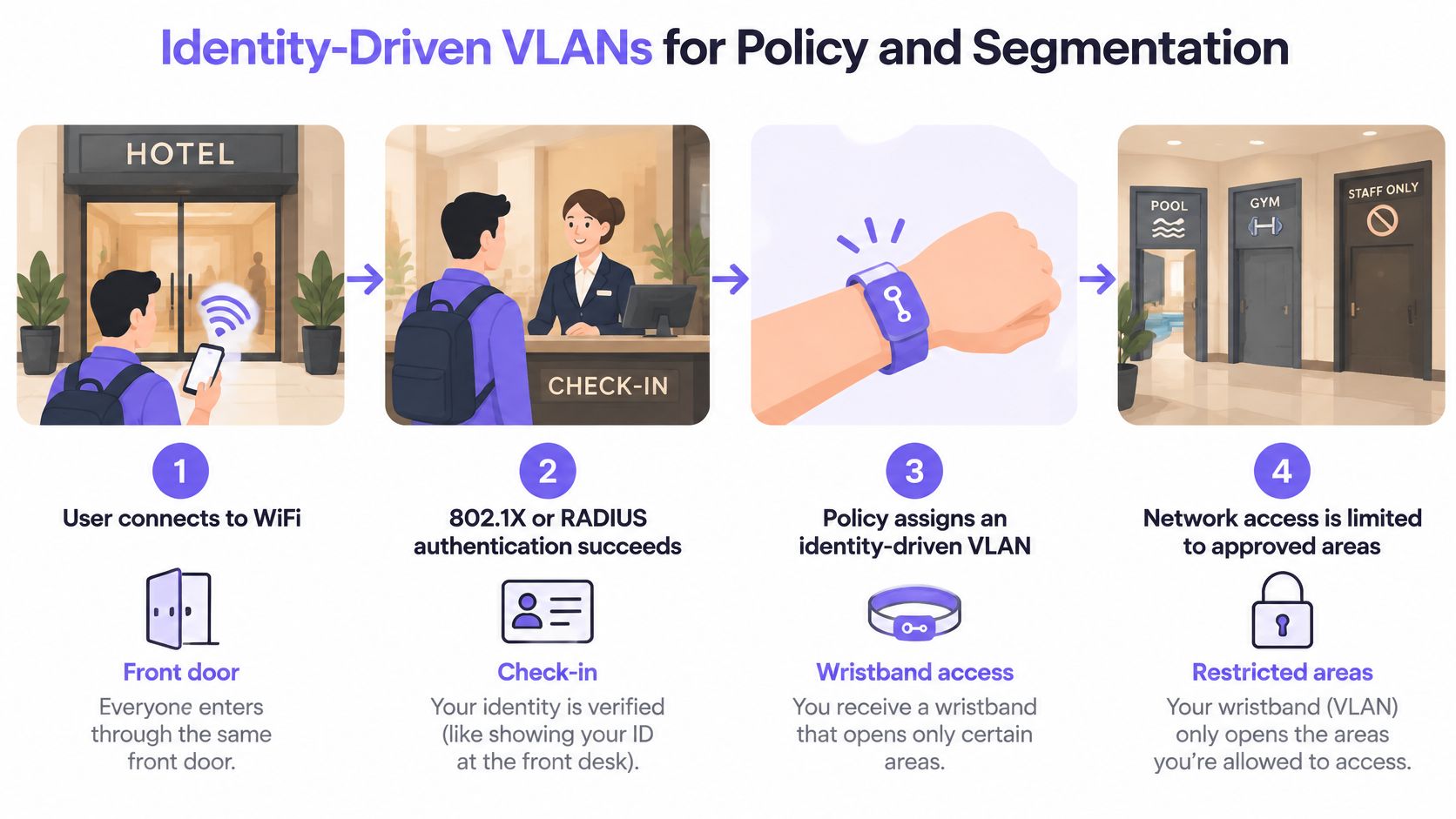
Fortinet's RADIUS VLAN documentation describes the standards attributes you'll configure: Tunnel-Type set to VLAN, Tunnel-Medium-Type set to 802, and Tunnel-Private-Group-ID carrying the VLAN identifier. When those attributes come back, the RADIUS-assigned VLAN takes precedence over the WLAN's local VLAN. Change the person's group, and the next authentication lands them somewhere else. Revoke the identity, and further access stops. You keep a small SSID set while staff, guests, payment systems, cameras, residents, and IoT stay apart. A practical look at WiFi network design helps when you decide how few SSIDs that set should be.
| Identity Group | Identity Source | Example VLAN | Policy |
|---|---|---|---|
| Guests | Portal sign-in or consent | 10 | Internet only, no internal access |
| Staff | Device certificate via MDM | 20 | Internal applications and file shares |
| Room or IoT devices | Per-device key | 40 | Own subnet, outbound only to vendor services |
| Payment terminals | Certificate or per-device key | 30 | Isolated segment in PCI-DSS scope |
| Cameras | Per-device key | 50 | Video upload only, no other east-west access |
Three checks before you trust the wristband
Safe default. If the attribute is missing or nonsense, the client must land in a VLAN that can reach almost nothing. Don't "fail open" onto the staff network because a bug omitted a field.
The path, not just the AP. Every trunk from the access point to the switch has to carry all of those dynamic VLANs. A VLAN that exists in RADIUS and not on the trunk looks like a successful login followed by silence.
The log. Record every Access-Accept with the identity, the VLAN, and the site. Without that line you can't prove which wristband opened which door.
Policy then follows the person or the device record, not the access point they happened to join.
Measuring Whether Segmentation Actually Works
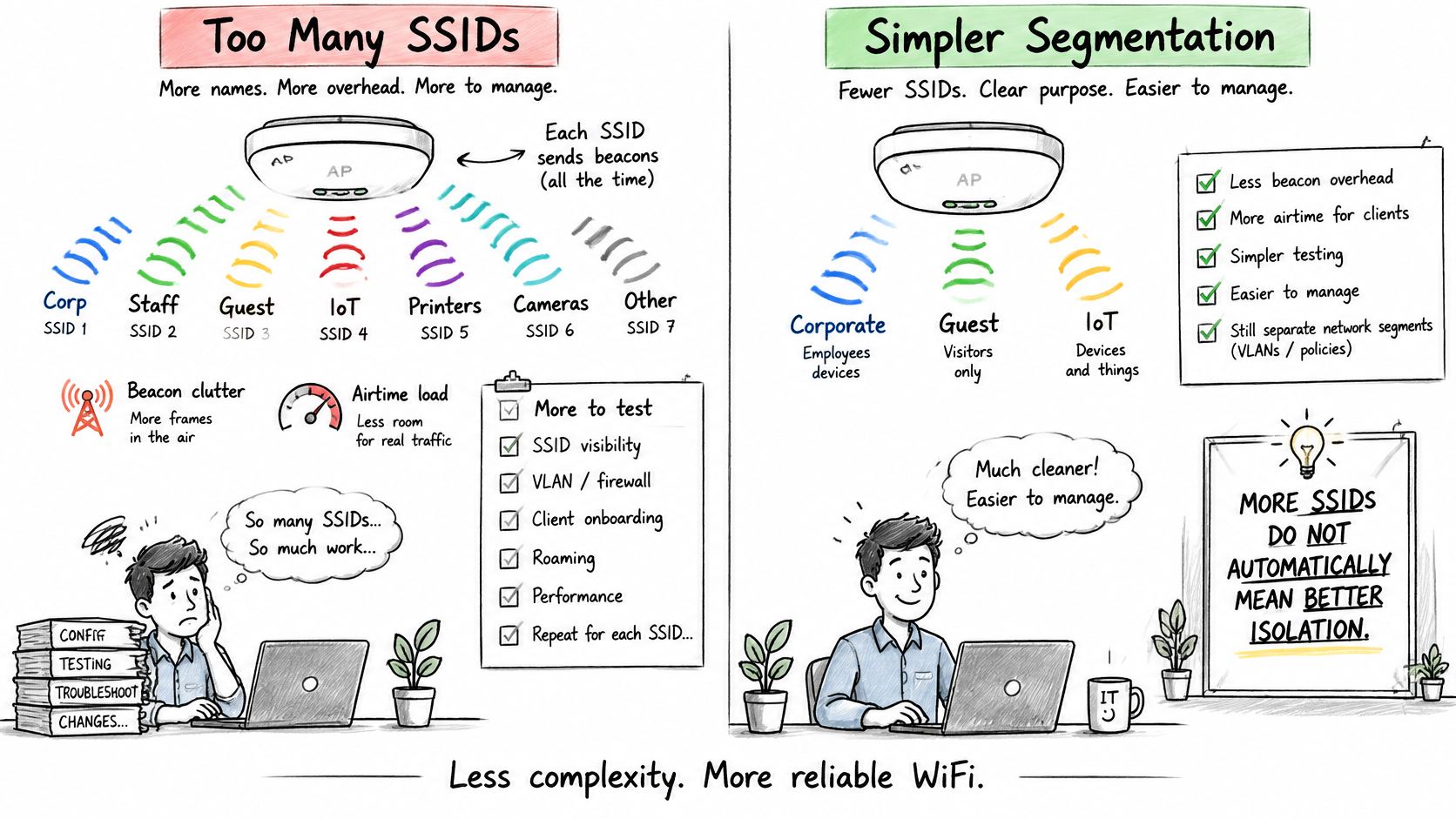
More SSIDs do not mean better isolation. That assumption is why some sites broadcast a dozen names and still find a guest laptop on the register VLAN.
Each extra SSID adds beacon and airtime overhead, more configuration, more roaming behavior to test, and more chances for a site to drift from the standard. The Cisco State of Wireless Report places network segmentation and dynamic identity verification among the core measures for reducing wireless exposure, and it notes mixed-generation clients, large IoT populations, and tighter visibility needs across radios and bands. Too little separation has the opposite failure: an infected guest device can move sideways toward cash registers, cameras, residents, or staff shares.
A lifecycle you can operate
- Define segments by identity and risk, not by how many names fit on a cell phone's WiFi list.
- Assign policy dynamically from the authentication result, so a group change doesn't require a new SSID.
- Document every exception with an owner and an expiration date. An exception without an end date becomes the new network.
- Measure failed authentications, unauthorized east-west traffic, and revocation time, and test a break-glass path each quarter.
Judge the design on four outcomes: containment, revocation time, audit evidence, and operational workload. SSID count isn't on that list. WiFi 7 and dense IoT make the measures more urgent because client generations mix and device counts climb, and visibility has to stay consistent across bands.
Disconnect one identity, confirm the next authentication is refused, and confirm the log shows the refusal. If you can't do that for a single camera, the segment isn't real yet.
Choosing Your WiFi Access Control Setup
Pick from the situation, not from the newest cipher.
- Cafe or home with guests: WPA3-Personal on the private side, plus a captive portal for visitors.
- Office of about 200 desks with managed laptops: 802.1X with certificates from the MDM, and a separate guest portal.
- Hotel, residential multi-family building, or concession estate: per-device keys, with identity-driven VLANs for rooms, tenants, and fixed devices.
- Campus or venue where people roam: Passpoint or OpenRoaming beside certificates for staff devices.
We collapse that sprawl into three SSIDs: Open for guests and BYOD, Secure for staff and trusted users, and xPSK for things, residents, and communities. A planner lets you check off what connects today and see where each group lands across those three.
The access points already on the ceiling often decide which of those methods you can turn on. Check certificate, per-device key, and CoA support before you promise a design the hardware can't finish.
- List every device group, including the awkward ones: contractors, loaner laptops, room TVs.
- Give each group an identity source and a VLAN, using the same mapping you use for guests, staff, IoT, payments, and cameras.
- Run the disconnect-and-verify test on one device in each group.
- Read the logs after a week. Look for accepts you can't explain and rejects that block real work.
- Walk the plan with a network engineer before rollout, especially the failure path when RADIUS is unreachable.
Identity-driven control with per-device revocation is the design that scales. A passphrase can't.
Purple Access gives guests, staff, and devices their own identity or key on the access points you already run, so WiFi access control isn't a shared password with a new name. You can see where each group lands, revoke one device without touching the rest, and keep the policy in RADIUS rather than in a longer SSID list. Visit Purple Access to map your sites and talk through the setup with a network engineer.