WPA2 enterprise vs Personal: Which to choose in 2026
Published
Search for WPA2 Enterprise vs Personal guidance and you'll get the same summary in a dozen formats: Personal is one shared password and therefore insecure, Enterprise uses 802.1X and is therefore secure, so migrate. That framing is tidy, and it's wrong in common usage.
Both modes protect traffic with the same cipher. WPA2 uses AES-CCMP in Personal and Enterprise alike, and the four-way handshake derives per-session keys either way. What differs is how a credential gets issued and what you must do when one has to stop working. That's an operational question with a cost you can measure in staff hours and support tickets, not a security grade you can print on a slide.
A team can spend six figures on RADIUS infrastructure and still fail an audit, because their clients were configured to accept any server certificate. A nine-person office can run one pre-shared key for four years without an incident, because nobody left and nobody shared it. Match the mode to how often your access list changes, then run whichever you pick properly.
Table of Contents
- WPA2 Enterprise and Personal Side by Side
- How Each Mode Authenticates a Device
- Key Management and Revoking Access When Staff Leave
- Security Trade-offs Comparisons Often Miss
- Deployment Effort, Infrastructure, and Cost
- Troubleshooting Enterprise Login Failures
- Which Mode Fits Hotels, Multi-Site, and Small Offices
- Confirm the Design Before You Switch Networks
WPA2 enterprise and Personal side by side
The verdict first. WPA2-Personal is the right default only when one trusted group shares one key and almost nobody leaves that group. WPA2-Enterprise is the right choice the moment each person, or each device, needs an account you can switch off on its own.
Everything else follows from that single fact about credential lifecycle, which is why the table below is organized around it rather than around protocol trivia.
WPA2-Personal vs WPA2-Enterprise at a glance
| Criterion | WPA2-Personal | WPA2-Enterprise |
|---|---|---|
| How clients authenticate | Shared pre-shared key (PSK) | IEEE 802.1X with an EAP method |
| Credential each user holds | One password shared by everyone | Individual username and password or client certificate |
| Authentication server | Not needed | Required, usually a RADIUS server |
| Removing one user | Change the password on every device | Disable that account or revoke that certificate only |
| Data encryption | AES-CCMP | AES-CCMP |
| Typical fit | Homes, small offices, short-term events | Multi-user, multi-site and managed-device networks |
Read the encryption row twice, because the shared cipher is the part most comparisons blur. Moving to Enterprise buys you nothing in bulk encryption. The data-protection mechanism is identical in both modes, and WPA2 replaced WPA's older TKIP either way. The upgrade is entirely in credential issuance and credential removal.
Two rows decide most projects: the credential row and the removal row. Cost those two properly before you buy anything, because the rest of the table is configuration detail you can fix in an afternoon.
To read it against your own network, count two things. How many people or devices hold one key today, and how often that population changes. One team, stable for years, no contractors? Personal works and nobody should apologize for it. More than one team, or any regular turnover, and the shared key starts costing more than the server it avoids.
How each mode authenticates a device
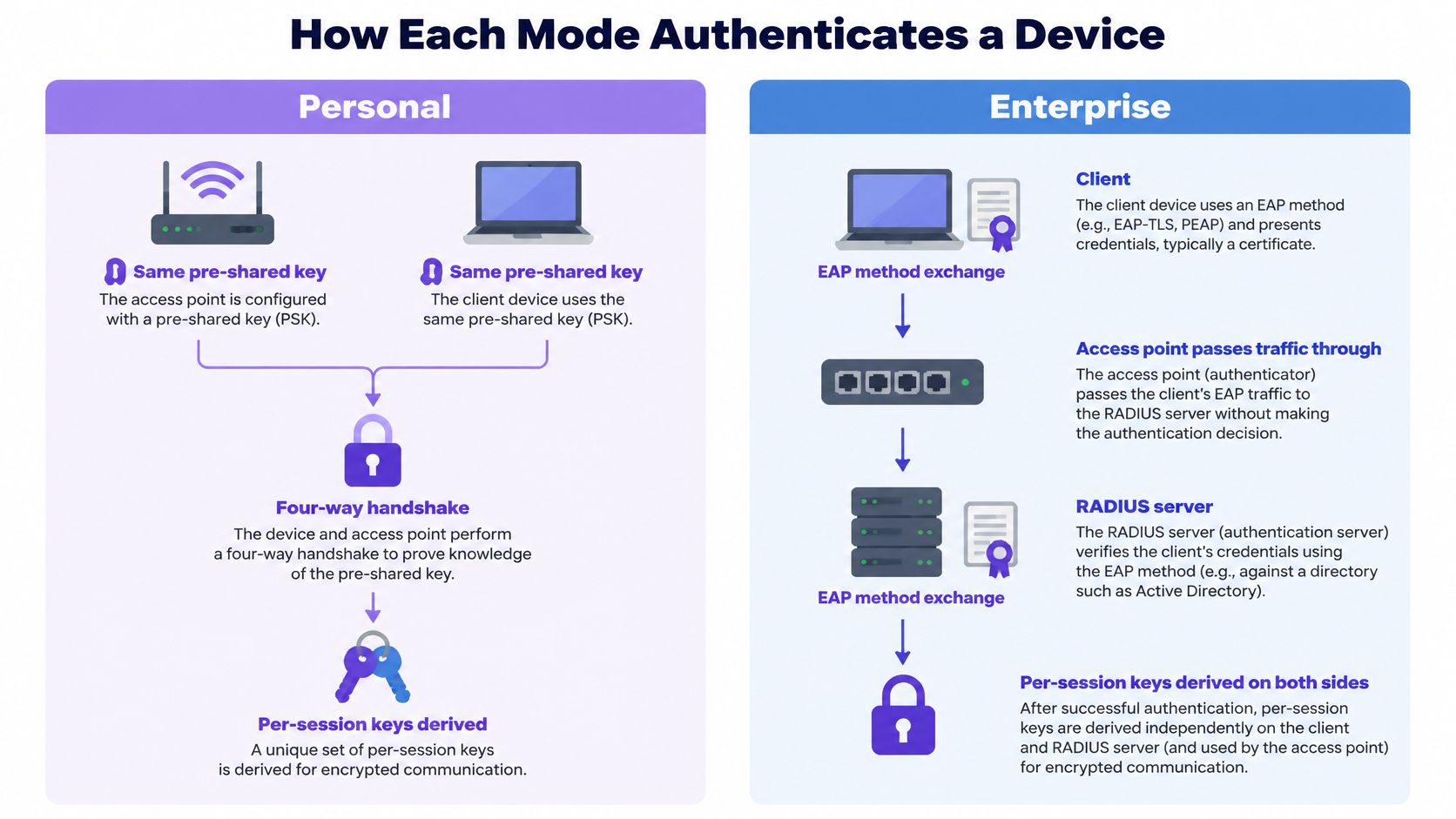
In WPA2-Personal, the access point and every client hold the same pre-shared key. When a device joins, the four-way handshake combines that key with the network name to derive session keying material. No server is involved, which is why a domestic router can be configured in a browser tab and why a cafe can hand the password over with a receipt.
WPA2-Enterprise takes the shared secret off the client. The client authenticates through IEEE 802.1X using an Extensible Authentication Protocol (EAP) method, and the access point relays that exchange to a RADIUS server, which checks identity against a directory and returns an accept or a reject. Session keys are then generated per connection. Two colleagues on the same SSID never share keying material derived from a password.
The two flows look like this, side by side, with the server sitting only in the Enterprise lane.
The EAP method decides how much security you actually get
Enterprise mode isn't one protocol. It's a wrapper around whichever EAP method you configure, and the method determines what the client holds and whether a stolen password can walk in the door.
EAP methods used with WPA2-Enterprise
| EAP method | Client credential | Server certificate | Typical fit |
|---|---|---|---|
| EAP-TLS | Client certificate issued by an MDM | Required and must be validated | Managed laptops and cell phones |
| PEAP-MSCHAPv2 | Username and password inside a TLS tunnel | Required and must be validated | Staff with directory accounts |
| EAP-TTLS | Username and password inside a TLS tunnel | Required and must be validated | Mixed or legacy directories |
EAP-TLS is the only one of the three with no password to phish, which is why managed fleets standardize on it. Certificates arrive over SCEP from the MDM, so a device that falls out of compliance loses its credential without a technician touching it. Our Secure network is one passwordless WPA-Enterprise SSID for every trusted user, using EAP-TLS certificates delivered by your MDM.
The join sequence, in order
- Association. The device joins the SSID and the access point opens a controlled port that passes only EAP traffic.
- EAP exchange. Client and RADIUS server negotiate the method and prove identity through the access point, which stays out of the cryptography.
- Access-accept. RADIUS checks the credential against the directory and returns the result plus any attributes, such as a VLAN.
- Key delivery. Both sides derive per-session keys and the controlled port opens.
- VLAN assignment. The access point applies the returned attribute, so a housekeeper lands on the staff segment and a register lands on its own.
If you want the frame-level detail, what 802.1X authentication does explains the port states and the role of the authenticator.
Check two things on any device that fails: the EAP method configured in the profile, and whether it validates the server certificate. Those two settings account for most enterprise connection trouble. Devices that can't run a supplicant at all, such as sensors and older vending hardware, belong on a different segment; explore vending telemetry connections for how those fleets get wired, then issue them a per-device key instead of an Enterprise profile they'll never complete.
Key management and revoking access when staff leave
A 40-room hotel gives twelve staff the WiFi password: front desk, housekeeping leads, maintenance, two managers. One hands in notice on Friday. In WPA2-Personal that notice becomes a project: change the key, then re-enter it on every staff cell phone, tablet, register and door reader inside one maintenance window. Miss one device and it drops mid-shift. Miss the point and Saturday goes to typing a new password into hardware that was working fine.
WPA2-Enterprise turns the same Friday into one directory action. Disable the account or revoke the certificate, and the next association attempt gets an Access-Reject. To the user it looks like WiFi trouble. To you it is the control doing its job.
Revocation in Personal mode is a project. Revocation in Enterprise mode is a checkbox.
The difference is structural. Personal mode shares one secret, so revoking it means rotating it for everyone. Enterprise mode gives each user or device its own credential and its own key material, which is exactly the property that makes individual removal cheap.
NIST's guidance on robust security networks recommends IEEE 802.11i security networks using 802.1X/EAP where centralized identity management and stronger administrative control are required, and it names the shared-secret lifecycle problem plainly: changing a password means updating every legitimate device.
Payment card rules push the same way. PCI DSS v4.0.1 Req 2.3.2 requires wireless keys to change when anyone who knows them leaves, which a shared key makes impractical. You can comply with a shared key. You'll do it at midnight, on every device, and you'll miss one.
Purple Access removes the shared password by standardizing on three SSIDs: open for guests, secure for staff and xPSK for things, tenants and communities. Every guest, staff member and device sits on its own identity or key. Room TVs, thermostats and registers join wirelessly on the xPSK SSID with key-bound VLANs guests never see, so the one key that walked out can be revoked while the rest keep running. The issue and revocation path for staff credentials is covered in certificate-based WiFi authentication.
Three questions expose the actual cost. Who holds the key? How many devices hold it? How long would a full re-key take, start to finish, including the device nobody remembers? If the third answer is measured in hours, the fourth person who leaves will be the one you don't re-key for.
Security Trade-offs comparisons often miss
Enterprise mode isn't secure because the configuration page says 802.1X. It's secure when the EAP method, the certificate validation, the identity directory and the lifecycle processes behind them are all run properly. Remove any one of those and you've built an expensive network with the same shared-secret fragility as the cheap one.
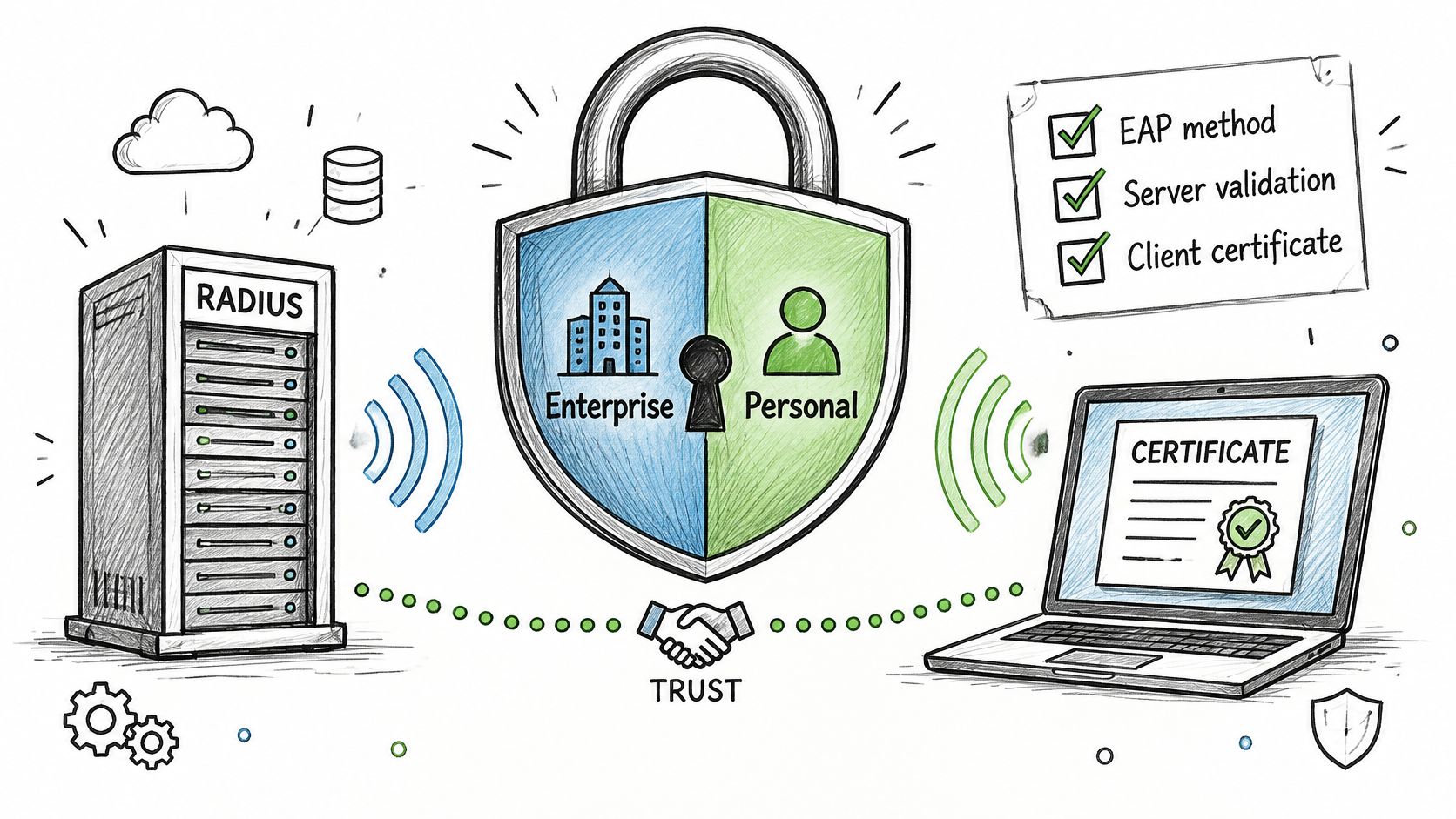
The Huawei WPA3 enterprise documentation is unusually blunt about this for a vendor document. It notes that WPA2-Enterprise isn't automatically secure merely because it uses 802.1X, that security depends on the EAP method, certificate validation, identity infrastructure, and lifecycle processes, and that poorly validated server certificates, password-based EAP without strong credential controls, unmanaged supplicants, or an unavailable authentication service can produce outages or enable credential theft.
Those four conditions are where Enterprise ends up weaker than a tidy Personal network:
- Clients that accept any certificate. A laptop configured to trust whatever presents itself will hand its credentials to a rogue access point. The server certificate check is the defense, and it's the first setting people disable to "fix" a login.
- Password-based EAP without credential controls. PEAP-MSCHAPv2 over a shared local account, never rotated, is a shared password with extra steps and a tunnel.
- Unmanaged supplicants. Old phones and forgotten tablets with out-of-date 802.1X stacks generate support tickets and get excluded from policy, which is how a register ends up on the guest network.
- A single RADIUS service. When it goes down, every user fails at once, including the ones who could previously just type a password.
Each of these fails in a recognizable way and each has a fix measurable in an afternoon: enforce server certificate validation in the profile you push, retire the shared local account, bring the stragglers under management or segment them, and give the authentication service a backup so one outage doesn't stop the site.
Enterprise is safer only when its certificates, directory and RADIUS service are run as carefully as the WiFi itself.
The honest argument for that work runs the other way. Certificate-based authentication revokes one user or one device without touching the rest, and it produces a log of who connected, from which device, at what hour. A shared key gives you neither, so the day someone leaves you inherit both the re-key and the uncertainty about what they could still reach.
WPA3 changes the Personal side of this comparison. It replaces the PSK handshake with SAE, which resists the offline dictionary attacks that make weak shared keys crackable. Transition mode doesn't rescue everything: some legacy and uncertified devices don't work reliably with it. The Wi-Fi Alliance's security guidance recommends WPA3-Personal-only defaults for new networks after 12/31/2027, so treat that date as the planning horizon for your hardware refresh cycle. When transition mode breaks a device, the temptation is to keep the broken device and the insecure exception together. Put those devices on their own segment instead and let the rest of the network move.
Deployment Effort, infrastructure and cost
Personal mode's infrastructure is an access point you already own. Its real cost is rotation: the hours spent walking the building with a new key, plus the devices that drop off the list every time.
Enterprise mode needs an 802.1X-capable access point, a RADIUS service with a secondary server so one failure doesn't stop the network, a certificate authority, and a process for issuing and renewing client certificates. Those last two are where projects stall, because certificates expire on a date and nobody owns the calendar.
That's the honest cost. It's also mostly automatable. Purple Access supports EAP-TLS certificates from Microsoft Intune, Jamf Pro, JumpCloud, Kandji, Hexnode, Iru and Addigy, delivered over SCEP, with setup taking five to ten minutes once per platform. After that, staff don't configure cell phones by hand; the MDM pushes the profile, and a new starter is on the network before their first coffee.
A worked comparison worth doing on paper
Suppose a site has twelve shared-key devices and six departures a year. Each re-key touches all twelve, so that's 72 device touches annually, before you count the coordination, the missed devices and the help desk calls from people locked out on a busy morning.
Now the Enterprise side of the ledger: RADIUS hosting, the secondary server, certificate authority upkeep, renewal work and the occasional supplicant that needs a profile rebuilt. It's a larger fixed cost and a much smaller marginal cost. Six revocations become six clicks.
Capture, Secure and xPSK networks are priced per access point per year, with guests, staff and devices included, so the commercial comparison is per access point rather than per user. That matters for a hotel with seasonal headcount: user-based pricing punishes exactly the sites that need identity-based access most.
Compare total cost of ownership, not license price. Include the hours of the people who'd do the work, including the ones who'd do it badly at 11pm. Then apply the test that decides most real deployments.
Rule of thumb: move to Enterprise when a shared key would need to change more than twice a year, or when more than one team shares access to it.
Troubleshooting enterprise login failures
Enterprise failures are rarely about radios. They're about credentials, certificates and attributes, and each one leaves a different signature.
WPA2-Enterprise login symptoms, causes and fixes
| Symptom | Likely cause | Fix |
|---|---|---|
| Authentication fails after a password change | Device still holds the saved old credential | Remove the saved profile and reconnect |
| Certificate warning on connect | Server certificate not trusted or server name not checked | Install the correct CA and set the server name to validate |
| Connects but gets no IP address | VLAN attribute missing or wrong for the directory group | Correct the group-to-VLAN mapping in RADIUS |
| Only some devices fail | Supplicant lacks the configured EAP method | Update the OS or switch the profile to a supported method |
| Login stops after a date | Client certificate has expired | Re-enroll the certificate through the MDM before expiration |
| All users fail at once | RADIUS server unreachable | Restore the primary server or fail over to the secondary |
Work the checks in order, because guessing costs more than reading a log.
- Reach the RADIUS server. Confirm it's up and that the failover answers. A ping and a test authentication from a known-good account settle this in a minute.
- Check the credential. Has the client certificate expired, been revoked, or has the account been disabled in the directory? Revocation lists and directory logs answer this faster than any client-side tool.
- Confirm the server certificate is trusted. The client must trust the issuing CA and must validate the correct server name. A profile that validates nothing connects to anything.
- Map the group to the VLAN. If the login succeeds but the device gets no address, RADIUS returned an attribute the access point couldn't apply, or the directory group has no mapping.
- Inspect the supplicant. Operating system version and configured EAP method. This is the last check, not the first, though it's the one people start with.
Fast fixes take minutes: removing a stale saved profile from one phone, correcting a group mapping that affects a whole department. Slow fixes take days: re-enrolling certificates across a laptop fleet, which is why renewal belongs on a calendar with a reminder, not on a to-do list. A specific symptom list and a working test path are covered in how to test RADIUS authentication.
Contrast that with Personal failures. Wrong password, or a password that changed last week and one device didn't get the message. Painful in volume, trivial in diagnosis.
The one rule worth memorizing: if every user fails at the same moment, the problem is the authentication service, not the devices. Check the server before you ask a hundred people to forget the network and rejoin.
Which mode fits Hotels, multi-site and small offices
Which WPA2 mode fits each scenario
| Scenario | Recommended mode | Reason |
|---|---|---|
| Family home or single-room office | Personal | Few devices, low turnover and no server to run |
| Small office, under about ten stable staff | Personal, with key rotation on every departure | Manageable overhead if rotation is part of the departure checklist |
| Multi-site company with managed laptops | Enterprise | Individual revocation and directory-based policy across sites |
| Hotel with staff, guests and room devices | Enterprise with three networks | Guests, staff and devices need separate segments |
| Multi-family building or co-living space | Enterprise with per-resident keys | Each resident and tenant is isolated and can be revoked on its own |
| Public venue with staff and guests | Enterprise for staff, portal for guests | Guests onboard without a shared key |
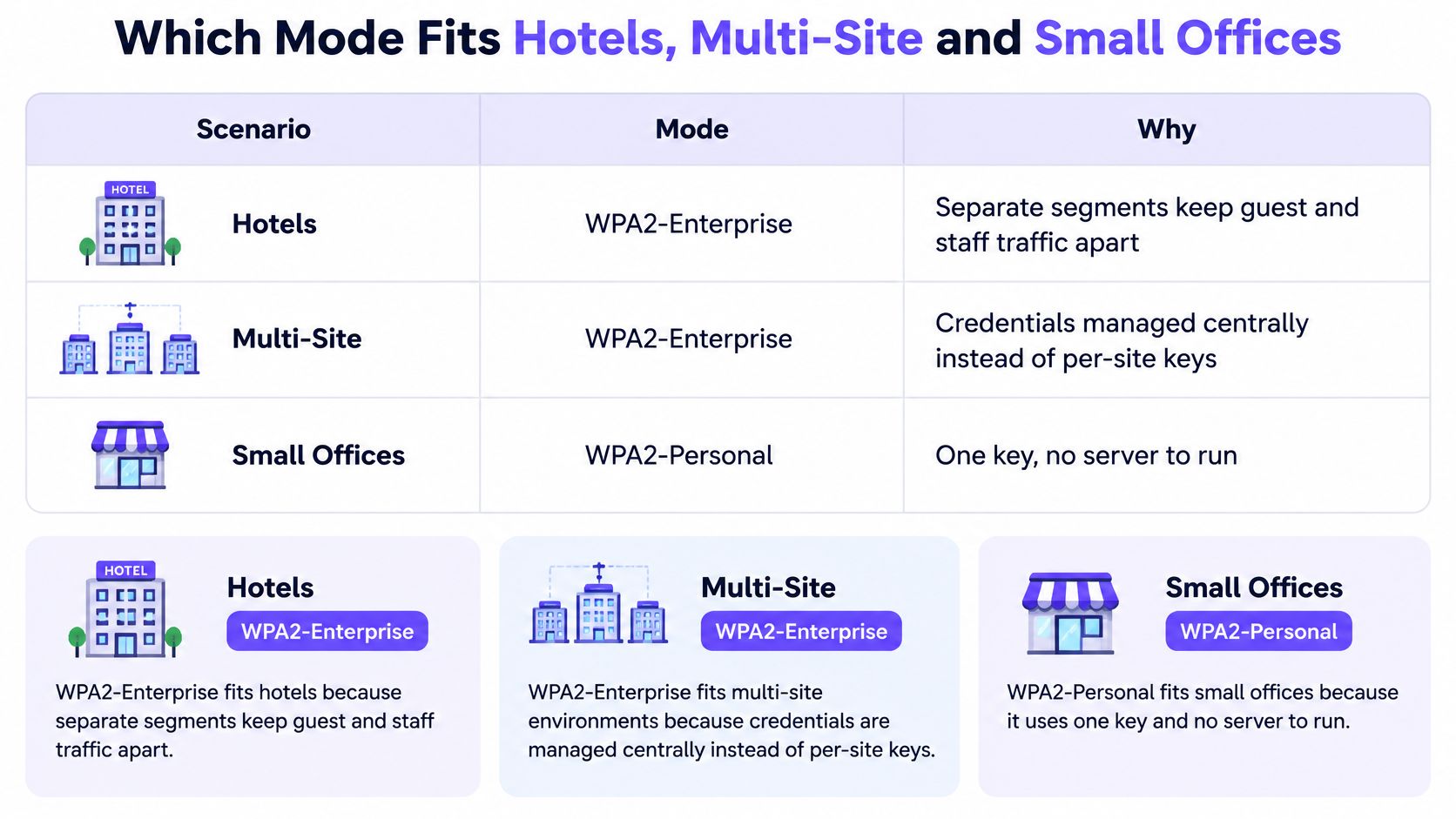
Hotels get the clearest answer. One network can't serve a housekeeper, a guest and a minibar sensor, so split them: staff on EAP-TLS, guests through a portal, and devices on key-bound VLANs the guest side never sees. We run three networks per property on exactly that split, with the guest portal checking against the property management system before it issues access.
Multi-site companies with managed laptops want one RADIUS service with per-site VLAN mapping. Policy stays consistent, each site keeps its own network, and a laptop moving between buildings authenticates the same way.
Multi-Family residential buildings and co-living spaces are the case people underrate. Per-resident keys isolate each tenant and survive the move-out, which is the event that breaks a shared key every time.
Small offices can stay on Personal. Under about ten people with a stable team, a rotated key on every departure is a reasonable overhead, provided the rotation is written into the leaving checklist and someone owns it. That proviso is doing a lot of work in that sentence.
The more people who share one key, the more often the key has to change.
Devices that can't run 802.1X need their own segment regardless of which mode you choose. Sensors, some TVs, older registers and printers with a two-line config page will never complete a TLS handshake.
One condition flips the small office verdict. A stable team that starts bringing contractors in every month has moved from Personal territory to Enterprise territory, even if the headcount hasn't changed. Contractors leave. That's the whole argument.
Confirm the design before you switch networks
Put the decision on paper with these five steps, and resist the urge to skip to step five.
- Inventory the shared keys. List every group that holds one and count the devices in each. Include the door readers and the POS register the finance team forgot.
- Assign a mode per group. Personal only where the group is small and stable. Enterprise wherever individuals or devices need separate revocation, and a per-device key where the hardware can't run a supplicant.
- Pilot on one site. We let customers prove the design on one site first, putting open, secure, and xPSK networks on the access points that site already has, running beside the network it uses today. Nothing gets switched off to start.
- Judge the pilot on three numbers. Support ticket volume, the time taken to revoke one departed user, and audit evidence that the revoked account can no longer connect. That third one is the test most pilots forget.
- Roll out one site at a time. Test the RADIUS failover before each wave, not after. A secondary server nobody has failed over to is a diagram, not a control.
A successful pilot looks unremarkable from the outside. Fewer shared credentials in circulation, revocation completed in minutes instead of a full re-key, and no rise in support tickets during the trial period. If tickets spike, the profile is wrong, not the idea.
Before you start, a 45-minute design session with one of our network engineers maps your existing SSIDs onto open, secure and xPSK networks on the access points you already own, and you keep the plan whether you proceed or not.
Purple Access runs the open, secure and xPSK networks on the access points you already own, with cloud RADIUS, managed PKI for EAP-TLS certificates and per-device keys you can revoke one at a time. If your honest answer to "how long would a full re-key take" is measured in hours, that's the cost we remove, and a single-site pilot is how you check it against your own ticket queue. Visit Purple Access to book the design session and see the three-network plan on your own floor plan.