Eap tls certificate requirements: A 2026 guide
Published
Many teams assume EAP-TLS certificate requirements boil down to a single task: push a client certificate to every laptop and switch the WiFi SSID from passwords to certificates. Why do so many rollouts still collapse on day one with untrusted-server warnings, silent lockouts, or former employees staying connected to the corporate WLAN?
The short answer is that EAP-TLS doesn't run on one certificate. It runs on a pair of matched trust chains, strict identity attributes, hardware-backed private keys, and explicit policy rules on the authentication server. Missing one intermediate certificate or leaving a revocation policy undefined breaks the entire login flow just as thoroughly as a bad client profile.
Table of Contents
- EAP-TLS Certificate Requirements at a Glance
- Why EAP-TLS Depends on Mutual Certificate Trust
- Client Certificate Fields and Identity Requirements
- Server Certificate, Trust Chain and RADIUS Policy Requirements
- How to Deploy Client Certificates Through an MDM
- Renewal, Expiry and Revocation Rules
- Fixing Common EAP-TLS Certificate Failures
- Confirm Your Certificate Plan Before Rollout
EAP-TLS certificate requirements at a Glance
| Certificate | Required properties | Checked by |
|---|---|---|
| Client (supplicant) certificate | X.509 issued by an enterprise CA; client authentication usage; unique per device or user; private key held by the device | RADIUS server during the EAP-TLS handshake |
| Server (RADIUS) certificate | Server authentication usage; subject or SAN matching the name clients expect; chain to a trusted root | Client device during server validation |
| Intermediate CA certificates | Link the server or client certificate to the trusted root; sent by the server or preinstalled on clients | Client when building the trust path |
| Root CA certificate | Trusted root placed in the client trust store through a secure management channel | Client, to verify the server |
| Revocation status (CRL or OCSP) | Reachable from the RADIUS server, with a defined policy for offline cases | RADIUS server during authorization |
Every row in that table serves one operational rule: the client must trust the server, and the server must authorize the client. Break the trust path on the client side, and laptops refuse to connect or prompt users to click through a warning. Break identity matching or revocation checks on the server side, and either legitimate devices land in the reject log or revoked hardware keeps passing traffic.
Each layer also belongs to a distinct part of the architecture. Client certificates live on endpoints and prove hardware or user identity. Server certificates, intermediates, and roots establish cryptographic identity for the authentication server, while revocation endpoints keep that trust accurate after issuance.
Two quick Readiness Tests before you change Anything
Before writing a single network policy or editing a RADIUS configuration, run two fast verification checks against your current estate:
- Audit client uniqueness: Pick five managed laptops or phones and inspect their local certificate stores. Confirm every endpoint holds its own individual certificate with a non-exportable private key rather than a shared file cloned from a gold image.
- Inspect the server chain from a clean endpoint: Query your authentication server's presented TLS certificate chain and verify that it includes every issuing intermediate up to (but not necessarily including) the root. A client should be able to build a complete trust path to its preinstalled root certificate without guessing or fetching missing pieces over an unauthenticated network.
If either check fails, fix that gap first. Tuning wireless controllers or supplicant timers won't rescue a broken chain or a shared credential.
Why EAP-TLS depends on mutual certificate trust
EAP-TLS became a formal Internet standard milestone on 21 March 2008, when the Internet Engineering Task Force published RFC 5216, obsoleting RFC 2716 while staying backward compatible with it. Unlike password-based WiFi methods such as PEAP-MSCHAPv2, EAP-TLS performs certificate-based mutual authentication. Both sides prove who they are cryptographically before the network passes a single packet of user traffic.
Three components take part in every enterprise wireless handshake, and keeping their roles distinct prevents most troubleshooting confusion:
- Supplicant: The client software running on the laptop, phone, or workstation (such as the native Windows, macOS, or iOS network stack) that presents the client certificate and validates the server.
- Authenticator: The wireless access point, controller, or Ethernet switch port that blocks traffic until authentication succeeds, forwarding EAP frames between the supplicant and the authentication server.
- RADIUS server: The backend authentication and authorization engine (such as Cloud RADIUS, FreeRADIUS, Microsoft NPS, or Cisco ISE) that evaluates the client certificate, checks revocation and directory rules, and returns an accept or reject decision along with VLAN attributes.
What mutual authentication Actually Verifies
During the handshake, the RADIUS server presents its certificate to the supplicant, the supplicant presents its own certificate and signs a challenge to prove private-key possession, and both parties derive fresh session keying material to encrypt the wireless link. Because there's no password anywhere in that exchange, successful access rests on four pillars: certificate possession, private-key protection, certificate-chain validation, and authorization policy.
That design changes what "authenticated" means in daily operations. Consider a staff member who resigns on Friday afternoon. If their directory password is reset, password-based WiFi stops working immediately. Under EAP-TLS, however, their corporate laptop still holds a cryptographically valid client certificate until that certificate is revoked, expires, or fails a live directory check on the RADIUS server. The wireless handshake proves the identity of the certificate holder, not whether the person behind the keyboard is still employed.
A valid certificate proves identity, nothing more. The RADIUS authorization policy decides whether that identity is still active and which VLAN it's allowed to reach.
Planning an EAP-TLS deployment therefore means engineering four validation controls alongside certificate issuance: identity matching to verify the certificate's subject belongs to an authorized account or device, a trusted root anchored on every client, intermediate chain availability so clients can verify the server, and certificate revocation so compromised or departed hardware loses access on schedule.
Client certificate fields and identity requirements
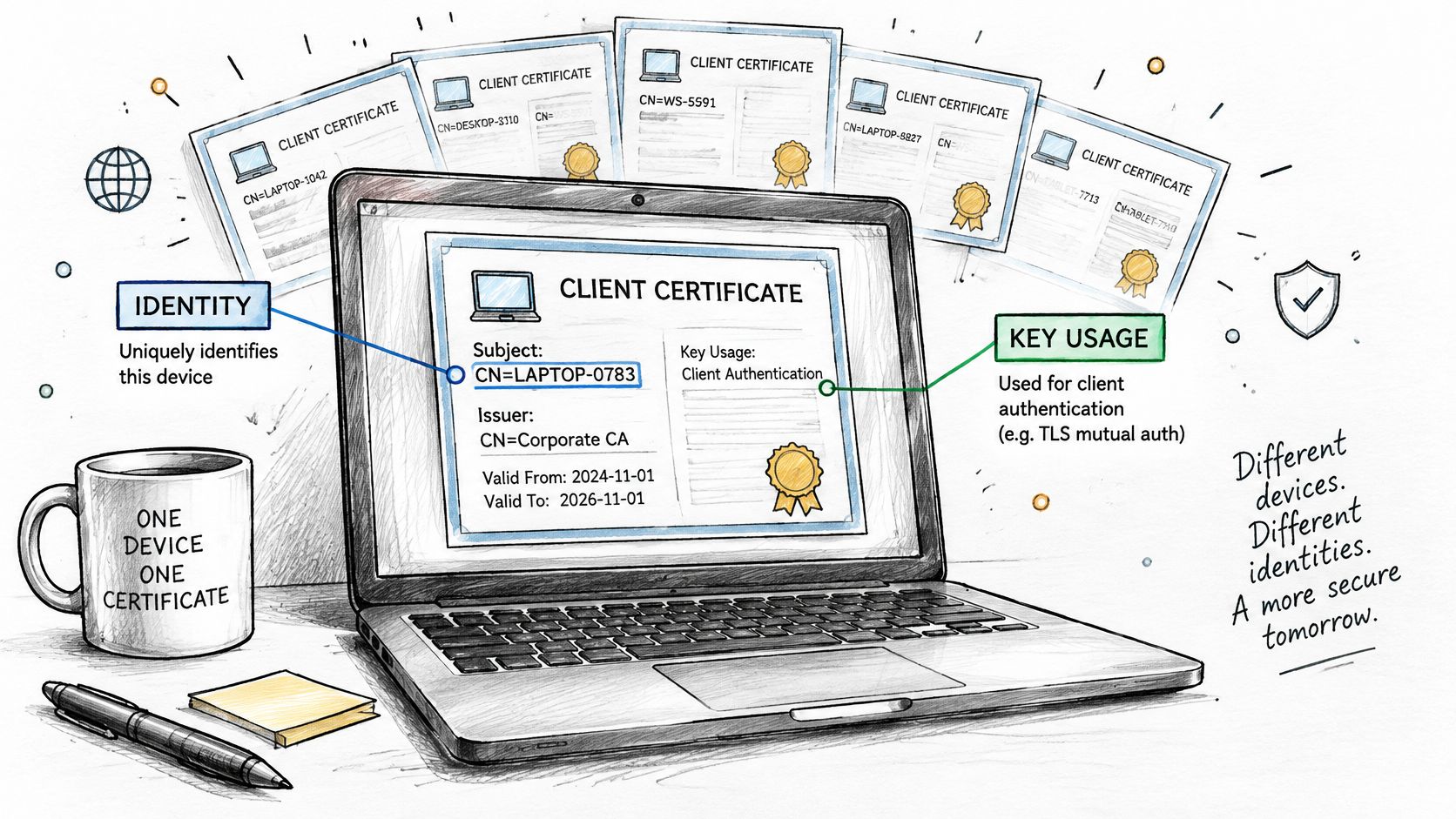
A client certificate is the credential your RADIUS server inspects on every join. The IETF EAP-TLS specification defines how that certificate is presented and validated inside the TLS handshake, while leaving identity and issuance choices to the deployment. Recommended practice in production WLANs is one unique certificate per managed device rather than a shared credential. Unique certificates make per-device authorization, reliable audit attribution, and targeted revocation possible, and distributing the server's root CA certificate through an MDM or OS trust profile protects endpoints against man-in-the-middle attacks from spoofed access points.

Before building your certificate templates, pin down every required attribute using the lookup below.
| Field | Typical value | Purpose | Common mistake |
|---|---|---|---|
| Subject CN | Device name or user identifier | Readable label in logs and audit records | Same generic name reused across many devices |
| Subject Alternative Name (SAN) | User principal name for users; serial or device ID for devices | Maps the certificate to a directory or device record | SAN missing when the policy matches on it |
| Extended Key Usage | Client Authentication (OID 1.3.6.1.5.5.7.3.2) | Limits the certificate to client authentication | Using a generic or code-signing profile |
| Key storage | Private key marked non-exportable and held in the platform secure store such as a TPM or secure enclave | Protects proof of possession during the handshake | Exportable keys left on endpoints |
| Validity period | Set to match the renewal process, often one year | Forces regular renewal and reissue | Expiry arriving before renewal runs |
Mapping identity fields to directory and device records
Each field carries a specific operational job during authentication. Subject Common Name (CN) gives engineers a human-readable string in RADIUS logs and SIEM exports, such as a laptop hostname or staff username. Relying on CN alone causes trouble because many modern authentication servers and directory lookups read the Subject Alternative Name (SAN) instead.
For a machine-level certificate installed in the local computer store, place the hardware serial number, MDM device ID, or fully qualified domain name in the SAN so the RADIUS server can verify the endpoint's enrolment state even at the login screen before anyone signs in. For a user-level certificate in the personal store, populate the SAN with the User Principal Name (UPN) from Entra ID, Okta, Active Directory, or Google Workspace so the server can look up group memberships cleanly.
The Extended Key Usage (EKU) extension must explicitly include Client Authentication (OID 1.3.6.1.5.5.7.3.2). If a template omits Client Authentication or repurposes a generic code-signing or S/MIME profile, strict RADIUS servers and operating-system supplicants reject the handshake outright. Just as important, bind the private key to hardware by marking it non-exportable inside the endpoint's Trusted Platform Module (TPM) on Windows or the Secure Enclave on Apple devices. An exportable .p12 or .pfx file copied onto a USB drive destroys proof of possession, turning a device-bound credential into a portable password.
One confusion worth clearing up early: expiry and revocation are separate lifecycle events, not two names for the same control. Expiry is a scheduled date baked into the certificate at issuance. Revocation is a deliberate action that kills a still-valid certificate. A deployment that relies on expiry alone leaves a stolen or departed laptop authenticated until the clock runs out, which is why per-device certificates and a working revocation path belong in the same design conversation.
Authorizing specific CAs instead of any enterprise certificate
Issuing well-formed certificates solves only half of the client equation. Your RADIUS authorization policy must restrict trust to certificates that chain specifically to your approved issuing CAs, then map the extracted SAN or CN to the appropriate user, device, SSID, and VLAN.
A surprisingly common shortcut in early deployments is configuring RADIUS to accept any valid certificate signed by the corporate root CA. That creates an immediate lateral-movement hole: a developer's internal test certificate, a VPN signing cert, or a web-testing cert from a different issuing sub-CA suddenly grants access to production WiFi. Lock the policy to dedicated WiFi issuing CAs and strict identity lookups.
Finally, settle your Subject CN and SAN schema before issuing certificates to production fleets. If you decide six months later to switch policy matching from CN to UPN or from hostname to MDM device ID, you can't patch existing certificates in place. You'll have to reissue and redeploy every client certificate across the estate.
Server certificate, trust chain and RADIUS policy requirements
Client certificates get most of the attention during planning, yet server-side validation errors cause the loudest outages. When a RADIUS server presents a malformed certificate or an incomplete chain, every endpoint on the floor fails simultaneously.
In Microsoft-based enterprise network access environments, Microsoft's EAP-TLS certificate guidance states that certificates must be valid X.509 certificates compatible with SSL/TLS, covering both native EAP-TLS and PEAP deployments that encapsulate EAP-TLS. Client certificates must come from an enterprise certification authority or map directly to an authorized user or computer account in Active Directory Domain Services, while clients must pull their credential from the current-user or local-computer certificate store. On the server side, the RADIUS certificate must include Server Authentication Extended Key Usage (OID 1.3.6.1.5.5.7.3.1), carry a Subject or SAN matching the exact hostname clients expect, and chain cleanly to a trusted root CA that passes Windows cryptographic validation and network policy checks.
Watch the short technical walkthrough below to see how certificate templates, server validation, and network access policy settings fit together in practice.
Where the trust chain Lives and why intermediates Break rollouts
A certificate chain isn't stored in one single place. Across a working EAP-TLS architecture, the trust path spans three separate locations:
- The Root CA certificate sits in the trusted root store on every client device, delivered securely via MDM or Group Policy.
- Intermediate CA certificates are transmitted by the RADIUS server during the TLS handshake.
- Preinstalled intermediate certificates sit on client endpoints as a fallback whenever the server can't supply them automatically.
Under the EAP-TLS standard, the authentication server must send its complete certificate chain except for the root certificate, allowing the supplicant to connect the server's leaf certificate back to the locally trusted root. Where a RADIUS appliance or older server configuration can't fetch and transmit intermediate certificates automatically, administrators must preconfigure those intermediates on the server or push them to every client ahead of time.
Consider what happens when this step gets missed during a routine server renewal. Say your PKI team rotates the RADIUS server certificate onto a newly minted issuing intermediate CA, keeping the same trusted root. The root was pushed to laptops two years ago through Intune or Jamf, so everyone assumes clients will trust the new server automatically. If the RADIUS server sends only its leaf certificate without the new intermediate, every single device rejects the server at once. Wireless clients don't have internet access yet during an EAP-TLS handshake, so they can't follow Authority Information Access (AIA) URLs to download a missing intermediate on the fly.
Field check: Always remember that root CAs rarely change and are pushed once via MDM, while issuing intermediates rotate far more often. Treat every intermediate rotation as a client-facing change, not a quiet server maintenance task.
Internal enterprise CA Versus a publicly trusted CA
Network engineers often debate whether to sign the RADIUS server certificate with an internal enterprise CA or a publicly trusted CA such as DigiCert or Sectigo. Both options work, but they shift different operational burdens onto your team.
Using a publicly trusted CA removes the need to push a custom server root CA to endpoints because public roots already live inside Windows, macOS, iOS, and Android trust stores. That convenience is tempting, especially when supporting personal or unmanaged devices. However, public certificates still require strict SAN matching in the supplicant profile so endpoints accept only your exact RADIUS server FQDN (for example, radius.corp.example), never just any certificate issued by that public CA. Without server-name pinning, an attacker could purchase a legitimate certificate from the same public CA for a different domain and impersonate your WiFi network. Public CAs also impose shorter maximum certificate lifetimes, meaning more frequent RADIUS server renewals.
Using an internal enterprise CA (either self-hosted Active Directory Certificate Services or a managed cloud PKI) gives you full control over validity windows, naming conventions, and private trust boundaries. Clients trust only your dedicated RADIUS root, dramatically shrinking the surface for impersonation. The trade-off is lifecycle ownership: you must deploy that root reliably to every endpoint and maintain clean hierarchy hygiene. Comparing managed PKI against on-premises AD CS early in your design helps clarify whether your team wants to maintain offline roots and issuing tiers internally or delegate PKI operations to a dedicated service.
The ordered RADIUS policy sequence and Pre-Test Documentation
Once the TLS handshake completes cryptographically, the RADIUS server evaluates the client against an ordered authorization sequence. Each step acts as a gate:
- Validity dates: Confirm the current system clock falls between the certificate's
Not BeforeandNot Aftertimestamps. - Chain validation against an approved CA list: Verify the client certificate chains cleanly to an explicitly permitted issuing CA, rejecting unknown or deprecated enterprise CAs.
- Revocation status: Check CRL or OCSP status according to your availability policy.
- Identity match: Extract the configured attribute (such as UPN or device ID from the SAN) and query the identity provider or device directory to confirm the account or endpoint is active and compliant.
- Authorization attributes: Assign the matching VLAN ID, role, ACL, or session timeout based on directory group membership.
Concrete policy outcomes make misconfigurations easy to spot during testing. A member of the staff directory group authenticates cleanly and lands on the staff VLAN. A disabled user account holding an unexpired laptop certificate fails the directory lookup at the next authentication attempt and receives an Access-Reject. A certificate missing the expected SAN attribute is rejected outright rather than falling through to a catch-all guest VLAN.
Before running your first pilot authentication, run three final server checks (root present on test clients, intermediates complete in the RADIUS handshake, and server name matching the supplicant profile) and document three core policy artifacts in a single reference sheet:
- Approved CA list: The exact root and issuing CA thumbprints authorized to sign client WiFi certificates.
- Identity mapping attribute: The precise certificate field (SAN UPN, SAN DNS, or CN) tied to each directory lookup.
- Group-to-VLAN table: Every directory group paired with its target VLAN ID, fallback behavior (always reject on mismatch), and owning administrator.
How to deploy client certificates through an MDM
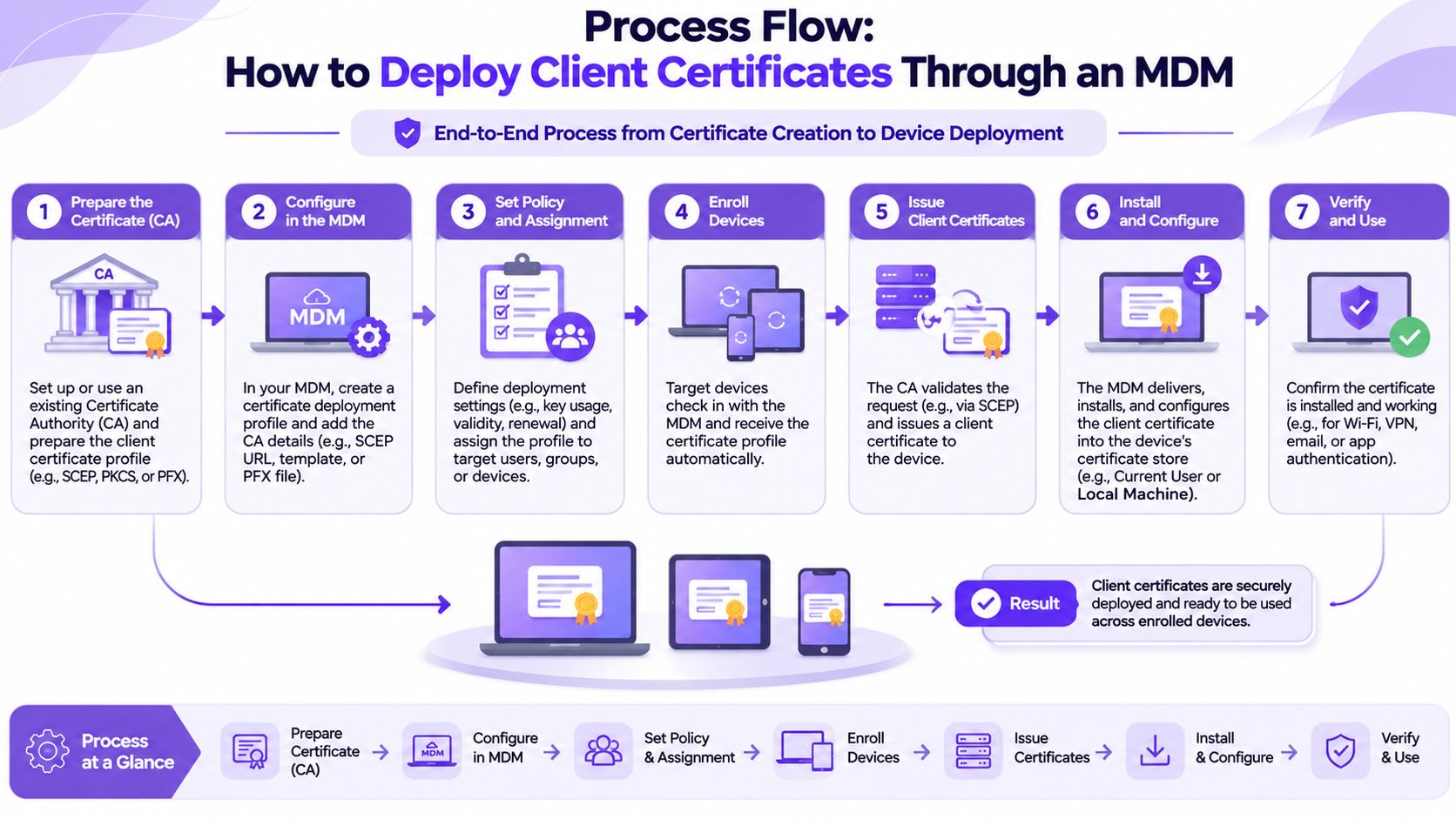
Manual certificate imports don't scale past a lab bench. In production, a Mobile Device Management platform such as Microsoft Intune, Jamf Pro, JumpCloud, Kandji, Hexnode, Iru, or Addigy distributes trust anchors, requests unique client certificates automatically via Simple Certificate Enrollment Protocol (SCEP) or ACME, and binds those credentials to the WiFi supplicant profile. Deciding between SCEP and ACME for WiFi certificate delivery depends on your endpoint operating systems and CA capabilities, though SCEP remains the broadest cross-platform standard across enterprise MDMs.
Seven steps from root profile to production cutover
- Create and push the trusted root and intermediate CA profile first. Every managed endpoint needs the RADIUS server's root CA (and any required intermediates) installed in its trust store before it ever sees a WiFi configuration payload. The usual slip is pushing the WiFi profile alongside or ahead of the root certificate, which leaves devices failing their first handshake with an untrusted-server error.
- Build the SCEP certificate profile with explicit usage and identity templates. Configure the SCEP payload to request Client Authentication EKU, populate the Subject CN and SAN using dynamic MDM variables (such as device serial number or user UPN), and lock the private key into the hardware secure store. Skipping the hardware-storage flag or mistyping a variable string produces blank SAN fields that RADIUS will reject.
- Assign profiles to groups that mirror your VLAN directory structure. Target the trust and SCEP profiles to the exact device or user groups referenced in your RADIUS policy. Assigning profiles to dynamic groups that include unenrolled or staging devices often triggers SCEP challenge failures and clutters PKI logs before hardware even reaches a user.
- Verify enrolment on a small pilot group. Pull five to ten endpoints spanning every OS you support (Windows, macOS, iOS, Android) and inspect their certificate stores directly. Confirm each device received exactly one valid client certificate with the right SAN, EKU, and non-exportable key flag, rather than duplicate certificates from overlapping group assignments.
- Deploy the WiFi supplicant profile with automatic certificate selection. Point the EAP-TLS network profile to the SCEP certificate payload and pin the RADIUS server's trusted root CA and exact server FQDN. Leaving certificate selection unset or forgetting to bind the server name causes operating systems to pop up confusing picker prompts asking staff to choose a certificate manually.
- Test every directory group on a dedicated pilot SSID. Connect one test device from each role or department to the pilot SSID and trace the event in your RADIUS authentication log. Verify the accept event, the matched identity string, and the assigned VLAN before moving near production users.
- Roll out in controlled waves while watching reject logs. Expand assignment by department, floor, or site in stages rather than flipping the entire estate at once. Monitoring live authentication rejects after each wave lets you catch an OS-specific quirk (like an outdated supplicant patch or missing intermediate on older tablets) before it affects thousands of endpoints.
What a clean join Looks like for managed and personal devices
When all seven steps align, a managed laptop or phone boots up, associates with the secure SSID, completes mutual EAP-TLS authentication in the background, and lands on its assigned VLAN without a single password box or trust prompt.
Personal BYOD phones and non-MDM hardware need a separate onboarding path because you can't push SCEP payloads to unmanaged endpoints. On cutover night, managed laptops and phones receive their certificate from the customer's MDM and join automatically, personal phones install a WiFi pass from the Purple app in two taps, and each till moves to its own key once and never needs re-keying for a leaver again. Separating managed endpoints, personal BYOD, and headless IoT or point-of-sale devices keeps your certificate PKI clean instead of forcing exceptions into your EAP-TLS policy.
Renewal, expiry and revocation rules
Most deployment guides treat certificate lifecycle management as a single checkbox: "enable CRL or OCSP revocation on RADIUS." That shortcut hides the hardest operational failure modes in production WiFi. A certificate expiring naturally, a stolen laptop being revoked, a firewall blocking an OCSP responder, an MDM accidentally stripping a root profile, and an HR role change modifying a VLAN all look like "WiFi stopped working" to the helpdesk, yet each event has a different detection signal, remediation path, and owning team.
| Event | Effect on access | How it is detected | Remediation path | Typical owner |
|---|---|---|---|---|
| Client or server certificate expires | Access fails at the next handshake once the validity date passes | Authentication log names an expired certificate | Reissue before expiry and install during the overlap window | PKI or endpoint team |
| Certificate revoked | Authentication fails at the next attempt when a revocation check is reachable | RADIUS log shows a revocation failure for one identity | Publish the updated CRL or OCSP response and confirm it is reachable | PKI team |
| Revocation endpoint unreachable | Fails closed and blocks access, or fails open and allows it, according to the stated policy | Spike of rejects with no change on the client | Restore CRL or OCSP reachability, then set the offline policy explicitly | Network team |
| Root removed from the client trust store | Client rejects the server certificate on every network it joins | Untrusted-server prompt or handshake alert on the endpoint | Redeploy the root profile through the MDM | Endpoint or MDM team |
| RADIUS authorization change | Identity stays valid but the VLAN or role mapping changes | Accounting log shows an unexpected VLAN for a known device | Update the policy mapping and send a change of authorization | Network team |
Handling renewal overlap cleanly eliminates the most avoidable entry on that table. Configure your MDM SCEP renewal threshold so devices request a replacement certificate well before expiry, while plenty of the validity window remains. During that overlap window, the endpoint installs the fresh certificate and switches over cleanly without dropping its active wireless session or getting stranded off-network with an expired credential.
The Offline Trade-Off and Short-Lived Certificates
Revocation checks introduce an unavoidable architectural choice whenever a Certificate Revocation List (CRL) distribution point or Online Certificate Status Protocol (OCSP) responder goes unreachable, or when a branch site experiences WAN disruption. As highlighted in ongoing IETF EAP-TLS 1.3 specification work, revocation and lifecycle behavior are core deployment requirements rather than passive features. Your RADIUS server must explicitly implement one of two behaviors when it can't verify revocation status:
- Fail closed (strict revocation): The RADIUS server rejects every authentication attempt until CRL or OCSP reachability returns. Security posture stays intact, but a single stalled web server hosting your CRL can knock an entire office offline.
- Fail open (soft fail): The RADIUS server accepts otherwise valid certificates when the revocation endpoint is unreachable and logs a warning. Business continuity survives a PKI outage, but a recently revoked device could temporarily connect during that window.
There's no universal answer here. A high-security financial trading floor usually selects fail closed backed by redundant, locally cached CRLs. A multi-site retail chain often chooses fail open paired with short CRL cache lifetimes and immediate directory disablement so tills and staff scanners don't halt during a WAN blip.
Some security architects take a contrarian route: issue short-lived certificates (valid for days rather than a year) to cut dependence on CRL and OCSP infrastructure altogether. If a stolen laptop's certificate expires automatically in 72 hours, revocation delays matter far less. The catch is operational fragility. Short-lived certificates make automated MDM renewal and tight NTP clock synchronization across every endpoint and RADIUS node mission-critical. A laptop left in a drawer for a week returns with an expired certificate and needs an alternate onboarding path (such as cellular connectivity or a quarantined remediation VLAN) just to pull a new cert.
Enabling OCSP without defining your offline behavior isn't a security control. It's an undocumented outage waiting for a firewall change.
When a staff member leaves mid-shift, revoking their certificate or disabling their directory account stops their next handshake, but their device may remain authenticated on an active session until reauthentication fires. Our platform supports revoking a single key without affecting others, and uses RADIUS Change of Authorization (CoA) to end live sessions on access points that support it, kicking the revoked endpoint off the air immediately instead of waiting for a roaming event or session timeout.
Building a lifecycle runbook for EAP-TLS 1.3 and Beyond
Enterprise wireless modernization adds another layer to lifecycle planning. Under RFC 9190, EAP-TLS 1.3 introduces distinct TLS 1.3 compliance rules, meaning older EAP-TLS cipher-suite assumptions no longer carry over automatically. As organizations migrate toward WPA3-Enterprise and TLS 1.3, client supplicant behavior and RADIUS server capabilities vary noticeably across older Windows builds, IoT firmware, and network hardware.
Document a concise certificate lifecycle runbook before production sign-off that covers six exact procedures:
- Issuance: Standard MDM SCEP onboarding and exception workflows for non-MDM devices.
- Renewal overlap: Automated renewal trigger thresholds and alerting for devices approaching expiry without renewing.
- Emergency revocation: Exact steps to revoke one client certificate, trigger RADIUS CoA, and verify session termination.
- CRL and OCSP availability: Health monitoring on revocation endpoints plus the documented fail-open or fail-closed decision.
- Session reauthentication: CoA support validation per access-point model and default reauthentication intervals.
- Rollback: Pre-staged procedures to restore a prior server certificate or intermediate chain if a renewal or TLS 1.3 upgrade triggers widespread rejects.
Fixing common EAP-TLS certificate failures
When an endpoint can't join an EAP-TLS network, guessing wastes hours because supplicant error messages are notoriously vague ("Can't connect to this network"). Start by matching the observed symptom to its root cause and targeted remediation.
| Symptom | Likely cause | Fix |
|---|---|---|
| Clients reject the server certificate | Root or intermediate missing from the client trust store | Deploy the full chain and root through an MDM profile |
| Authentication fails right after server renewal | New server certificate chains to an intermediate clients do not yet trust | Trust the new intermediate before switching the server certificate |
| Untrusted-server prompt on devices | Server name does not match the name clients are configured to expect | Align the certificate subject or SAN with the supplicant configuration |
| Former staff still connect | Old client certificate valid and not revoked | Revoke that single certificate and end the live session |
| Some devices pass, others fail | Missing client authentication usage, or private key outside the secure store | Reissue the certificate with the correct profile |
| Access denied after revocation check | CRL or OCSP endpoint unreachable and no offline policy set | Publish reachable endpoints or define the offline policy |
| Device lands on the wrong VLAN | Mapping uses the wrong identity attribute | Map on the SAN or directory group in the RADIUS policy |
A four-step Diagnostic Order for failing endpoints
Resist the urge to edit MDM profiles or restart RADIUS services blindly. Follow a fixed four-step triage sequence so you isolate the exact layer where validation stopped:
- Read the RADIUS authentication log first. Pull the exact reject reason code, TLS alert message, presented identity, and matched policy rule for the failing MAC address or username. If you don't see an entry at all, the client aborted the handshake during server validation or the access point isn't reaching RADIUS. Running structured verification steps to test RADIUS authentication separates network reachability issues from TLS certificate rejects in minutes.
- Inspect the certificate chain directly on one failing endpoint. Open the device's certificate store and check three facts: is the RADIUS root CA present and explicitly trusted, does the client certificate carry Client Authentication EKU, and is its validity window active against the device's system clock?
- Compare the certificate SAN against the RADIUS policy attribute. Copy the exact SAN or CN string from the failing certificate and compare it character-for-character against the identity field your RADIUS server expects. A trailing domain suffix mismatch or an unexpected uppercase/lowercase transformation in a directory lookup often explains why an authenticated device lands on the wrong VLAN or gets rejected.
- Test CRL and OCSP endpoint reachability from the RADIUS server itself. Verify that the authentication server (not your admin workstation) can resolve and fetch the configured CRL or query the OCSP responder over the required port without proxy interception or TLS inspection breaking the response.
Plan remediation timelines realistically around how fast changes propagate. A supplicant or MDM profile fix usually reaches online devices within a day once pushed, making minor SAN or server-name corrections relatively quick to clean up. A CA hierarchy or intermediate chain change, by contrast, may need a staged rollout spanning a full week to catch laptops that were powered off, travelling, or working remotely. Always schedule server certificate and intermediate rotations well ahead of your renewal calendar so straggling endpoints never wake up locked out on Monday morning.
Confirm your certificate plan before rollout
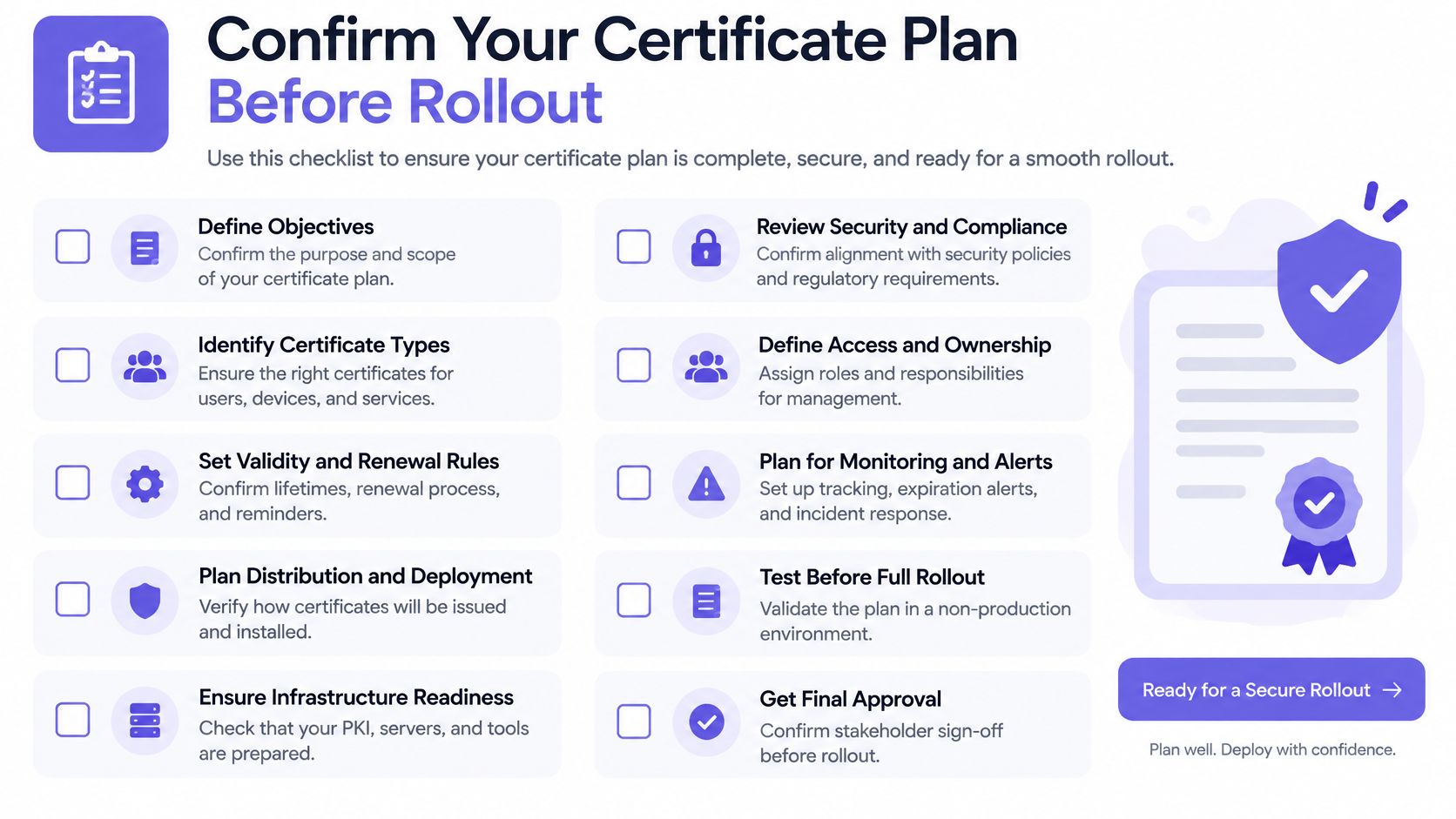
Switching an enterprise wireless estate to certificate-based WiFi shouldn't feel like a leap of faith. Before scheduling a production cutover, put your architecture against this seven-point go/no-go checklist. Every box needs a verifiable yes:
- Unique client certificates: Every managed endpoint receives its own non-exportable certificate with Client Authentication EKU and a finalized CN/SAN identity schema.
- MDM trust distribution: The RADIUS root CA and any required intermediates are pushed reliably to all managed operating systems through your MDM.
- Complete server certificate: The RADIUS server certificate includes Server Authentication EKU, matches the exact FQDN pinned in supplicant profiles, and presents its full intermediate chain.
- Strict RADIUS mapping: Authorization policies accept only explicitly approved issuing CAs, map SAN or directory groups to target VLANs, and reject unmatched or disabled identities cleanly.
- Automated renewal overlap: SCEP or ACME renewal runs well ahead of expiry so endpoints install replacement certificates before their old ones lapse.
- Revocation policy and reachability: CRL or OCSP endpoints are reachable from RADIUS, monitored continuously, and backed by an explicit fail-open or fail-closed offline rule.
- Documented rollback plan: A tested procedure exists to revert a server certificate, intermediate chain, or supplicant profile if wave-one reject logs spike unexpectedly.
Proving the configuration on a single site first
Even a spotless paper design deserves live validation before touching your entire estate. Rather than risking a multi-site disruption, prove the certificate plan on one pilot site first. We let teams prove the setup on one site first, putting open, secure, and xPSK networks on the access points the site already has, beside the network it runs today, then judging the result on tickets and audit evidence before rolling out.
Running the new EAP-TLS SSID alongside your existing wireless network removes cutover pressure completely. Staff in the pilot group authenticate automatically using their MDM-delivered certificates while everyone else remains untouched. You can measure real authentication failure rates, inspect VLAN placement across every role, test an emergency single-device revocation with CoA, and verify that your logs produce clean audit evidence before expanding to site two.
Take one concrete step this week: run the seven-point checklist above against a single pilot group of ten to twenty devices across your core operating systems. Fix every unchecked item, confirm zero unexplained rejects in the RADIUS log, and widen access only once the pilot runs cleanly end to end.
Purple Access brings managed PKI, multi-region Cloud RADIUS, and direct SCEP integration for major MDMs together so your team can deploy EAP-TLS certificates, enforce directory-driven VLANs, and revoke individual keys cleanly without maintaining on-premises CA infrastructure. Whether you're replacing legacy NPS servers or consolidating SSID sprawl across dozens of venues, you can prove the entire certificate architecture on one site using your existing access points before scaling further. Explore how it fits your network by visiting Purple Access.