WiFi guest network: How it works and how to secure it
Published
The standard advice for guest WiFi is a checklist: spin up a second SSID, drop it on its own VLAN, tick client isolation, hand out the password. Each step is correct. Together they prove nothing.
A guest network is a claim about reach. You're telling visitors, and yourself, that a phone joining your lobby SSID cannot touch the booking system, the door controllers, the tills or the cameras. A VLAN and a checkbox record that somebody intended that boundary. They don't show the boundary holds once traffic crosses a switch, an IPv6 router, a multicast group or a roaming event.
That gap matters because guest WiFi stopped being a courtesy years ago. It's infrastructure now, used by the people you know least about.
Table of Contents
- What a WiFi Guest Network Is and Why It Exists
- How a Guest Network Differs from a Corporate Network
- Choosing an Access Model and How Many Networks to Run
- How to Separate Guest Traffic and Set Up the Network
- Guest Network Examples by Venue and Where Each One Breaks
- Why Client Isolation Needs Testing and How to Do It
- What to Do This Week
What a WiFi guest network is and Why it Exists
A guest WiFi network is a separate access path for visitors, not proof that their devices are private. It can use the same access points as staff WiFi while applying different rules to where traffic may go. The name in a visitor's WiFi list is the visible part; the configuration behind it determines what the connection can reach.
In a hotel, guests need internet access in the lobby and their rooms. They do not need access to reception's booking system, staff computers or payment terminals. A guest network is meant to keep those uses apart, while still giving visitors a usable connection.
Visitor devices are unmanaged. Operators may not know whether a contractor's laptop or a patient's phone is patched, or what other devices are on the same network. A separate guest connection limits the risk of giving those devices access intended for staff.
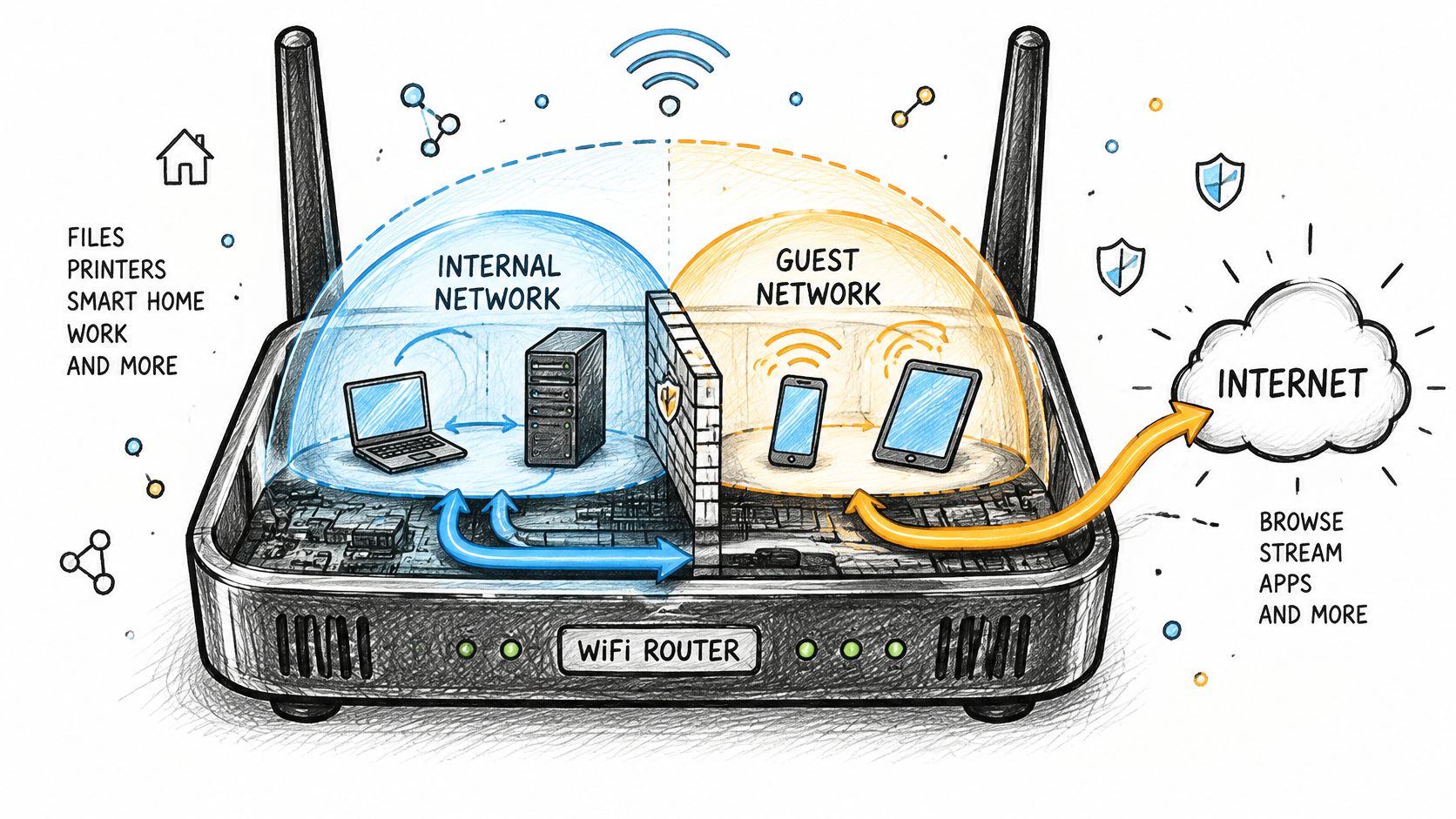
Public WiFi serves people in places such as offices, shops, malls, hospitals, campuses and outdoor areas. Its growth reflects a practical need: visitors expect internet access where they work, stay or receive services.
A guest network should provide internet access without exposing internal systems. Operators also need to decide how guests join, what limits apply and how long access lasts. VLANs and client isolation express the intended separation, but configuration alone does not prove it works.
The test that matters: try to reach an internal host from a guest device. If the connection succeeds, the boundary has failed. If it fails, keep testing the paths guests could use, including traffic between guest devices.
How a guest network Differs from a corporate network
A corporate network trusts the person and the device. A guest network trusts only the connection it hands over. Everything else follows from that one shift: authentication, reach, what gets logged, and how long access survives.
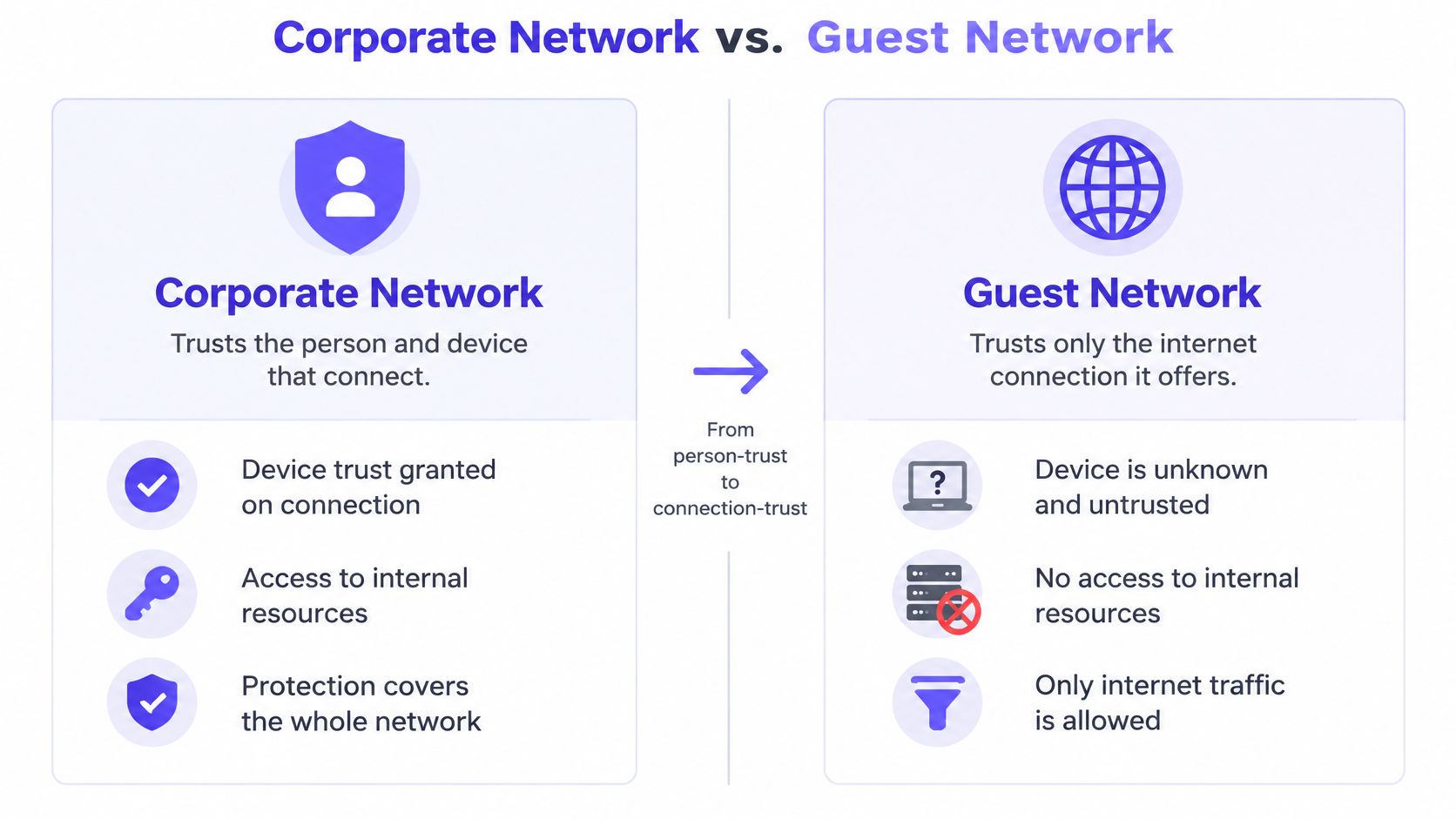
| Factor | Guest network | Corporate network |
|---|---|---|
| Who connects | Visitors, contractors and personal devices | Employees and company-managed devices |
| Authentication | Captive portal, voucher or shared guest key | Certificates (EAP-TLS) or directory login |
| Shared password | Often yes, and rotated only occasionally | Should never be shared |
| Reach to internal systems | None, blocked at the gateway | File servers, printers, internal apps |
| Device trust | Unknown and unmanaged | Managed, patched and inventoried |
| Logging and records | Session logs and consent records | Full audit trail tied to a named user |
| Bandwidth policy | Capped per device or per session | Usually uncapped, with priority for business apps |
| Access lifetime | Hours to days, expiring automatically | Until employment or contract ends |
The reach row accounts for most incidents. Corporate clients see file shares, printers and internal applications because that's the job. Guest clients must be denied all of it by explicit rule, not by the accident of being on a different subnet that still routes inward.
The credentials row is the quiet one. Staff should authenticate as individuals through certificates or directory logins, so a single departed employee can be revoked without touching anyone else. Guest networks usually run on one shared password that spreads through group chats and door hangers, and nobody rotates it because rotating it disconnects everyone at once.
Time works differently too. Guest access should die within hours or days on its own, while staff access lasts as long as the employment does. And both networks almost always ride the same radios and access points, so the difference lives entirely in configuration, identity and policy. The mechanics of issuing and revoking that access sit in the identity layer, which is what this guide to WiFi access control unpacks.
Choosing an Access model and how many networks to run
The access model decides how a guest gets on, and it decides what you can take away later. Four models cover most venues.
| Access model | How guests join | Security level | Best fit | Main drawback |
|---|---|---|---|---|
| Open network with captive portal | Accept terms or sign in on a web page | Low | Cafes, lobbies, short visits | Anyone can join; portal pages can be spoofed |
| Shared guest password (WPA2 or WPA3) | Type one common password | Medium | Small offices, waiting rooms | Password spreads; changing it disconnects everyone |
| Individual pre-shared key per device | Each device gets its own key | High | Long-stay residents, IoT devices | Key issuance and revocation need management |
| Passpoint or OpenRoaming profile | Phone installs a profile and joins automatically | High | Repeat visitors, venues with many returners | Needs compatible devices and profile setup |
Pick by return rate and device ownership. A cafe with five-minute visits needs nothing more than a portal and a bandwidth cap. A serviced apartment block with month-long stays needs keys that expire on a known date, because "who still has access" is a question you'll be asked. The explainer on what an SSID is and isn't is worth reading before you decide that each visitor group needs its own network name.
Why the SSID count matters more than it looks
Every additional SSID forces every access point to transmit more beacon and management frames on the channel, and those frames go out at the lowest mandatory rate, where they occupy the medium for the longest time.
The numbers are blunt. A technical analysis of SSID overhead estimates that with three access points sharing a channel, 500-byte beacons and a 1 Mbps basic rate, six SSIDs consume roughly 74.92% of airtime, against 37.46% for three SSIDs. Raise the basic rate to 12 Mbps and the same six-SSID design drops to about 7.01% overhead. On congested 2.4 GHz networks, the low-rate management frames are what your guests feel as latency.
The fix is fewer networks with smarter identity:
- One portal network for visitors and BYOD, with consent recorded.
- One secure network for staff and trusted devices, using certificates or directory login.
- One key-based network for things that must stay isolated, such as tills, sensors and casting devices.
Use 802.1X identity, dynamic VLAN assignment or per-device credentials to vary policy inside those networks instead of adding a new SSID per audience. Test basic-rate changes on a handful of access points first, because raising them can knock distant or old clients off entirely.
How to separate guest traffic and Set up the network
A guest network is not private just because it has its own name. Separation depends on the VLAN, gateway rules and access-point controls working together, then passing tests from a guest device. NIST's guidance on WLAN security recommends separate WLANs for users with different security profiles and isolation in both directions: guests should not initiate connections to internal systems, and the gateway should limit guest traffic to required services.
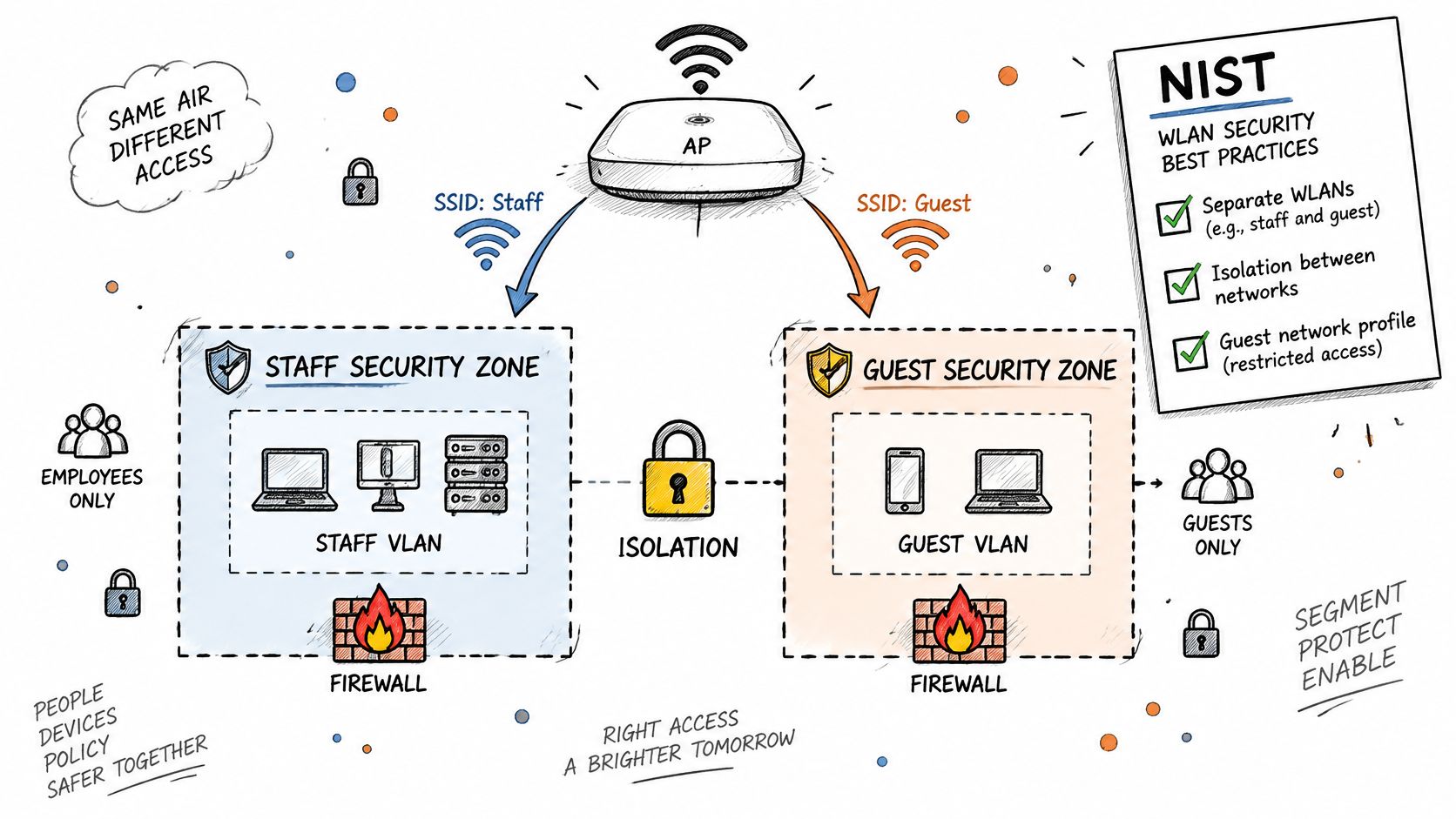
Build it in this order
- Create the zone. Map the guest SSID to a dedicated VLAN or equivalent overlay. A guest SSID on the staff broadcast domain changes the network name, not the security boundary.
- Write deny-first gateway rules. Allow DHCP, DNS, captive-portal services and internet access. Block private address ranges, management interfaces and administrative access from the guest segment.
- Enable client isolation at the access point. This is intended to prevent guests from scanning or connecting directly to one another. It does not block routed paths to servers, printers or cameras, so test those separately.
- Choose the radio security mode. Use WPA3 where supported, or WPA2 with AES when older clients require it. An open network with a portal does not encrypt traffic over the radio before the client reaches a TLS-protected service. Passpoint or individual pre-shared keys can provide encrypted access where supported.
- Serve the portal over HTTPS and collect only necessary information. An email address or room number may be enough for access. Ask for more only when you have a clear reason.
- Set bandwidth limits and session expiry. Per-device limits help prevent one guest's heavy use from consuming capacity. Expiry removes stale sessions and credentials.
- Define what you log and how long you retain it. Record relevant association, authentication and DHCP events, and state the retention period on the portal.
- Test from a guest device before opening the network. Scan for reachable corporate addresses and services. Any unexpected response means the intended boundary needs investigation.
For a walkthrough of the configuration sequence, watch below.
Where the encryption baseline actually sits
WiFi security has progressed from WEP through WPA and WPA2 to WPA3, but older equipment and configurations remain in use. The practical choice depends on which client devices the venue must support. WPA3 offers stronger protections, while WPA2 with AES can maintain compatibility with older clients.
Deployment has not kept pace uniformly. Mathy Vanhoef's WiSec measurement study found that WPA-TKIP remained in use on 7.30% of encrypted networks in a May 2021 Belgian survey, despite a decline from an earlier measurement. A separate global estimate cited in that study put WPA3 use at 1.28% of WiFi networks as of May 2024. Sampling methods vary, so treat the figure as an estimate rather than a universal measure.
For guest access, an open network, a shared password and legacy encryption create different risks. None provides the same per-person revocation as identity-based access.
At a property such as Count Kálnoky's Estates guesthouses, frequent guest turnover makes portal flow, session expiry and credential revocation operational concerns, not just launch settings.
Treat isolation as a standing test, not a one-time configuration task. Scan from an authenticated guest device, check that internal addresses and services are unreachable, and repeat the checks after firewall or WLAN changes. Keep the results with the configuration record so the intended separation can be compared with what the network permits.
Guest network Examples by venue and where each one Breaks
Guest WiFi needs differ by venue, but each design still needs a clear boundary between visitors and other users or devices. A VLAN expresses the intended separation; testing shows whether traffic is contained.
Hotel. Guests can sign in through a captive portal with a room check against the property management system. Room TVs, thermostats and leak sensors belong on key-bound VLANs that guests cannot access. The weak point is a shared room password: it can remain in use after a guest has left.
Airport or retail. Visits are often brief, so an SMS one-time passcode or social sign-in can keep access straightforward while limiting the information collected. In October 2023, 59% of surveyed U.S. air travelers said they used public WiFi in airports, while 39% acknowledged the risks, according to Forbes Advisor's survey on WiFi while traveling. A practical risk to check is whether a lookalike portal could imitate the venue's brand.
Clinic or hospital. Visitors and patients need a guest path that cannot reach clinical systems or medical equipment. Check for equipment accidentally connected to the guest segment, as well as rules that permit traffic from guest devices to internal destinations.
University. Keep member access, such as eduroam, distinct from visitor access. A visitor provisioned onto the member network as a temporary workaround can cross that boundary.
Multifamily housing. Residents need private access that follows them around the building, while casting devices stay within their own group. A single building-wide key makes it harder to control access when residents move out.
Trust also depends on clear communication. In a survey of 436 U.S. respondents across 18 states, 57% said they did not feel safe using public or business WiFi, while only 17% felt safe, according to SplashAccess public WiFi security guidance. Explain what the portal collects and when that information is deleted; a polished login screen alone does not answer those questions.
Event crowds often arrive, connect and leave within a few hours, a pattern that suits an expiring captive-portal session. For event operators reviewing venue amenities at Texas Old Town, the practical test is whether the session ends when access is no longer needed, without leaving a shared credential in circulation.
Why client isolation needs testing and how to do it
The most common misconception in guest WiFi is that a guest VLAN plus a ticked client isolation box means the network is private. Client isolation isn't standardized across vendors, and independent research on WiFi client isolation from UC Riverside found it can be bypassed through attacks at the encryption, routing and switching layers. It's a control to test, not a checkbox to tick.
Guests compensate on their own side, unevenly. In May 2024, 37% of 2,000 surveyed U.S. adults said they used a VPN at least some of the time on public WiFi, per U.S. News & World Report's privacy survey. A VPN protects traffic in transit. It changes nothing about which internal hosts a guest client can reach.
| Test | How to run it | Pass condition |
|---|---|---|
| Lateral reachability | Ping and connect to internal host addresses from a guest client | No response from any internal range |
| Management plane exposure | Try controller and switch web and SSH ports from the guest segment | Connection refused or timed out |
| Guest-to-guest | Connect two guest devices and scan between them | Peers unreachable from each other |
| IPv6 paths | Check for IPv6 addresses and routes on the guest network | No route to internal IPv6 prefixes |
| DNS behaviour | Query internal hostnames through the guest resolver | Only public answers returned |
| Captive portal bypass | Attempt internet access before signing in | Only portal and DNS reachable before login |
| Roaming and failover | Move between access points and reboot the gateway | Isolation rules still apply afterwards |
Multicast and casting protocols such as mDNS deserve their own check, because some designs leak service discovery across subnets and a guest in room 412 ends up casting to the TV in 414. These tests belong in a schedule, not a launch day: rerun them after every firewall change, after every access point firmware upgrade, and at least once a quarter. Record each result with the date, firmware version and last change, so a failure can be traced to whatever caused it. VLAN segmentation for venues covers the design side that these tests verify.
A guest VLAN proves intent. A failed ping from a guest laptop to the file server proves isolation.
What to Do This Week
Start with people and devices, not hardware. Two groups decide the design: people you don't employ (visitors, contractors, patients, residents) and devices that must never see each other (TVs, tills, sensors, locks). Assign each group a model from the access table, then hold the airtime line: two or three purposeful SSIDs, with identity doing the rest of the work.
Purple Access collapses that into three networks, Open for guests and BYOD, Secure for staff and trusted users, and xPSK for things, tenants and communities, with Cloud RADIUS sending every device to the right network and VLAN by identity. A planner shows where each group lands once you tick what connects today. The same split can be built on other access points without it, and the tests below still apply either way.
This week, sketch the networks, list every device that touches each one, and run the seven isolation tests against the live guest network, including IPv6 paths, internal DNS answers, portal bypass, multicast and casting, and behaviour after roaming or a gateway reboot. Write the date, firmware version and most recent firewall change beside each pass or fail.
A vendor checkbox for client isolation is not a sign-off.
Purple Access runs the split this article describes on the access points you already own: a guest portal with consent recorded, staff on certificates, devices on individual keys, and Cloud RADIUS placing every device on its own VLAN by identity. Start with the planner to see where your current groups land across three networks, then test the result against the isolation checks above. You can map your network and try it at Purple Access.