Stadium WiFi design: Capacity, channels, and security
Published
52,400 devices used WiFi simultaneously at Ohio Stadium's Penn State game during the 2019 season, according to Ohio State's IT team. That's not a coverage challenge. It's a shared-airtime, authentication and infrastructure challenge, concentrated inside a venue where spectators expect their cell phones to work immediately.
Good stadium WiFi design starts with the services people need during a game, not a heatmap showing signal everywhere. Fans uploading clips, stewards using operational applications and concession staff taking payments can fail together even when every device shows a strong connection. The design has to account for those dependencies before anyone orders access points.
Table of Contents
- Size Stadium WiFi From Concurrent Devices, Not Seats
- Channel Width and Band Choices for Dense Seating
- Coordinating 6 GHz With Broadcast and Fixed Systems
- Segmenting Fans, Staff and Operations Onto Separate Networks
- Authenticating Fans, Staff and Roaming Across the Bowl
- Running Stadium WiFi Through Each Phase of a Game Day
- Pilot One Venue Before You Commit to the Design
Size stadium WiFi from concurrent devices, not seats
Start with the sizing relationship:
Attendance × simultaneous connection share × devices per connected visitor = concurrent devices.
Divide that device target by the usable client capacity of an access point to establish a preliminary AP requirement. Then adjust it for seating geometry, application demand, antenna placement and the concentration of users in each zone. A controller's maximum association limit is a poor substitute for tested application capacity. Association only proves a device attached. It says nothing about whether uploads, payments, ticketing and messaging hold up when a bowl fills.
The ALE high-density design guidelines describe a 52,000-seat stadium, a 30% simultaneous connection assumption, an engineering target of approximately 21,000 concurrent devices, and a planning density of at least 60 clients per AP. Treat the device target as a separate engineering input: the attendance percentage alone doesn't produce that target without an additional device-count assumption.
That distinction matters. A visitor count, an associated-device count and an actively transmitting-client count describe different loads. Record each separately rather than letting an ambiguous spreadsheet column become the purchasing specification. Game day makes those differences visible because people arrive in waves, sit in dense blocks, then move into concourses and lines at the same moments.
Reference stadium WiFi deployments and sizing baseline
| Venue | Scale (seats or measured devices) | Access points and infrastructure | Measured or planned load |
|---|---|---|---|
| Planning example, high-density design guide | Stadium attendance model with a separate concurrent-device target | Calculated from the device target and usable clients per AP, then adjusted by zone | Design target, not a measured load |
| Ohio Stadium, 2019 season | Penn State game concurrency described above | Dense game-day network built for concentrated use across the venue | Multi-terabyte game-day traffic reported in the same Ohio State account |
| Notre Dame Stadium, December 2024 playoff | Playoff crowd | Outdoor WiFi deployment | WiFi traffic exceeded 26 Gbps, according to HPE |
| Empower Field at Mile High, 2025 upgrade | 76,125 seats | More than 2,400 APs in the WiFi 6E and LAN upgrade, according to Verizon Business | Upgrade scope, not a measured traffic load |
Use deployment comparisons as sanity checks, not templates. AP totals can include hospitality rooms, concourses, offices and outdoor approaches, while a seating count describes only part of the venue. A venue that supports a large device count may still fail if those devices cluster behind one gate or upload from one seating block. The useful comparison is how the load was handled, not whether the AP count looks impressive.
Build the model by zone
A press box needs a different traffic model from a seating section. Hospitality areas can concentrate several devices around each table, while a gate can experience intense connection churn without sustained heavy throughput. Concessions bring payment traffic. Media positions bring uplink demand. Concourses mix roaming clients with people stopping long enough to post or message.
Before procurement, fix these inputs:
- Concurrency by zone: Estimate connected devices during the busiest relevant phase, not just average attendance.
- Usable clients per AP: Define this against the required applications and acceptable upload performance.
- Client capabilities: Measure the audience's supported bands and security methods rather than assuming every cell phone can use the newest radios.
Place APs close to users where installation conditions allow. Under-seat placement can improve cell containment but complicates cabling and maintenance. Overhead directional placement can simplify access but demands careful aiming. Neither mounting method rescues an unrealistic capacity model. Size for the game-day service you intend to deliver, then let the physical design serve that load.
Channel width and band Choices for dense seating
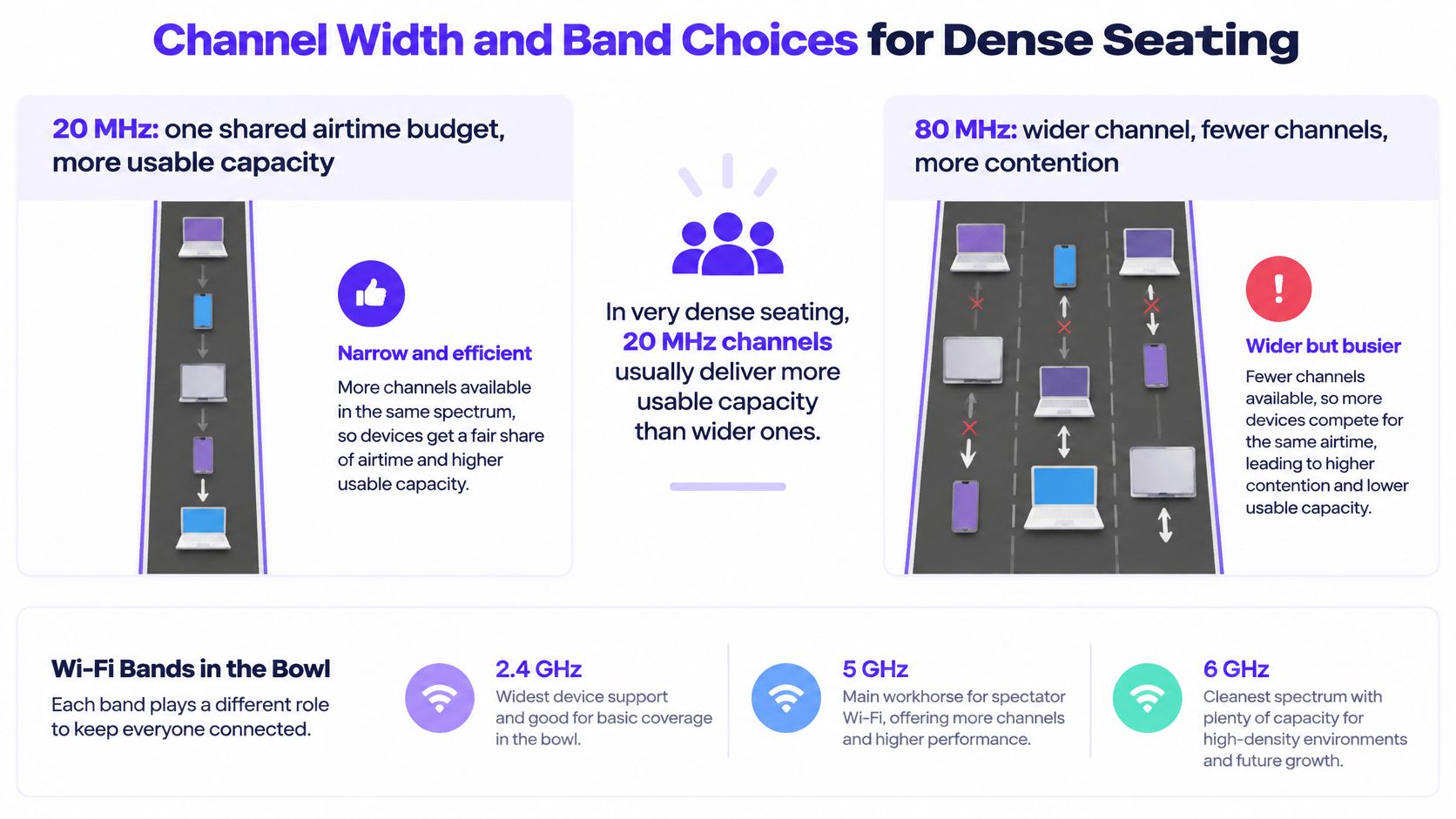
Narrower channels can deliver more usable stadium capacity than wider channels. Cisco's high-client-density design guide recommends 20 MHz operation where AP density is high and available channels are constrained. The same shared-spectrum trade-off makes 80 MHz a poor default for a crowded bowl.
A wider channel can give an individual phone a higher peak connection rate. It also consumes spectrum that neighboring cells could otherwise use independently. If adjacent radios can hear one another on the same channel, their clients still compete for transmission opportunities.
The comparison below illustrates the reuse trade-off, not a promise that a narrow channel is faster.
Choose widths around neighboring cells
Think of several groups of cell phones distributed across independently usable channels, rather than one group sharing a broad channel. The gain comes from parallel reuse across the seating area, not from changing the channel width on an isolated AP.
Channel width and band roles in dense seating
| Band or width | Where it fits | Why | Limit |
|---|---|---|---|
| 20 MHz on 5 GHz | Default for the seating bowl | More independent channels and better reuse | Lower peak rate per client |
| 40 MHz on 5 GHz | Candidate for lower-density concourses and back-of-house | Moderate speed with a manageable reuse trade-off | Fewer channels for neighboring cells |
| 80 MHz on 5 GHz | Avoid as the dense-bowl default | High single-client peak rates | Consumes spectrum and reduces reuse opportunities |
| 20 MHz on 6 GHz | Where cell phone support and local rules permit | Additional spectrum for compatible phones | Cell phone compatibility and coordination constraints |
| 2.4 GHz | Compatibility layer only | Serves legacy devices | Restricted channel reuse |
The table is a starting configuration, not a venue-wide policy. A concourse that looks quiet during a survey may become the busiest radio environment during halftime.
Tune cells before adding radios
Set the narrow-channel baseline, apply directional antenna patterns and use conservative transmit power. Then tune assignments by seating section, including the sections above and below each radio. An AP can interfere across a bowl even when its nearest neighbor is well controlled.
During an occupied test, inspect channel utilization, retry rate, RSSI, SNR and application throughput together. High utilization with healthy signal suggests contention; retries with poor SNR call for a closer look at coverage, interference or antenna alignment.
Practical rule: Don't raise transmit power just because uploads are slow. First establish whether the cell phone can reach the AP reliably and whether the channel has airtime available.
Change one variable at a time. Otherwise, you won't know whether an improvement came from channel assignment, antenna direction or a quieter test period.
Coordinating 6 GHz with broadcast and fixed systems
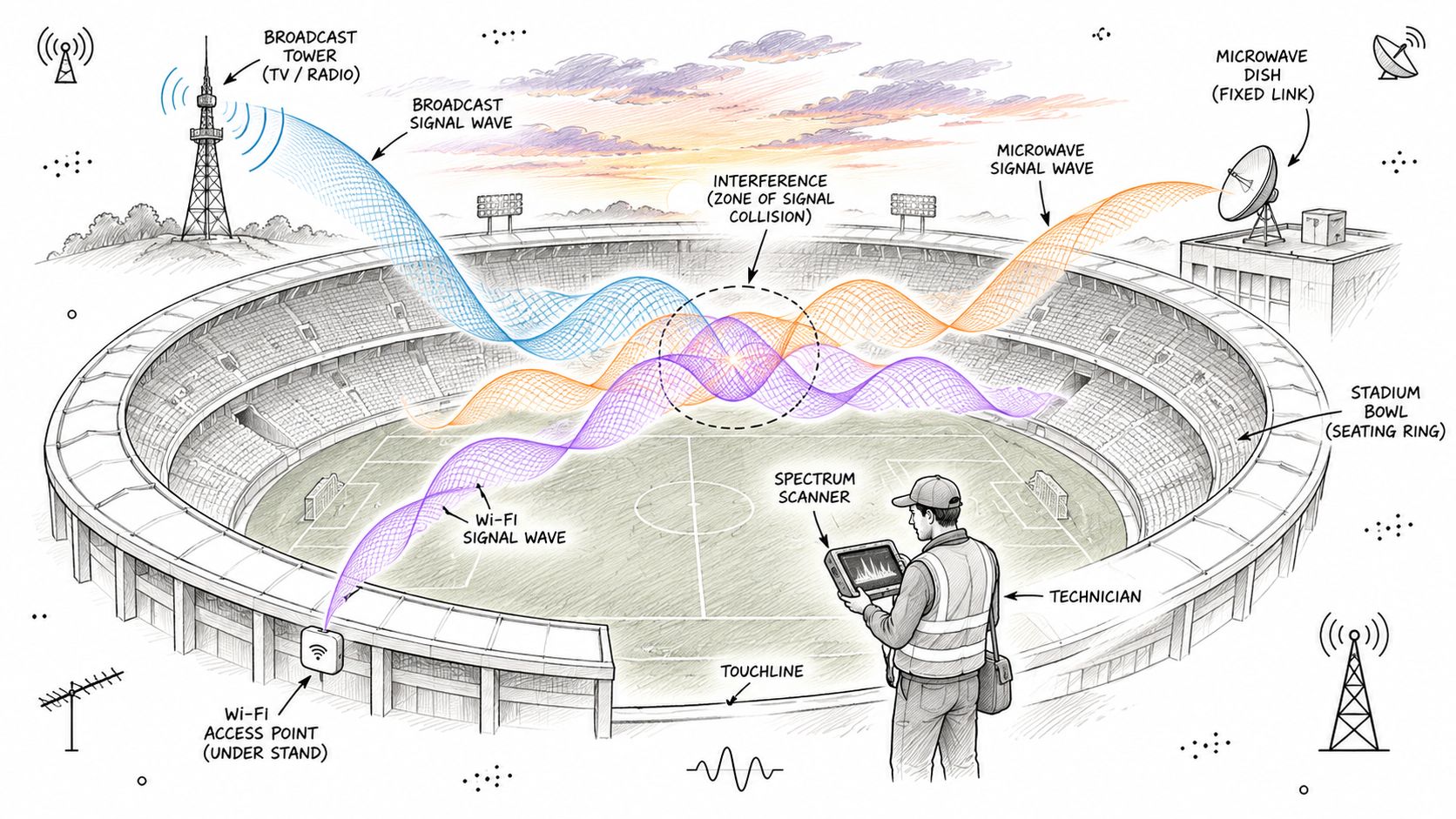
More spectrum doesn't automatically mean a better fan experience. Outdoor deployments must coexist with incumbent systems, and the radio plan has to reflect the operating environment rather than the capabilities printed on the AP box.
The Wi-Fi Alliance's stadium frequency-coordination account describes interference involving in-house cameras, broadcast operations and fixed-link users following outdoor deployments during the 2024–2025 sports season. It also reports that 14% of client connections used 6 GHz at a roughly 80,000-person stadium, while the established band was almost completely saturated on game days.
That's a meaningful offload opportunity, but it isn't universal relief. Cell phones that can't use the additional band still need a working service.
Spectrum investigation must include production equipment as well as fan connectivity.
Make coexistence a lifecycle requirement
Use a coordinated sequence rather than treating spectrum approval as a final installation task:
- Inventory incumbent systems. Include broadcast, production, security and backhaul links. Record equipment owners and temporary event equipment.
- Model permitted operation. Where automated frequency coordination applies, evaluate the permitted channels and power at the actual installation locations.
- Forecast compatible clients. Use observed device capabilities to estimate demand rather than assuming every new cell phone will select the additional band.
- Preserve fallback capacity. Make the established-band service usable for incompatible devices and for locations where new-band coverage is constrained.
- Specify coexistence tests. Include representative broadcast and camera operation, plus a defined fallback acceptance test.
The responsible engineer needs access to the production schedule. A quiet weekday test won't reveal a conflict with a camera link that appears only during televised games.
Judge usable coverage, not radio count
Building materials, antenna placement and permitted power can limit how much traffic moves onto the new band. Adding radios behind an unsuitable mounting surface won't necessarily improve the median spectator's connection.
A spectrum upgrade is ready when production systems remain reliable and incompatible cell phones still meet the venue's fallback service target.
Document who investigates a conflict and who can approve a channel or power change. Without that ownership, the network team and broadcast contractor can spend game day changing settings independently and making diagnosis harder.
Segmenting fans, staff and operations onto separate networks
A flat network lets a compromised fan device or misconfigured camera attempt connections to systems it has no reason to reach. Strong authentication won't compensate for unrestricted access after admission.
Define security groups and permitted destinations before deciding how many SSIDs to broadcast. An SSID identifies a wireless service; it isn't, by itself, a complete security boundary. Use identity-based assignment, VLANs and enforced firewall policies to create the separation.
Map access to operational purpose
Network separation by user group
| User group | Network | Isolation rule | Reason |
|---|---|---|---|
| Fans on cell phones | Guest network | Client isolation with internet-only access | Keeps guest traffic away from internal systems |
| Staff devices | Secure network | Role-based VLAN limited to operations tools | Restricts access to the employee's role |
| Payment and ticketing | Dedicated segment | No guest access, separate VLAN | Protects sensitive transaction systems |
| Cameras and broadcast feeds | Dedicated VLAN | No unsolicited internet-facing exposure | Controls access to production devices and services |
| Concessions and vendors | Per-vendor key or VLAN | Vendors cannot reach each other | Contains a vendor compromise |
For a practical explanation of the boundary, use the VLAN segmentation guide when reviewing how logical networks map to enforced access rules. Creating VLANs without controlling traffic between them leaves the central risk unresolved.
Don't assume isolation guarantees performance, either. Cameras and registers can remain logically separate while competing with guests for the same radio or congested switch uplink. Protect application queues and evaluate dedicated infrastructure where an operational service can't tolerate shared-resource contention.
Test the prohibited paths
Start with a fan device and attempt to reach internal services, device-management interfaces and another guest device. Then test a vendor device against another vendor's segment. A successful internet connection proves admission works, not that isolation works.
Check both address families if the venue supports them. Also inspect discovery traffic and management access, since an apparently blocked application can coexist with an exposed administration interface.
The number of SSIDs should follow from the access model. Broadcasting a separate network for every concession adds management traffic and configuration work when identity-based policies could assign the correct segment.
Before handover, require:
- Guest-side evidence: Recorded tests showing that unauthorized destinations are blocked.
- Individual credentials: No venue-wide shared password for staff or payment access.
- Named ownership: An accountable owner for every VLAN, policy and exception.
Give temporary-event access an expiration and a revocation procedure. Otherwise, yesterday's contractor can become tomorrow's unexplained active credential.
Authenticating fans, staff and roaming across the bowl
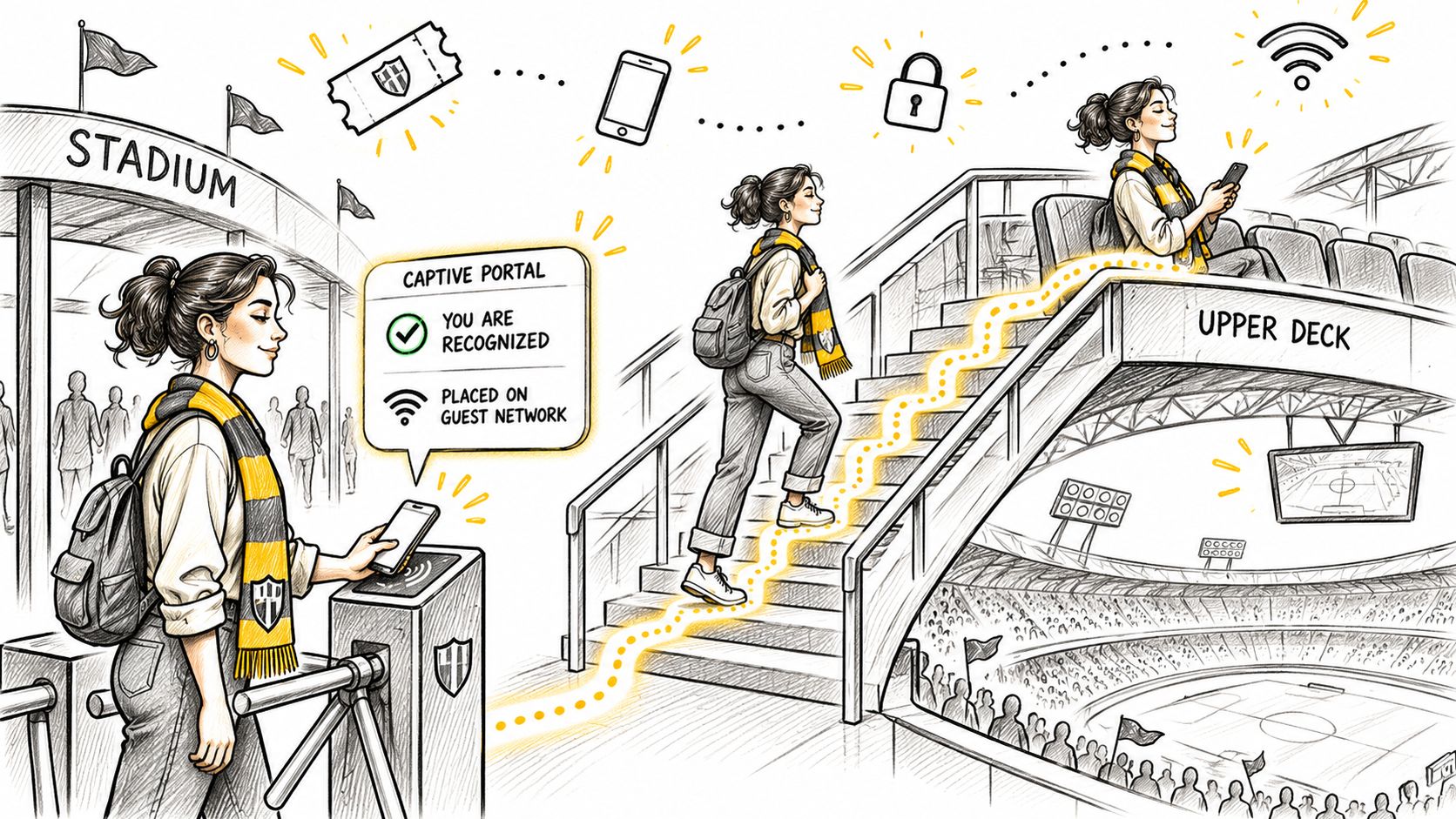
A fan scans a ticket at the turnstile, joins the guest network, completes the portal, then climbs toward the upper deck. If the session drops during that walk, the cause could sit in association, DHCP, authentication, policy, DNS or the application path, and each one has a different fix. “WiFi failed” is six possible failures sharing one symptom.
Treat onboarding as a service chain under match-day load. At ingress the chain has to admit a crowd of devices while spectrum, portal dependencies and back-end policy are all contending at once. Record where the chain stops, not just whether the cell phone shows bars.
Match credentials to the user
A captive portal suits visitors who arrive without a trusted profile. Social or SMS sign-in can help onboarding and consent, but external identity services and message delivery join the dependency chain, so test them slow and unavailable rather than only on a quiet day.
Managed staff devices belong on EAP-TLS certificates delivered through device management. Staff should not carry a shared wireless password, and a lost handset should be revocable without forcing a password change across the venue. Passpoint and OpenRoaming can remove the portal step for devices holding the right profile, while still requiring checks on identity-provider availability, certificate trust and policy assignment.
Authentication has to land on enforced boundaries. When that review reaches firewalls around point of sale, IPTV, scoreboards and building systems, general references such as firewall safeguards for industrial sites can frame the questions, then the stadium writes rules for its own services and failure modes.
Validate movement with real clients
The WiFi roaming guide explains the handoff between access points. Enable fast BSS transition where the handset and authentication mix support it, and prove it with real clients rather than turning on every mobility feature at once.
Write authentication success rate and time to associate during entry peak into acceptance. Measure failures by stage so a portal timeout is not mistaken for weak RF. For the pilot, walk from gate to highest seat with a representative phone and log every reconnection, authentication exchange and application interruption while the concourse is occupied.
Running stadium WiFi through each phase of a game day
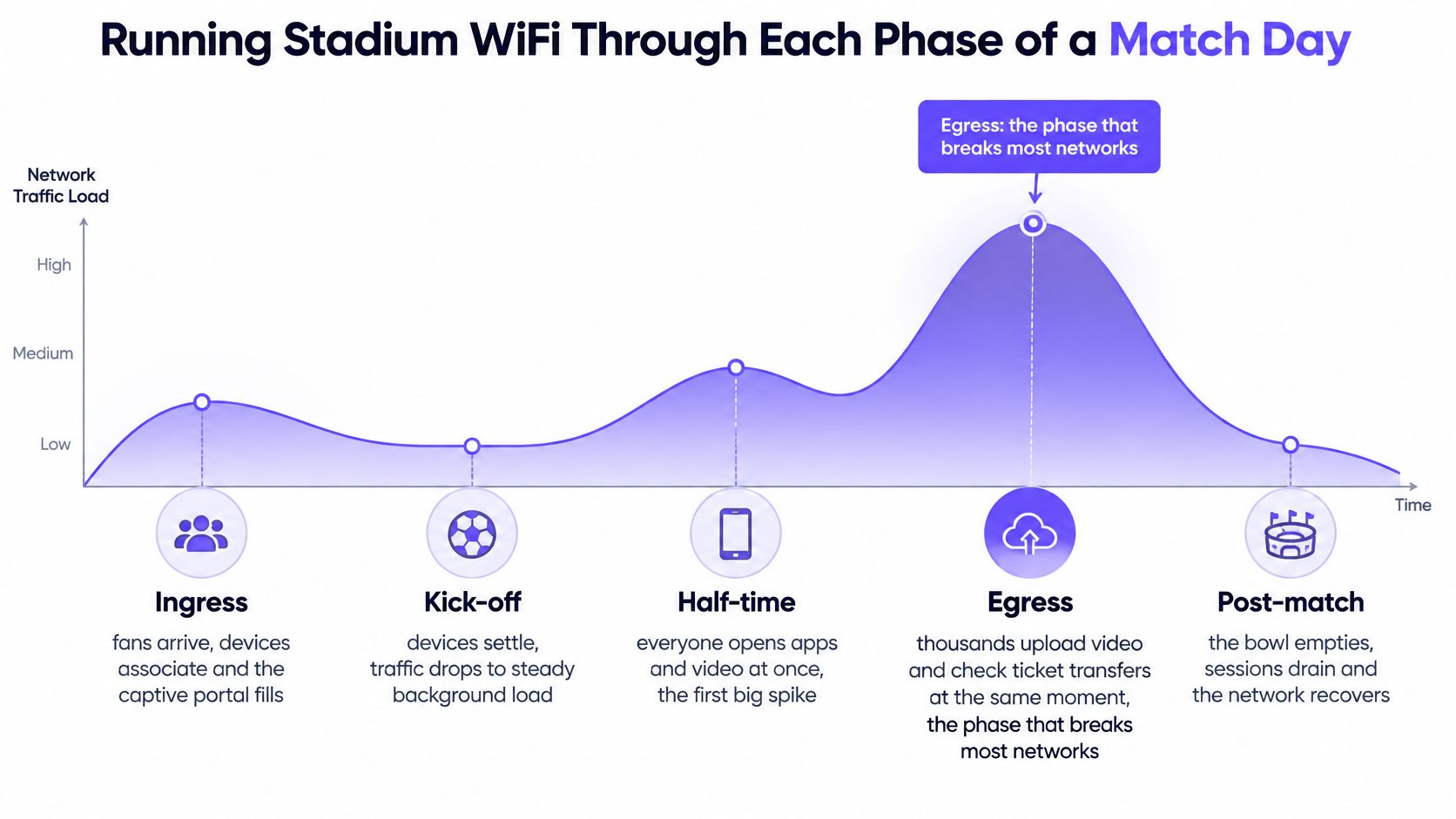
At the final whistle, fans can start uploading clips while moving toward the exits and checking travel or ticket-transfer applications. Treat that combination of movement and uplink demand as a deliberate stress case, not a quiet shutdown period.
A phase-based operating plan makes those changing demands visible.
Define service objectives by place and phase
The Notre Dame stadium connectivity study describes approximately 77,622 spectators, about 900 outdoor APs, and a multi-carrier neutral-host cellular system operating alongside the wireless network. That coexistence is an operational reminder: users experience a mixture of WiFi, cellular and application-specific connectivity, not an isolated radio network.
Don't assume cellular provides a reliable fallback for every failed WiFi session. Test the actual application paths and agree which operational services need wired connections or independently validated backup access.
| Gameday phase | Operational focus | What to observe |
|---|---|---|
| Ingress | Admit devices without connection queues | Authentication outcomes, address assignment and association delay |
| Pre-game | Keep staff tools and transactions responsive | Application latency and dependency health |
| Peak play | Sustain active sessions and uploads | Uplink delivery, airtime utilization and queuing |
| Halftime | Handle concentrated concourse activity | Roaming interruptions, retries and concession transaction completion |
| Egress | Maintain service while users move and upload | Internet egress saturation and fault recovery |
Test registers, scanners, cameras and temporary production infrastructure under the same crowd conditions as fan devices. A successful guest speed test says little about whether a concession application can complete a transaction.
Use the stadium concession WiFi guide to frame the retail service requirements around transaction completion rather than signal bars.
Include the whole delivery path
Inspect edge-switch uplinks, aggregation links, firewall capacity and internet egress during upload bursts. An apparently healthy radio can feed a saturated wired path, and a backup circuit may preserve only a subset of normal services.
Exercise failover deliberately in a controlled test window. Record which applications recover automatically, which require another sign-in and which need operator intervention.
For a broader technical walkthrough of stadium connectivity, this video provides additional context.
Operational acceptance: Aggregate throughput isn't enough. A network passes when users can complete the required tasks during the phase and fault conditions that matter.
Keep the game-day dashboard focused: uplink retries, authentication failures, utilization per section and recovery time after faults. Give each alert a named responder and an agreed first diagnostic action.
Pilot one venue before you Commit to the design
Prove the operational model at a representative venue before copying it across a portfolio. A pilot should expose the awkward dependencies, including legacy clients, temporary vendors and production equipment, while the consequences remain manageable.
Choose a normal busy fixture rather than an unusually quiet event. Define acceptance criteria before the game so a good headline speed test can't override poor onboarding or failed isolation.
Leave the workshop with buildable decisions
Map the existing SSIDs, VLANs, APs, switches and cabling to the proposed guest, staff, payment, operations and vendor groups. Produce an as-built diagram and a reuse, replace or new-build list.
Include switch power budgets, cable condition, mounting access and controller compatibility. Existing APs may support the access model while still needing relocation or a different antenna strategy for the bowl.
We offer an engineer-led design session that maps existing networks to the proposed access structure and leaves the customer with the plan. The workshop should end with named owners, not just a conceptual diagram.
Judge the pilot on evidence
Run the pilot alongside the existing service with a controlled migration and rollback plan. Don't duplicate every broadcast network across every radio without checking the airtime and channel implications.
Use an acceptance pack containing:
- Entry results: Authentication outcomes and association delay during the arrival peak.
- Application results: Upload reliability, retry behavior and transaction completion under crowd load.
- Movement evidence: Logs from the occupied gate-to-upper-deck walk.
- Security evidence: Guest and vendor isolation tests, plus credential revocation results.
- Resilience evidence: Coexistence findings and recovery records for agreed fault scenarios.
Compare support tickets and audit evidence as well as technical telemetry. A design that performs well but leaves staff unable to identify a failed credential or policy assignment isn't ready for wider operation.
If the pilot passes, roll out in operator-controlled waves using a consistent network pattern and documented local exceptions. This week, book the workshop, select the pilot game and name the person authorized to accept or reject the results.
Purple Access provides guest, staff and device access on the access points you already own, with identity-based segmentation and individually controlled credentials. Visit Purple Access to arrange a design session, map your existing stadium networks and define a pilot judged on game-day service rather than coverage alone.