What is WiFi roaming and how devices switch
Published
WiFi roaming is a client device moving from one access point to another while staying on the same wireless network, and the device usually decides when to switch.
That's why the popular advice to add more access points can miss the problem. A phone can have another access point nearby and still refuse to leave its current connection. Before changing hardware, an IT lead needs to distinguish the device's roaming decision, the network's assistance, and the authentication work that happens during the move.
Table of Contents
- What WiFi Roaming Means for a Moving Device
- How a Client Chooses the Next Access Point
- Fast Roaming Standards and Authentication
- Roaming Through Offices Hotels and Venues
- Sticky Clients and Other Roaming Myths
- Local WLAN Roaming Versus OpenRoaming
- Test the Handoff Before You Add More APs
What WiFi roaming means for a moving device
WiFi roaming lets a device change its wireless attachment point without requiring the user to select a different network. The access point changes, but the intended network service stays available.
Say an employee leaves their desk with a laptop and walks into a meeting room. At the desk, the laptop communicates through the office access point. Near the meeting room, it discovers another suitable access point and joins it under the same network name, without asking the employee to enter their password again.
The user might never notice. However, remaining on the same network doesn't mean packets flow continuously throughout the transition. A short interruption can occur while the laptop finds its next connection and completes the required security exchanges.
The network name stays familiar
The SSID is the network name users see in their WiFi settings. Access points can advertise that same name while providing different radio connections, each identified by a BSSID.
A Basic Service Set, or BSS, describes the wireless service associated with a particular access point radio. Moving between those services is the technical transition behind the familiar experience of walking around a building while connected.
Unlike cellular handover, where the infrastructure more often directs the change, WiFi normally leaves the decision with the client. The network supplies information and security support, but the phone or laptop evaluates when to move.
Practical distinction: A familiar WiFi name tells you which network the device selected, not which access point is carrying its traffic.
A normal part of moving through buildings
Conventional WiFi coverage cells are often only a few dozen metres across, so people walking through offices, hotels, hospitals and warehouses may need repeated transitions. Signal strength alone doesn't make those transitions successful: the client also needs compatible security, usable coverage and a suitable next access point.
The relevant enterprise amendments are 802.11k and 802.11r, published in 2008, and 802.11v, published in February 2011, as documented in the IEEE's history of WiFi standards.
Operationally, a roam includes discovery, target selection, authentication, reassociation, and any remaining key and quality-of-service setup. A complete disconnect followed by manual network selection isn't the experience administrators are trying to deliver.
This local movement is also different from automatically joining WiFi at another hotel or airport. Within a managed WLAN, administrators coordinate the radio and security environment. Across unrelated venues, they also need agreements about identity and trust.
How a client Chooses the next Access point
| Stage | What happens | Who decides | Effect on the session |
|---|---|---|---|
| Discovery | Client scans or uses a neighbor report to find nearby access points | Client, assisted by 802.11k | Active scanning can pause data |
| Target selection | Client compares signal, quality and available load information and may receive a suggested BSS | Client; 802.11v can only suggest | A sticky client may stay on a weak AP |
| Authentication | Full security exchange, or Fast BSS Transition using prepared keys | Client plus RADIUS or the mobility domain | Can create the longest stall when keys are renegotiated |
| Reassociation | Client joins the new Basic Service Set | Client initiates; AP accepts | Counted in IEEE roaming time |
| Key and QoS setup | Four-way handshake or prepared keys, plus required QoS exchanges | Access point and client | Protected traffic waits for required security setup |
The table describes the work involved, not a rigid sequence of separate delays. Some security preparation can happen before the actual move, which is precisely why fast-transition mechanisms help.
The client begins by monitoring its existing connection. When its internal criteria call for another candidate, it can scan channels or use information supplied by the infrastructure to narrow the search.
This visual separates candidate discovery and evaluation from the eventual handoff.
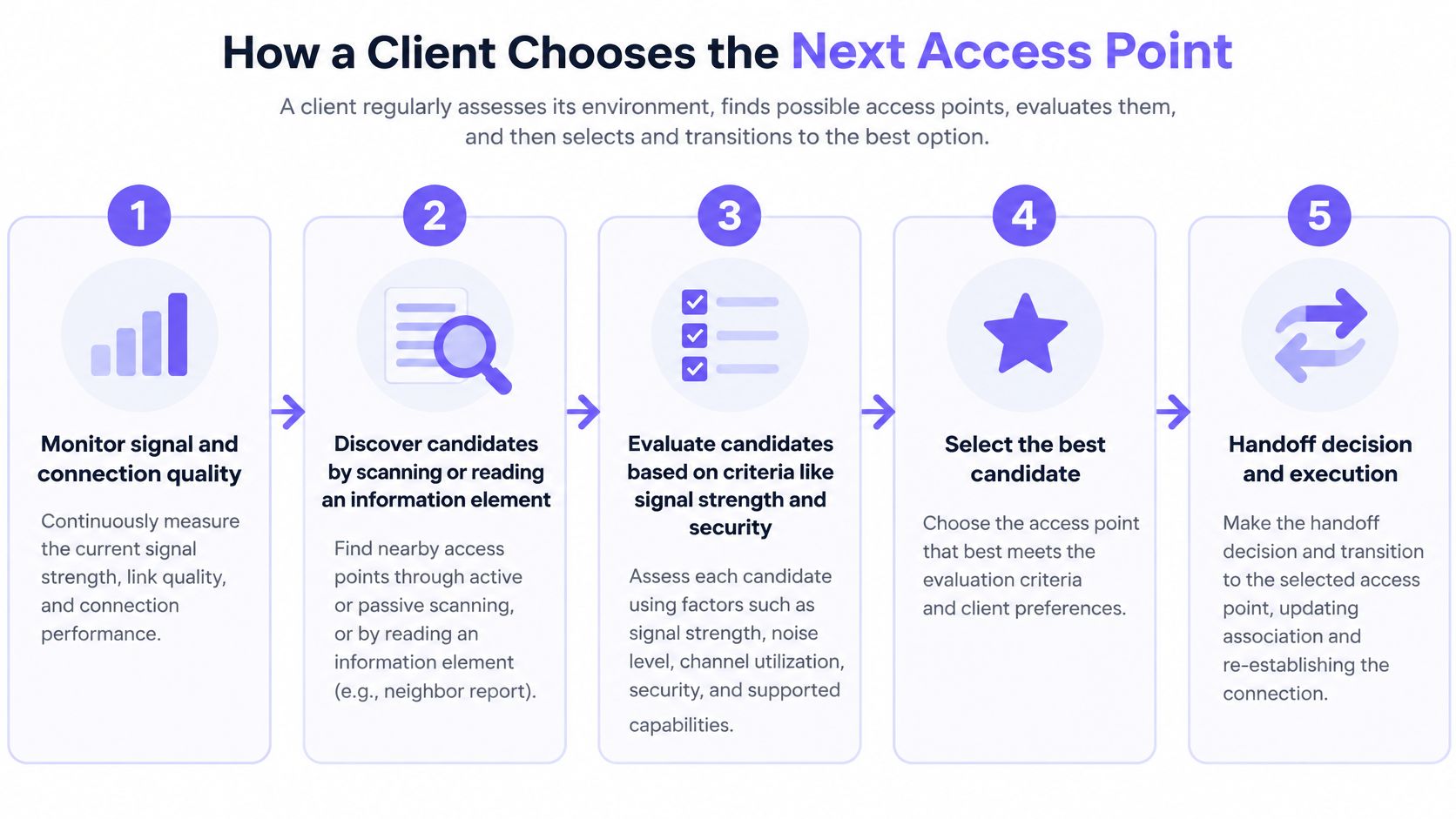
Finding a candidate isn't completing a roam
A neighbor report helps the device identify relevant access points rather than searching blindly. A transition recommendation can identify a preferred target, but the client still evaluates whether and when to use it.
Once the client selects its target, it must establish an acceptable relationship with that access point. Depending on the security design, that can involve authentication infrastructure, previously prepared keying material, and exchanges needed to resume protected traffic.
The IEEE methodology for measuring BSS-transition time treats authentication, reassociation and quality-of-service exchanges as measurable transition activities. Roaming time isn't just the moment a signal-strength reading changes.
Consider a phone on a voice call. It may recognize a deteriorating connection promptly, yet the user still hears a gap while the phone scans, authenticates and reassociates. An association log can record a successful move even though the call briefly became unusable.
Measure the transition and the application
Use a wireless packet capture tool such as Wireshark, alongside application monitoring, to separate discovery delays from authentication or reassociation failures. Synchronize timestamps so the application interruption can be matched to the wireless exchange.
Keep results separated by:
- Device type and software: Record the handset or laptop model, operating system and wireless driver.
- Radio band: Don't combine results from different bands into one average.
- Authentication method: Distinguish full enterprise authentication from fast-transition behavior.
- AP pair and direction: Test the actual move between neighboring access points in both directions.
- Session impact: Record lost packets, audio gaps, transaction failures and recovery.
The design must support the sequence before tuning can improve it. That means consistent SSIDs and security settings, sufficient coverage overlap and compatible clients. A denser arrangement of access points doesn't automatically satisfy those requirements.
Fast roaming standards and authentication
| Standard | Published | Job during a roam | What it does not do |
|---|---|---|---|
| 802.11k | 2008 | Neighbor reports and radio-resource measurements | Force the client to leave an AP |
| 802.11r Fast BSS Transition | 2008 | Prepare keying material so security transition is shorter | Work without client and mobility-domain support |
| 802.11v | February 2011 | Suggest a target BSS and other management actions | Override the client's roaming decision |
These amendments address different parts of the problem. 802.11k supports discovery, 802.11v supports management recommendations, and 802.11r reduces security-transition work. Treating them as interchangeable fast-roaming switches makes troubleshooting harder.
The biggest distinction is between finding the next access point and becoming ready to exchange protected traffic with it. A device can identify an excellent candidate immediately and still stall during security setup.
What fast transition actually saves
802.11r Fast BSS Transition, usually shortened to FT, prepares keying material within a configured mobility domain. The client can then move between participating access points without repeating a complete security exchange at every change.
Published evaluations illustrate the possible difference: the technical evaluation hosted by Inria HAL describes conventional handover delays around 344 ms in some scenarios and optimized FT averages near 13 ms. Those are scenario-specific results, not performance guarantees for a particular hotel, hospital or office.
The engineering lesson is the mechanism, not a universal target. Removing repeated authentication and handshake work reduces the interval during which the device can't deliver application packets.
That matters when someone is speaking, presenting over video, or completing a scanner transaction. A browser may recover from a brief interruption; a real-time conversation exposes it immediately.
For enterprise networks, distinguish FT from the broader process of 802.1X authentication. Initial identity verification and authorization still matter, even when the network avoids repeating the entire process during each local move.
Compatibility and policy still need testing
Enabling FT on the controller isn't enough. Check the complete security path:
- Client support: The endpoint must support the selected FT mode, not merely advertise generic fast-roaming capability.
- Mobility-domain configuration: Participating access points need a compatible, correctly configured domain.
- Credentials and authorization: The authentication architecture must preserve the intended access policy during movement.
- Segmentation: Confirm that certificate-based or identity-driven access retains the correct VLAN and authorization attributes.
- Revocation: Verify that withdrawing access still works after a device has roamed.
Don't accept a successful association entry as the entire test result. Walk representative phones, laptops and scanners through the deployment while measuring packet loss, jitter and reconnect time.
A fast transition that places a device in the wrong VLAN isn't successful. Neither is an apparently clean wireless handoff that leaves the application waiting for recovery.
Roaming through offices hotels and venues
Different buildings expose roaming failures through different applications. These scenarios show why the test should follow the user's task rather than stop at the WiFi connection icon.
The illustration highlights how a local transition can appear to users as an application failure.
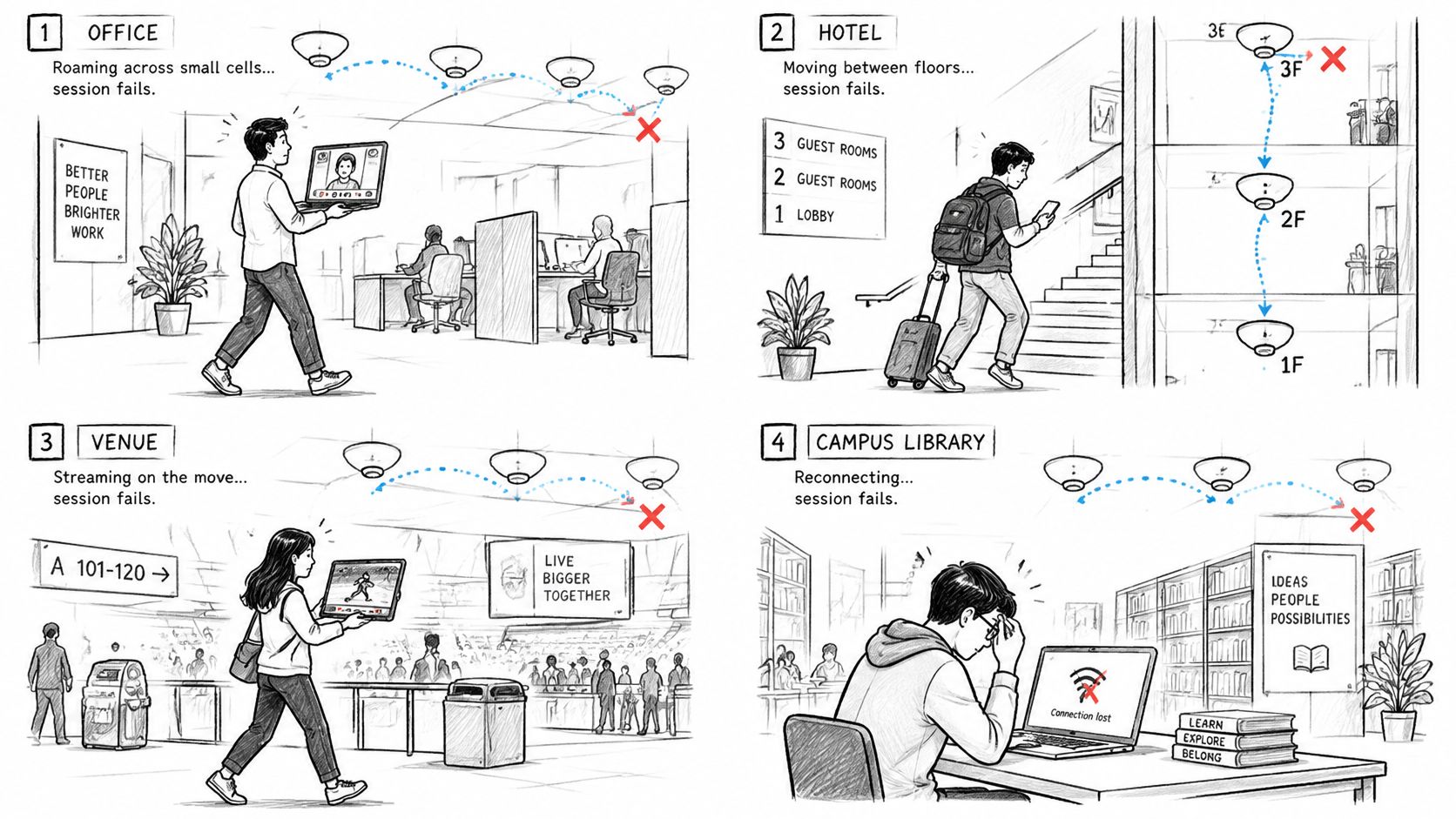
Follow the session through the building
In an office, an employee carries a laptop from a workstation to a meeting room during a video call. The network name stays unchanged, but participants see a frozen face or hear clipped speech. Test with the meeting application running, not just with a browser open.
In a hotel, a guest walks along a corridor during a WiFi voice call. Their phone may retain its connection to an access point behind them rather than choosing the nearer candidate. The complaint will be a dropped call, not an explanation of which radio the phone selected.
In a hospital or warehouse, a clinical handset or barcode scanner follows recurring routes throughout a shift. A failed scanner transaction can leave an operator unsure whether to repeat the scan. Include application confirmation and duplicate-transaction handling in the operational test, rather than assuming wireless reconnection proves the task succeeded.
The video provides another way to visualize movement between access points.
In an airport or stadium, a guest crosses a concourse while using a messaging or ticketing application. Even in a crowded building with many access points, that movement can remain entirely inside one managed WLAN. The guest may think the network has died when the actual failure is a local transition.
Choose the device that cannot fail
Phones, laptops, scanners and IoT radios don't all use the same roaming policies. A route that works well on a recent phone may still expose a problem on an older handheld.
Test the session you can't afford to lose, on the device that actually runs it.
Choose the important path, carry the operational device and repeat its normal task while walking. A stationary speed test answers a different question: how well that connection transfers traffic while the device stays put.
Sticky clients and other roaming Myths
Turning on fast roaming does not give the controller a remote control for the phone. The usual complaint is that 802.11r is enabled and a laptop still sits on an access point at the far end of the floor. That complaint assumes the network should move the station. On one WLAN, the client decides when to leave.
A sticky client stays associated with its current AP after another candidate would serve it better. Fast authentication can be healthy and the device still will not move, because it has not started a roam. A driver can know a shorter road exists and stay on the highway until their own rule says the exit is worth taking. Hysteresis is that margin. It stops the radio from bouncing between access points every time the measured signal wobbles by a few decibels.
For an office laptop, or a scanner that walks the same aisle all shift, remaining on the old AP often matches the client's own thresholds. The physically nearest radio is not automatically the best candidate either. Walls, interference, a security suite the device will not use, and a weak signal on the other band all change which BSSID it will accept.
The standards split the work. Neighbor reports (802.11k) and BSS transition management (802.11v) can suggest candidates and nudge a roam. Prepared fast-transition keys (802.11r) shorten authentication only after the client has already chosen to move. None of those features starts the transition for a station that is still satisfied with its current association. Support for r, k, and v also differs by driver and operating-system build, so a feature switched on at the AP is not the same thing as a feature the installed client will use.
Check the decision before you try to force it:
- Roaming thresholds: Read the adapter settings and the manufacturer's documentation. Do not copy values from a different model.
- Hysteresis: Watch for both faults: moves that come far too late, and rapid back-and-forth between the same two APs.
- Driver and operating system: Confirm what the installed software supports, not only what the radio chipset can do.
- RF overlap: Walk the actual route and confirm the target AP is usable before the old one becomes unusable.
- Authentication timing: Separate a pause before the client picks a target from a stall after it has already chosen one.
Forcing the client off creates a different failure. A deauthentication does not assign the device to the AP you intended. Very aggressive RSSI or load settings can add extra handoffs and repeated associations instead of one clean move.
Assistance is not control, and client policy remains decisive.
For a check you can run tomorrow, stand under the AP you expect the device to use and read its actual BSSID in the client diagnostics or the controller. Match that identifier to the AP inventory, then walk the problem route without turning WiFi off and on. A manual reconnect hides the late roam you are trying to see.
Local WLAN roaming Versus OpenRoaming
Can a guest move automatically from one hotel's WiFi to an airport's network? Only if the networks participate in a compatible identity and trust system and the device is provisioned to use it. Local AP roaming alone doesn't provide that capability.
| Question | Inside one managed WLAN | Passpoint or OpenRoaming |
|---|---|---|
| What moves | The client changes access points | The client changes participating networks |
| What must already match | SSID and security; mobility-domain configuration for FT | A provisioned profile and a trusted identity |
| What the user repeats | Nothing if the session stays up | No password or splash page when correctly provisioned |
| What fails the experience | Sticky client, overlap or slow authentication | Venue not participating, or no usable profile |
| Governance focus | VLAN, keys and revocation on your WLAN | Who authenticates, which policy applies and shared identity |
The comparison below illustrates the different scopes. A managed WLAN can span buildings, so local refers to its coordinated network environment, not necessarily a single physical venue.
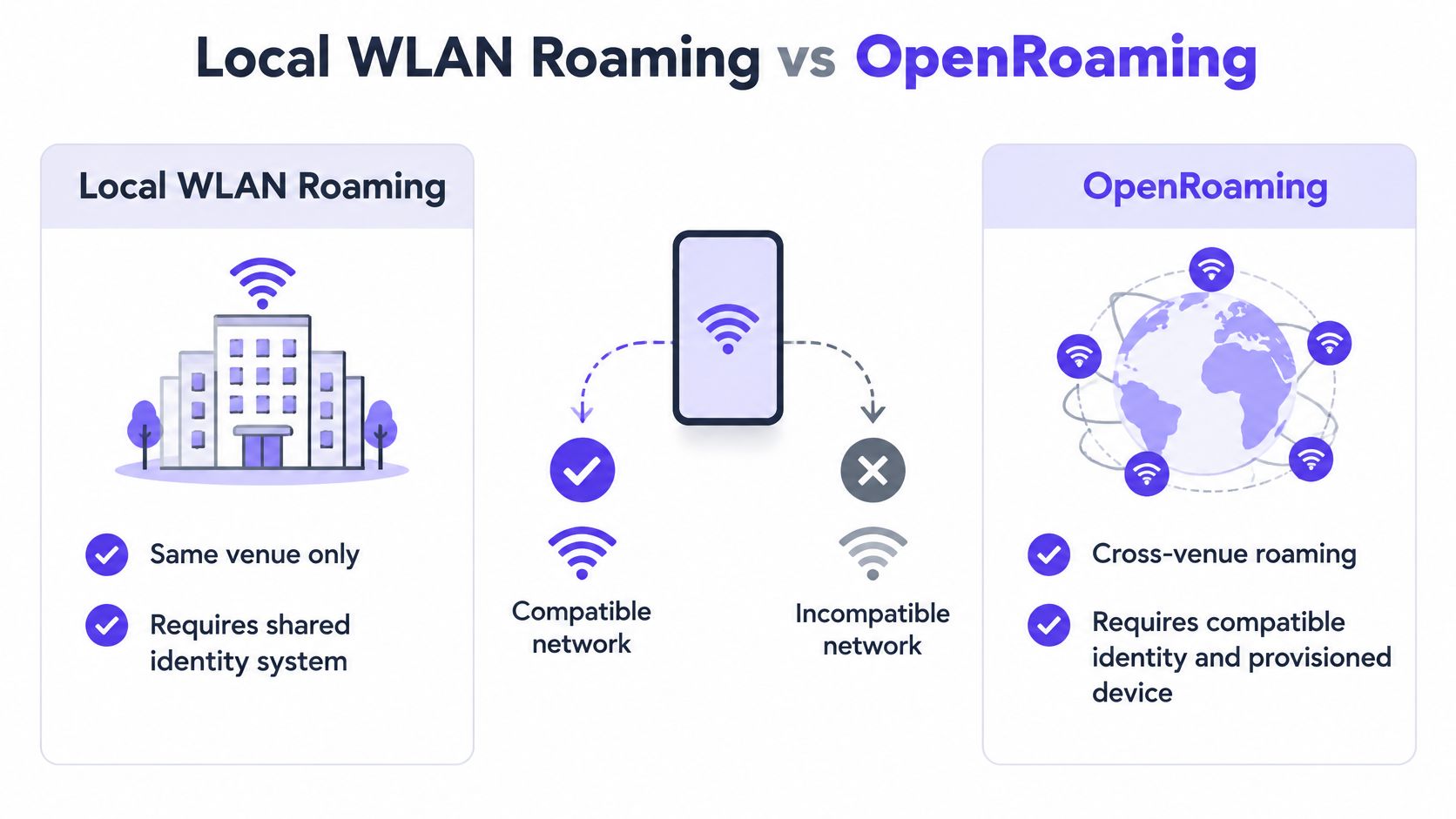
Automatic access across participating networks
Passpoint, using the Hotspot 2.0 framework, enables compatible devices to discover and authenticate participating networks without repeatedly entering passwords or completing captive portals. Boingo launched the first public Passpoint network at Chicago O'Hare in September 2013, according to the WiFi Alliance's account of Passpoint deployments.
OpenRoaming extends automatic connectivity through federation among network providers, identity providers and venues. The important change is who trusts the device's identity, not merely which AP has the strongest signal.
In the Wireless Broadband Alliance's 2024 survey of 200 organizations worldwide, 47% planned to add OpenRoaming or Passpoint and 33% had already done so, as reported by Critical Comms. Those figures describe participating organizations' adoption and intentions, not universal availability at public venues.
Identity needs an operational owner
The distinction between local movement and federation is also central to the Passpoint provisioning service market overview: cross-provider connectivity requires compatible provisioning, trust and policy.
Before planning OpenRoaming WiFi, assign ownership for these questions:
- Authentication: Which identity provider verifies the user or device?
- Acceptable use: Which venue's terms and access restrictions apply?
- Revocation: Who can withdraw credentials, and how is that enforced?
- Identity sharing: What information passes between participating organizations?
Automatic access doesn't guarantee that an active call will survive every change between unrelated networks. Authentication convenience and end-to-end session continuity are separate requirements.
Federation is an identity project, not a radio setting. It can remove repeated sign-ins, but it won't repair poor coverage or an incompatible local handoff.
Test the handoff before you add more APs
Use a repeatable walking test before buying hardware or changing security settings. A disciplined WiFi network design starts with the device, route and application that fail.
- Walk the route. Carry the affected device, keep the application active and record which AP it retains.
- Confirm network consistency. Check SSID and security settings across participating APs, including the intended mobility-domain configuration.
- Verify endpoint capabilities. Confirm support for 802.11k, 802.11v and the selected FT mode on the installed software.
- Measure the user-visible interruption. Capture reconnect time, packet loss and the important session, not just successful association events.
- Change the identified cause. Only then adjust overlap, supported roaming settings or authentication. Change one factor at a time and repeat the route.
If the complaint is repeated portal sign-in at different properties, classify it separately. Consider Passpoint or OpenRoaming, a provisioned profile and a named owner for authentication, acceptable use and revocation across providers.
We're a certified WBA identity broker for OpenRoaming, so we can help distinguish the federation requirements from local radio troubleshooting. Make federated identity the next project only after these checks show the local radio path is sound.
Purple Access supports Passpoint and OpenRoaming so provisioned guests can connect automatically without repeating a captive-portal sign-in. Visit Purple Access to discuss your participating properties, guest provisioning and identity requirements alongside the local roaming checks your team has completed.