WPA WPA2 Enterprise explained: Modes, EAP and setup
Published
A staff member hands in their notice on a Friday. On Monday their personal cell phone still joins the staff network, because the passphrase hasn't changed and nobody wants to re-key registers, tablets, and printers during business hours.
That scene is the whole case for WPA and WPA2 Enterprise in miniature. The problem isn't the cipher. It's that a shared secret can't tell you who is connecting, so it can't be withdrawn from one person without costing everyone else a site visit.
The mechanics are less intimidating than the acronym soup suggests. There are three parts, one conversation between them, and a handful of client settings that decide whether the whole thing is real security or decoration.
Table of Contents
- WPA and WPA2 Enterprise Modes Compared
- The Three Parts Behind Every 802.1X Login
- Choosing an EAP Method That Fits Your Risk
- Client Settings That Quietly Undo WPA2 Enterprise Security
- Diagnosing Failed WPA2 Enterprise Logins
- Assigning Each Device Group a Mode and Migration Path
WPA and WPA2 enterprise Modes Compared
Open the wireless configuration page on a business access point and you get four names in a drop-down that look like variations on one setting. They answer different questions about who holds the credential that gets a device onto the network.
| Mode | Authentication | Encryption | Credential model | Typical use |
|---|---|---|---|---|
| WPA Enterprise | 802.1X with EAP | TKIP (RC4-based) | Per user | Legacy networks |
| WPA2 Enterprise | 802.1X with EAP | AES-CCMP | Per user or device | Corporate, government, education, healthcare |
| WPA2 Personal | One pre-shared key | AES-CCMP | One key shared by all users | Homes and small offices |
| WPA3 Enterprise | 802.1X with EAP | AES-CCMP, optional 192-bit mode | Per user or device | Modern fleets with WPA3-capable clients |
Read the table as two axes rather than four options. Along one axis sits the credential model, where the top, second and fourth rows issue something personal to each user or device and the third row hands one secret to everybody. Along the other axis sits cryptography, where WPA Enterprise is stuck on TKIP built on RC4 and every newer row uses AES-CCMP.
Why WPA2 Enterprise became the default
WEP came first, using a single shared key, and its weaknesses were serious enough that the industry needed a stopgap rather than a redesign. WPA filled that gap for hardware that couldn't do better, which is why TKIP exists at all.
WPA2 was the finished version. Per the IEEE 802.11i-2004 amendment record, IEEE ratified the 802.11i wireless security amendment on June 24, 2004, the WiFi Alliance launched WPA2 certification in September 2004, and contemporary industry reporting records the related ratification milestone as July 29, 2004, a difference in how those approval dates were reported. The cryptographic change that mattered was the replacement of WPA's RC4-based approach, including TKIP, with AES using CCMP, which became the required foundation for WPA2 certification rather than an optional enhancement.
That origin explains why enterprise deployments still stand on 802.1X, EAP, RADIUS, AES and CCMP as their conceptual base, twenty years later. The standard stopped being a compatibility exercise and became a complete architecture.
What separates enterprise from personal
The encryption between WPA2 Personal and WPA2 Enterprise is identical. The credential model is not, and that's the decision that shapes everything downstream.
Personal mode gives the same passphrase to a reception laptop, a card terminal, a smart TV and a contractor's cell phone. Enterprise mode runs a separate authentication exchange for each one, so the network knows which device asked and can answer differently.
The removal test: if you can't turn off one device's access without touching any other device on the estate, you're running a shared secret, whatever the SSID label claims.
Three questions settle the mode for any network before you touch a config page. How many people share this login? If the honest answer is more than a handful, the passphrase is already out of your control. Can one user be removed without disturbing anyone else? Offboarding is the moment shared keys fail loudest. Do the devices support WPA3? That sets the ceiling for the next migration, not this one.
The same trade-off between convenience and verified identity shows up in physical access control, where Nimbio's WiFi vs LTE gate security comparison weighs always-on connectivity against a system that only opens after it knows who is standing there.
The three parts Behind every 802.1X login
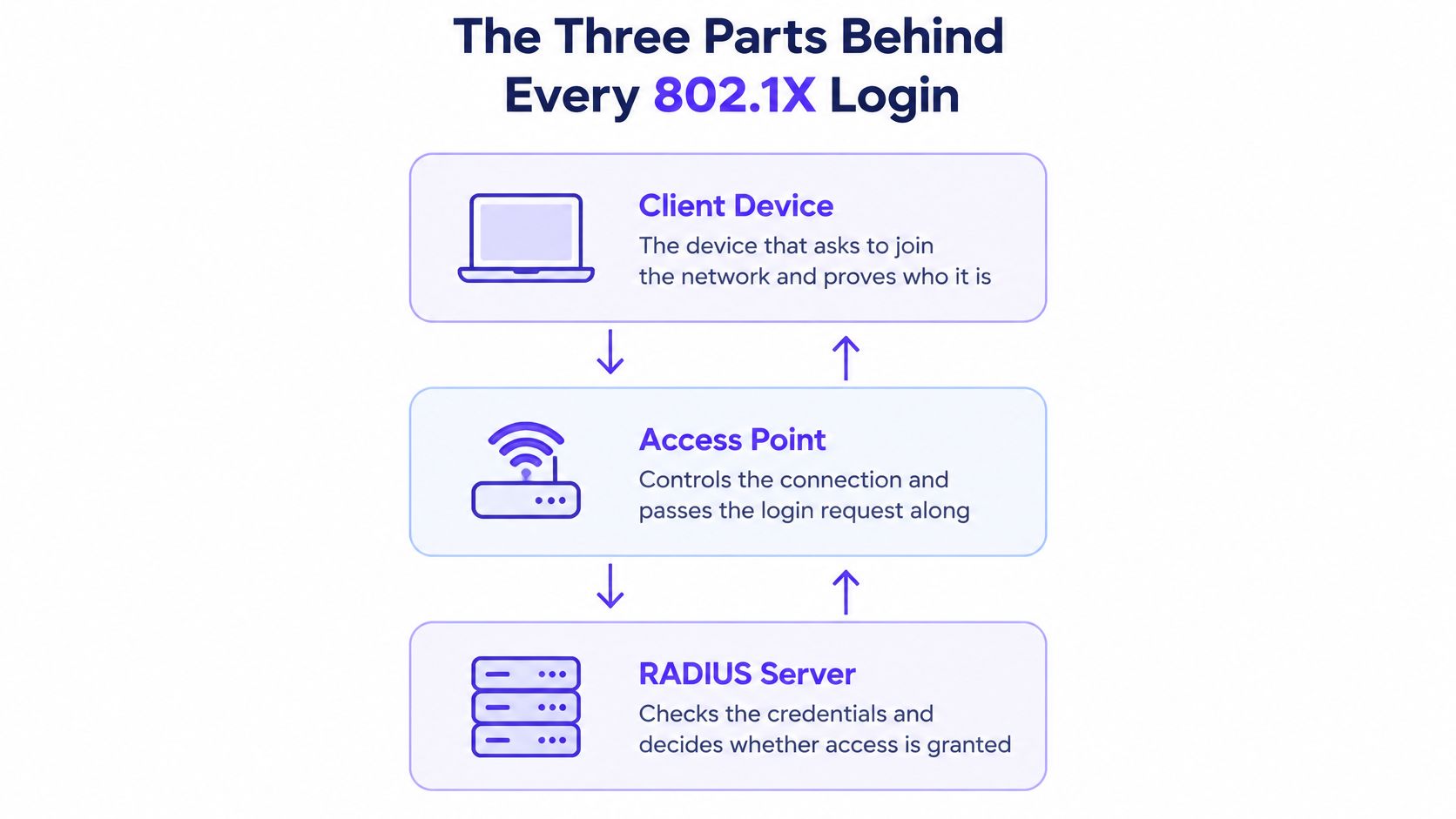
A device joining an enterprise network isn't proving anything to the access point in front of it. It's proving something to a server elsewhere, and the access point is only carrying the conversation. Get that straight and most failed logins stop looking mysterious.
Three parts do the work. The client (called the supplicant in the standard) is the laptop, cell phone or scanner asking to join. The access point is the authenticator, the doorman holding the door shut until told otherwise. The RADIUS server is the authentication server, the one that decides.
Think of a hotel check-in. The receptionist at the desk doesn't decide whether your reservation is valid; they call the reservations system and pass your name through. The reservation system checks the record and replies, and only then does the receptionist hand over a key card. The clerk relays, the system decides, and the guest proves an identity rather than reciting a building-wide code.
The login sequence, step by step
- The device associates with the SSID. Radio-level joining happens first, and it grants nothing on its own.
- The access point blocks all traffic except EAP messages. Only the authentication conversation is allowed through, so a failed login never reaches the LAN.
- The access point relays the EAP exchange to RADIUS. The AP is a messenger here; it doesn't inspect the credential, which keeps the trust in the server.
- The server validates the credential and returns an accept or reject, with attributes such as a VLAN or a session timeout riding along with the accept.
- Client and server derive session keys. Fresh keying material per session means one device's keys are useless on another.
- AES-CCMP encrypts the data. Only now does the traffic get a cipher, and only with keys that came from a successful authentication.
That separation is the practical difference from Personal mode, where a single pre-shared key covers the whole network. As NIST Special Publication 800-97 sets out, Enterprise mode runs a separate authentication exchange for each user or device, so credentials and certificates are validated centrally and can be revoked individually instead of triggering a site-wide password change. The same guidance advises organizations that use authentication servers with 802.1X and EAP to procure products with WPA2 Enterprise-level certification, and for government environments recommends requiring FIPS conformance or NIST approval.
Many organizations choose not to run that server on their own hardware. If you're weighing the options, cloud-based RADIUS covers how a hosted decision-maker changes the operational shape of an 802.1X rollout.
What to verify on the access point
Four settings account for most "it worked in the lab" failures. Confirm 802.1X is enabled on the SSID and not left on WPA2 Personal by a template copy. Confirm the RADIUS server is reachable from the access point itself, using the AP's built-in test rather than a ping from your desk. Confirm the shared secret matches on both sides, since a trailing character is enough to break it. Finally, confirm the AP is presenting a valid server certificate if your clients pin or validate the server identity.
Choosing an EAP method that Fits your risk
The EAP method is where the strength of the login lives. WPA2 Enterprise is a container; the method inside it decides whether you've built something resistant to phishing or a password prompt with better marketing.
| EAP method | Client credential | Server trust | Operational effort | Best fit |
|---|---|---|---|---|
| EAP-TLS | Device certificate and private key | Client validates the RADIUS server certificate | High: PKI, renewal and revocation | Managed corporate fleets |
| PEAP with MSCHAPv2 | Username and password inside a TLS tunnel | Client must validate server certificate and expected name | Medium: user passwords and profile rollout | Mixed staff devices with directory accounts |
| Password-only with no server validation | Username and password | None enforced | Low | Not recommended for any enterprise network |
Read the bottom row first. A password with no server validation isn't enterprise authentication with lighter settings. It's an open door for anyone holding a hotspot.
Where EAP-TLS earns its reputation
EAP-TLS gives mutual certificate authentication and key derivation, which removes reusable passwords from the wireless login entirely. RFC 9190 documents EAP-TLS with TLS 1.3 and records that it is widely supported for authentication and key establishment in IEEE 802.11 networks using 802.1X, while RFC 5216 defines the earlier protocol and its certificate-based mutual-authentication model.
The cause and effect is worth spelling out. A stolen password gets an attacker nowhere unless they also hold an enrolled private key that your certificate policy will accept. Disabling a device means revoking or invalidating its certificate, not rotating a secret that forty other devices are using.
The lifecycle work EAP-TLS demands
Certificates are only strong while the lifecycle around them holds. In a multi-site deployment, treat issuance, renewal and revocation as production infrastructure rather than a one-time project.
- One certificate per device, with the private key protected and never exported into a shared folder.
- Short validity periods, long enough to avoid churn and short enough to limit the value of a leaked key.
- Automated renewal before expiration, because a fleet-wide expiration date is a fleet-wide outage.
- Trusted CA validation and server pinning on every client, so the device checks who it's talking to as well as what it presents.
- Failure monitoring for clock drift and incomplete chains, the two causes that produce baffling rejects at scale.
Once identity is settled, RADIUS policy can map certificate identity, directory group or device posture to a VLAN and a set of authorization attributes. The same SSID then puts a finance laptop and a workshop tablet on different networks without a second network name. Our EAP-TLS certificate requirements guide walks through the certificate fields that trip people up.
PEAP, and when it's genuinely the right answer
PEAP with MSCHAPv2 wraps a username and password inside a TLS tunnel. It's the common password-based alternative and it's workable, but only when the client validates the server. Strip that validation out and you've rebuilt the shared-password problem with extra steps and a much more convincing login screen.
Client settings that Quietly Undo WPA2 enterprise security
Two laptops sit in the same conference room. Both connect to the corporate SSID. One validates the RADIUS server certificate and refuses anything else. The other has a checkbox cleared, and it will happily hand its credentials to a hotspot in a backpack broadcasting the same network name.
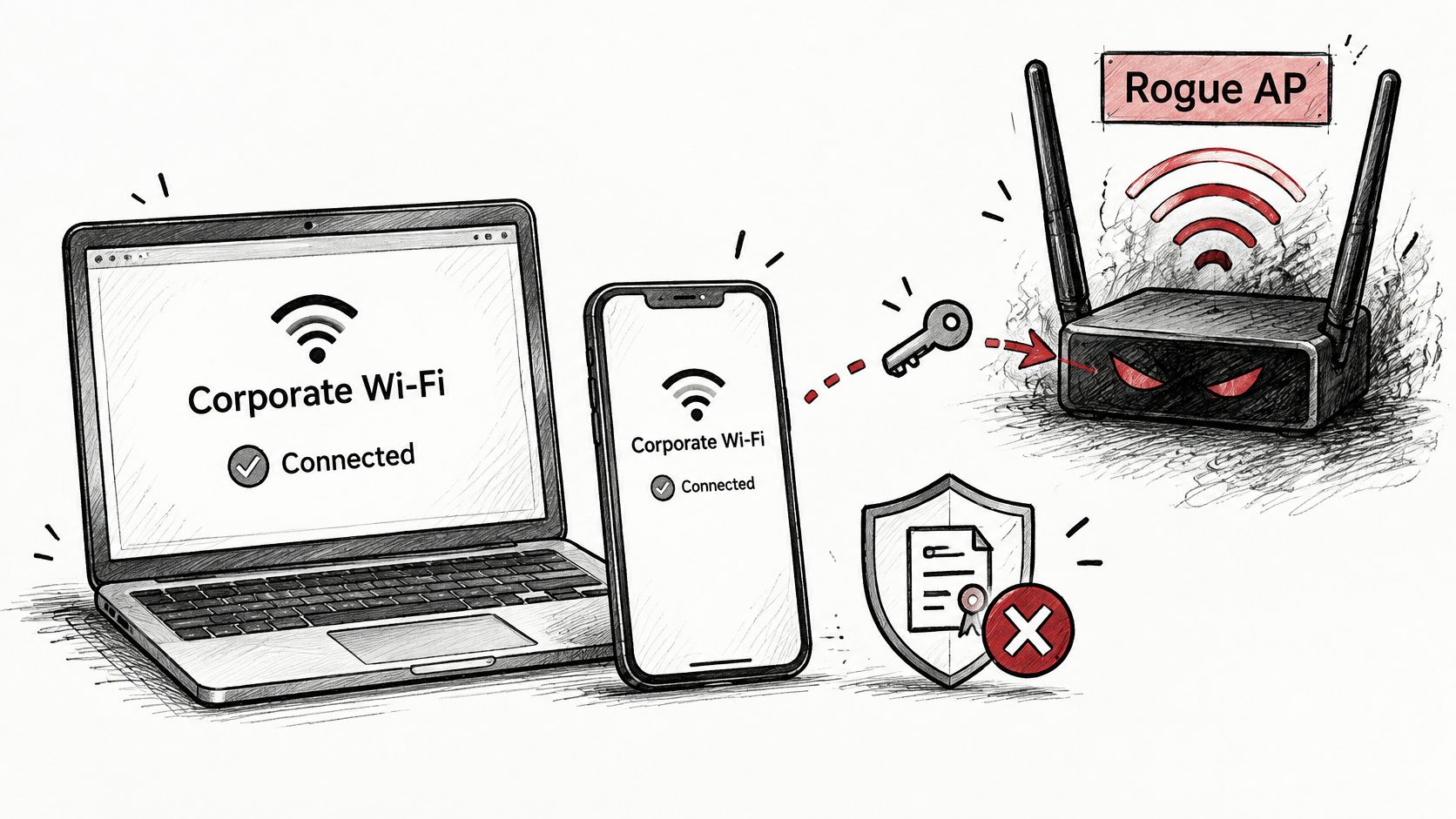
That second laptop is not a theoretical risk. In the commonly deployed PEAP/MSCHAPv2 pattern, the client must validate the RADIUS server certificate chain and the expected server name; where certificate validation is disabled, misconfigured, or delegated to users, a rogue access point can impersonate the corporate SSID and capture authentication exchanges, as independent analysis of PEAP deployments sets out.
That analysis names three weaknesses that keep reappearing: missing server authentication, failure to enforce the intended EAP method, and password reuse across services. Each is a client-side setting, not a flaw in the standard.
The test that catches the problem
Run this on one device per platform before a rollout, not after an incident.
- Certificate chain trusted. Open the device's certificate viewer during a connection attempt and confirm the chain resolves to your CA with no missing intermediate.
- Expected server name entered. An empty or wildcard name field means the client accepts any valid certificate from any CA, which is the same as no check.
- No fallback to weaker methods. Set the profile to the intended method only, then confirm a manual attempt at another method is rejected.
- Users can't click through warnings. If a prompt offers "continue anyway", staff will take it on a bad day.
- The password isn't reused. Check the account used for WiFi against the identity provider, since a password shared with email turns one phish into network access.
The behavior differs on every platform you support. Windows exposes server validation in the profile XML, macOS and iOS bury it in the 802.1X payload, Android varies by vendor skin, and ChromeOS follows its own prompts. Unmanaged BYOD cell phones are the hardest case, because nobody controls the profile and the user taps through whatever appears.
The weakest device sets your risk
Take a hotel where staff laptops are configured correctly and guest phones accept whatever certificate appears. The rogue access point doesn't need to beat the laptops; it only needs one phone that stops checking.
Moving to WPA3 Enterprise doesn't close this by itself. Transition mode keeps supporting WPA2 Enterprise clients, so a mixed estate can advertise the newer standard while carrying the older client behavior underneath. If the inner authentication is weak or the client trusts anything, the label on the SSID changes nothing that matters.
Diagnosing failed WPA2 enterprise logins
When a login fails, the WiFi icon tells you nothing useful. The RADIUS server usually tells you everything, if you read the reject before you touch anything.
What the reject reason tells you
Work through these in order, because the cheap causes sit at the top.
- The access point isn't forwarding EAP. Test RADIUS reachability from the AP itself. If that fails, no client change will help.
- The server certificate chain is incomplete or expired on the client. Look at the chain the device builds, not the one your server thinks it sends.
- Clocks have drifted. A device a few minutes off can fail validity checks on a certificate that's perfectly good, which is why a time sync check comes before a reissue.
- The device offers a method the policy forbids. The server log records the offered method, and a mismatch shows up as a reject with no credential problem at all.
- The certificate was revoked or not yet renewed. Check the PKI record for that device serial before assuming a configuration fault.
- Group mapping returns no VLAN. An accept with no authorization attributes can look like a failure, so read the accept as carefully as the reject.
A cluster of rejects that starts right after a certificate renewal almost always points at a chain or trust problem. The WiFi password, assuming anyone still has one, is rarely the cause. If you need a repeatable way to prove the server side first, this guide on how to test RADIUS authentication covers the sequence.
Reading those logs across a network is the part that grinds people down. Our authentication log shows every accept and reject with identity, device, MDM enrollment state, method, access point, SSID, site, VLAN, role, reason and timestamps in one query, so you can compare sites instead of tailing six server consoles.
When many devices fail at once
Fix the shared dependency first. Confirm the RADIUS server's own certificate chain and expiration, then check whether the access points can still reach it, then look at the time source your fleet syncs to. Only after those three are ruled out is it worth testing a single client profile, because a change that fixes one device while the server certificate is broken will fail again on the next hundred.
Assigning each device group a mode and migration path
The question worth asking isn't "WPA2 Enterprise or WPA3 Enterprise". It's how you modernize authentication without breaking roaming, POS systems or a ten-year-old thermostat. Transition mode is the reason that question exists, and it's also the reason mixed properties can look modern while carrying legacy risk.
The WiFi Alliance WPA3 technology overview explains that WPA3 Enterprise transition mode is designed to preserve interoperability with WPA2 Enterprise clients, while the optional 192-bit mode requires compatible clients and has no transition mode at all. It also flags the constraints that catch people out in the field: 6 GHz operation is WPA3-only, legacy WPA2 clients may fail to connect there, and 192-bit mode has limited compatibility with fast-transition roaming.
What transition mode hides
An SSID advertising WPA3 Enterprise with transition mode enabled still accepts WPA2 clients, which means one weak device keeps the older behavior alive for the whole network name. You get the appearance of progress and the persistence of the old risk, on a schedule nobody wrote down.
That's why the migration needs a target date per device population, not a target date for the SSID.
Route each device group
| Device group | Authentication path | Target mode | Review point |
|---|---|---|---|
| Managed staff laptops | EAP-TLS on WPA2 Enterprise now | WPA3 Enterprise transition mode | Move when OS and driver support is confirmed |
| BYOD phones | MDM-delivered EAP-TLS or PEAP | WPA2 Enterprise | Keep until profiles are managed and verified |
| Handheld scanners and registers | Certificate-based access on a dedicated network name | WPA2 Enterprise | Retire when vendor firmware supports WPA3 |
| Room TVs, thermostats and IoT | Individual key per device on an isolated VLAN | WPA2 Enterprise or WPA2 Personal where supported | Review at each firmware release |
| Guest devices | Captive portal | Open network with portal | Outside the 802.1X migration |
The table earns its keep because the groups fail differently. A managed laptop fleet follows your OS upgrade cycle. Handhelds follow a vendor's firmware release notes, which arrive when they arrive. Guest cell phones never follow anything at all.
A venue example
Picture a hotel with 40 access points. Staff laptops move to EAP-TLS on WPA3 Enterprise as each OS version is confirmed, and housekeeping devices get their certificates from the MDM so that a leaver loses access the moment their directory account is disabled. Room TVs, thermostats and the bar registers stay on their own network name with an individual key each, on a VLAN that guests never see, until the firmware supports WPA3. Guest cell phones go to a portal and never touch 802.1X.
Nothing in that plan depends on one universal answer. Each population has a path and a review date, and the network can be modernized while the registers keep trading.
The pre-rollout checklist
- Confirm the MDM can deliver device certificates to every managed platform you're keeping.
- Confirm every profile validates the server certificate, using the client test from earlier rather than a vendor default.
- Map each group to a VLAN by directory group, so authorization comes from identity rather than from which SSID someone picked.
- Set expiration and revocation rules before the first certificate ships, including what happens on a leaver's last day.
- Pilot one site, keeping the current network running beside the new one so you can compare.
- Review rejects before expanding, because a pilot that only measures "it connected" measures nothing about the next site.
The success metric is verified policy and device coverage per group, read from authentication logs. Not the security mode advertised in the SSID beacon.
Purple Access runs the whole model on the access points you already own: an open network for guests, a secure passwordless SSID using EAP-TLS certificates from your MDM, and an xPSK network where every device, tenant or concession gets its own key, each on its own VLAN. Every accept and reject lands in one authentication log you can query across the estate, so the migration table above turns into evidence instead of a hope. If you want the device groups mapped before you touch a controller, visit Purple Access and book the 45-minute design session.